EVAL-CN0569-PMDZ
Infrared Gesture Recognition Module
Overview
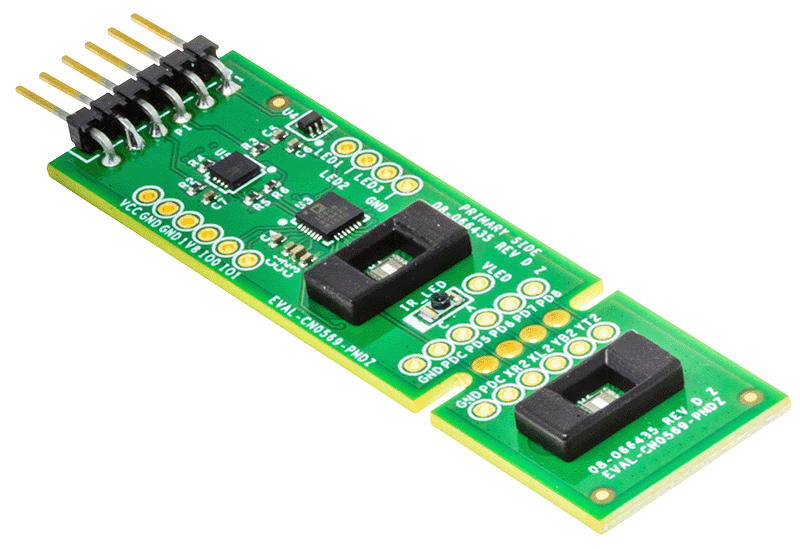
The EVAL-CN0569-PMDZ is a 4-layer printed circuit board (PCB) that allows evaluation of the CN0569 Infrared Light Angle Sensor Module for Gesture Recognition. The board is fabricated with a 0.5 oz./1 oz. copper cladding (external layers overplated to 1.5 oz.) and IPC-4101 (or IPC-4103) laminates and bonding materials.
Designed to use the I²C Pmod hardware interface, the EVAL-CN0569-PMDZ features a small form-factor with PCB dimensions of 2.7 in (68.58 mm) × 0.8 in (20.32 mm) x 0.062 in (1.5748 mm). The evaluation board uses the standard 1 x 6, 0.1 in (2.54 mm) right-angle male header for I²C Pmod devices. Two 3D-printed optical baffles are included with the EVAL-CN0569-PMDZ for use with the onboard ADPD2140 sensors.
Features
Highly Integrated Optical Front End
Dual Light Sensors for Intensity and Directionality Measurements
Open Source Gesture Detection Algorithm
Applications
Gesture Recognition Applications
Recommendations
People who follow the flow that is outlined, have a much better experience with things. However, like many things, documentation is never as complete as it should be. If you have any questions, feel free to ask on our EngineerZone forums, but before that, please make sure you read our documentation thoroughly.
Warning
All the products described on this page include ESD (electrostatic discharge) sensitive devices. Electrostatic charges as high as 4000V readily accumulate on the human body or test equipment and can discharge without detection. Although the boards feature ESD protection circuitry, permanent damage may occur on devices subjected to high-energy electrostatic discharges. Therefore, proper ESD precautions are recommended to avoid performance degradation or loss of functionality. This includes removing static charge on external equipment, cables, or antennas before connecting to the device.
Help and support
Please go to Help and Support page.