
XSA Pipeline — Developer Guide
This document explains the internal architecture of the XSA pipeline, how Jinja2 templates are used for DTS generation, and how to add support for new components and boards.
Architecture
The XSA pipeline is composed of six loosely coupled stages. Each stage
lives in its own subpackage under adidt/xsa/ and operates on
well-defined inputs and produces file or data-structure outputs that feed
the next stage:
Stage |
Subpackage |
Responsibility |
|---|---|---|
parse |
|
Read the Vivado |
config |
|
Typed configuration dataclasses ( |
build |
|
Compose ADI overlay nodes from topology + config: per-board
builders ( |
merge |
|
Merge the base sdtgen DTS with overlay nodes ( |
validate |
|
Structural lint of the merged DTS ( |
viz |
|
Render an interactive HTML report ( |
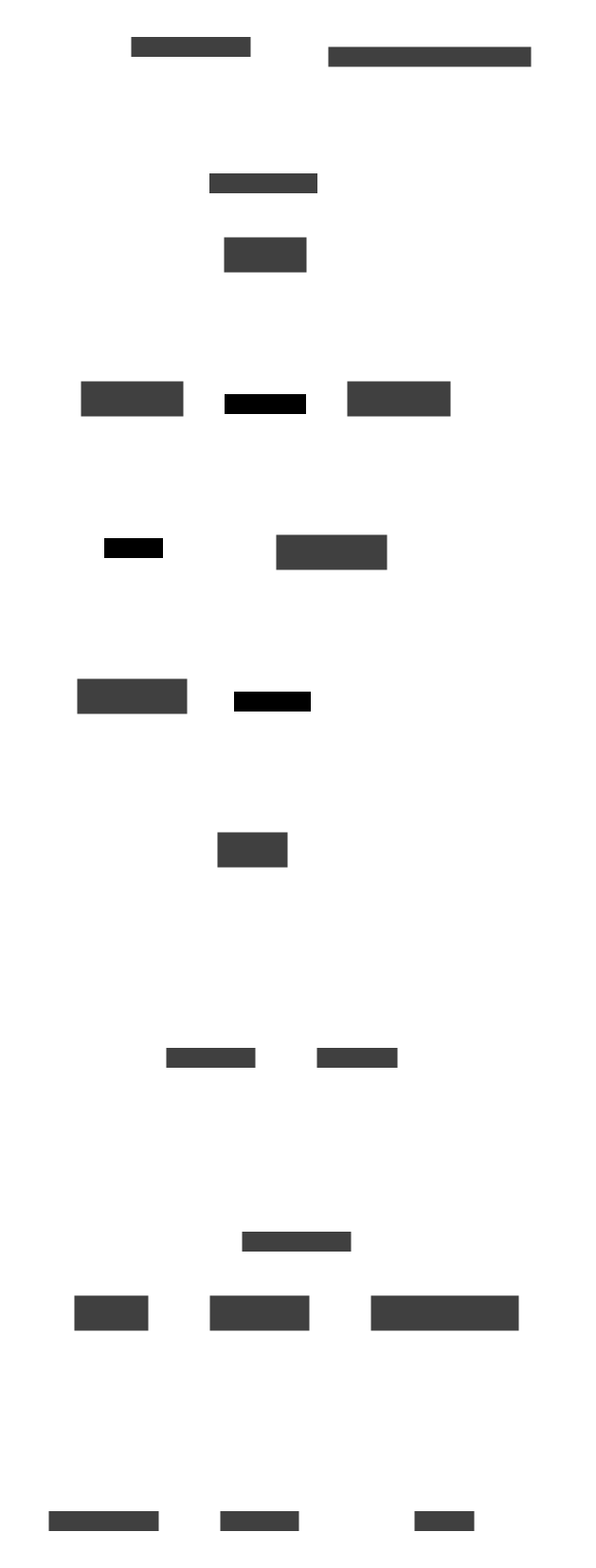
XsaPipeline.run() in adidt/xsa/pipeline.py wires all stages
together and returns a dict[str, Path] of artifact paths. Each
stage class can also be used independently — the subpackages have no
cross-dependencies in the wrong direction (e.g., parse does not
import from build).
Component interaction
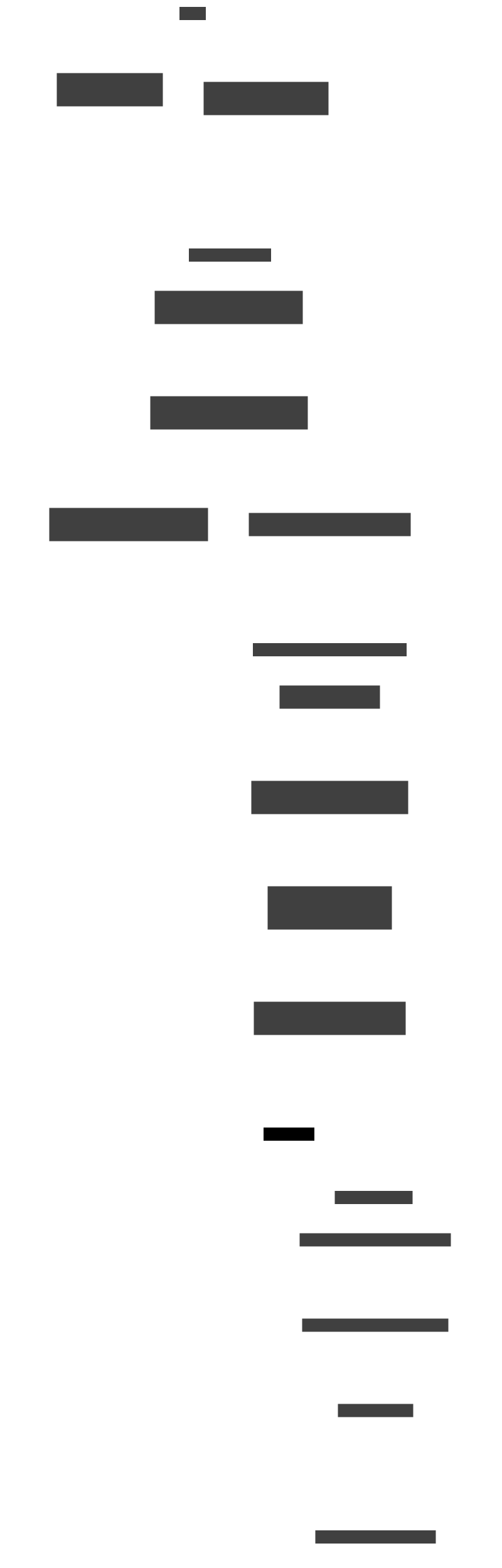
The following diagram shows how NodeBuilder orchestrates rendering.
It receives the topology and config, dispatches to per-board builders via
a registry, and produces categorised DTS node strings that the merger
assembles into the final tree.
The context builder pattern is central to how templates receive their
data. For every .tmpl file there is a corresponding _build_*_ctx()
method that:
Reads values from the board config (typed dataclass or raw dict).
Computes derived values (
_fmt_hz()for frequency annotations,_fmt_gpi_gpo()for hex GPIO strings, clock phandle strings).Pre-formats list values into DTS-ready strings (
clock_output_names_str).Returns a flat
dictwhose keys match the Jinja2 variable names in the template.
This separation means templates contain no logic beyond conditionals — all value computation happens in Python where it can be tested independently.
Key data models
XsaTopology(parse/topology.py)Populated by
XsaParser.parse(). Carries lists ofJesd204Instance,ClkgenInstance,ConverterInstance, andSignalConnectionobjects plusfpga_part.The helper methods
is_fmcdaq2_design(),is_fmcdaq3_design(),inferred_converter_family(), andinferred_platform()encapsulate topology-level detection logic so thatNodeBuilderdoes not have to re-parse names in multiple places.PipelineConfig/cfgdict (config/pipeline_config.py,config/board_configs.py)Configuration can be supplied as a typed
PipelineConfigobject or as a plain Python dict.PipelineConfigwrapsJesdConfig,ClockConfig, and an optional board-family config (e.g.FMCDAQ2BoardConfig,AD9084BoardConfig). Thefrom_dict()class method auto-detects the board family from key presence ("fmcdaq2_board","ad9084_board", etc.).JESD204 parameters live under
jesd.rx/jesd.tx; board-wiring overrides live under family-specific attributes. Profile loading and merging is handled byconfig/profiles.py— profiles are merged into the raw dict beforePipelineConfig.from_dict()is called.BoardBuilderProtocol (build/builders/__init__.py)Each board family implements the
BoardBuilderprotocol with four methods:matches(topology, cfg)— detect whether this builder handles the designbuild_nodes(node_builder, topology, cfg, ...)— generate DTS node stringsskips_generic_jesd()— whether this builder renders its own JESD nodesskip_ip_types()— converter IP types handled by this builder
NodeBuilderiterates_DEFAULT_BUILDERSand dispatches to matching builders. Adding a new board family means creating a new builder module and adding it to the list — no changes tobuild/node_builder.pyare needed.Current builders:
FMCDAQ2Builder,FMCDAQ3Builder,AD9172Builder,AD9081Builder,AD9084Builder,ADRV9009Builder,ADRV937xBuilder(AD9371 / ADRV9371 / ADRV9375 on ZC706 and ZCU102).BoardModel(model/board_model.py)The unified board model that all builders produce internally. A
BoardModelcontains:components— list ofComponentModel(clock chips, converters) each with a role, part name, template, SPI bus, and context dictjesd_links— list ofJesdLinkModel(RX/TX JESD links) each with ADXCVR, JESD overlay, and TPL core configsfpga_config—FpgaConfigwith platform, address cells, and PS clock labelsextra_nodes— raw DTS node strings for non-template nodesmetadata— free-form dict for rendering metadata
The model is editable after creation — callers can modify component configs, JESD link parameters, or metadata before rendering.
BoardModelRenderer(model/renderer.py)Groups the pre-rendered strings carried on a
BoardModel’s components and JESD links, wraps each SPI-bus group in an&spi_bus { ... };overlay, and returns the samedict[str, list[str]]shape thatNodeBuilder.build()does. The renderer itself does no template lookups; every string it concatenates was produced by a declarative device class.- Declarative device classes (
adidt/devices/) Typed pydantic models whose fields map 1:1 to DT properties. Each class owns its rendering via
render_dt(cs=...); the output is a plain DTS string. See Declarative Devices for the full catalog and Authoring a new device class for the end-to-end walkthrough on authoring a new device class.FPGA-side JESD IP overlays (
Adxcvr,Jesd204Overlay,TplCore) live underadidt.devices.fpga_ip. Legacybuild_adxcvr_ctx/build_jesd204_overlay_ctx/build_tpl_core_ctxfunctions are kept as thin shims that construct and render the corresponding device.
NodeBuilder internals
NodeBuilder (build/node_builder.py) orchestrates the pipeline. It
owns platform detection, clock resolution, and the generic rendering path.
Board builders now construct a BoardModel internally and render it via
BoardModelRenderer, using shared context builders from
adidt/model/contexts.py. Builders no longer delegate rendering back
to NodeBuilder methods — they are self-contained.
Entry point
result = NodeBuilder().build(topology, cfg)
# Returns:
# {
#   "clkgens":    [str, ...],   # axi-clkgen overlay nodes
#   "jesd204_rx": [str, ...],   # generic JESD RX overlay nodes
#   "jesd204_tx": [str, ...],   # generic JESD TX overlay nodes
#   "converters": [str, ...],   # all board-specific nodes
# }
build() detects the platform, resolves clocks, then runs two rendering
paths:
Generic path — renders clkgen and JESD FSM nodes for IP instances that no board builder claims. Uses
clkgen.tmplandjesd204_fsm.tmpl.Builder path — iterates
_DEFAULT_BUILDERS, callsmatches()on each, thenbuild_nodes()on the matched builder. The builder generates all SPI-device, clock-chip, DMA, TPL, JESD overlay, and XCVR nodes for its board family.
The builder tells NodeBuilder which IP types it handles (via
skip_ip_types() and skips_generic_jesd()), so the generic path skips
those instances.
Platform-aware register format
MicroBlaze platforms (VCU118) use 32-bit addressing (#address-cells = <1>),
while ZynqMP platforms use 64-bit (#address-cells = <2>). Templates must
emit reg properties in the correct cell format.
NodeBuilder exposes two Jinja2 globals — reg_addr() and reg_size()
— that format addresses and sizes according to the detected platform:
reg = <{{ reg_addr(instance.base_addr) }} {{ reg_size(0x10000) }}>;
On VCU118 this renders as reg = <0x44ad0000 0x10000> (2 cells), and on
ZCU102 as reg = <0x0 0x44ad0000 0x0 0x10000> (4 cells).
The platform is detected from the FPGA part string in the XSA topology via
inferred_platform(). 32-bit platforms are listed in
NodeBuilder._32BIT_PLATFORMS.
sdtgen postprocessing (MicroBlaze)
The SdtgenRunner applies several fixups to the sdtgen-generated DTS for
MicroBlaze/VCU118 targets that are required for Linux boot:
CPU cluster rename:
cpus_microblaze@0→cpus(Linuxof_find_node_by_path("/cpus")requires exact name match).DDR4 memory node: Adds
device_type = "memory"and collapses 4-cellregto 2-cell format when#address-cells = <1>.earlycon bootargs: Injects
bootargs = "earlycon"into thechosennode so the kernel produces serial output from early boot.
Jinja2 environment
The Jinja2 Environment is a @cached_property on NodeBuilder:
@cached_property
def _env(self) -> Environment:
    return Environment(
        loader=FileSystemLoader(str(Path(__file__).parent.parent / "templates" / "xsa")),
        keep_trailing_newline=True,
    )
Templates are loaded from adidt/templates/xsa/. The environment uses no
auto-escaping (DTS is not HTML) and preserves trailing newlines so that
rendered nodes concatenate cleanly.
Template rendering
All template rendering goes through a single helper:
def _render(self, template_name: str, ctx: dict) -> str:
    return self._env.get_template(template_name).render(ctx)
ctx is passed as a positional dict, not as keyword arguments. This is
intentional: the context dict schema is documented in the context-builder
docstring (see below), and passing it positionally keeps the call sites
uniform.
SPI bus wrapping
Multiple templates produce device nodes that must appear inside an
&spi_bus { ... } overlay block. The helper _wrap_spi_bus is used
instead of repeating the framing in each caller:
def _wrap_spi_bus(self, label: str, children: str) -> str:
    return (
        f"\t&{label} {{\n"
        '\t\tstatus = "okay";\n'
        "\t\t#address-cells = <1>;\n"
        "\t\t#size-cells = <0>;\n"
        f"{children}"
        "\t};"
    )
Templates
Template files live in adidt/templates/xsa/ and use the .tmpl
extension. Each template renders a single DTS node or a pair of related nodes
(e.g. a device node that must appear inside an SPI bus block).
How templates compose into a full device tree
A complete merged DTS is assembled in layers. The base DTS (from sdtgen)
provides the FPGA bus structure and CPU nodes. NodeBuilder renders
individual templates, then the board builder and merger nest them into
the final tree.
The following diagram shows this layering for an FMCDAQ2 design (AD9523-1 clock + AD9680 ADC + AD9144 DAC). The same pattern applies to all board families — only the specific templates change.
┌─────────────────────────────────────────────────────────────────────┐
│  Merged DTS (.dts)                                                 │
│                                                                    │
│  /dts-v1/;                                                         │
│  / {                                                               │
│    amba: axi {   ◄── from base DTS (sdtgen)                        │
│                                                                    │
│  ┌───────────────────────────────────────────────────────────────┐  │
│  │  /* --- Clock Generators --- */                               │  │
│  │  axi_clkgen_0: ... { ... };  ◄── clkgen.tmpl                 │  │
│  └───────────────────────────────────────────────────────────────┘  │
│                                                                    │
│  ┌───────────────────────────────────────────────────────────────┐  │
│  │  /* --- JESD204 RX --- */                                     │  │
│  │  axi_jesd204_rx_0: ... { ... };  ◄── jesd204_fsm.tmpl        │  │
│  │                                        (generic path)         │  │
│  └───────────────────────────────────────────────────────────────┘  │
│                                                                    │
│  ┌───────────────────────────────────────────────────────────────┐  │
│  │  /* --- JESD204 TX --- */                                     │  │
│  │  axi_jesd204_tx_0: ... { ... };  ◄── jesd204_fsm.tmpl        │  │
│  └───────────────────────────────────────────────────────────────┘  │
│                                                                    │
│  ┌───────────────────────────────────────────────────────────────┐  │
│  │  /* --- ADC / DAC / Transceiver PHY --- */                    │  │
│  │  (board builder output — all nodes below)                     │  │
│  │                                                               │  │
│  │  ┌─────────────────────────────────────────────────────────┐  │  │
│  │  │  &spi0 {  ◄── _wrap_spi_bus()                          │  │  │
│  │  │    ┌────────────────────────────────────────────────┐   │  │  │
│  │  │    │  clk0_ad9523: ad9523-1@0 { ... };             │   │  │  │
│  │  │    │    ◄── ad9523_1.tmpl                           │   │  │  │
│  │  │    ├────────────────────────────────────────────────┤   │  │  │
│  │  │    │  adc0_ad9680: ad9680@2 { ... };               │   │  │  │
│  │  │    │    ◄── ad9680.tmpl                             │   │  │  │
│  │  │    ├────────────────────────────────────────────────┤   │  │  │
│  │  │    │  dac0_ad9144: ad9144@1 { ... };               │   │  │  │
│  │  │    │    ◄── ad9144.tmpl                             │   │  │  │
│  │  │    └────────────────────────────────────────────────┘   │  │  │
│  │  │  };                                                    │  │  │
│  │  └─────────────────────────────────────────────────────────┘  │  │
│  │                                                               │  │
│  │  &axi_ad9680_dma { ... };      ◄── inline DMA overlay        │  │
│  │  &axi_ad9144_dma { ... };      ◄── inline DMA overlay        │  │
│  │                                                               │  │
│  │  ┌─────────────────────────────────────────────────────────┐  │  │
│  │  │  &axi_ad9680_core { ... };  ◄── tpl_core.tmpl (rx)     │  │  │
│  │  │  &axi_ad9144_core { ... };  ◄── tpl_core.tmpl (tx)     │  │  │
│  │  └─────────────────────────────────────────────────────────┘  │  │
│  │                                                               │  │
│  │  ┌─────────────────────────────────────────────────────────┐  │  │
│  │  │  &axi_ad9680_jesd204_rx { ... };                        │  │  │
│  │  │    ◄── jesd204_overlay.tmpl (rx)                        │  │  │
│  │  │  &axi_ad9144_jesd204_tx { ... };                        │  │  │
│  │  │    ◄── jesd204_overlay.tmpl (tx)                        │  │  │
│  │  └─────────────────────────────────────────────────────────┘  │  │
│  │                                                               │  │
│  │  ┌─────────────────────────────────────────────────────────┐  │  │
│  │  │  &axi_ad9680_adxcvr { ... };  ◄── adxcvr.tmpl (rx)     │  │  │
│  │  │  &axi_ad9144_adxcvr { ... };  ◄── adxcvr.tmpl (tx)     │  │  │
│  │  └─────────────────────────────────────────────────────────┘  │  │
│  │                                                               │  │
│  └───────────────────────────────────────────────────────────────┘  │
│                                                                    │
│    };  /* amba */                                                   │
│  };    /* / */                                                      │
└─────────────────────────────────────────────────────────────────────┘
Key points:
The base DTS (from sdtgen) defines the root
/and busamba: axinodes. The merger inserts generated nodes inside the bus.Generic nodes (clkgens, JESD204 RX/TX) are rendered directly by
NodeBuilderusingclkgen.tmplandjesd204_fsm.tmpl. These go into theclkgens,jesd204_rx, andjesd204_txresult lists.Board builder nodes go into the
converterslist. A board builder (e.g.FMCDAQ2Builder) calls_render()for each chip template, then_wrap_spi_bus()to nest the SPI device nodes inside an&spi0 { ... }overlay block.Overlay nodes (prefixed with
&) like&axi_ad9680_core,&axi_ad9680_jesd204_rx, and&axi_ad9680_adxcvradd properties to IP instances that sdtgen already defined in the base DTS. The merger places these at the top level of the output.The
DtsMergerarranges all nodes into the final DTS with section comments (/* --- Clock Generators --- */, etc.) and handles overlay-vs-bus placement.
The AD9084 variant is more complex (four JESD links, two SPI buses, HSCI,
ADF4382 PLL) but follows the same layering principle — each template renders
one DTS node, _wrap_spi_bus() groups SPI children, and the merger
assembles everything into the tree.
Indentation convention
Templates use tabs for DTS indentation. DTS nodes rendered at the top
level of an overlay (&label { ... };) start at the first column; content
inside them is indented one level per nesting depth.
Jinja2 delimiters are placed at the start of control lines with no leading whitespace; rendered property lines carry their full DTS indentation inside the string literal.
&{{ label }} {
     compatible = "adi,axi-jesd204-rx-1.0";
     clocks = {{ clocks_str }};
{%- if clock_output_name %}
     clock-output-names = "{{ clock_output_name }}";
{%- endif %}
     jesd204-device;
};
The {%- trim marker removes the newline before the block tag, keeping
properties flush with no blank lines.
Pre-formatted string variables
The Jinja2 environment does not load the tojson filter. Wherever a
property value is a list of quoted strings (e.g. clock-output-names or
clock-names), the context builder pre-formats it as a single string:
# In the context builder:
clock_output_names_str = ", ".join(f'"{n}"' for n in names)

# In the template:
clock-output-names = {{ clock_output_names_str }};
This pattern appears in every template that emits multi-value string properties.
Conditional properties
Properties that are only present on some variants of a node use
{%- if x is not none %} guards:
{%- if converter_resolution is not none %}
     adi,converter-resolution = <{{ converter_resolution }}>;
{%- endif %}
Use is not none (not a truthiness check) so that the property is emitted
when the value is 0.
raw_channels escape hatch
hmc7044.tmpl supports two channel-rendering modes:
Structured: pass
channelsas a list of dicts with keysid,name,divider,freq_str,driver_mode, etc. The template loops over the list and renders each channel sub-node.Raw string: pass
channels=Noneandraw_channelsas a pre-rendered DTS string. The template emits the string verbatim.
The raw-string path is used by the FMComms8 builder where the channel block is too complex (or too hardware-specific) to be captured as structured channel dicts without a dedicated schema extension.
Template catalogue
Template |
Renders |
|---|---|
|
HMC7044 clock chip node (inside SPI bus). Supports structured
channels or raw |
|
AD9523-1 clock chip (FMCDAQ2); 8 channels hardcoded, optional GPIO lines (sync, status0/1). |
|
AD9528 clock chip (FMCDAQ3); channels carry |
|
AD9528-1 variant (ADRV9009 standard path); ADRV9009-specific PLL
properties, |
|
AD9680 ADC. |
|
AD9144 DAC. |
|
AD9152 DAC (FMCDAQ3). Includes |
|
AD9172 DAC. Simple structure, mostly hardcoded properties. |
|
GT transceiver overlay. |
|
JESD204 controller overlay (RX or TX). TX fields
( |
|
AXI TPL core overlay. |
|
AD9084 converter SPI device node. Supports |
|
AD9081 MXFE device node. Complex nested |
|
ADRV9009/9025 PHY device node. |
|
AXI clock-generator overlay. |
|
Generic JESD204 FSM overlay (used by the generic path). |
|
AXI AD9081 MXFE PL core overlay. |
ADRV9009 ZC706 specifics
The ADRV9009 builder applies two ZC706-only fixes to make buffered RX capture work on the sdtgen-merged DTB:
``sampl_clk`` on TPL cores.
cf_axi_adccallsclk_get_rate(sampl_clk)to size the DMA buffer. Without it, the driver still binds and the JESD link reachesDATA, butiio_buffer_refillnever triggers and capture hangs. The builder wiressampl_clkin two passes: pass 1 points at the PS reference (clkc); pass 2 redirects to the ADRV9009 chip’s per-direction clock-provider outputs (trx0_adrv9009 0/1/2) once the phy label is resolvable.DMA-done IRQ override. The Kuiper ZC706 ADRV9009 XSA declares
PCW_IRQ_F2P_MODE = REVERSEon the PS, and sdtgen follows that — emitting DT cell 31 (SPI 63) forIn13/rx_dma. The bitstream actually fires DMA-done on the DIRECT-mode SPIs the productionzynq-zc706-adv7511-adrv9009.dtsuses (DT cells 57/56/55 for rx/tx/rx-obs). With the sdtgen vectors,/proc/interruptsshows zero counts during refill and capture stalls. The builder overridesinterruptson the rx / tx / rx-obsaxi_dmacnodes forplatform == "zc706"only; ZynqMP boards keep their sdtgen interrupts unchanged.
Context builders
Every template has a matching context builder function in
adidt/model/contexts.py. Context builders are responsible for:
Accepting named parameters for the component configuration.
Computing derived values (e.g.
fmt_hz()for frequency annotations,fmt_gpi_gpo()for hex GPIO control strings).Pre-formatting list values into strings (
clock_output_names_str, etc.).Returning a flat
dictwhose keys match the variable names used in the template.
Naming convention: build_<chip>_ctx() or build_<chip>_device_ctx().
These functions are standalone (not methods on NodeBuilder) so they can
be reused by both XSA builders and the manual board-class workflow
(to_board_model()). Legacy _build_*_ctx() methods still exist on
NodeBuilder for backward compatibility but internally delegate to the
shared functions.
Context builder docstrings document the full context schema — the complete set of keys returned and the meaning of each. For example:
def _build_jesd204_overlay_ctx(
    self,
    label: str,
    ps_clk_label: str,
    ps_clk_index: int,
    device_clk_ref: str,
    xcvr_label: str,
    jesd_link_id: int,
    is_tx: bool,
    octets_per_frame: int,
    frames_per_multiframe: int,
    num_converters: int | None = None,
    converter_resolution: int | None = None,
    bits_per_sample: int | None = None,
    control_bits_per_sample: int | None = None,
    clock_output_name: str | None = None,
) -> dict:
    """Build context dict for jesd204_overlay.tmpl.

    Context schema:
        label (str): DTS label (e.g. ``"axi_ad9680_jesd_rx_axi"``).
        direction (str): ``"rx"`` or ``"tx"``.
        clocks_str (str): Pre-formatted ``clocks = <...>`` value.
        clock_names_str (str): Pre-formatted ``clock-names = "..."`` value.
        clock_output_name (str | None): If set, emits ``clock-output-names``.
        f (int): Octets per frame.
        k (int): Frames per multiframe.
        converter_resolution (int | None): Emits ``adi,converter-resolution`` when set.
        ...
    """
Board-specific config extraction
Each builder’s build_model() method extracts configuration from the
cfg dict using coerce_board_int() for type-safe integer conversion.
The extracted values populate ComponentModel.config dicts (via context
builder functions) and JesdLinkModel fields.
Legacy private dataclasses (_FMCDAQ2Cfg, _FMCDAQ3Cfg,
_AD9172Cfg) still exist in build/node_builder.py but are no longer used
by the builders — configuration extraction now happens directly in each
builder’s build_model() method.
Adding a new component
This section walks through the full process of adding DTS support for a new
SPI-attached chip — for example a new ADC called AD_NEW.
Step 1 — Write the template
Create adidt/templates/xsa/ad_new.tmpl. Follow the indentation
convention (tabs, single-level inside the SPI bus node):
             {{ label }}: ad_new@{{ cs }} {
                     compatible = "adi,ad-new";
                     reg = <{{ cs }}>;
                     spi-max-frequency = <{{ spi_max_hz }}>;
{%- if reset_gpio is not none %}
                     reset-gpios = <&{{ gpio_controller }} {{ reset_gpio }} 0>;
{%- endif %}
                     adi,sampling-frequency = <{{ sampling_freq_hz }}>;
                     #clock-cells = <0>;
             };
Follow these rules when writing templates:
Use
{%- if x is not none %}(not truthiness) for optional properties.Pre-format any multi-value string property in the context builder, not in the template.
Keep the closing
};at the same indentation as the openinglabel:.
Step 2 — Write the context builder
Add a build_ad_new_ctx() function to adidt/model/contexts.py.
Use keyword-only arguments so callers are explicit:
def build_ad_new_ctx(
    *,
    label: str = "adc0_ad_new",
    cs: int,
    spi_max_hz: int = 10_000_000,
    gpio_controller: str = "gpio0",
    reset_gpio: int | None = None,
    sampling_freq_hz: int,
) -> dict:
    """Build context dict for ``ad_new.tmpl``."""
    return {
        "label": label,
        "cs": cs,
        "spi_max_hz": spi_max_hz,
        "gpio_controller": gpio_controller,
        "reset_gpio": reset_gpio,
        "sampling_freq_hz": sampling_freq_hz,
    }
Context builders live in adidt/model/contexts.py so they can be reused
by both XSA builders and manual board classes (to_board_model()).
Step 3 — Write tests
Add tests under test/devices/ for the device class itself (field
semantics, rendered DTS content) and test/xsa/ for the builder
integration. Follow TDD: write the test first, confirm it fails, then
implement.
def test_ad_new_renders_expected_properties():
    ad_new = ADNew(
        label="adc0_ad_new",
        reset_gpio=100,
        sampling_frequency_hz=245_760_000,
    )
    out = ad_new.render_dt(cs=0, context={"gpio_label": "gpio"})
    assert 'compatible = "adi,ad-new";' in out
    assert "adc0_ad_new: ad_new@0 {" in out
    assert "reset-gpios = <&gpio 100 0>;" in out
    assert "adi,sampling-frequency = /bits/ 64 <245760000>;" in out
Run tests:
nox -s tests -- test/xsa/test_node_builder_templates.py -v -k "ad_new"
Step 4 — Add board detection (if needed)
If the new chip is the primary converter in a design, add a detection method
to XsaTopology in parse/topology.py:
def is_ad_new_design(self) -> bool:
    """Return True if the topology contains an AD_NEW design."""
    return self.has_converter_types("axi_ad_new")
Or use JESD instance name matching if there is no dedicated AXI IP type:
def is_ad_new_design(self) -> bool:
    return "ad_new" in self._jesd_name_blob()
Add the family to inferred_converter_family() in the priority list.
Step 5 — Wire into a board builder
All builders construct a BoardModel internally by instantiating
declarative device classes and stuffing their rendered strings into
ComponentModel.rendered. Add the new device by writing a class
under adidt/devices/ (see Authoring a new device class for
the full pattern — class design, render_node hooks, and cookbook
recipes) and wiring it in:
from adidt.model.board_model import ComponentModel
from adidt.devices.converters import ADNew

# Inside the builder's build_model():
ad_new = ADNew(
    label="adc0_ad_new",
    sampling_frequency_hz=245_760_000,
    # ... further fields match the DT properties 1:1.
)
components.append(
    ComponentModel(
        role="adc",
        part="ad_new",
        template="",
        spi_bus=spi_bus,
        spi_cs=adc_cs,
        config={},
        rendered=ad_new.render_dt(cs=adc_cs),
    )
)
The BoardModelRenderer handles SPI bus grouping, template rendering,
and assembly automatically.
If it is a new board family entirely, create a new builder module in
adidt/xsa/build/builders/ implementing the BoardBuilder protocol with a
build_model() method. See fmcdaq2.py as the reference
implementation. Add the builder to NodeBuilder._DEFAULT_BUILDERS.
Adding a new board
A board in this context means a specific combination of FPGA platform and
daughter card (e.g. ad_new_zcu102). Adding board support involves:
Creating a board JSON profile
Registering the profile
Adding topology detection (if the FPGA part is new)
Writing or extending a board builder
Step 1 — Create the board JSON profile
Create adidt/xsa/config/profiles/ad_new_zcu102.json. A profile supplies default
values for all board-wiring keys so that users only need to override what
differs:
{
  "name": "ad_new_zcu102",
  "defaults": {
    "jesd": {
      "rx": { "F": 4, "K": 32 },
      "tx": { "F": 4, "K": 32 }
    },
    "ad_new_board": {
      "spi_bus": "spi0",
      "clk_cs": 0,
      "adc_cs": 1,
      "clk_spi_max_frequency": 10000000,
      "adc_spi_max_frequency": 10000000,
      "reset_gpio": 100,
      "sampling_freq_hz": 245760000
    }
  }
}
Profile keys are validated against a schema in config/profiles.py. Add
the new board-level key ("ad_new_board" in this example) to
KNOWN_BOARD_KEYS in config/profiles.py and define its allowed
sub-keys to prevent silent typos.
Step 2 — Register the profile
In config/profiles.py, add an entry to the profile registry so that
XsaPipeline can auto-select or explicitly load it:
_BUILTIN_PROFILES = [
    ...
    "ad_new_zcu102",
]
Auto-selection logic lives in XsaParser / XsaPipeline. If the new
design is unambiguously identifiable from the topology (e.g. a unique
axi_ad_new IP type), add it to the auto-selection table. If it shares
IP names with an existing family, require explicit profile= selection and
document this in the xsa.rst user guide.
Step 3 — Platform support
If the FPGA part is not yet known, add it to _PART_TO_PLATFORM in
parse/topology.py:
_PART_TO_PLATFORM = {
    ...
    "xczu9eg": "zcu102",
    "xc7z045": "zc706",
    "xcvu9p":  "vcu118",   # ← new entry
}
inferred_platform() uses this table to select PS clock labels and GPIO
controller names. If a new platform needs different labels, update the
_platform_ps_labels() helper in NodeBuilder.
Step 4 — Board builder
Create a builder module under adidt/xsa/build/builders/ad_new.py
implementing the BoardBuilder protocol:
from adidt.devices.clocks import HMC7044, ClockChannel
from adidt.devices.converters import ADNew
from adidt.model.board_model import BoardModel, ComponentModel, JesdLinkModel
from adidt.model.renderer import BoardModelRenderer
from ...parse.topology import XsaTopology

class ADNewBuilder:
    """BoardBuilder for AD_NEW + ZCU102 designs."""

    def matches(self, topology: XsaTopology, cfg: dict) -> bool:
        return topology.is_ad_new_design()

    def skips_generic_jesd(self) -> bool:
        return True   # this builder renders its own JESD overlay nodes

    def skip_ip_types(self) -> tuple[str, ...]:
        return ("axi_ad_new",)

    def build_model(
        self,
        topology: XsaTopology,
        cfg: dict,
        ps_clk_label: str,
        ps_clk_index: int,
        gpio_label: str,
    ) -> BoardModel:
        board_cfg = cfg.get("ad_new_board", {})

        hmc7044 = HMC7044(label="hmc7044", vcxo_hz=125_000_000, ...)
        ad_new  = ADNew(label="adc0_ad_new", ...)

        components = [
            ComponentModel(
                role="clock", part="hmc7044",
                spi_bus=board_cfg["spi_bus"],
                spi_cs=board_cfg["clk_cs"],
                rendered=hmc7044.render_dt(cs=board_cfg["clk_cs"]),
            ),
            ComponentModel(
                role="adc", part="ad_new",
                spi_bus=board_cfg["spi_bus"],
                spi_cs=board_cfg["adc_cs"],
                rendered=ad_new.render_dt(cs=board_cfg["adc_cs"]),
            ),
        ]
        # Populate jesd_links / fpga_config / extra_nodes as needed.
        return BoardModel(components=components, ...)
Then register the builder by adding it to _DEFAULT_BUILDERS in
adidt/xsa/build/node_builder.py:
from .builders.ad_new import ADNewBuilder

_DEFAULT_BUILDERS: list[BoardBuilder] = [
    ADRV9009Builder(),
    ADRV937xBuilder(),
    AD9081Builder(),
    AD9084Builder(),
    AD9172Builder(),
    FMCDAQ2Builder(),
    FMCDAQ3Builder(),
    ADNewBuilder(),   # ← new entry
]
NodeBuilder.build() runs BoardModelRenderer on the returned
BoardModel automatically — no changes to the orchestrator are needed.
See Authoring a new device class for the full walkthrough on
designing the ADNew device class itself.
Regression and parity testing
For hardware-verified designs, add a parity test that runs the full pipeline against a reference DTS and checks that required roles are present:
# test/xsa/test_parity.py  (or equivalent)
def test_ad_new_zcu102_parity(xsa_path, ref_dts_path):
    cfg = load_profile("ad_new_zcu102")
    result = XsaPipeline().run(
        xsa_path=xsa_path,
        cfg=cfg,
        output_dir=tmp_path,
        reference_dts=ref_dts_path,
        strict_parity=True,
    )
    # Passes when all required roles from the reference are present.
Unit tests for the new context builder and template should live in
test/xsa/test_node_builder_templates.py.
Utility helpers
Several static helpers on NodeBuilder are useful when writing new board
builders.
_fmt_hz(hz)Formats an integer frequency into a human-readable string:
245760000 → "245.76 MHz". Used for DTS comment annotations._fmt_gpi_gpo(controls)Formats a list of integer values as lowercase hex tokens for HMC7044 GPI/GPO control properties:
[0x1F, 0x2B] → "0x1f 0x2b"._topology_instance_names(topology)Returns the union of all IP instance names from a topology, with hyphens replaced by underscores to match DTS label conventions.
_pick_matching_label(topology_names, default, required_tokens)Returns the first topology name containing all
required_tokens(as substrings of the lowercased name), ordefaultif none match. Useful for finding labels likeaxi_adrv9009_rx_xcvrwhen the exact name varies by design._wrap_spi_bus(label, children)Wraps a string of rendered device-node content inside an
&label { status = "okay"; ... };SPI bus overlay block._coerce_board_int(value, key_path)Converts a config value to
int, raisingValueErrorwith context when conversion fails (guards againstTrue/Falsebeing accidentally passed where integers are expected).
Testing conventions
All DTS-generation logic should be covered at three levels:
Template smoke tests (
test_node_builder_templates.py): callNodeBuilder()._render(template, ctx)with a minimal hand-crafted context dict and assert that key properties and labels appear in the output.Context builder unit tests (
test_node_builder_context_builders.py): callNodeBuilder()._build_<x>_ctx(...)with specific inputs and assert the returned dict contains the expected values, especially for edge cases and derived fields.Board builder integration tests (
test_node_builder.py): callNodeBuilder().build(topology, cfg)with a mocked or minimalXsaTopologyand assert that the returned node list contains the expected DTS fragments.
Follow TDD: write the failing test first, run it to confirm the failure, then implement.
# Run only the new tests while developing
nox -s tests -- test/xsa/ -v -k "ad_new"

# Run the full suite before committing
nox -s tests -- test/xsa/ -v