AD57XX
Overview
The purpose of this testbench is to validate the serial interface functionality of the projects/ad57xx_ardz reference design.
The entire HDL documentation can be found here AD57XX-ARDZ HDL project.
Block design
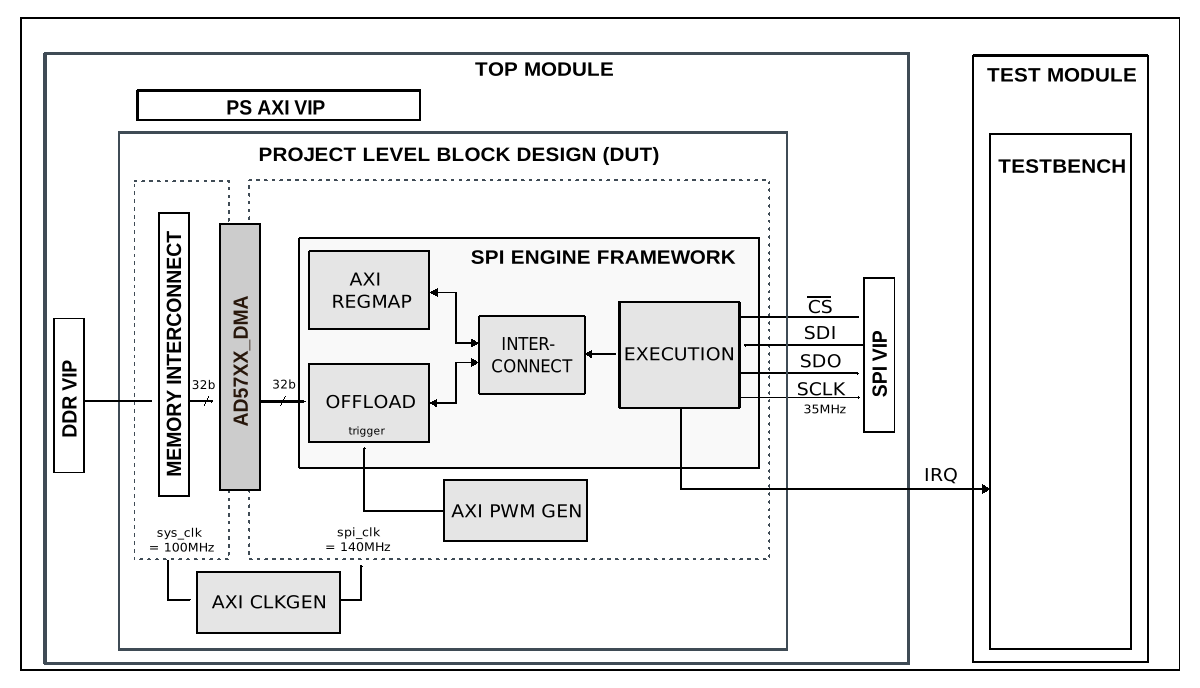
The testbench block design includes part of the AD57XX-ARDZ HDL reference design, along with VIPs used for clocking, reset, PS and DDR simulations.
Block diagram
The data path and clock domains are depicted in the below diagram:
Configuration parameters and modes
The following parameters of this project that can be configured through the configuration files:
DATA_DLENGTH: defines the number of bits for the serial interface. Used for configuring the SPI Engine instance on the DUT.
THREE_WIRE: selects whether to use a three-wire SPI setup, used for configuring the SPI Engine instance on the DUT. Currently only a value of 0 us supported. Options: 0 - disabled (separate SDI and SDO), 1 - enabled (shared SDI and SDO)
CPOL: configures the polarity of the SCLK signal. Options: 0 - the idle state of the SCLK signal is low, 1 - the idle state of the SCLK signal is high.
CPHA: configures the phase of the SCLK signal. Options: 0 - data is sampled on the leading edge and updated on the trailing edge. 1 - data is sampled on the trailing edge and updated on the leading edge.
SDO_IDLE_STATE: selects the state of the DUT’s SDO pin when CS is inactive or during read-only transfers.
SLAVE_TIN: defines the simulated input delay for the SPI peripheral model in the simulation, specified in ns.
SLAVE_TOUT: defines the simulated output delay for the SPI peripheral model in the simulation, specified in ns.
CS_TO_MISO: defines the simulated chip-select to miso delay for the SPI peripheral model in the simulation, specified in ns.
CLOCK_DIVIDER: defines the clock divider for the prescaler in the SPI Engine instance on the DUT.
NUM_OF_WORDS: defines the number of words in each SPI transfer performed during the test.
NUM_OF_TRANSFERS: defines the number of SPI transfers to be performed on each trigger event during the test.
CS_ACTIVE_HIGH: selects the polarity for the chip-select pin on the SPI peripheral model used in the simulation.
PWM_PERIOD: defines the period for the PWM generator instance in the DUT, used for triggering the SPI transfers.
TEST_DATA_MODE: selects the method for generating the test data. Options: DATA_MODE_RANDOM - generates random data, DATA_MODE_RAMP - generates a ramp pattern (incrementing counter), DATA_MODE_PATTERN - sends a fixed pattern (‘h1A50F), DEFAULT - sends a ‘ones’ pattern (‘b1).
Configuration files
Currently only a single configuration file is available: cfg1, which aproximates the operation of an AD5780 device.
cfg1 |
|
|---|---|
Parameter |
Value |
DATA_DLENGTH |
24 |
THREE_WIRE |
0 |
CPOL |
0 |
CPHA |
1 |
SDO_IDLE_STATE |
0 |
SLAVE_TIN |
0 |
SLAVE_TOUT |
0 |
CS_TO_MISO |
0 |
CLOCK_DIVIDER |
1 |
NUM_OF_WORDS |
1 |
NUM_OF_TRANSFERS |
3 |
CS_ACTIVE_HIGH |
0 |
PWM_PERIOD |
98 |
TEST_DATA_MODE |
DATA_MODE_PATTERN |
Tests
The following test program files are available:
Test program |
Usage |
|---|---|
test_program |
Tests the serial interface capabilities. |
Available configurations & tests combinations
The test program is compatible with the above mentioned configuration.
CPU/Memory interconnects addresses
Below are the CPU/Memory interconnect addresses used in this project:
Instance |
Address |
|---|---|
axi_intc |
0x4120_0000 |
spi_ad57xx_axi_regmap |
0x44A0_0000 |
ad57xx_dma |
0x44A4_0000 |
axi_ad57xx_clkgen |
0x44A7_0000 |
trig_gen |
0x44B0_0000 |
ddr_axi_vip |
0x8000_0000 |
Interrupts
Below are the Programmable Logic interrupts used in this project:
Instance name |
HDL |
|---|---|
ad57xx_dma |
13 |
spi_ad57xx |
12 |
Test stimulus
The test program is structured into several tests as follows:
Environment bringup
The steps of the environment bringup are:
Create the environment
Start the environment
Start the clocks
Configure the agents
Assert the resets
Sanity test
This test is used to check the communication with the AXI REGMAP module of the AD57XX SPI Engine interface, by reading the core VERSION register, along with writing and reading the SCRATCH register.
Configuration test
Start the SPI clock generator (axi_clkgen)
Configure the PWM generator (axi_pwmgen)
Configure the spi_ad57xx IP (SPI Engine)
SPI transfers emulating configuring an AD5780 chip
Compare value read from the DUT’s SPI Engine to expected
Offload test
Prepare a buffer on memoy with data for TX
Configure the DMA
Submit a DMA TX transfer
Configure the spi_ad57xx IP (SPI Engine) for offload
Compare data sent by DUT on SPI bus to expected
Stop the environment
Stop the clocks
Stop VIP agents
Building the testbench
The testbench is built upon ADI’s generic HDL reference design framework. ADI does not distribute compiled files of these projects so they must be built from the sources available at the hdl repository and the testbenches repository, with the specified hierarchy described Set up the Testbenches repository. To get the source you must clone the HDL repository, and then build the project as follows:.
Linux/Cygwin/WSL
Example 1
Build all the possible combinations of tests and configurations, using only the command line.
user@analog:~$
cd testbenches/ad57xx
user@analog:~/testbenches/ad57xx$
make
Example 2
Build all the possible combinations of tests and configurations, using the Vivado GUI. This command will launch Vivado, run the simulation and display the waveforms.
user@analog:~$
cd testbenches/ad57xx
user@analog:~/testbenches/ad57xx$
make MODE=gui
Example 3
Build a particular combination of test and configuration, using the Vivado GUI. This command will launch Vivado, will run the simulation and display the waveforms.
user@analog:~$
cd testbenches/ad57xx
user@analog:~/testbenches/ad57xx$
make MODE=gui CFG=cfg1 TST=test_program
The built projects can be found in the runs folder, where each configuration specific
build has it’s own folder named after the configuration file’s name.
Example: if the following command was run for a single configuration in the clean folder
(no runs folder available):
make CFG=cfg1
Then the subfolder under runs name will be:
cfg1
Resources
More information
Support
Analog Devices, Inc. will provide limited online support for anyone using the reference design with ADI components via the EngineerZone FPGA reference designs forum.
It should be noted, that the older the tools’ versions and release branches are, the lower the chances to receive support from ADI engineers.