Util Pack
Overview
The purpose of this testbench is to validate the packaging functionality of the library/util_pack/util_cpack2 and library/util_pack/util_upack2 IP cores.
Block design
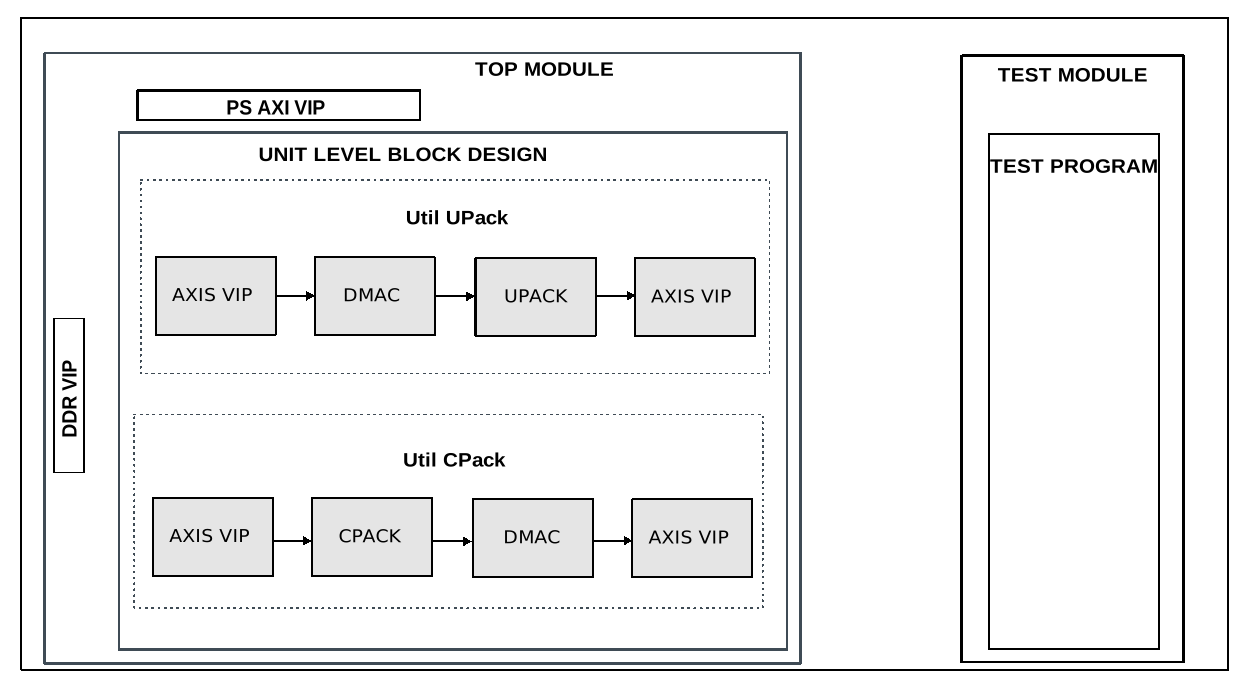
The block design is based on the test harness with the DUT being the 2 packer
IPs and other auxiliary modules. For the util_upack IP testing, the
auxiliary modules are a DMAC, a master and a slave AXI4 Stream VIP. The AXIS
VIP is used to generate data for the DMAC IP. The DMAC IP then passed the input
data to the output AXIS interface, which is used by the util_upack IP. The
util_upack IP unpacks the data on the respective lanes. The data is
concatenated and fed into the slave AXIS VIP for verification. The
util_cpack IP testing uses the same IPs, but in reversed order and
different configuration to match the required interfacing.
Block diagram
Configuration parameters and modes
The following parameters of this project that can be configured:
CHANNELS: defines the data generation mode: Integer value between 2 and 16
SAMPLES: defines the valid delays between data beats: Options: 2, 4, 8, 16
WIDTH: defines the valid delays between packets: Options: 8, 16, 32, 64
Hint
The max width is calculated with: CHANNELS*SAMPLES*WIDTH and it cannot exceed 2048.
Configuration files
The following configuration files are available:
Configuration mode
Parameters
CHANNELS
SAMPLES
WIDTH
cfg1
3
2
16
cfg_rand
random
random
random
Tests
The following test program file is available:
Test program |
Usage |
|---|---|
test_program |
Tests the packer modules. |
Available configurations & tests combinations
The test program is compatible with all the above-mentioned configurations.
CPU/Memory interconnects addresses
Instance |
Address |
|---|---|
axi_intc |
0x4120_0000 |
ddr_axi_vip |
0x8000_0000 |
dmac_rx |
0x5000_0000 |
dmac_tx |
0x5001_0000 |
Interrupts
Nothing connected.
Test stimulus
The test program is running in parallel for both TX and RX testing in the same code space.
Environment Bringup
The steps of the environment bringup are:
Create the environment
Start the environment
Start the clocks
Assert the resets
Packer testing
Configure the data_length
Enable RX and TX DMA
Initializes the sequencers, monitors and scoreboards
Configures the DMA
Configures the watchdog
Starts the data transmission and the watchdog
Waits for scoreboard to check all the data
Caution
Increasing the hardcoded value for the data length might cause the watchdog timer to trigger prematurely!
Stop the environment
Stop the watchdog
Stop the clocks
Building the test bench
The testbench is built upon ADI’s generic HDL reference design framework. ADI does not distribute compiled files of these projects so they must be built from the sources available here and here, with the specified hierarchy described Set up the Testbenches repository. To get the source you must clone the HDL repository, and then build the project as follows:
Linux/Cygwin/WSL
Example 1
Building and simulating the testbench using only the command line.
user@analog:~$
cd testbenches/ip/util_pack
user@analog:~/testbenches/ip/util_pack$
make
Example 2
Building and simulating the testbench using the Vivado GUI. This command will launch Vivado, will run the simulation and display the waveforms.
user@analog:~$
cd testbenches/ip/util_pack
user@analog:~/testbenches/ip/util_pack$
make MODE=gui
Example 3
Build a particular combination of test and configuration, using the Vivado GUI. This command will launch Vivado, will run the simulation and display the waveforms.
user@analog:~$
cd testbenches/ip/util_pack
user@analog:~/testbenches/ip/util_pack$
make MODE=gui CFG=cfg1 TST=test_program
The built project can be found in the runs folder, where each configuration
specific build has its own folder named after the configuration file’s name.
Example: if the following command was run for a single configuration in the
clean folder (no runs folder available):
make CFG=cfg1
Then the subfolder under runs name will be:
cfg1
Resources
More information
Support
Analog Devices, Inc. will provide limited online support for anyone using the reference design with ADI components via the EngineerZone FPGA reference designs forum.
It should be noted, that the older the tools’ versions and release branches are, the lower the chances to receive support from ADI engineers.