Project based testbench template
Overview
*This section must contain: the purpose of the testbench/ type of interface it’s validating, the corresponding hdl project and the HDL Github documentation page.*
Block design
*Mention the HDL and SV source components that the testbench is using.*
Block diagram
If the testbench has multiple configurations that change the block design itself, then make subsections for each of these configuration-block design pairs. Example: project is configured in serial mode or parallel mode. If there are many configuration options on how the block design looks, try to find ways to generalize them (eg. multiple interfaces of the same type are enabled by a parameter).
*** KEEP THIS PARAGRAPH *** The data path and clock domains are depicted in the below diagram:
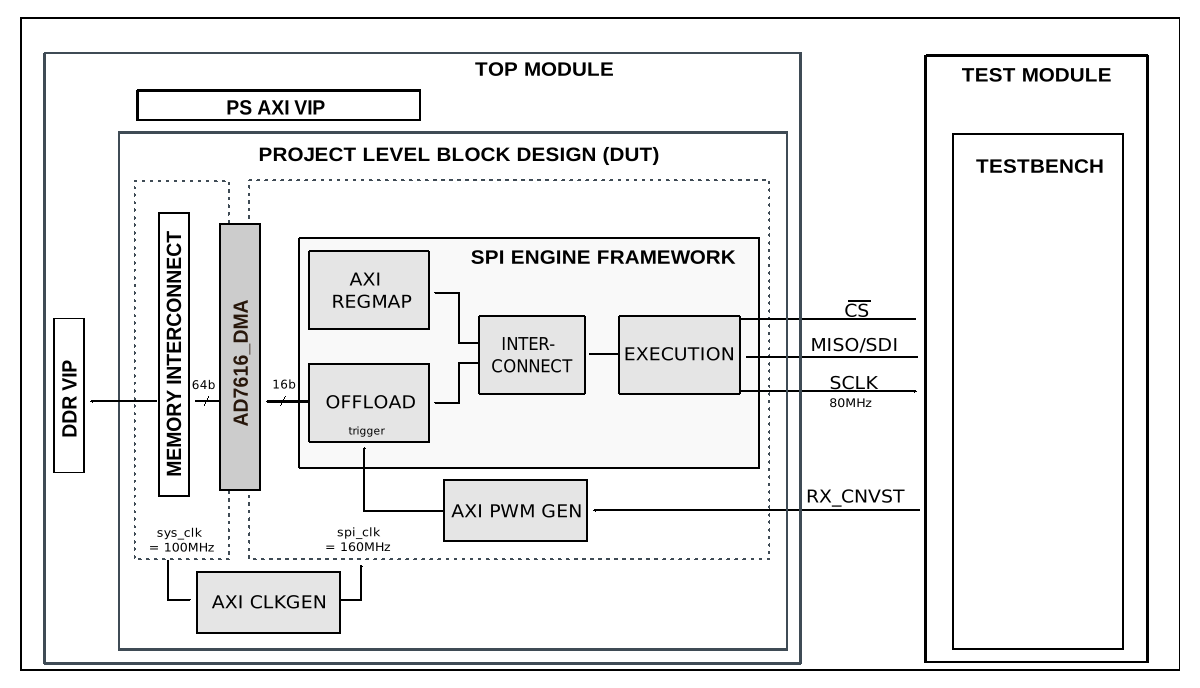
** MUST: Use SVG format for the diagram **
** TIP: Block diagrams must contain subtitles only if there are at least two different diagrams **
Configuration parameters and modes
*** MENTION IF THERE ARE ANY CONFIGURATION PARAMETERS AND/OR MODES ***
*** THIS IS JUST AN EXAMPLE ***
The following parameters of this project that can be configured:
CLK_MODE: defines clocking mode of the device’s digital interface: Options: 0 - SPI mode, 1 - Echo-clock or Master clock mode
NUM_OF_SDIO: defines the number of MOSI lines of the SPI interface: Options: 1 - Interleaved mode, 2 - 1 lane per channel, 4 - 2 lanes per channel, 8 - 4 lanes per channel
CAPTURE_ZONE: defines the capture zone of the next sample. There are two capture zones: 1 - from negative edge of the BUSY line until the next CNV positive edge -20ns, 2 - from the next consecutive CNV positive edge +20ns until the second next consecutive CNV positive edge -20ns
DDR_EN: defines the type of data transfer. In echo and master clock mode the SDI lines can have Single or Double Data Rates. Options: 0 - MISO runs on SDR, 1 - MISO runs on DDR.
Configuration files
*** MENTION IF ANY CONFIGURATION FILES ARE AVAILABLE ***
*** THIS IS JUST AN EXAMPLE ***
The following are available configurations for the testbench:
Configuration mode
Parameters
CLK_MODE
NUM_OF_SDIO
CAPTURE_ZONE
DDR_EN
cfg_cm0_sdi2_cz1_ddr0
0
2
1
0
cfg_cm0_sdi2_cz2_ddr0
0
2
2
0
cfg_cm0_sdi4_cz2_ddr0
0
4
2
0
cfg_cm0_sdi8_cz2_ddr0
0
8
2
0
cfg_cm1_sdi1_cz2_ddr0
1
1
2
0
cfg_cm1_sdi2_cz2_ddr0
1
2
2
0
cfg_cm1_sdi2_cz2_ddr1
1
2
2
1
cfg_cm1_sdi4_cz2_ddr0
1
4
2
0
cfg_cm1_sdi4_cz2_ddr1
1
4
2
1
cfg_cm1_sdi8_cz2_ddr0
1
8
2
0
cfg_cm1_sdi8_cz2_ddr1
1
8
2
1
*** ALTERNATIVE VERSION IN CASE THE TABLE EXPANDS HORIZONTALLY FOR TOO LONG ***
Configuration file |
Parameter |
|||
|---|---|---|---|---|
CLK_MODE |
NUM_OF_SDIO |
CAPTURE_ZONE |
DDR_EN |
|
cfg_cm0_sdi2_cz1_ddr0 |
0 |
2 |
1 |
0 |
cfg_cm0_sdi2_cz2_ddr0 |
0 |
2 |
2 |
0 |
cfg_cm0_sdi4_cz2_ddr0 |
0 |
4 |
2 |
0 |
cfg_cm0_sdi8_cz2_ddr0 |
0 |
8 |
2 |
0 |
cfg_cm1_sdi1_cz2_ddr0 |
1 |
1 |
2 |
0 |
*** IF THERE ARE TOO MANY PARAMETERS AND THE TABLE DOESN’T LOOK GOOD WHEN BUILT, CONSIDER TRANSPOSING THE TABLE ***
Tests
*** THIS IS JUST AN EXAMPLE ***
The following test program files are available:
Test program |
Usage |
|---|---|
test_program_si |
Tests the parallel interface capabilities. |
test_program_pi |
Tests the serial interface capabilities. |
Available configurations & tests combinations
*** THIS IS JUST AN EXAMPLE ***
*** CASE 1: EVERY CONFIGURATION AND TEST PROGRAM PAIR IS COMPATIBLE ***
The test program is compatible with all of the above mentioned configurations.
*** CASE 2: THERE ARE INCOMPATIBLE PAIRS ***
Configuration |
Test |
Build command |
|---|---|---|
cfg_si |
test_program_si |
make CFG=cfg_si TST=test_program_si |
cfg_pi |
test_program_pi |
make CFG=cfg_pi TST=test_program_pi |
*** IF THERE ARE INCOMPATIBLE PAIRS, THE WARNING MESSAGE MUST BE PRESENT ***
Error
Mixing a wrong pair of CFG and TST will result in a building errror. Please checkout the proposed combinations before running a custom test.
CPU/Memory interconnects addresses
*** THIS IS JUST AND EXAMPLE ***
Below are the CPU/Memory interconnect addresses used in this project:
*** ADDRESS SPACE MUST BE SORTED ASCENDING BY BASE ADDRESS VALUE ***
Instance |
Address |
|---|---|
axi_intc |
0x4120_0000 |
spi_ad7616_axi_regmap |
0x44A0_0000 |
axi_ad7606x_dma * |
0x44A3_0000 |
spi_clkgen ** |
0x44A7_0000 |
ad7606_pwm_gen |
0x44B0_0000 |
*** IN THE CASE OF MULTIPLE BLOCK DESIGNS WHERE ADDRESS SPACE CHANGES, LEGEND MUST BE USED ***
Legend
*instantiated only for parallel interface**instantiated only for serial interface
Interrupts
*** THIS IS JUST AND EXAMPLE ***
Below are the Programmable Logic interrupts used in this project:
*** INTERRUPTS LIST MUST BE SORTED DESCENDING BY POSITION ***
Instance name |
HDL |
|---|---|
axi_ad7606_dma |
13 |
spi_ad7606 * |
12 |
*** IN THE CASE OF MULTIPLE BLOCK DESIGNS WHERE INTERRUPT LOCATIONS CHANGE, LEGEND MUST BE USED ***
Legend
*instantiated only for parallel interface
Test stimulus
*** LIST AND EXPLAIN ALL THE TESTS DONE IN ALL TEST PROGRAMS ***
*** THIS IS JUST AND EXAMPLE ***
The test program is structured into several tests as follows:
Environment bringup
The steps of the environment bringup are:
Create the environment
Start the environment
Start the clocks
Assert the resets
Sanity test
This test is used to check the communication with the AXI REGMAP module of the AD7606 SPI Engine interface, by reading the core VERSION register, along with writing and reading the SCRATCH register.
Data acquisition test
Start the SPI clock generator (axi_clkgen)
Configure the PWM generator (axi_pwmgen)
Configure the DMA
Configure the axi_ad7616 IP
Submit a DMA transfer
Stop the PWM generator
Capture and compare the data
Stop the environment
Stop the clocks
Building the testbench
The testbench is built upon ADI’s generic HDL reference design framework. ADI does not distribute compiled files of these projects so they must be built from the sources available here and here, with the specified hierarchy described Set up the Testbenches repository. To get the source you must clone the HDL repository, and then build the project as follows:.
Linux/Cygwin/WSL
Example 1
Build all the possible combinations of tests and configurations, using only the command line.
user@analog:~$
cd testbenches/ad7616
user@analog:~/testbenches/ad7616$
make
Example 2
Build all the possible combinations of tests and configurations, using the Vivado GUI. This command will launch Vivado, will run the simulation and display the waveforms.
user@analog:~$
cd testbenches/ad7616
user@analog:~/testbenches/ad7616$
make MODE=gui
Example 3
Build a particular combination of test and configuration, using the Vivado GUI. This command will launch Vivado, will run the simulation and display the waveforms.
user@analog:~$
cd testbenches/ad7616
user@analog:~/testbenches/ad7616$
make MODE=gui CFG=cfg_pi TST=test_program_pi
The built projects can be found in the runs folder, where each configuration specific
build has it’s own folder named after the configuration file’s name.
Example: if the following command was run for a single configuration in the clean folder
(no runs folder available):
make CFG=cfg_pi
Then the subfolder under runs name will be:
cfg_pi
Resources
More information
Support
Analog Devices, Inc. will provide limited online support for anyone using the reference design with ADI components via the EngineerZone FPGA reference designs forum.
It should be noted, that the older the tools’ versions and release branches are, the lower the chances to receive support from ADI engineers.