ZedBoard Quickstart
This guide provides quick instructions on how to set up the EVAL-ADMX100X-FMCZ on:
ZedBoard FMC LPC
All the products described on this page include ESD (electrostatic discharge) sensitive devices. Electrostatic charges as high as 4000V readily accumulate on the human body or test equipment and can discharge without detection. Although the boards feature ESD protection circuitry, permanent damage may occur on devices subjected to high-energy electrostatic discharges. Therefore, proper ESD precautions are recommended to avoid performance degradation or loss of functionality. This includes removing static charge on external equipment, cables, or antennas before connecting to the device.
Using Linux as software
Necessary files
Note
The SD card includes several folders in the root directory of the BOOT partition. In order to configure the SD card to work with a specific FPGA board and ADI hardware, several files must be copied onto the root directory. Using the host PC, drag and drop the required files onto the BOOT partition, and use the EJECT function when removing the SD card from the reader.
The following files are needed for the system to boot:
HDL boot image:
BOOT.BINLinux Kernel image:
uImageLinux device tree:
devicetree.dtb
They can either be taken from the SD card – already generated by us, or you can build them manually:
Instructions on how to choose the boot files from the SD card can be found in the Platform-Specific Manual Steps section from here: Hardware Configuration.
Instructions on how to manually build the boot files from source can be found here:
- Build Zynq Linux kernel and devicetree (the only difference compared to the ZynqMP is
that instead of running
make adi_zynqmp_defconfig, you must runmake zynq_xcomm_adv7511_defconfig)
ADMX100X-EVB HDL project build documentation. More HDL build details at Build an HDL project.
Important
Some projects provide multiple devicetree files in the SD card’s boot folders. Make sure you select the devicetree that matches your specific use case.
Required Software
SD Card 16GB imaged with Kuiper (check out that guide on how to do it, then come back to this section)
A UART terminal (Putty/Tera Term/Minicom, etc.) with baud rate 115200 (8N1)
Required Hardware
AMD Xilinx ZedBoard FPGA (supports both ADMX1001 and ADMX1002)
EVAL-ADMX100X-FMCZ evaluation board
SD card with at least 16 GB of memory
Micro-USB cable (UART)
LAN cable (Ethernet)
More details as to why you need these can be found at Prerequisites.
Testing
Creating the setup
Caution
This project was tested with VADJ = 3.3V
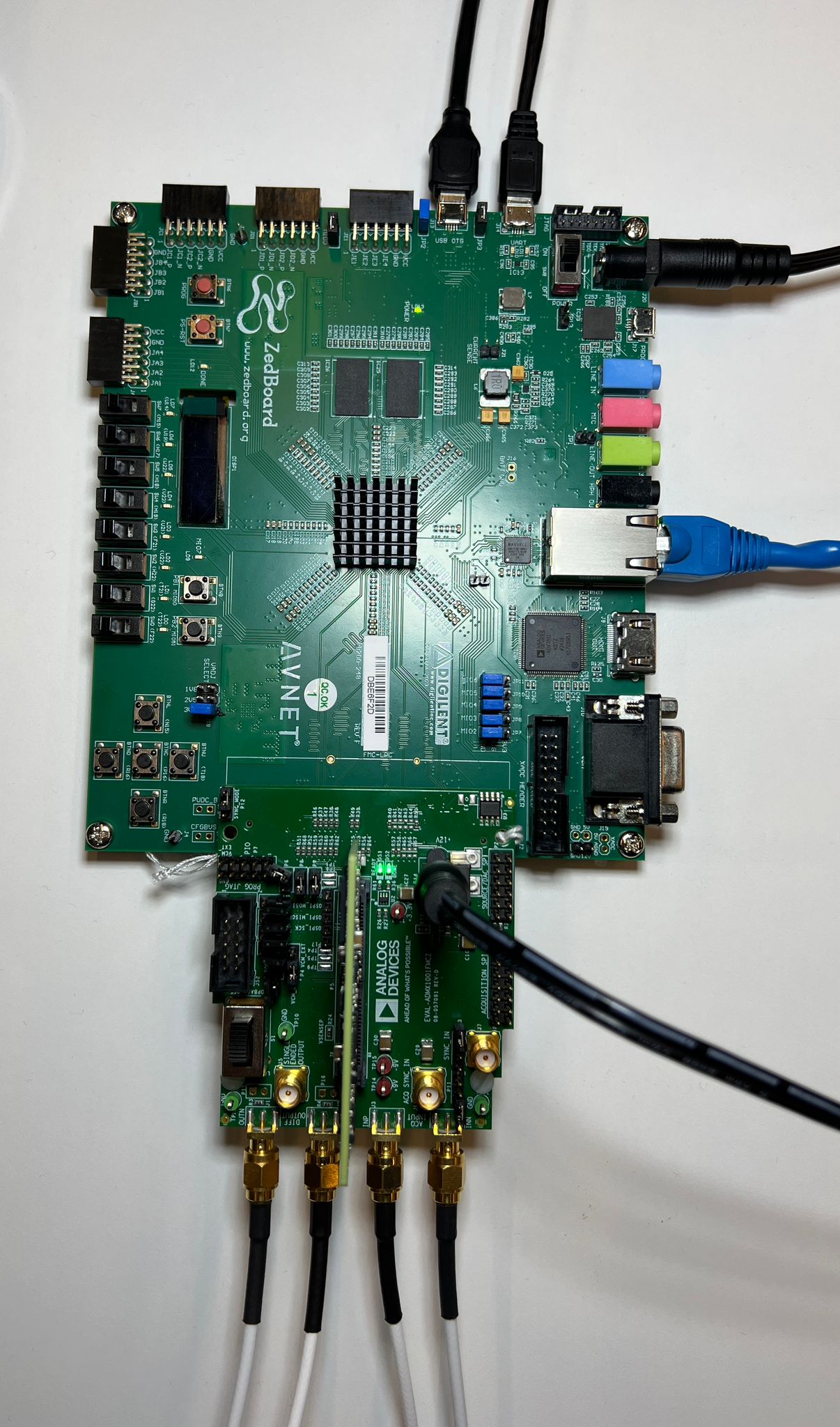
In the following example, we will prepare the evaluation setup by connecting the ADMX1001 board to the ZedBoard and applying a test input signal.
Follow the steps in this order, to avoid damaging the components:
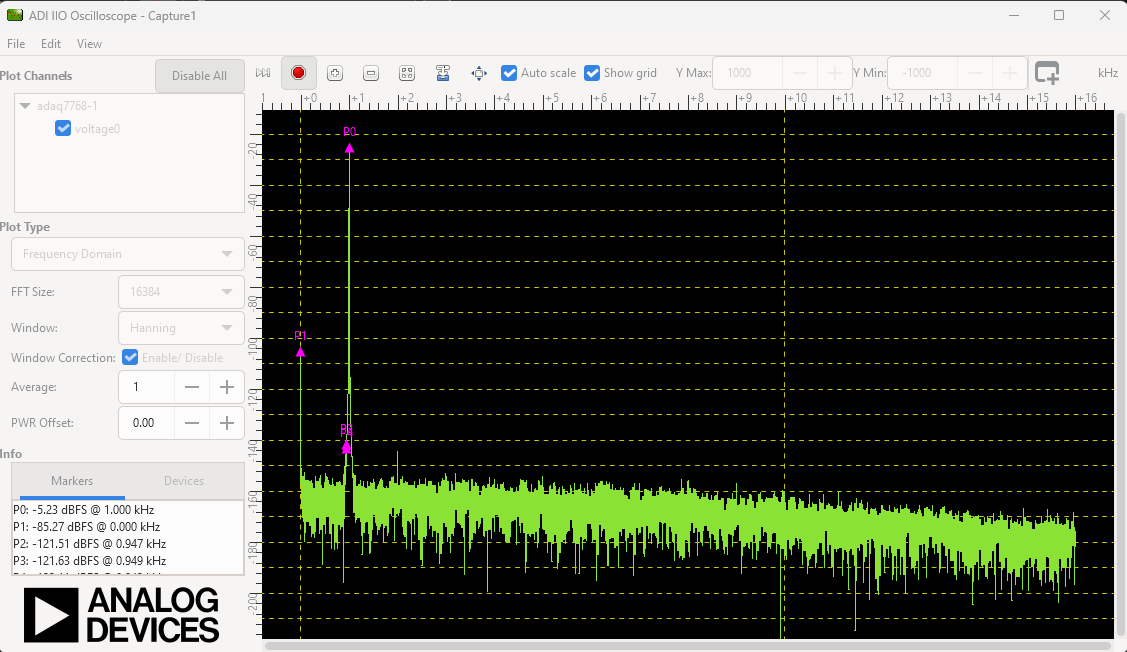
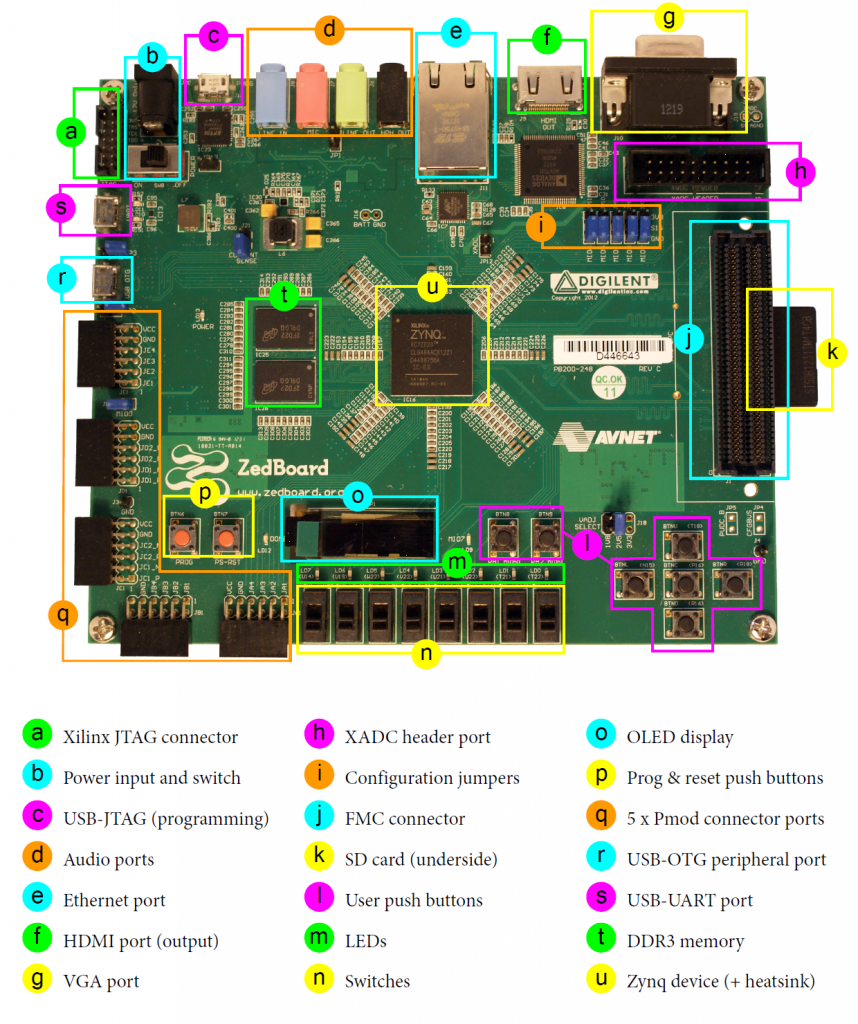
Get the ZedBoard
Configure ZedBoard for SD BOOT:
The BOOT switches (JP7–JP11) and the MIO0 jumper (JP6) must be set for SD-card boot mode. VADJ must be set to 3.3 V, as specified in the HDL project’s README at ADMX100X-EVB HDL project. Optionally, to use USB peripheral devices with the ZedBoard, install jumpers JP2 and JP3.
Insert the SD card into the SD Card Interface Connector (J12)
Connect the ADMX1001 or ADMX1002 module to the module connector (P5) on the EVAL-ADMX100X-FMCZ board.
Plug the EVAL-ADMX100X-FMCZ into the FMC LPC Connector (J1) on the ZedBoard.
Plug the Power Supply into the 12 V Power input connector (J20) (DO NOT turn the device on).
Apply power to the EVAL-ADMX100X-FMCZ board using the 12 V wall adapter.
Plug in an Ethernet cable from your router/switch to the Ethernet port on the ZedBoard.
Connect the UART port of ZedBoard (J14) to a PC via MicroUSB.
Turn on the power switch on the ZedBoard.
Observe kernel and serial console output messages on your terminal.
Boot messages
The following is what is printed in the serial console, after you have connected to the proper ttyUSB or COM port:
U-Boot 2018.01-21442-gf06dec3cab (Feb 13 2025 - 17:07:11 +0200), Build: jenkins-development-build_uboot-57

Model: Zynq Zeadmx100x spi1.0: ADMX: HW reset complete
admx100x spi1.0: ADMX_REG_STATUS = 0x00070004
admx100x spi1.0: Module ID: 0x0f0f0f0f
admx100x spi1.0: ADMX: defaults secondary set (amp2=2000000 uVrms, freq2=2000000000 uHz)
admx100x spi1.0: ADMX: defaults set (amp=1000000 uVrms, freq=1000000000 uHz, type=0)
admx100x spi1.0: Step 1 ADMX_REG_PROFILE_ID(0x068) = 0x0000000e (expected 0x0000000E)
admx100x spi1.0: Step 2 Reg 0x104 = 0x00040004 (expected 0x3)
admx100x spi1.0: Step 3 Reg ADMX_REG_SET_AMPLITUDE_PRIMARY = 0x000f4240 (expected 0xF4240)
admx100x spi1.0: Step 4 Reg ADMX_AMPLITUDE_SECONDARY = 0x0003d090 (expected 0x3D090)
admx100x spi1.0: Step 5 Reg ADMX_REG_SET_FREQUENCY_PRIMARY_L = 0x3b9aca00 (expected 0x3B9ACA00)
admx100x spi1.0: Step 6 Reg ADMX_REG_SET_FREQUENCY_PRIMARY_H = 0x00000000 (expected 0x0)
admx100x spi1.0: Step 7 Reg ADMX_FREQUENCY_SECONDARY_L = 0xa13b8600 (expected 0xA13B8600)
admx100x spi1.0: Step 8 Reg ADMX_FREQUENCY_SECONDARY_H = 0x00000001 (expected 0x01)
admx100x spi1.0: Step 9 Reg ADMX_REG_SET_CYCLE_COUNT = 0xffffffff (expected 0xFFFFFFFF)
admx100x spi1.0: Step 10 Reg 0x50 = 0x00002710 (expected 0x2710)
admx100x spi1.0: Step 11 Reg 0x54 = 0x40420f00 (expected 0x40420F00)
admx100x spi1.0: Step 12 Reg 0x58 = 0x00000000 (expected 0x0)
admx100x spi1.0: Step 13 Reg ADMX_REG_SET_SIGNAL_TYPE = 0x00000004 (expected 0x0)
admx100x spi1.0: Step 15 Reg ADMX_REG_CONTROL = 0x00000004 (expected 0x05)
admx100x spi1.0: Step 16 Reg ADMX_REG_CONTROL = 0x00000400 (expected 0x400)
admx100x spi1.0: Step 17 Reg ADMX_REG_CONTROL = 0x00000401 (expected 0x401)
admx100x spi1.0: ADMX init sequence completed.
axi_sysid 45000000.sysid: AXI System ID core version (1.01.a) found
axi_sysid 45000000.sysid: [admx100x_evb] on [zed] git branch <admx100x_rx2> git <2cb1f45eeb6742690487421102e53f40b6b71544> clean [2026-02-17 07:39:36] UTC
fpga_manager fpga0: Xilinx Zynq FPGA Manager registered
usbcore: registered new interface driver snd-usb-audio
axi-i2s 77600000.i2s: probed, capture enabled, playback enabled
NET: Registered PF_INET6 protocol family
Segment Routing with IPv6
In-situ OAM (IOAM) with IPv6
sit: IPv6, IPv4 and MPLS over IPv4 tunneling driver
NET: Registered PF_PACKET protocol family
NET: Registered PF_IEEE802154 protocol family
Key type dns_resolver registered
Registering SWP/SWPB emulation handler
of-fpga-region fpga-region: FPGA Region probed
[drm] Initialized axi_hdmi_drm 1.0.0 20120930 for 70e00000.lcd-controller on minor 0
axi-hdmi 70e00000.lcd-controller: [drm] Cannot find any crtc or sizes
axi-hdmi 70e00000.lcd-controller: [drm] Cannot find any crtc or sizes
debugfs: File 'Capture' in directory 'dapm' already present!
axi-hdmi 70e00000.lcd-controller: [drm] Cannot find any crtc or sizes
input: gpio-keys as /devices/soc0/gpio-keys/input/input0
of_cfs_init
of_cfs_init: OK
clk: Not disabling unused clocks
ALSA device list:
  #0: HDMI monitor
  #1: ZED ADAU1761
EXT4-fs (mmcblk0p2): recovery complete
EXT4-fs (mmcblk0p2): mounted filesystem 675b84e0-16af-4fea-97ce-a01fc7c7f005 r/w with ordered data mode. Quota mode: disabled.
VFS: Mounted root (ext4 filesystem) on device 179:2.
devtmpfs: mounted
Freeing unused kernel image (initmem) memory: 1024K
Run /sbin/init as init process
systemd[1]: System time before build time, advancing clock.
systemd[1]: Failed to look up module alias 'autofs4': Function not implemented
systemd[1]: systemd 247.3-7+rpi1+deb11u6 running in system mode. (+PAM +AUDIT +SELINUX +IMA +APPARMOR +SMACK +SYSVINIT +UTMP +LIBCRYPTSETUP +GCRYPT +GNUTLS +ACL +XZ +LZ4 +ZSTD +SECCOMP +BLKID +ELFUTILS +KMOD +IDN2 -IDN +PCRE2 default-hierarchy=unified)
systemd[1]: Detected architecture arm.

Welcome to Kuiper GNU/Linux 11.2 (bullseye)!

systemd[1]: Set hostname to <analog>.
systemd[1]: memfd_create() called without MFD_EXEC or MFD_NOEXEC_SEAL set
systemd[1]: /lib/systemd/system/plymouth-start.service:16: Unit configured to use KillMode=none. This is unsafe, as it disables systemd's process lifecycle management for the service. Please update your service to use a safer KillMode=, such as 'mixed' or 'control-group'. Support for KillMode=none is deprecated and will eventually be removed.
systemd[1]: Queued start job for default target Graphical Interface.
random: crng init done
systemd[1]: system-getty.slice: unit configures an IP firewall, but the local system does not support BPF/cgroup firewalling.
systemd[1]: (This warning is only shown for the first unit using IP firewalling.)
systemd[1]: Created slice system-getty.slice.
[  OK  ] Created slice system-getty.slice.
systemd[1]: Created slice system-modprobe.slice.
[  OK  ] Created slice system-modprobe.slice.
systemd[1]: Created slice system-serial\x2dgetty.slice.
[  OK  ] Created slice system-serial\x2dgetty.slice.
systemd[1]: Created slice system-systemd\x2dfsck.slice.
[  OK  ] Created slice system-systemd\x2dfsck.slice.
systemd[1]: Created slice User and Session Slice.
[  OK  ] Created slice User and Session Slice.
systemd[1]: Started Forward Password Requests to Wall Directory Watch.
[  OK  ] Started Forward Password R…uests to Wall Directory Watch.
systemd[1]: Condition check resulted in Arbitrary Executable File Formats File System Automount Point being skipped.
systemd[1]: Reached target Slices.
[  OK  ] Reached target Slices.
systemd[1]: Reached target Swap.
[  OK  ] Reached target Swap.
systemd[1]: Listening on Syslog Socket.
[  OK  ] Listening on Syslog Socket.
systemd[1]: Listening on fsck to fsckd communication Socket.
[  OK  ] Listening on fsck to fsckd communication Socket.
systemd[1]: Listening on initctl Compatibility Named Pipe.
[  OK  ] Listening on initctl Compatibility Named Pipe.
systemd[1]: Condition check resulted in Journal Audit Socket being skipped.
systemd[1]: Listening on Journal Socket (/dev/log).
[  OK  ] Listening on Journal Socket (/dev/log).
systemd[1]: Listening on Journal Socket.
[  OK  ] Listening on Journal Socket.
systemd[1]: Listening on udev Control Socket.
[  OK  ] Listening on udev Control Socket.
systemd[1]: Listening on udev Kernel Socket.
[  OK  ] Listening on udev Kernel Socket.
systemd[1]: Condition check resulted in Huge Pages File System being skipped.
systemd[1]: Condition check resulted in POSIX Message Queue File System being skipped.
systemd[1]: Mounting RPC Pipe File System...
         Mounting RPC Pipe File System...
systemd[1]: Mounting Kernel Debug File System...
         Mounting Kernel Debug File System...
systemd[1]: Condition check resulted in Kernel Trace File System being skipped.
systemd[1]: Condition check resulted in Kernel Module supporting RPCSEC_GSS being skipped.
systemd[1]: Starting Restore / save the current clock...
         Starting Restore / save the current clock...
systemd[1]: Starting Set the console keyboard layout...
         Starting Set the console keyboard layout...
systemd[1]: Condition check resulted in Create list of static device nodes for the current kernel being skipped.
systemd[1]: Starting Load Kernel Module configfs...
         Starting Load Kernel Module configfs...
systemd[1]: Starting Load Kernel Module drm...
         Starting Load Kernel Module drm...
systemd[1]: Starting Load Kernel Module fuse...
         Starting Load Kernel Module fuse...
systemd[1]: Condition check resulted in Set Up Additional Binary Formats being skipped.
systemd[1]: Condition check resulted in File System Check on Root Device being skipped.
systemd[1]: Starting Journal Service...
         Starting Journal Service...
systemd[1]: Starting Load Kernel Modules...
         Starting Load Kernel Modules...
systemd[1]: Starting Remount Root and Kernel File Systems...
         Starting Remount Root and Kernel File Systems...
systemd[1]: Starting Coldplug All udev Devices...
         Starting Coldplug All udev Devices...
systemd[1]: Mounted RPC Pipe File System.
[  OK  ] Mounted RPC Pipe File System.
systemd[1]: Mounted Kernel Debug File System.
[  OK  ] Mounted Kernel Debug File System.
systemd[1]: Finished Restore / save the current clock.
[  OK  ] Finished Restore / save the current clock.
systemd[1]: modprobe@configfs.service: Succeeded.
systemd[1]: Finished Load Kernel Module configfs.
[  OK  ] Finished Load Kernel Module configfs.
systemd[1]: modprobe@drm.service: Succeeded.
systemd[1]: Finished Load Kernel Module drm.
[  OK  ] Finished Load Kernel Module drm.
systemd[1]: Started Journal Service.
[  OK  ] Started Journal Service.
[  OK  ] Finished Set the console keyboard layout.
[  OK  ] Finished Load Kernel Module fuse.
[FAILED] Failed to start Load Kernel Modules.
See 'systemctl status systemd-modules-load.service' for details.
         Mounting FUSE Control File System...
         Mounting Kernel Configuration File System...
         Starting Apply Kernel Variables...
[  OK  ] Mounted FUSE Control File System.
[  OK  ] Mounted Kernel Configuration File System.
[  OK  ] Finished Apply Kernel Variables.
[  OK  ] Finished Remount Root and Kernel File Systems.
[  OK  ] Finished Coldplug All udev Devices.
         Starting Helper to synchronize boot up for ifupdown...
         Starting Flush Journal to Persistent Storage...
         Starting Load/Save Random Seed...
         Starting Create System Users...
         Starting Wait for udev To …plete Device Initialization...
[  OK  ] Finished Helper to synchronize boot up for ifupdown.
[  OK  ] Finished Load/Save Random Seed.
[  OK  ] Finished Flush Journal to Persistent Storage.
[  OK  ] Finished Create System Users.
         Starting Create Static Device Nodes in /dev...
[  OK  ] Finished Create Static Device Nodes in /dev.
[  OK  ] Reached target Local File Systems (Pre).
         Starting Rule-based Manage…for Device Events and Files...
[  OK  ] Started Rule-based Manager for Device Events and Files.
         Starting Show Plymouth Boot Screen...
[  OK  ] Started Show Plymouth Boot Screen.
[  OK  ] Started Forward Password R…s to Plymouth Directory Watch.
[  OK  ] Reached target Local Encrypted Volumes.
[  OK  ] Found device /dev/ttyPS0.
[  OK  ] Found device /dev/disk/by-partuuid/a22286d2-01.
[  OK  ] Finished Wait for udev To Complete Device Initialization.
         Starting File System Check…isk/by-partuuid/a22286d2-01...
         Starting Load Kernel Modules...
[  OK  ] Started File System Check Daemon to report status.
[FAILED] Failed to start Load Kernel Modules.
See 'systemctl status systemd-modules-load.service' for details.
[  OK  ] Finished File System Check…/disk/by-partuuid/a22286d2-01.
         Mounting /boot...
[  OK  ] Mounted /boot.
[  OK  ] Reached target Local File Systems.
         Starting Set console font and keymap...
         Starting Raise network interfaces...
         Starting Preprocess NFS configuration...
         Starting Tell Plymouth To Write Out Runtime Data...
         Starting Create Volatile Files and Directories...
[  OK  ] Finished Set console font and keymap.
[  OK  ] Finished Tell Plymouth To Write Out Runtime Data.
[  OK  ] Finished Preprocess NFS configuration.
[  OK  ] Reached target NFS client services.
[  OK  ] Reached target Remote File Systems (Pre).
[  OK  ] Reached target Remote File Systems.
[  OK  ] Finished Create Volatile Files and Directories.
         Starting Network Time Synchronization...
         Starting Update UTMP about System Boot/Shutdown...
[  OK  ] Finished Update UTMP about System Boot/Shutdown.
         Starting Load Kernel Modules...
[  OK  ] Started Network Time Synchronization.
[  OK  ] Finished Raise network interfaces.
[  OK  ] Reached target System Time Set.
[  OK  ] Reached target System Time Synchronized.
[FAILED] Failed to start Load Kernel Modules.
See 'systemctl status systemd-modules-load.service' for details.
[  OK  ] Reached target System Initialization.
[  OK  ] Started CUPS Scheduler.
[  OK  ] Started Daily apt download activities.
[  OK  ] Started Daily apt upgrade and clean activities.
[  OK  ] Started Periodic ext4 Onli…ata Check for All Filesystems.
[  OK  ] Started Discard unused blocks once a week.
[  OK  ] Started Daily rotation of log files.
[  OK  ] Started Daily man-db regeneration.
[  OK  ] Started Daily Cleanup of Temporary Directories.
[  OK  ] Reached target Paths.
[  OK  ] Reached target Timers.
[  OK  ] Listening on Avahi mDNS/DNS-SD Stack Activation Socket.
[  OK  ] Listening on CUPS Scheduler.
[  OK  ] Listening on D-Bus System Message Bus Socket.
[  OK  ] Listening on Erlang Port Mapper Daemon Activation Socket.
[  OK  ] Listening on GPS (Global P…ioning System) Daemon Sockets.
[  OK  ] Listening on triggerhappy.socket.
[  OK  ] Reached target Sockets.
[  OK  ] Reached target Basic System.
         Starting Analog Devices power up/down sequence...
         Starting Save/Restore Sound Card State...
         Starting Avahi mDNS/DNS-SD Stack...
[  OK  ] Started Regular background program processing daemon.
[  OK  ] Started D-Bus System Message Bus.
         Starting dphys-swapfile - …unt, and delete a swap file...
         Starting Remove Stale Onli…t4 Metadata Check Snapshots...
[  OK  ] Started fan-control.
         Starting Fix DP audio and X11 for Jupiter...
         Starting Creating IIOD Context Attributes......
         Starting Authorization Manager...
         Starting DHCP Client Daemon...
         Starting LSB: Switch to on…nless shift key is pressed)...
         Starting LSB: rng-tools (Debian variant)...
         Starting System Logging Service...
         Starting User Login Management...
         Starting triggerhappy global hotkey daemon...
         Starting Disk Manager...
         Starting WPA supplicant...
[  OK  ] Finished Save/Restore Sound Card State.
[  OK  ] Finished Fix DP audio and X11 for Jupiter.
[  OK  ] Started triggerhappy global hotkey daemon.
[  OK  ] Started System Logging Service.
[  OK  ] Started DHCP Client Daemon.
[  OK  ] Started Authorization Manager.
[  OK  ] Finished dphys-swapfile - …mount, and delete a swap file.
[  OK  ] Started Avahi mDNS/DNS-SD Stack.
[  OK  ] Started User Login Management.
[  OK  ] Started WPA supplicant.
[  OK  ] Reached target Network.
[  OK  ] Reached target Network is Online.
[  OK  ] Reached target Sound Card.
         Starting Modem Manager...
         Starting CUPS Scheduler...
[  OK  ] Started Erlang Port Mapper Daemon.
         Starting HTTP based time synchronization tool...
         Starting Internet superserver...
         Starting /etc/rc.local Compatibility...
         Starting OpenBSD Secure Shell server...
         Starting Permit User Sessions...
[  OK  ] Started Unattended Upgrades Shutdown.
[  OK  ] Started Internet superserver.
[  OK  ] Finished Remove Stale Onli…ext4 Metadata Check Snapshots.
[  OK  ] Started LSB: rng-tools (Debian variant).
[  OK  ] Started /etc/rc.local Compatibility.
[  OK  ] Started HTTP based time synchronization tool.
[  OK  ] Finished Permit User Sessions.
         Starting Light Display Manager...
         Starting Hold until boot process finishes up...
[  OK  ] Started LSB: Switch to ond…(unless shift key is pressed).
[FAILED] Failed to start VNC Server for X11.

Raspbian GNU/Linux 11 analog ttyPS0

analog login: root (automatic login)

Linux analog 6.6.0-25583-gc89db4d3c8e0-dirty #35 SMP PREEMPT Tue Feb 17 14:18:06 EET 2026 armv7l

The programs included with the Debian GNU/Linux system are free software;
the exact distribution terms for each program are described in the
individual files in /usr/share/doc/*/copyright.

Debian GNU/Linux comes with ABSOLUTELY NO WARRANTY, to the extent
permitted by applicable law.
Last login: Tue Mar 18 19:11:12 GMT 2025 on ttyPS0
root@analog:~#
Useful commands for the serial terminal
The below commands are to be run in the serial terminal connected to the FPGA.
Login Information
user: analog password: analog
To find out the IP of the FPGA board, run the following command and take the IP specified at “eth0 inet”:
~$
ifconfig
To see the IIO devices detected, run:
~$
iio_info | grep iio:device
To power off the system, run the following command, and wait for the final message to be printed, then power off the ZedBoard from the switch as well.
~$
poweroff
To reboot the system, run:
~$
reboot
Important
Even though this is Linux, this is a persistent file system. Care should be
taken not to corrupt the file system – please shut down things, don’t just
turn off the power switch. You can do this from the terminal as well with
sudo shutdown -h now or the above-mentioned command for powering off.
IIO Oscilloscope
Important
Make sure to download/update to the latest version of IIO Oscilloscope.
Once done with the installation or an update of the latest IIO Oscilloscope, open the application. The user needs to supply a URI which will be used in the context creation of the IIO Oscilloscope.
Press
Refreshto display available IIO Devices and pressConnect.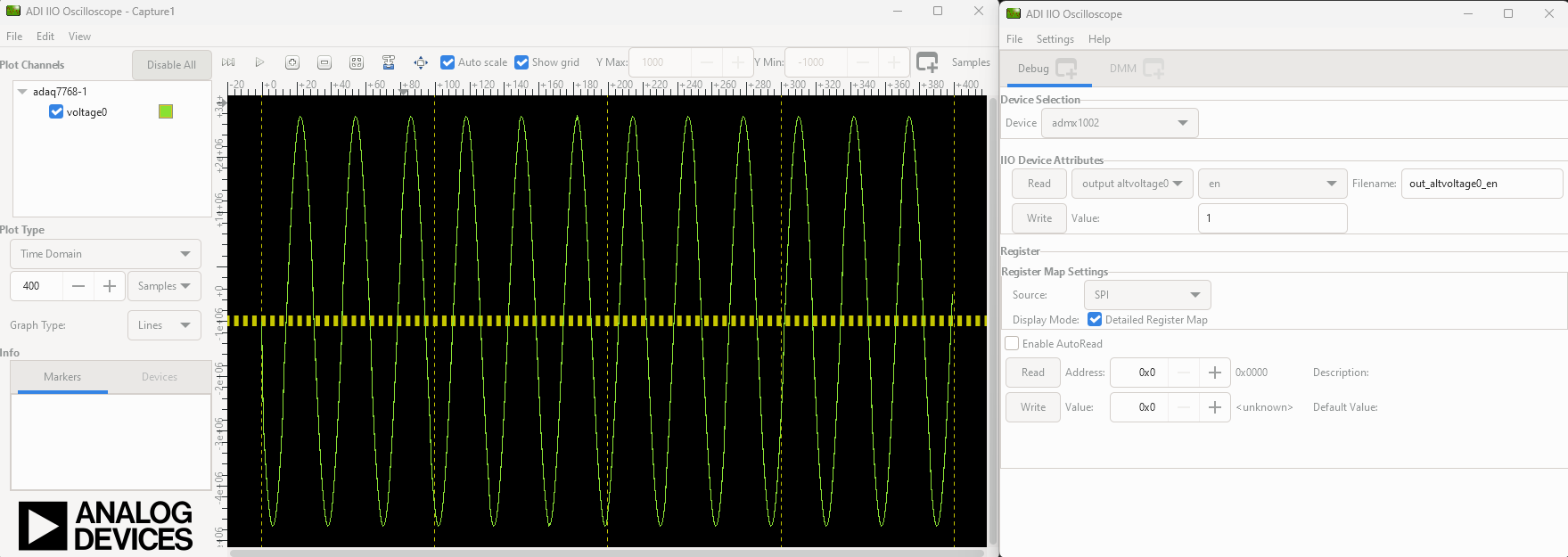
After the board is connected and a channel is enabled, hit the play button. The data capture window can be seen like in the shown picture.