

ADAQ23875 HDL project
The EVAL-ADAQ23875/ EVAL-ADAQ23876/ EVAL-ADAQ23878 provide an analog front-end and an FMC digital interface for ADAQ23875/ ADAQ23876/ ADAQ23878, its core. It is a low noise, high speed successive approximation register (SAR) ADC with a resolution of 18/16 bits and sampling rate up to 15MSPS.
The ADAQ2387X family includes an on-board reference oscillator and a retiming circuit to minimize signal-to-noise ratio (SNR) degradation due to the FPGA additive jitter.
In order to support high speed operations while minimizing the number of data lines, a serial LVDS digital interface is used. It has a one-lane and two-lane output modes, allowing the user to optimize the interface data rate for each application, through setting a parameter.
Supported boards
Supported devices
Supported carriers
ZedBoard on FMC slot
Block design
Warning
The VADJ for the Zedboard must be set to 2.5V.
Block diagram
The data path and clock domains are depicted in the below diagrams:
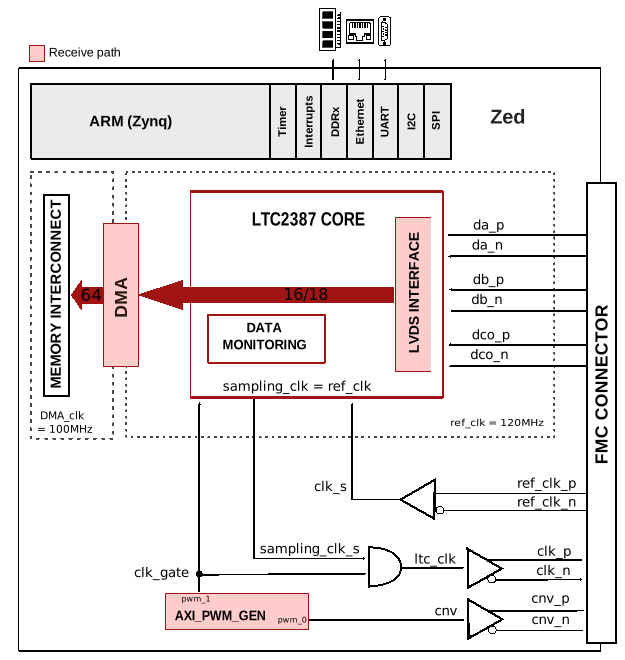
Configuration modes
TWOLANES: specifies the number of lanes used
1 - two-lane output mode (default)
0 - one-lane output mode
ADC_RES: resolution in bits; selects between EVAL-ADAQ23878 (18-bit, default) and EVAL-ADAQ23875/EVAL-ADAQ23876 (16-bit)
18 - 18 bits ADC resolution, EVAL-ADAQ23878 (default)
16 - 16 bits ADC resoluton, EVAL-ADAQ23875/EVAL-ADAQ23876
Jumper setup
Depending on what configuration of pins is chosen on the jumpers J6, J8 and J9, the device can act in different modes, as described below. Of course, the PD jumper overrides the PD signal from the FPGA. It is controlled by a one-bit-adc-dac, in software.
J6 - configures PD_N
Shorting pins 1 and 2 → PD_N = 1, device is not powered down
Shorting pins 2 and 3 → PD_N = 0, device is powered down
J8 - configures TESTPAT
Shorting pins 1 and 2 → TESTPAT = 1, pattern testing is active
Shorting pins 2 and 3 → TESTPAT = 0, pattern testing is inactive
J9 - configures TWOLANES parameter
Shorting pins 1 and 2 → TWOLANES = 1 (TWO LANES mode)
Shorting pins 2 and 3 → TWOLANES = 0 (ONE LANE mode)
Warning
TWOLANES is fixed at HDL build time and cannot be changed at runtime. Do not change the hardware switch unless the HDL was built with the corresponding TWOLANES setting.
Clock scheme
The clock architecture of the EVAL-ADAQ2387X is designed with careful consideration to ensure low jitter and low phase noise.
An on-board 100 MHz voltage controlled crystal oscillator (VCXO) is used to provide the clock for the EVAL-ADAQ2387X boards and the FPGA. It is further named as reference clock. This clock is gated and fed back to the device as the sampling clock, on which the data was sampled.
The DMA runs on the Zynq PS clock FCLK_CLK0 which has a frequency of 100MHz.
CPU/Memory interconnects addresses
The addresses are dependent on the architecture of the FPGA, having an offset added to the base address from HDL (see more at CPU/Memory interconnects addresses).
Instance |
Zynq/Microblaze |
|---|---|
axi_ltc2387 |
0x44A0_0000 |
axi_ltc2387_dma |
0x44A3_0000 |
axi_pwm_gen |
0x44A6_0000 |
Interrupts
Below are the Programmable Logic interrupts used in this project.
Instance name |
HDL |
Linux Zynq |
Actual Zynq |
|---|---|---|---|
axi_ltc2387_dma |
13 |
57 |
89 |
Building the HDL project
The design is built upon ADI’s generic HDL reference design framework. ADI distributes the bit/elf files of these projects as part of the ADI Kuiper Linux. If you want to build the sources, ADI makes them available on the HDL repository. To get the source you must clone the HDL repository.
Default configuration, TWOLANES=1, ADC_RES=18 (EVAL-ADAQ23878 in two-lane mode):
~$
cd hdl/projects/adaq23875/zed
~/hdl/projects/adaq23875/zed$
make
Example configuration for EVAL-ADAQ23878 in one-lane mode (TWOLANES=0, ADC_RES=18):
~/hdl/projects/adaq23875/zed$
make TWOLANES=0 ADC_RES=18
The built project will be found in a folder called TWOS0_ADCRES18.
Example configuration for EVAL-ADAQ23875/EVAL-ADQ23876 in two-lane mode (TWOLANES=1, ADC_RES=16):
~/hdl/projects/adaq23875/zed$
make TWOLANES=1 ADC_RES=16
The built project will be found in a folder called TWOS1_ADCRES16.
A more comprehensive build guide can be found in the Build an HDL project user guide.
Resources
More information
Support
Analog Devices, Inc. will provide limited online support for anyone using the reference design with ADI components via the EngineerZone FPGA reference designs forum.
For questions regarding the ADI Linux device drivers, device trees, etc. from our Linux GitHub repository, the team will offer support on the EngineerZone Linux software drivers forum.
For questions concerning the ADI No-OS drivers, from our No-OS GitHub repository, the team will offer support on the EngineerZone microcontroller No-OS drivers forum.
It should be noted, that the older the tools’ versions and release branches are, the lower the chances to receive support from ADI engineers.