ADRD3161-01Z Hardware Guide
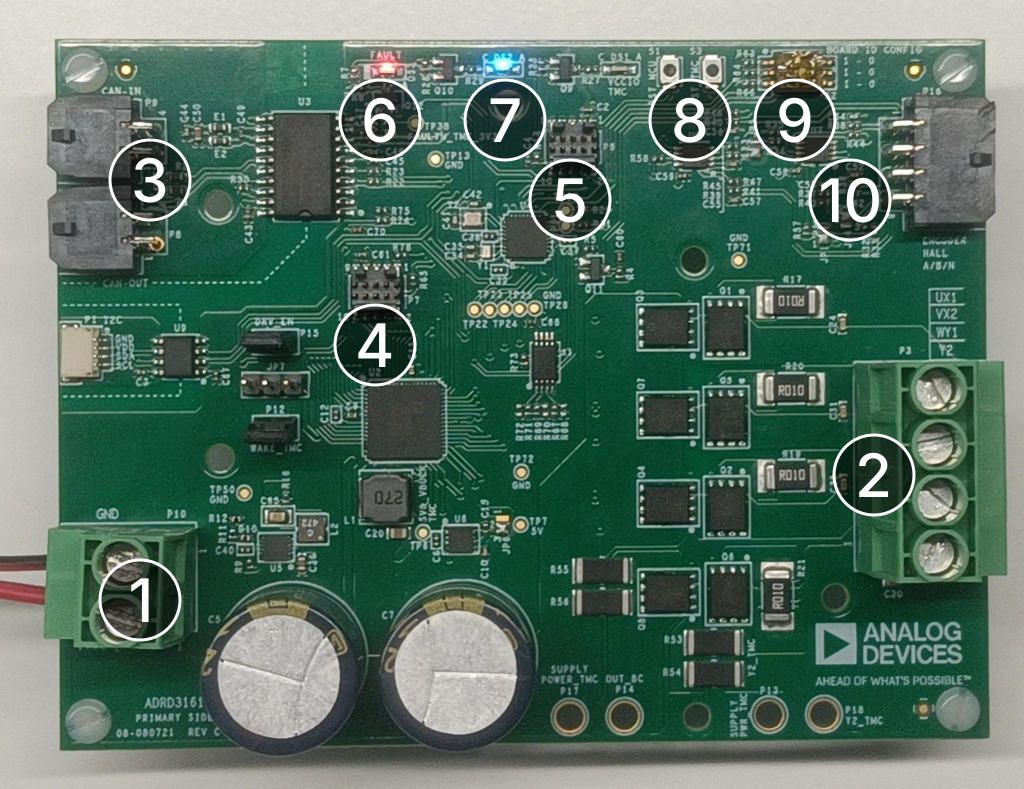
Annotation |
Component |
Function |
|---|---|---|
1 |
P10 |
DC power connection, 9 - 70 V |
2 |
P3 |
|
3 |
P8, P9 |
CAN bus connections (daisy-chainable) |
4 |
P7 |
TMC9660 debug port |
5 |
P6 |
MAX32662 debug port |
6 |
DS3 |
|
7 |
DS2 |
|
8 |
S1, S3 |
|
9 |
S2 |
|
10 |
P16 |
Encoder cable connection |
Motor winding connections
Warning
Wire colors are not standard and vary between motors. These tables reflect the wiring of Trinamic motors. Check your motor’s datasheet!
Motor phase |
Wire color |
Terminal |
|---|---|---|
A+ |
Black |
UX1 |
A- |
Green |
VX2 |
B+ |
Red |
WY1 |
B- |
Blue |
Y2 |
Motor phase |
Wire color |
Terminal |
|---|---|---|
U |
Yellow |
UX1 |
V |
Red |
VX2 |
W |
Black |
WY1 |
Motor phase |
Wire color |
Terminal |
|---|---|---|
M+ |
Red |
UX1 |
M- |
Black |
VX2 |
Status LEDs
The LEDs on the board signal the CANopen status according to CiA 303-3.
Reset switches
Switches RST_TMC and RST_MCU reset the TMC9660 motor drive and MAX32662 application processor, respectively. Press them in the order: RST_TMC, RST_MCU to do a full board reset.
Address selection switch
The boards’ CANopen node IDs can be configured using the DIP switch S2. The CANopen node ID is 0x10 + the binary value of the DIP switches. Assigning node IDs via CANopen LSS is not supported yet. Most CAN messages sent and received by a specific device will have the lower 7 bits set to the node ID, allowing for easy identification when monitoring the bus:
Switch position |
CANopen node ID |
CAN frame IDs |
|---|---|---|
(111) |
0x17 (default) |
|
(110) |
0x16 |
|
(101) |
0x15 |
|
(100) |
0x14 |
|
(011) |
0x13 |
|
(010) |
0x12 |
|
(001) |
0x11 |
|
(000) |
0x10 |
|
Encoder cable
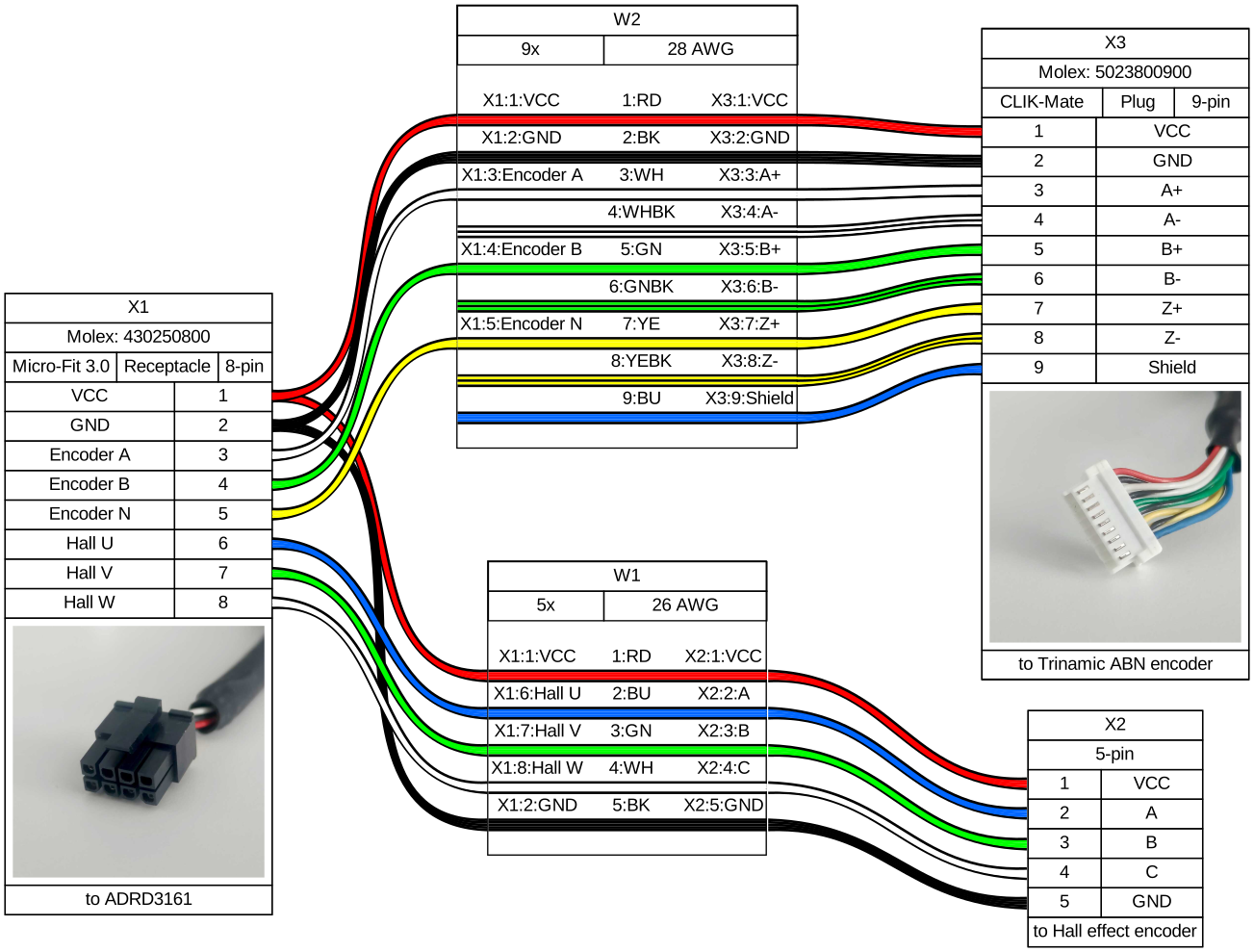
Header P16 provides 5V power to encoders and has isolated inputs corresponding to ABN and Digital Hall encoders.
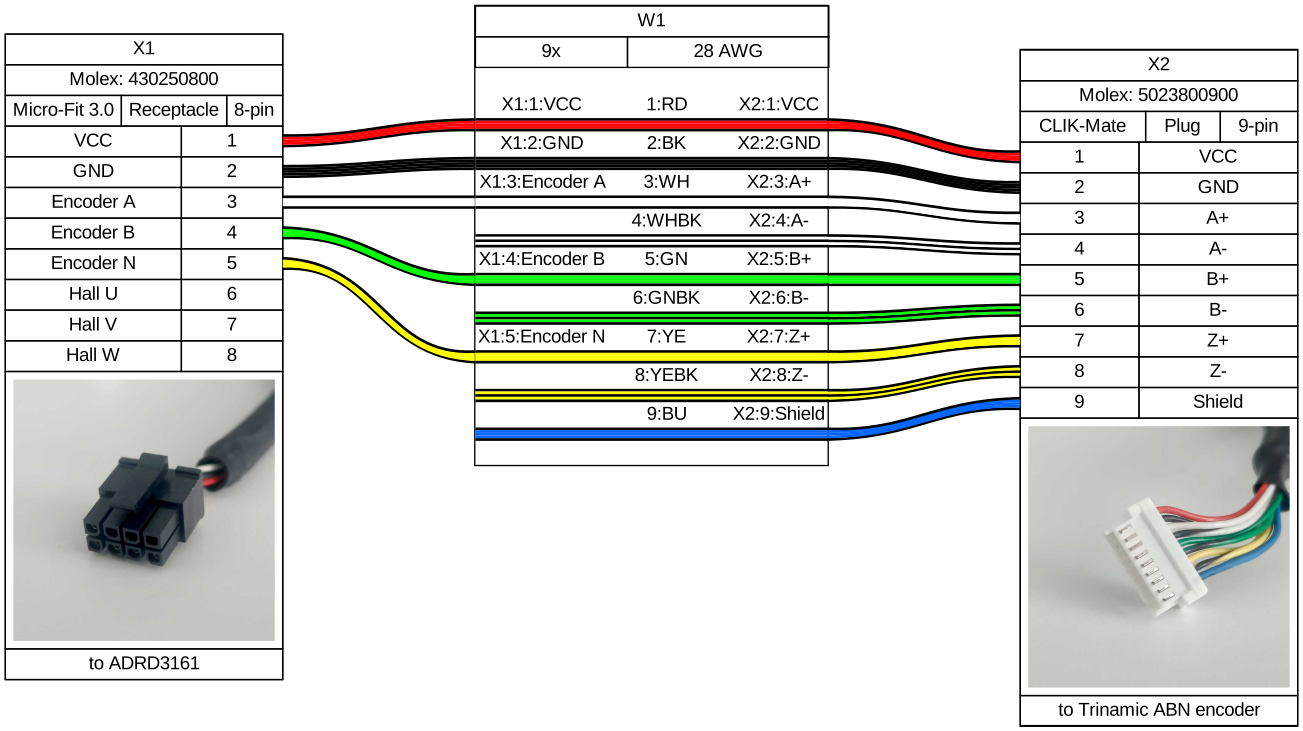
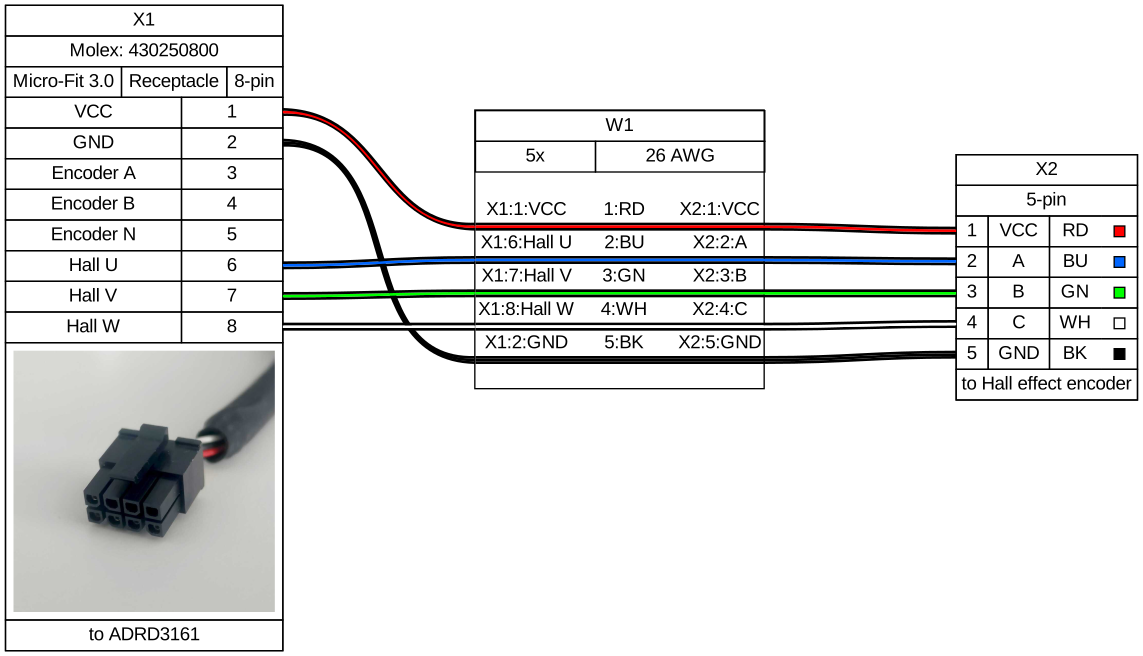
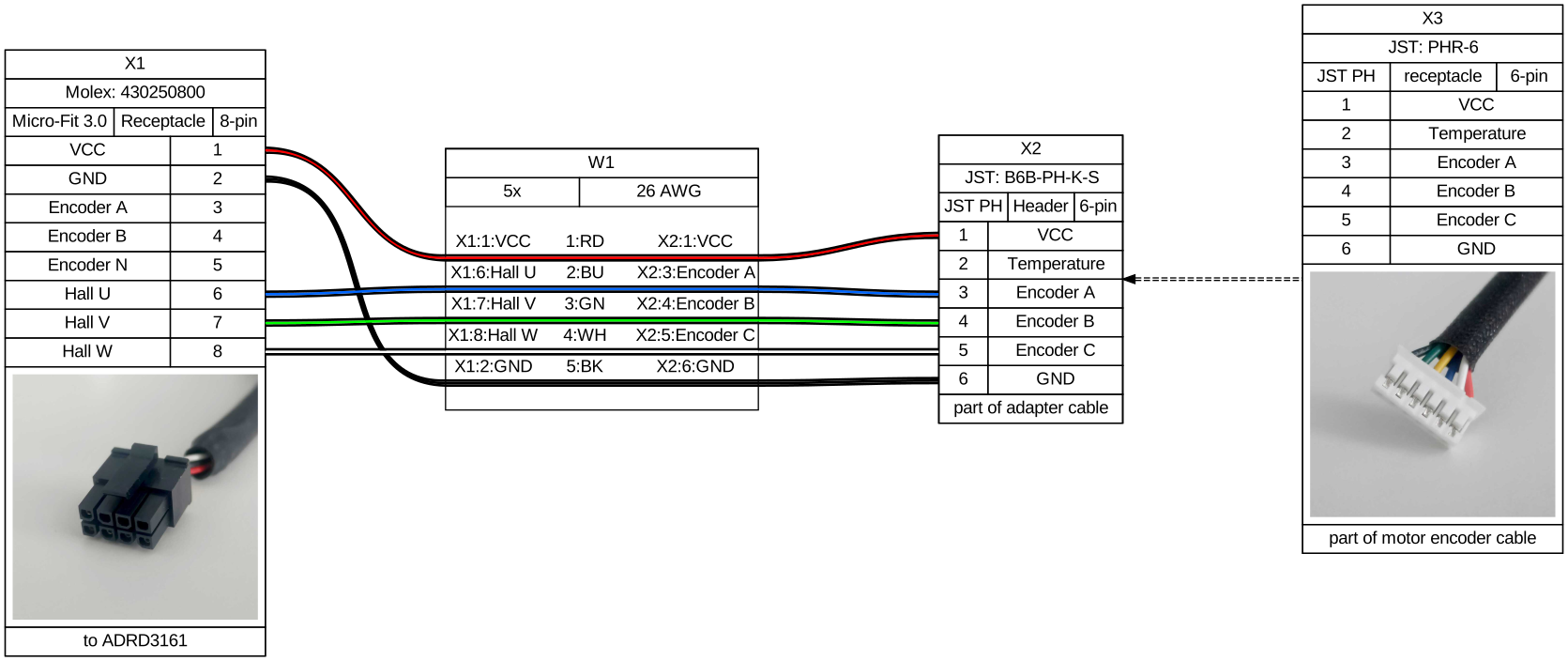
Depending on the used motor and its wiring, you may need to customize the encoder cable. Some examples:
Encoder cable for ADI Trinamic ABN encoders, such as the ADI Trinamic TMCS series, and the builtin encoders on ADI Trinamic QSH series stepper motors.
Encoder cable for a generic BLDC with Digital Hall sensor configuration, with no special encoder connector, such as the ADI Trinamic QBL series.
Encoder cable for using a Digital Hall sensor with a VESC-like encoder connector (6-pin JST PH), such as the REV-21-1650.
Encoder cable for using both an ADI Trinamic ABN encoder and a Digital Hall sensor.
CAN cable
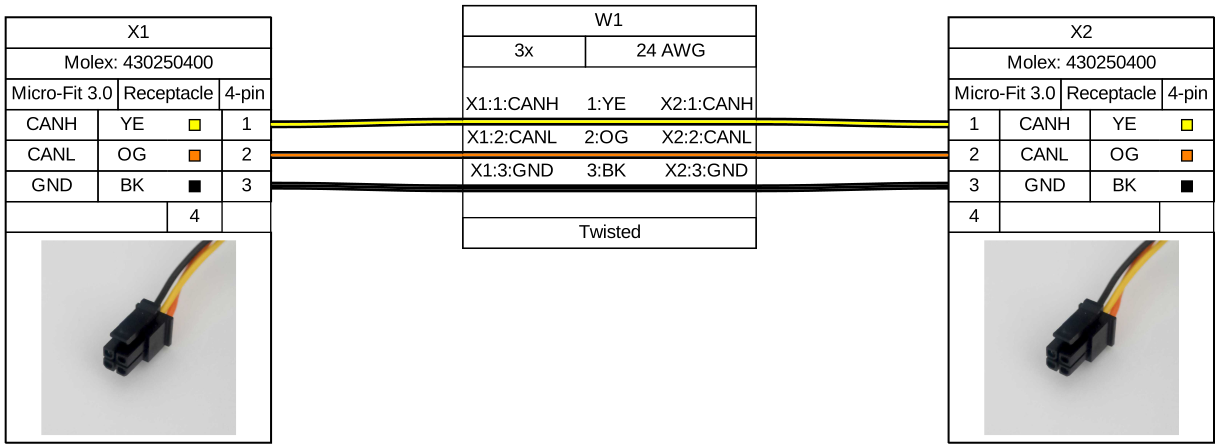
The ADRDx161 board family communicates via CAN bus. The two headers P8, P9 allow for daisy-chaining CAN devices.
Design support files
A design support package consisting of the board schematic, layout, assembly and fabrication files, and more, can be downloaded from the ADRD3161-01Z page. If you intend to build your own board from scratch, follow the ADRD3161-01Z Production Guide for the necessary first-time programming steps.