AD9783 Evaluation Board, DAC-FMC Interposer & Xilinx Reference Design
The AD9783 includes pin-compatible, high dynamic range, dual digital-to-analog converters (DACs) with 16-bit resolution, and sample rate of up to 500 MSPS. The device includes specific features for direct conversion transmit applications, including gain and offset compensation, interfacing seamlessly with analog quadrature modulators.
Supported Devices
Supported Carriers
Functional Description
Block Diagram
The reference design consists of a DDS module and a LVDS interface.
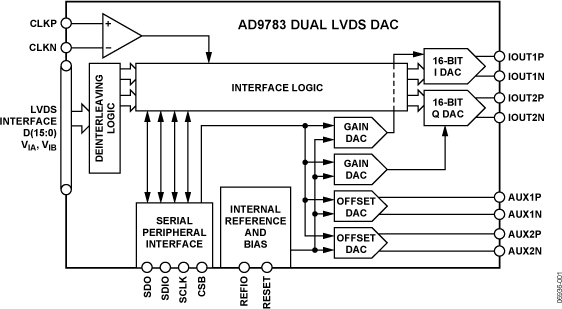
Description
Creating the constraints
When creating the constraints file for this project, the AD9783-EBZ, AD-DAC-FMC-ADP and ZCU102 schematics were used, because we have to make a correspondence between the signals from one side and the other. First, we look in the AD9783-EBZ schematic and we spot the signals we have to use in the HDL design, like D[15:0] LVDS pairs, DCI_P and _N, DCO_P and _N, and the SPI signals (SDIO, SDO, SCLK and CSB). Then, we check which pins are their correspondents in the AD-DAC-FMC-ADP schematic.
Example:
AD9783-EBZ schematic: D15P is connected to J17 plug header, at A3 AD-DAC-FMC-ADP schematic: J17 plug header pin A3 is called TXI_DATA_P15 and is connected to CLK1_M2C_P pin from P1 FMC header ZCU102 schematic: pin CLK1_M2C_P is pin T8 in FMC HP0 Thus we have this constraint:
set_property -dict {PACKAGE_PIN T8 IOSTANDARD LVDS} [get_ports data_p[15]] ; ## G2 FMC_HPC0_CLK1_M2C_P
Quick Start Guide
Required Hardware
ZCU102 board
AD9783-EBZ board & power supply
Signal/clock generator (2.5GHz)
Spectrum analyzer
5Vdc 1A power supply (banana cables) for the evaluation board
1x USB Mini-B to connect to the evaluation board
1x USB Micro-B to connect to UART
2x SMA cables
Required Software
An UART terminal, with baud rate 115200
Setup
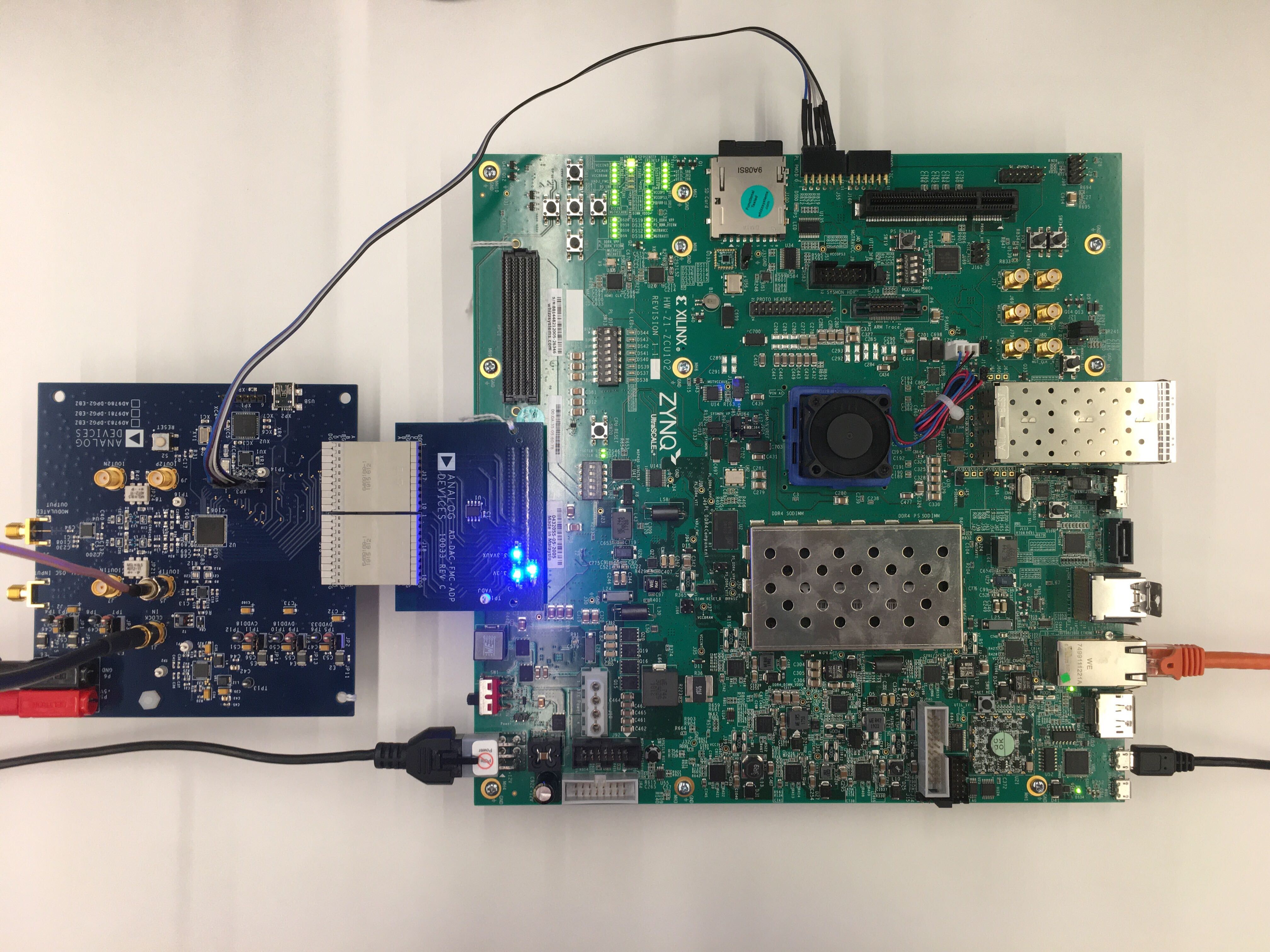
Hardware adjustments:
Desolder XJP1, 3, 4, 5 from the AD9783-DPG-EBZ in order to use the SPI communication through the cable from step 3 and directly into the ZCU102’s PMOD0
Check that the desoldering was done properly and there is no current from one side to the other
Attach the AD9783-DPG2-EBZ to the ZCU102 FMC 0 connector using the AD-DAC-FMC-ADP adapter board
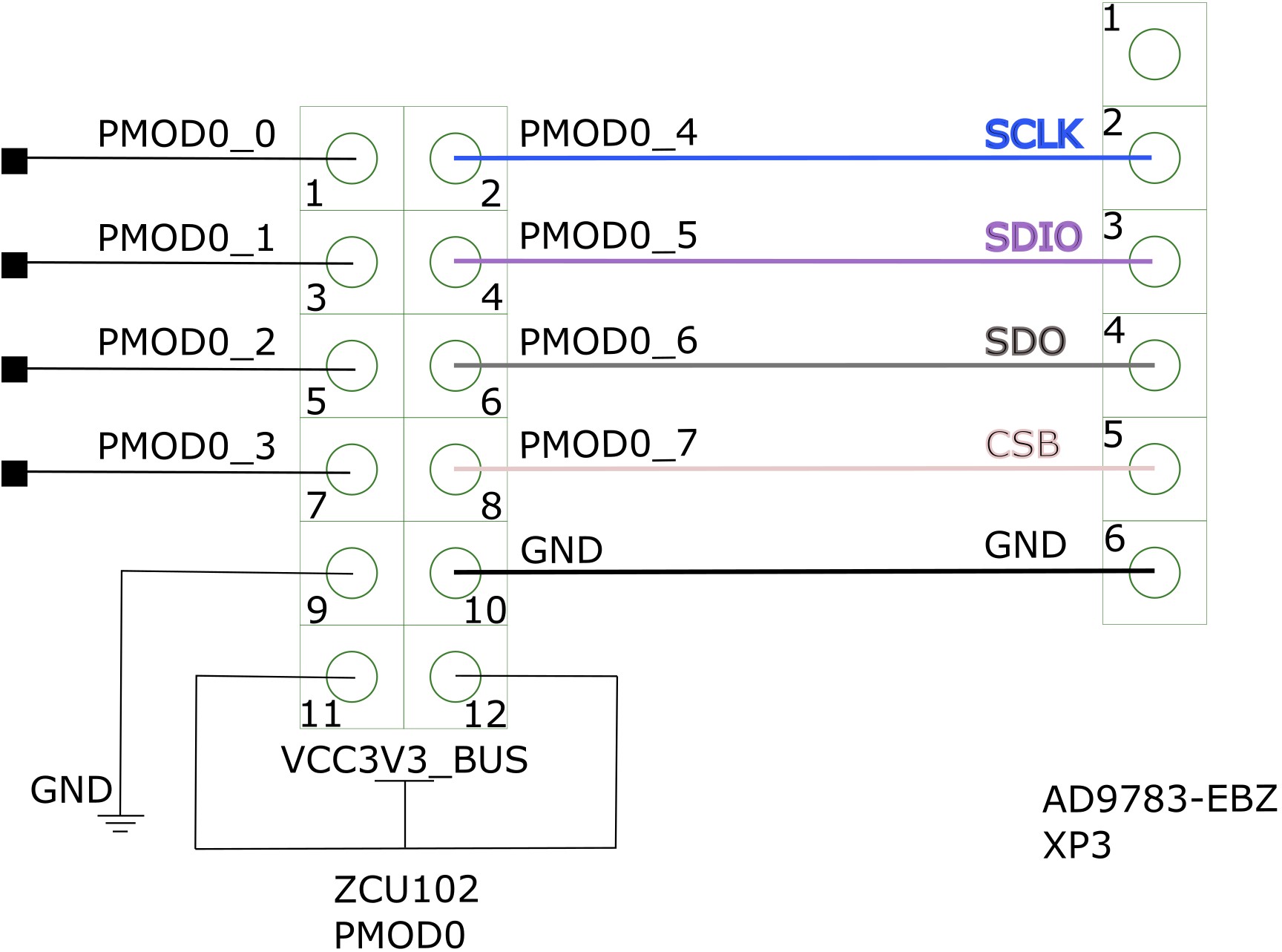
Connect a 5 wire cable from the AD9783-EBZ’s XP3 to the ZCU102’s PMOD0 (see the pinout in Figure 3):
Prepare the SD card:
Prepare the latest Linux image following the ADI Kuiper Linux guide, then continue from here
From the zynqmp-common folder of the boot partition, copy the Image file into the root folder of the partition
From the zynqmp-zcu102-rev10-ad9783 folder of the boot partition, copy the system.dtb and BOOT.BIN files into the root folder of the partition
Insert the SD card into the ZCU102 SD card slot
Connect the clock source for the clock input at J1 on the evaluation board via an SMA cable, and the DAC output at J5 (IOUT1P) or J9 (IOUT2P) via an SMA cable to a spectrum analyzer
Connect the UART port on the ZCU102 via USB Micro-B to the PC
Set the clock input to 500 MHz, +3 dBm
Connect the evaluation board to a 5 Vdc 1 A power supply on P5 and P6
Power on the evaluation board, clock generator and ZCU102
Write the EEPROM found on the AD-DAC-FMC-ADP to set the Vadj to 1.8 V, using the FMC EEPROM Programming tutorial. The file you will write on the EEPROM can be found in the fru_tools repository: download the AD9783-DPG2-EBZ.bin file from the masterfiles folder onto your SD card.
Troubleshooting
Check if the voltage supply test points of the evaluation board have the correct value
Check if all (3) blue LEDs on the AD-DAC-FMC-ADP board are lit up. Reconnect the board to the FMC connector of the carrier if not lit up
Check if the carrier is being supplied properly
Check on the spectrum analyzer if the DAC clock inputs are properly driven. If not detected, check properly the clock source and connections.