Customizing the ADALM-PLUTO
Changing the Network
The RFC 1918
reserves the 192.168.*.* range for private networks. Analog Devices uses
192.168.2.* for PlutoSDR devices, which may conflict with existing networks
using the same subnet.
The default network settings are:
[NETWORK]
hostname = pluto
ipaddr = 192.168.2.1
ipaddr_host = 192.168.2.10
netmask = 255.255.255.0
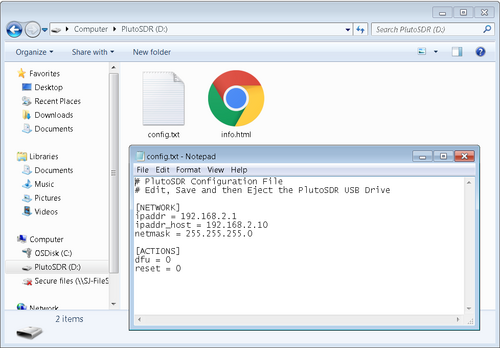
You can modify these values to avoid conflicts. Both addresses must remain unique and on the same subnet.
Multiple Devices
For multiple PlutoSDR units on a single host:
USB mode: Works without modifications
Network mode: Requires unique IP address assignments for each device
Each device must have a distinct subnet to prevent address collisions.
Zeroconf/mDNS
The Avahi daemon running on the PlutoSDR enables zero-configuration networking.
The hostname can be customized in config.txt and allows connection via
hostname.local format.
Linux
Install Avahi support:
analog@analog:~$ sudo apt-get install avahi-daemon avahi-utils
Discovery commands:
analog@analog:~$ avahi-resolve --name pluto.local
analog@analog:~$ avahi-browse -d local _ssh._tcp --resolve -t
analog@analog:~$ avahi-browse -d local _sftp-ssh._tcp --resolve -t
Windows
Windows implements LLMNR (Link-Local Multicast Name Resolution) by default, which Avahi doesn’t support. You may need applications like Skype, iTunes, or Adobe Photoshop that bundle compatible protocols.
Config File Actions
The [ACTIONS] section in config.txt allows you to trigger specific
operations:
[ACTIONS]
diagnostic_report = 0
dfu = 0
reset = 0
Available actions:
Action |
Function |
|---|---|
|
Generates status file for troubleshooting |
|
Enters Device Firmware Upgrade mode |
|
Reboots the device |
Process: Edit config.txt → Save → Eject USB drive (not unplug) →
Device processes changes after 2-3 seconds.
Upgrading the RF Transceiver
The ADALM-PLUTO can be configured to emulate different AD936x variants:
Chip |
Tuning Range |
Bandwidth |
Channels |
|---|---|---|---|
AD9363 (default) |
325-3800 MHz |
20 MHz |
2 Rx, 2 Tx |
AD9364 |
70-6000 MHz |
56 MHz |
1 Rx, 1 Tx |
AD9361 |
70-6000 MHz |
56 MHz |
2 Rx, 2 Tx |
Warning
This only changes the software configuration. The hardware is still an AD9363, but it will operate with the extended capabilities of the selected variant.
Configuration via U-Boot
Access the device via serial connection or SSH (user: root, password:
analog) and use U-Boot fw_printenv and fw_setenv commands.
For AD9364 mode (70-6000 MHz, 1R1T):
root@pluto:~# fw_setenv attr_name compatible
root@pluto:~# fw_setenv attr_val ad9364
root@pluto:~# fw_setenv compatible ad9364
root@pluto:~# reboot
For AD9361 mode with 2R2T:
root@pluto:~# fw_setenv attr_name compatible
root@pluto:~# fw_setenv attr_val ad9361
root@pluto:~# fw_setenv compatible ad9361
root@pluto:~# fw_setenv mode 2r2t
root@pluto:~# reboot
Changing the Root Password (v0.32+)
Initial Setup
First-time users must format the mtd2 partition:
root@pluto:~# device_format_jffs2
This requires confirmation and erases the JFFS2 partition in 64KB increments.
Setting a New Password
root@pluto:~# device_passwd
The system prompts for a new password with validation (minimum length requirements apply).
Password Reset
If you forget the password, add revert_passwd = 1 under [ACTIONS] in
config.txt to restore default credentials (root/analog).
Persistent SSH Keys (v0.32+)
Prerequisites
Format the mtd2 partition first using device_format_jffs2.
Setup
root@pluto:~# device_persistent_keys
This generates 256-bit ECDSA keys stored on the mtd2 partition. The system validates the MD5 sum at boot and uses persistent keys instead of generating temporary ones.
The output includes:
Key fingerprint (SHA1)
Public key portion (ECDSA format)
USB Ethernet Compatibility Modes
Supported Protocols
Mode |
Windows |
Linux |
macOS |
iPadOS |
Android |
|---|---|---|---|---|---|
RNDIS (default) |
✔ |
✔ |
✘ |
✘ |
✘ |
CDC-NCM |
✘ (Win 11 ✔) |
✔ |
✔ |
✔ |
✔ |
CDC-ECM |
✘ |
✔ |
✘ |
✘ |
✔ |
Note
The default RNDIS mode does not work on macOS. The platform you are testing on needs to support high-power USB 2.0 devices (500mA) – iPad supports this, iPhone does not.
Configuration Methods
Method 1 - Config File:
[SYSTEM]
usb_ethernet_mode = ncm
Method 2 - U-Boot Environment:
root@pluto:~# fw_setenv usb_ethernet_mode ncm
root@pluto:~# reboot
Mode Values:
rndisor blank = RNDIS (default)ncm= CDC-NCMecm= CDC-ECM