VCU118 Quick start
This guide provides quick instructions on how to setup the ADQUADMXFE1EBZ on:
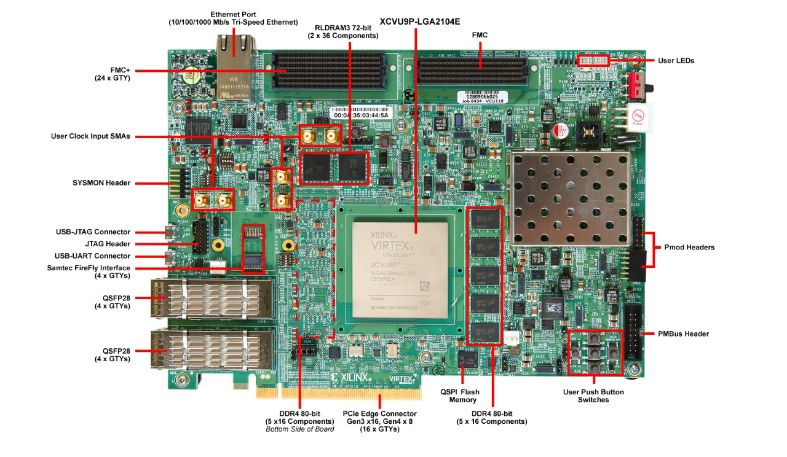
VCU118 FMC+
Using Linux as software
Necessary files
Note
This carrier only has programming logic (PL) and, thus, a MicroBlaze soft core is necessary to run Linux. As such, the files required for running Linux need to be manually built.
The following files are needed for the system to boot:
HDL bitstream file:
system_top.bitLinux Kernel image:
simpleImage.strip
Instructions on how to manually build the boot files from source can be found here:
AD-QUADMXFE1-EBZ HDL project build documentation. More HDL build details at Build an HDL project
Important
Multiple JESD204 configurations are available for this platform. Make sure you select the devicetree and bitstream that match your specific use case and hardware revision. See the README in the ad_quadmxfe1_ebz VCU118 HDL project for the full list of supported configurations.
Required software
Xilinx Vivado/Vitis (includes XSCT)
A UART terminal (Putty/Tera Term/Minicom, etc.) with baud rate 115200 (8N1)
Required hardware
VCU118 FPGA board and its power supply
ADQUADMXFE1EBZ Quad-MxFE evaluation board and its 12V power supply
FMC+ extender
500 MHz reference oscillator (~0 dBm)
2x Micro-USB cables (UART + JTAG)
Ethernet cable
SMA cables (as needed for loopback testing)
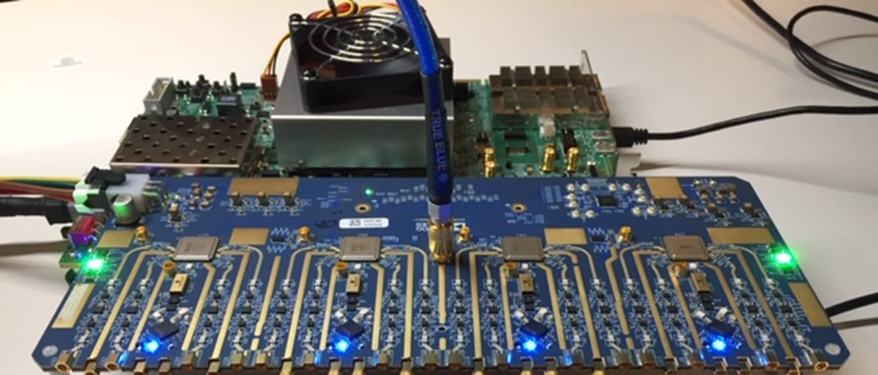
Fan/heat sinks installed on the Quad-MxFE board
More details can be found at Prerequisites.
Testing
Creating the setup
All the products described on this page include ESD (electrostatic discharge) sensitive devices. Electrostatic charges as high as 4000V readily accumulate on the human body or test equipment and can discharge without detection. Although the boards feature ESD protection circuitry, permanent damage may occur on devices subjected to high-energy electrostatic discharges. Therefore, proper ESD precautions are recommended to avoid performance degradation or loss of functionality. This includes removing static charge on external equipment, cables, or antennas before connecting to the device.
Follow the steps in this order, to avoid damaging the components:
Install fan/heat sinks on the Quad-MxFE board if not already done (see Fan Installation)
Connect the ADQUADMXFE1EBZ to the VCU118 via the FMC+ extender
Connect the 500 MHz reference oscillator to J41 on the Quad-MxFE board
Plug-in an Ethernet cable from your router/switch (or USB-to-Ethernet dongle) to the VCU118 Ethernet port
Connect USB UART (Micro-USB) to your host PC
Connect USB JTAG (Micro-USB) to your host PC
Open a serial terminal (PuTTY, etc.) configured for 115200-8N1 on the second USB COM port (the first one is the system controller)
Power on the 500 MHz oscillator
Power on the Quad-MxFE board (12V supply)
Power on the VCU118 board
Program the board using
xsdborxsct. See generic instructions for programming MicroBlaze-based systems at Build MicroBlaze Linux kernel.Observe console output messages on your terminal
Boot messages
After running the con command in
XSDB, the Linux kernel begins booting and
its messages appear on the serial console. When connecting the VCU118 USB UART
to PC, it typically registers two USB COMx/ttyUSBx ports. The first one is
connected to the system controller, while the second one is connected to the
FPGA and features the serial terminal. Make sure a UART terminal is open at
115200-8N1 on the second port before issuing con.
Ramdisk addr 0x00000000,
wt_msr_noirq
pcpu-alloc: s0 r0 d32768 u32768 alloc=1\*32768
pcpu-alloc: [0] 0
Built 1 zonelists, mobility grouping on.  Total pages: 195072
Kernel command line: console=ttyUL0,115200
Dentry cache hash table entries: 131072 (order: 7, 524288 bytes)
Inode-cache hash table entries: 65536 (order: 6, 262144 bytes)
Memory: 764272K/786432K available (4526K kernel code, 489K rwdata, 4264K rodata, 4906K init, 93K bss, 22160K reserved, 0K cma-reserved)
Kernel virtual memory layout:
  * 0xffffe000..0xfffff000  : fixmap
  * 0xffffe000..0xffffe000  : early ioremap
  * 0xb0000000..0xffffe000  : vmalloc & ioremap
NR_IRQS: 64, nr_irqs: 64, preallocated irqs: 0
irq-xilinx: /amba_pl/interrupt-controller@41200000: num_irq=16, edge=0x4f0
/amba_pl/timer@41c00000: irq=1
clocksource: xilinx_clocksource: mask: 0xffffffff max_cycles: 0xffffffff, max_idle_ns: 19112604467 ns
xilinx_timer_shutdown
xilinx_timer_set_periodic
sched_clock: 32 bits at 100MHz, resolution 10ns, wraps every 21474836475ns
Calibrating delay loop... 49.35 BogoMIPS (lpj=246784)
pid_max: default: 32768 minimum: 301
Mount-cache hash table entries: 2048 (order: 1, 8192 bytes)
Mountpoint-cache hash table entries: 2048 (order: 1, 8192 bytes)
devtmpfs: initialized
random: get_random_u32 called from bucket_table_alloc.isra.7+0x1e8/0x218 with crng_init=0
clocksource: jiffies: mask: 0xffffffff max_cycles: 0xffffffff, max_idle_ns: 19112604462750000 ns
futex hash table entries: 256 (order: -1, 3072 bytes)
NET: Registered protocol family 16
GPIO line 482 (ADRF5020_CTRL) hogged as output/high
GPIO line 428 (GPIO_0 HDL mux mode) hogged as output/high
jesd204: found 10 devices and 1 topologies
clocksource: Switched to clocksource xilinx_clocksource
NET: Registered protocol family 2
tcp_listen_portaddr_hash hash table entries: 512 (order: 0, 4096 bytes)
TCP established hash table entries: 8192 (order: 3, 32768 bytes)
TCP bind hash table entries: 8192 (order: 3, 32768 bytes)
TCP: Hash tables configured (established 8192 bind 8192)
UDP hash table entries: 512 (order: 1, 8192 bytes)
UDP-Lite hash table entries: 512 (order: 1, 8192 bytes)
NET: Registered protocol family 1
RPC: Registered named UNIX socket transport module.
RPC: Registered udp transport module.
RPC: Registered tcp transport module.
RPC: Registered tcp NFSv4.1 backchannel transport module.
random: fast init done
Skipping unavailable RESET gpio -2 (reset)
workingset: timestamp_bits=30 max_order=18 bucket_order=0
jffs2: version 2.2. (NAND) (SUMMARY)  © 2001-2006 Red Hat, Inc.
Block layer SCSI generic (bsg) driver version 0.4 loaded (major 252)
io scheduler noop registered
io scheduler deadline registered
io scheduler cfq registered (default)
io scheduler mq-deadline registered
io scheduler kyber registered
Serial: 8250/16550 driver, 4 ports, IRQ sharing disabled
40600000.serial: ttyUL0 at MMIO 0x40600000 (irq = 5, base_baud = 0) is a uartlite
console [ttyUL0] enabled
brd: module loaded
Xilinx SystemACE device driver, major=254
xilinx_spi 44a70000.axi_quad_spi: no CS gpios available
xilinx_spi 44a80000.axi_quad_spi: no CS gpios available
xilinx_spi 44b80000.axi_quad_spi: no CS gpios available
libphy: Fixed MDIO Bus: probed
xilinx_axienet 40c00000.ethernet: TX_CSUM 2
xilinx_axienet 40c00000.ethernet: RX_CSUM 2
ad9081 spi0.0: AD9081 Rev. 3 Grade 10 (API 1.0.5) probed
ad9081 spi0.1: AD9081 Rev. 3 Grade 10 (API 1.0.5) probed
ad9081 spi0.2: AD9081 Rev. 3 Grade 10 (API 1.0.5) probed
ad9081 spi0.3: AD9081 Rev. 3 Grade 10 (API 1.0.5) probed
ad9081 spi0.0: JESD RX (JTX) Link1 in DATA, SYNC deasserted, PLL locked, PHASE established, MODE valid
ad9081 spi0.0: JESD TX (JRX) Link1 0xF lanes in DATA
ad9081 spi0.1: JESD RX (JTX) Link1 in DATA, SYNC asserted, PLL locked, PHASE established, MODE valid
ad9081 spi0.1: JESD TX (JRX) Link1 0xF lanes in DATA
ad9081 spi0.2: JESD RX (JTX) Link1 in DATA, SYNC deasserted, PLL locked, PHASE established, MODE valid
ad9081 spi0.2: JESD TX (JRX) Link1 0xF lanes in DATA
ad9081 spi0.3: JESD RX (JTX) Link1 in DATA, SYNC deasserted, PLL locked, PHASE established, MODE valid
ad9081 spi0.3: JESD TX (JRX) Link1 0xF lanes in DATA
Freeing unused kernel memory: 4904K
This architecture does not have kernel memory protection.
Run /init as init process
Starting syslogd: OK
Starting klogd: OK
Initializing random number generator... done.
Starting network: udhcpc: started, v1.29.3
udhcpc: sending discover
xilinx_axienet 40c00000.ethernet eth0: Link is Up - 1Gbps/Full - flow control rx/tx
udhcpc: sending select for 10.44.3.52
udhcpc: lease of 10.44.3.52 obtained, lease time 43200
Starting dropbear sshd: OK
Starting IIO Server Daemon

Welcome to Buildroot
buildroot login:
Login credentials:
Field |
Value |
|---|---|
Login |
root |
Password |
analog |
Useful commands for the serial terminal
The below commands are to be run in the serial terminal connected to the FPGA.
To find out the IP of the FPGA board, run the following command and take the IP specified at “eth0 inet”:
~$
ifconfig
When the system starts it tries to acquire an IP using the DHCP protocol. In
case it fails DHCP it will configure a static IP address of 192.168.2.1.
To see the IIO devices detected, run:
~$
iio_info | grep iio:device
Note
See Cmd Line for more IIO command-line utilities. All IIO commands can be used locally or remotely. When using the remote backend, install libiio for your platform from Latest Libiio release.
To connect via SSH from a remote PC:
~$
ssh root@<board-ip>
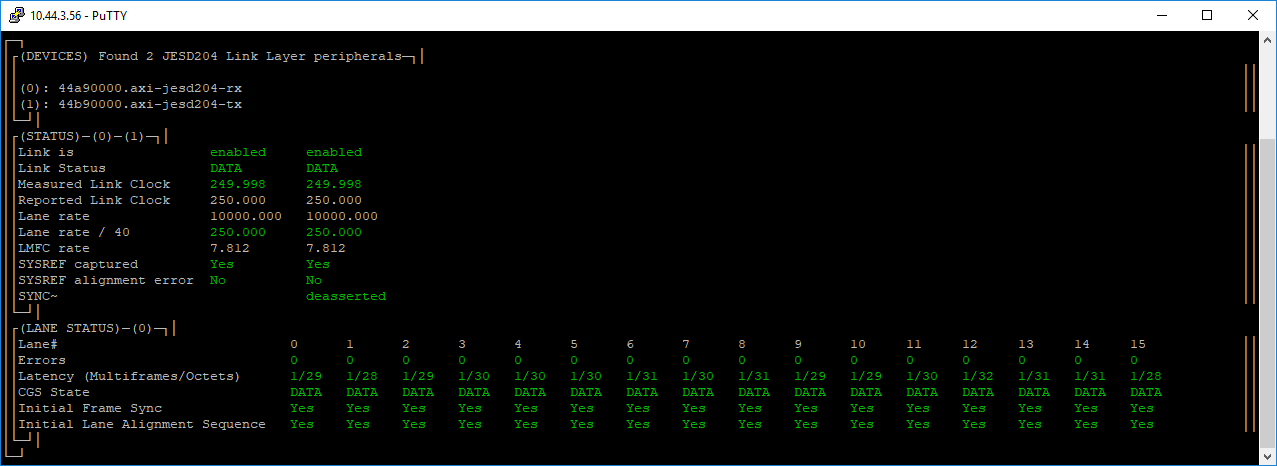
Check JESD204 link status
Important
Both Links must be in DATA
To check the link status from the serial terminal:
~$
jesd_status -s
To check the link status from SSH:
~$
ssh root@<board-ip>
~$
jesd_status
To power off the system, run:
~$
poweroff
To disconnect XSDB when done:
xsdb% disconnect
See also
IIO Oscilloscope guide for detailed instructions on using the IIO Oscilloscope GUI with the Quad-MxFE platform
Software architecture overview for IIO device mapping and driver documentation
MATLAB Control Overview for controlling the platform via MATLAB
Multi-Chip Synchronization for MCS theory and calibration