User guide
The complete documentation of the evaluation board can be found at:
IBIS models: available for download from the AD9783 product page
Hardware guide
Hardware configuration
The EVAL-AD9783 connects to the controller board (SDP-H1/ADS7-V2) or to the FPGA carrier through the AD-DAC-FMC adapter board.
The main connectors and controls of the evaluation board are:
Reference |
Description |
|---|---|
J1 |
Clock input (SMA) |
J5 (IOUT1P), J9 (IOUT2P) |
DAC outputs (SMA) |
J2 (LO IN) |
Local oscillator input of the ADL5375 modulator (SMA) |
J6 (RF OUT) |
ADL5375 modulator output (SMA) |
P5, P6 |
5 V power supply input |
S2 |
AD9783 chip reset |
XD1 |
USB status LED |
Using the ADL5375 modulator
By default, solder jumpers JP4, JP5, JP6, and JP7 are configured to route the DAC outputs to SMA J5 (IOUT1P) and to J9 (IOUT2P). This jumper setting is shown on the left of Figure 1. To connect the DAC output to the filter that feeds into the ADL5375, the solder jumpers should be reconfigured as shown on the right of Figure 1. Source the desired LO of the modulator (i.e. 900 or 1800 MHz, 3 dBm) on SMA J2 (LO IN). The ADL5375 modulator output can be observed on SMA J6 (RF OUT).
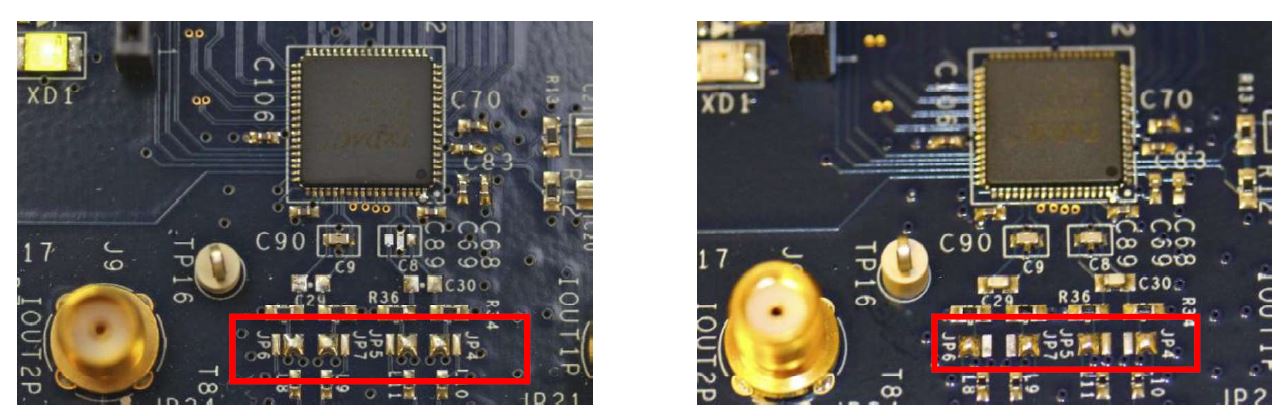
Figure 1 DAC output configuration (left) and modulator output configuration (right)
Using the ZCU102 carrier
To use the SPI communication through a cable directly into the ZCU102 PMOD0, the solder jumpers XJP1, XJP3, XJP4 and XJP5 must be desoldered from the evaluation board, and the SPI signals are connected from XP3 of the evaluation board to PMOD0 of the ZCU102. The steps and the pinout are described in AD9783 Evaluation Board, DAC-FMC Interposer & Xilinx Reference Design.
Power supply
The evaluation board is supplied with a 5 Vdc 1 A power supply connected to P5 and P6. The controller board (SDP-H1/ADS7-V2) is supplied separately with a 12 Vdc power supply.
The supply voltages of the evaluation board can be checked at:
P5 and P6: 5 V
TP3, TP5 and TP7: 3.3 V
TP9 and TP11: 1.8 V
When using the ZCU102, the Vadj of the AD-DAC-FMC adapter board must be set to 1.8 V by writing its EEPROM, see AD9783 Evaluation Board, DAC-FMC Interposer & Xilinx Reference Design.
Schematic, PCB layout, bill of materials
Design files (schematics, PCB layout, and BOM) are available for the AD9783-DPG2-EBZ RevB and the AD9783-DUAL-EBZ RevB.
Software guide
The evaluation board is controlled from the PC through ACE and the DPG Lite application, using an SDP-H1 or ADS7-V2 controller board. For a step-by-step walkthrough, see the EVALUATING THE AD9780/AD9781/AD9783 DIGITAL-TO-ANALOG CONVERTERS guide.
Troubleshooting
This section lists items to check and practices to use when debugging any unexpected performance of a board. If unexpected results occur:
Check the voltage rails of the evaluation board. P5 and P6 should be 5 V; TP3, TP5, and TP7 should be 3.3 V; TP9 and TP11 should be 1.8 V.
Check if all (3) blue LEDs on the AD-DAC-FMC-ADP board are lit up. Reconnect the board to the FMC connector of the controller board (SDP-H1/ADS7-V2) if not lit up.
Check if the controller board (SDP-H1/ADS7-V2) is being supplied properly by the 12 Vdc adapter. Some LEDs on the controller board should be lit up.
Perform a chip reset by pressing S2 on the AD9783 evaluation board.
Power cycle both the controller board (SDP-H1/ADS7-V2) and the AD9783 evaluation board.
Probe C18 and C19 to make sure a clock signal is being sent into the DAC.
Check if XD1 is lit up on the evaluation board. Reconnect/replace the USB cable connection to the evaluation board if it is not lit up.
Disconnect and reconnect the controller board (SDP-H1/ADS7-V2) and the AD9783 evaluation board. Reopen the ACE and DPG Lite software.