Unlocking a “Bricked” ADICUP3029
Problem Statement
Occasionally when you are debugging a new program or loading a pre-built .HEX or .BIN file using the ADICUP3029, the board can get stuck and becomes unusable(commonly known as “bricked”). This can happen because the code is in an endless loop, hard fault occurs, or other mistakes that make it so the board becomes unresponsive.
The good thing is there is a way to recover your hardware from this condition!
How to Recover the ADICUP3029
Download and install CrossCore Serial Programmer
Plug in the micro USB cable into P10 of the EVAL-ADICUP3029 board
Plug the other end of the USB cable into the computers USB port
Open up the CrossCore Serial Programmer tool
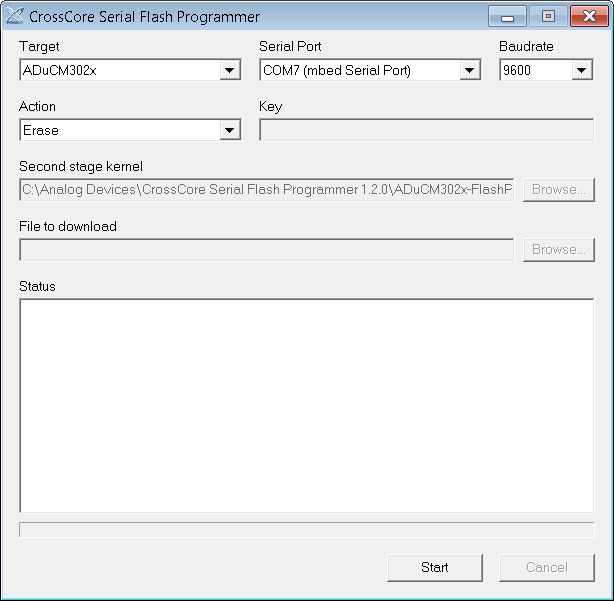
Change the parameters of the utility to the following settings:(see image below)
“Target” = ADuCM302x
“Serial Port” = COM X (mbed Serial Port)
“Baudrate” = 9600
“Action” = Erase
On the EVAL-ADICUP3029 board, hold down the “3029_BOOT” button
On the EVAL-ADICUP3029 board press and release the “3029_RESET” button, but continue holding the “3029_BOOT” button
Go back to the CrossCore Serial Programmer application and hit the “Start” button
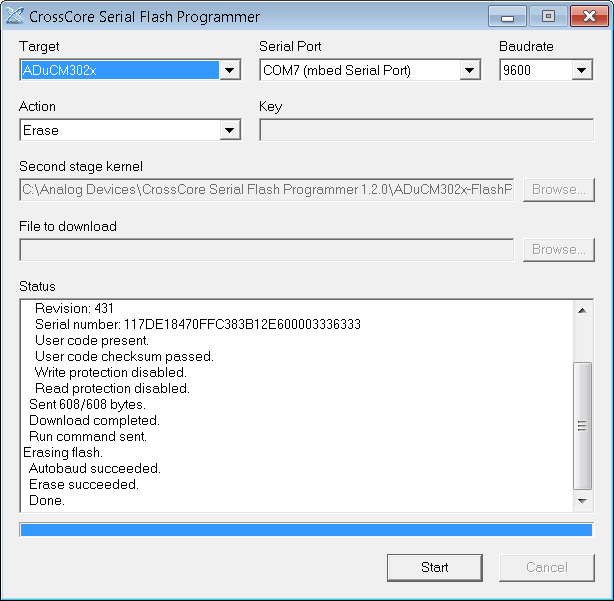
Allow the program to finish erasing the memory, and once its complete your EVAL-ADICUP3029 will be ready for use once again.
End of Document