Array Factor and Beamwidth Lab
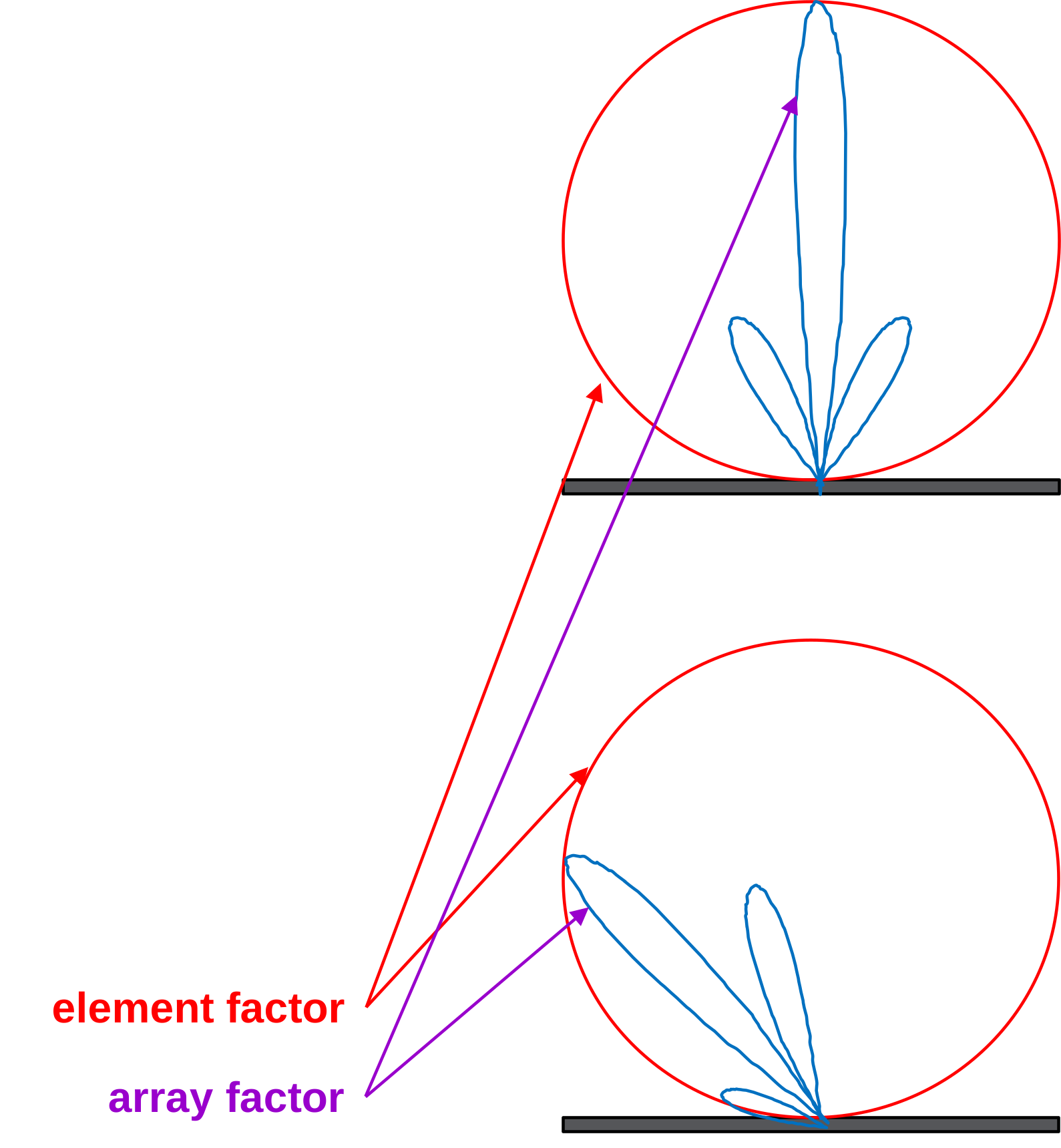
In a phased array antenna, the total antenna gain is actually a function of two parts: the Element Factor and the Array Factor. (see this article).
The element factor is the radiating pattern from a single element of the array. This is defined by the construction of the element, and it’s not something we can change electrically – so we’ll just leave it as a constant in our analysis.
The Array Factor is the portion of the antenna gain that we can influence by beamforming. The array factor for a linear array is derived in many places, and we won’t repeat that derivation here. For a great explanation, please see the derivation by Dr. Arik Brown, Appendix A, “Active Electronically Scanned Arrays: Fundamentals and Applications”. But basically, we are going to sum together each signal, with a phase shift. Then we do some trigonometric math and simplify with an assumption of steering near mechanical boresight. The end result, and assuming a steering angle near mechanical boresight, is this sin(N) over N * sin type-of-equation.
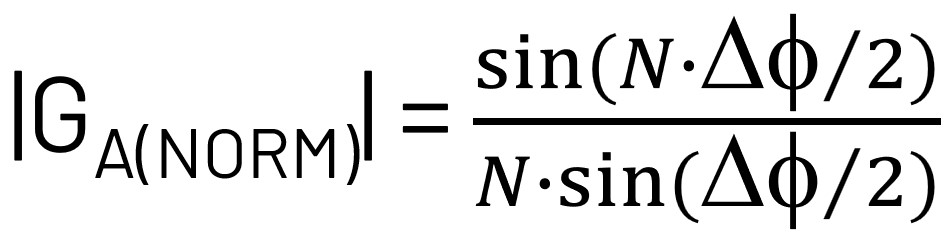
Note that for all of these labs, the analysis and equations will be for a linear array. Specifically, an 8x1, equally spaced, linear array. But a linear array is the building block from which many other array types can spring out of. So it is very useful and instructive to start with this.
It may not be intuitively obvious what this normalized array factor equation means, so let’s plot out a few cases for various numbers of array elements (N):
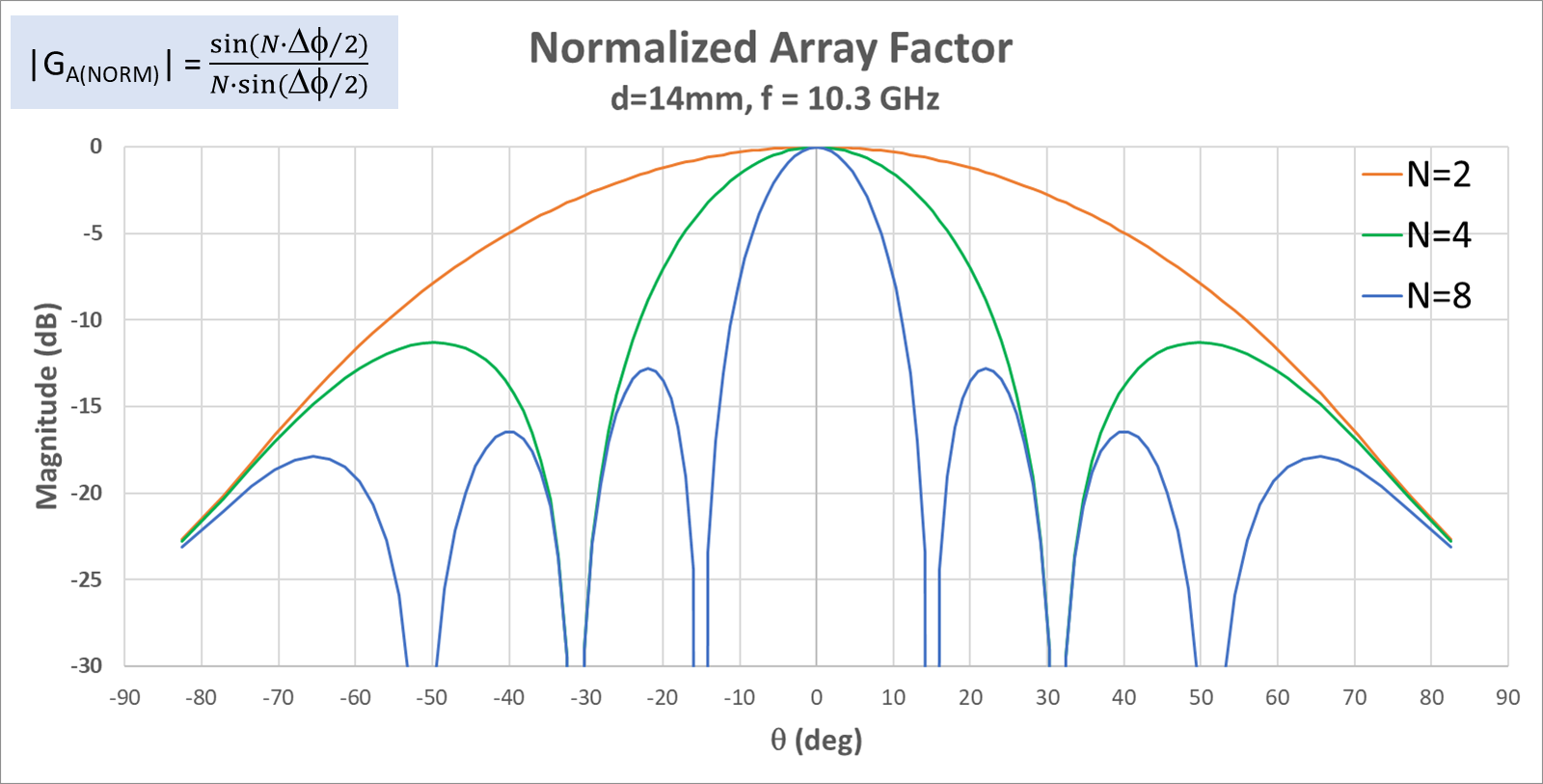
The first thing we can measure in our Phaser lab is the width of that main lobe. The array factor equation predicts that we can reduce the main lobe beamwidth by increasing the number of elements (which for a linear uniformly distributed array increasing the number of elements means that our aperture diameter is increasing).
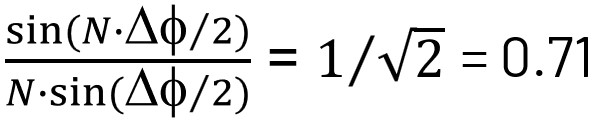
So how do you measure the width of the main lobe? Most commonly we talk about the half power beamwidth. So at what point does our main lobe lose half of its power? Half power is -3 dB on the decibel scale. So the main lobe beamwidth, measured 3 dB down from its peak. 3dB in log terms is the same as 1/sqrt(2) in linear teams. So solving the array factor equation for one over the square root of two gives a half power beamwidth of 13 deg for an 8-element array.
N |
HPBW |
|---|---|
8 |
13 deg |
4 |
27 deg |
2 |
62 deg |
And in the table, you can see how it increases with decreasing numbers of elements. Again, this is for a uniformly distributed linear array.
Another thing that we can use the array factor equation to look at is the null to null spacing of the main lobe This is just another way to measure beamwidth. The nulls are very pronounced, so measuring the first null beamwidth is sometimes easier to do than trying to measure the half power beamwidth. And of course a null is zero, so we just solve the array factor equation for a phase shift that gives us a zero.
N |
FNBW |
|---|---|
8 |
30 deg |
4 |
62 deg |
2 |
180 deg |
So an 8 element array, at 10.3GHz, has a 30 deg null to null spacing of the main lobe.
And these are all measurements we can make on our Phaser hardware setup. So let’s try that now and see how close our calculations come to the actual measured values!
Measuring Beamwidth with the Phaser GUI
In this lab, we will directly observe the array factor equation. And then observe how the beamwidth changes with steering angle.
First Observe the Beam Pattern
In the Phaser GUI, select “Lab 2: Array Factor”
Slowly move the HB100 in a half-circle around the array and observe the changes
Does the main lobe’s beamwidth remain constant as you move the RF source?
In the Phaser GUI, select “Polar Plot”
This is the same data, just displayed on a polar grid
Slowly move the HB100 in a half-circle around the array and observe the changes again
Measure the Beamwidth for N = 8
Now let’s make measurements on the array pattern and compare to the theoretical values.
In the Phaser GUI, select “Lab 2: Array Factor”
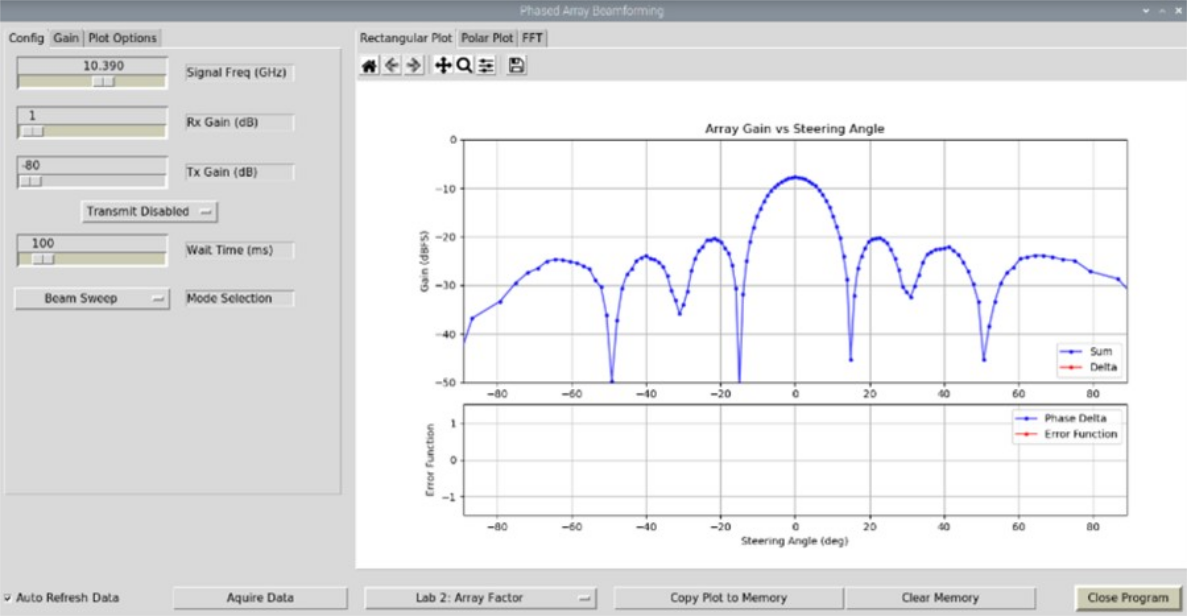
Move the HB100 to the mechanical boresight location (i.e. directly facing the array)
Record the following:
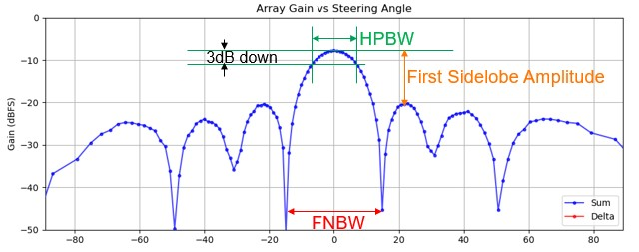
* Peak Amplitude: signal strength of the main lobe (measured in dBFS for our lab)
* Halfpower Beam Width (HPBW): Main lobe beamwidth, measured 3dB down from peak
* First Null Beam Width (FNBW): Spacing between main lobe nulls
* First Sidelobe Amplitude: Difference in amplitude (measured in dBc) from the main lobe to the first sidelobe on either side of the main lobe.
N |
Peak Amplitude |
HPBW (meas) |
HPBW (calc) |
FNBW (meas) |
FNBW (calc) |
First Sidelobe (dBc) |
|---|---|---|---|---|---|---|
8 |
13 deg |
30 deg |
How do the HPBW and FNBW values compare with the calculated values?
Measure the Beamwidth for N = 4 and N = 2
In the Phaser GUI, select the “Gain” tab
Click the Rx1_Gain button to disable that channel.
Do the same for Rx2, Rx7, and Rx8. We now have a 4 element array!
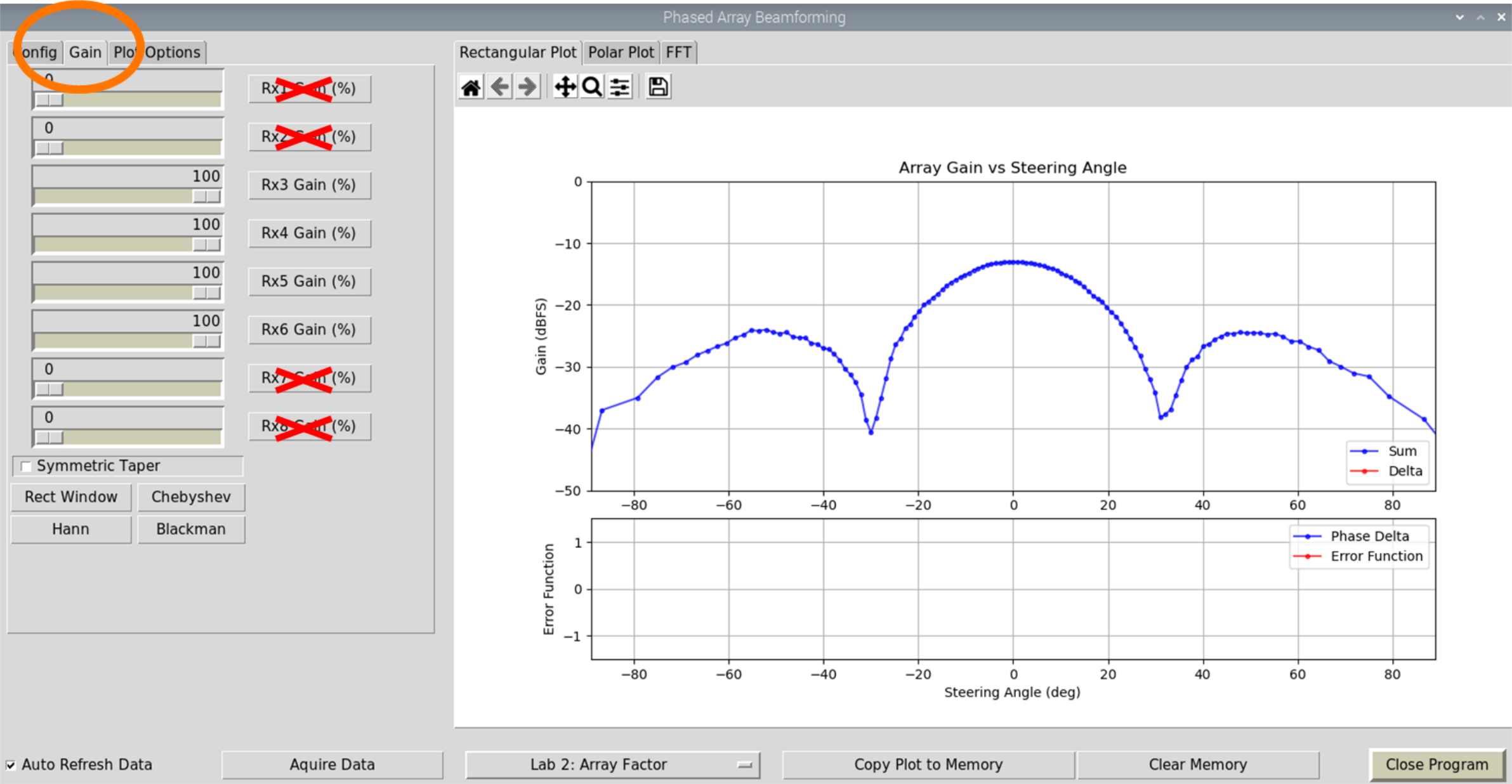
Repeat the beamwidth measurements and compare to the calculated values and to the N=8 values.
N |
Peak Amplitude |
HPBW (meas) |
HPBW (calc) |
FNBW (meas) |
FNBW (calc) |
First Sidelobe (dBc) |
|---|---|---|---|---|---|---|
8 |
13 deg |
30 deg |
||||
4 |
27 deg |
62 deg |
||||
2 |
62 deg |
180 deg |
You can find a video walkthrough of this lab here:
Note
For questions or help with the Phaser, please visit: EngineerZone