Arria10 SoC Quick Start Guide
This guide provides quick instructions on how to setup the EVAL-ADRV9371 on:
All the products described on this page include ESD (electrostatic discharge) sensitive devices. Electrostatic charges as high as 4000V readily accumulate on the human body or test equipment and can discharge without detection. Although the boards feature ESD protection circuitry, permanent damage may occur on devices subjected to high-energy electrostatic discharges. Therefore, proper ESD precautions are recommended to avoid performance degradation or loss of functionality. This includes removing static charge on external equipment, cables, or antennas before connecting to the device.
Using Linux as software
Necessary files
Note
The SD card includes several folders in the root directory of the BOOT partition. In order to configure the SD card to work with a specific FPGA board and ADI hardware, several files must be copied onto the root directory. Using the host PC, drag and drop the required files onto the BOOT partition, and use the EJECT function when removing the SD card from the reader.
The following files are needed for the system to boot:
HDL boot image:
fit_spl_fpga.itbLinux Kernel image:
zImageLinux device tree:
socfpga_arria10_socdk_sdmmc.dtbU-Boot image:
u-boot.imgBoot configuration file:
extlinux.confSecondary program loader:
u-boot-splx4.sfp
They can either be taken from the SD card – already generated by us, or you can build them manually:
Instructions on how to choose the boot files from the SD card can be found in the Platform-Specific Manual Steps section from here: Hardware Configuration.
Instructions on how to manually build the boot files from source can be found here:
ADRV9371x HDL reference design build documentation. More HDL build details at Build an HDL project.
Important
Some projects provide multiple devicetree files in the SD card’s boot folders. Make sure you select the devicetree that matches your specific use case.
Required Software
SD Card 16GB imaged with Kuiper
A UART terminal (Putty/Tera Term/Minicom, etc.) with baud rate 115200 (8N1)
Required Hardware
Arria10 SoC (Rev. C or later) FPGA board and its power supply
EVAL-ADRV9371 FMC evaluation board
SD card with at least 16GB of memory
(Optional) 2x SMA cable for analog signal loopback
(Optional) External clock generator
Mini-USB cable (UART)
(Optional) Ethernet cable
More details as to why you need these, can be found at Prerequisites.
Testing
Creating the setup
Important
To be compatible with the EVAL-ADRV9371 the Arria10 SoC Development Kit requires a minor rework.
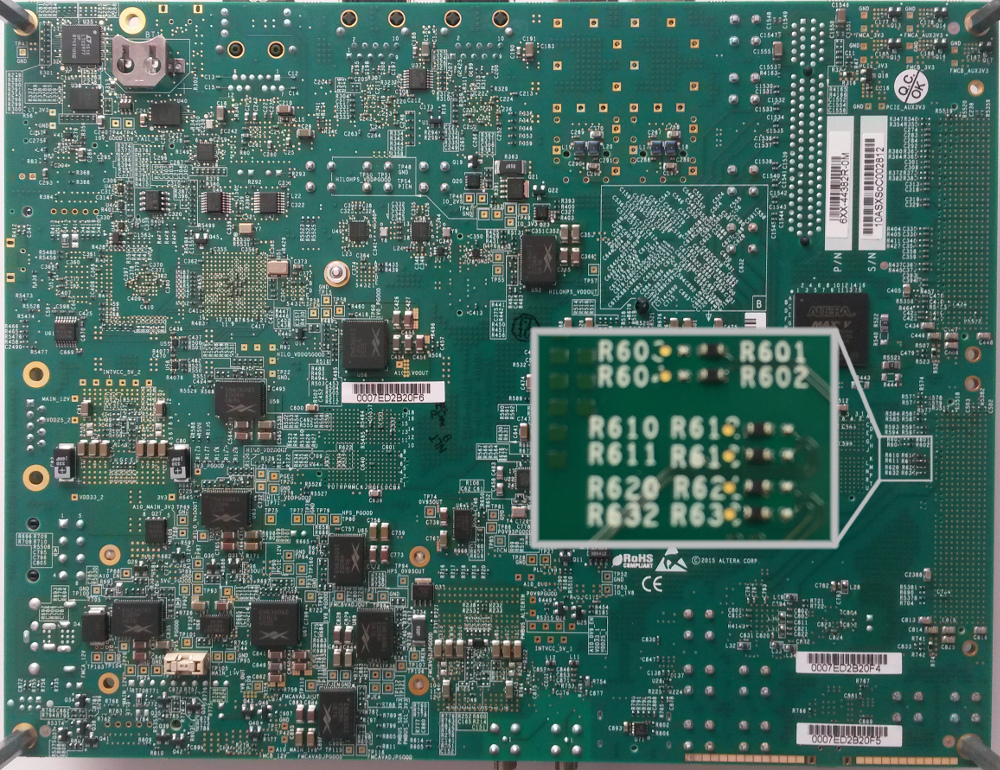
In the default configuration of the Arria10 SoC Development Kit some of the FMC header pins are connected to a dedicated clock chip. To be compatible with the EVAL-ADRV9371 these pins need to be connected directly to the FPGA.
The connection of those pins can be changed by moving the position of four zero Ohm resistors:
R612 to R610
R613 to R611
R621 to R620
R633 to R632
These resistors can be found on the backside of the Arria10 SoC Development Kit underneath the FMC A connector (J29). The following picture shows the required configuration to be compatible with the EVAL-ADRV9371.
Caution
This project was tested with VADJ = 1.8 V
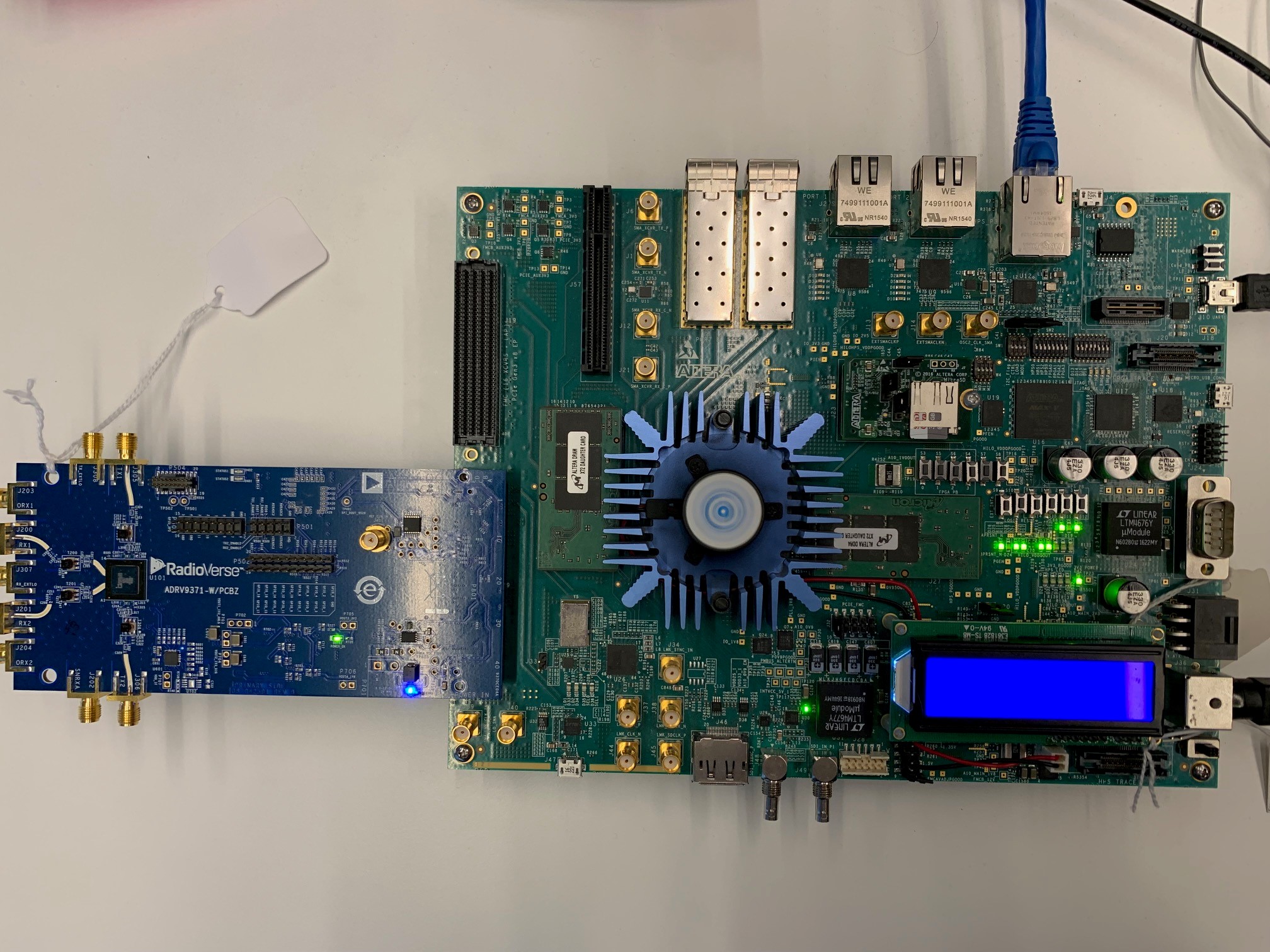
Follow the steps in this order, to avoid damaging the components:
Important
Both the HPS (J26) and FPGA (J27) memory module must be installed on the Arria10 SoC Development Kit
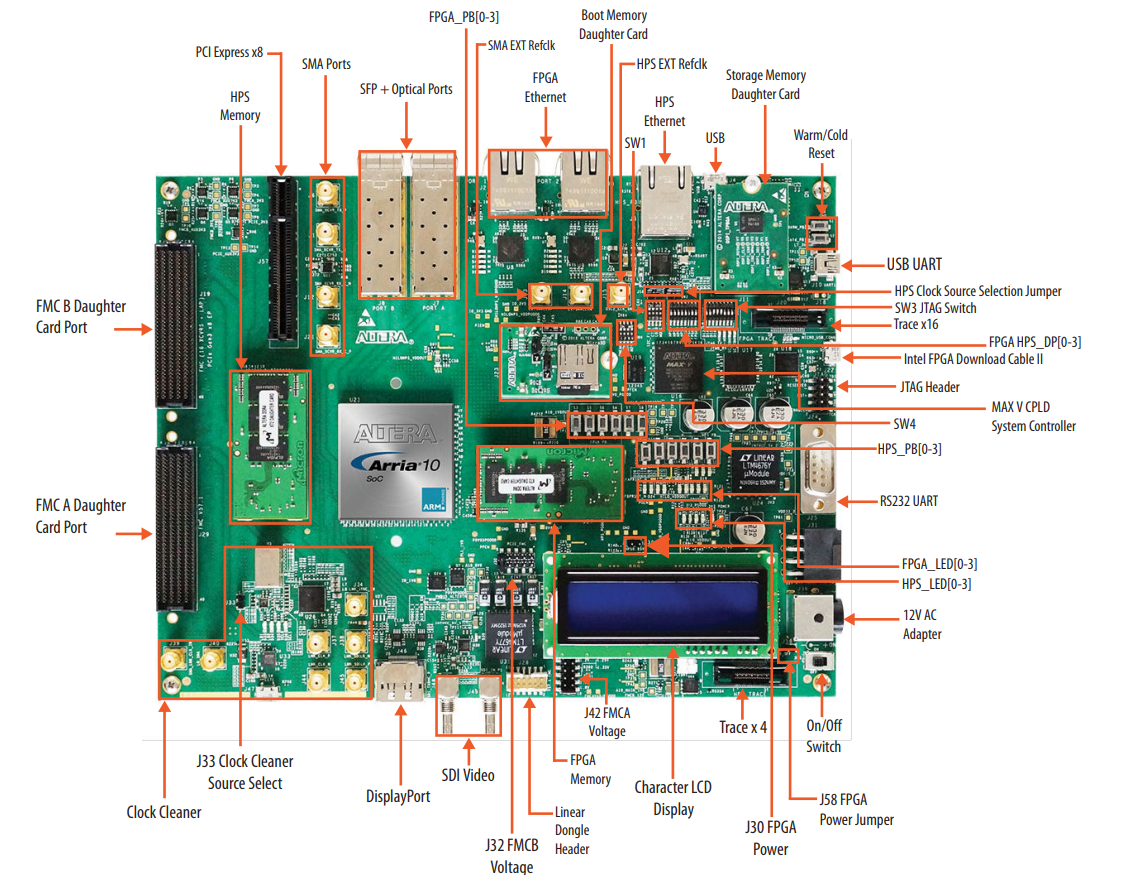
Connect the EVAL-ADRV9371 FMC board to the Arria10 SoC FMCA (J29) header
Insert SD card into the SD card socket on the FPGA
Configure the Arria10 SoC Development Kit for SD card boot mode (all jumpers and switches should be in the default position)
Connect USB UART1 J10 (Mini-USB) to your host PC
(Optional) Connect the external clock generator and/or loopback cables
(Optional) Plug-in an Ethernet cable from your router/switch to the Ethernet port on the FPGA board (J5)
Plug in the power supply and turn on the power switch on the FPGA board
Observe Kernel and serial console output messages on your terminal (use the first ttyUSB or COM port registered)
Booting the System
After turning on the power switch the following messages should appear on the serial console:
U-Boot SPL 2021.07-16360-gee63370553-dirty (Oct 24 2024 - 18:55:06 +0100)

U-Boot SPL 2021.07-16360-gee63370553-dirty (Oct 24 2024 - 18:55:06 +0100)
DDRCAL: Success
WDT:   Started with servicing (10s timeout)
Trying to boot from MMC1
Configuring the FPGA will take a few seconds. Once the FPGA has been configured the green D18 LED will turn on and the boot process will continue:
U-Boot 2021.07-16360-gee63370553-dirty (Oct 24 2024 - 18:55:06 +0100)socfpga_arria10, Build: jenkins-hdl_2023_r2-builds-hdl_2023_r2_latest_commit-projects-adrv9371x.a10soc-1

CPU:   Altera SoCFPGA Arria 10
BOOT:  SD/MMC Internal Transceiver (3.0V)
Model: Altera SOCFPGA Arria 10
DRAM:  1 GiB
WDT:   Started with servicing (10s timeout)
MMC:   dwmmc0@ff808000: 0
Loading Environment from MMC... *** Warning - bad CRC, using default environment

In:    serial
Out:   serial
Err:   serial
Model: Altera SOCFPGA Arria 10
Net:
Warning: ethernet@ff800000 (eth0) using random MAC address - 06:cb:39:66:c1:6f
eth0: ethernet@ff800000
Hit any key to stop autoboot:  0
Failed to load 'u-boot.scr'
14989972 bytes read in 734 ms (19.5 MiB/s)
fpga - loadable FPGA image support

Usage:
fpga [operation type] [device number] [image address] [image size]
fpga operations:
dump  [dev] [address] [size]  Load device to memory buffer
info  [dev]                   list known device information
load  [dev] [address] [size]  Load device from memory buffer
loadb [dev] [address] [size]  Load device from bitstream buffer (Xilinx only)
loadmk [dev] [address]        Load device generated with mkimage
      For loadmk operating on FIT format uImage address must include
      subimage unit name in the form of addr:<subimg_uname>
switch to partitions #0, OK
mmc0 is current device
Scanning mmc 0:1...
Found /extlinux/extlinux.conf
Retrieving file: /extlinux/extlinux.conf
162 bytes read in 7 ms (22.5 KiB/s)
1:      Linux Default
Retrieving file: /extlinux/../zImage
9543072 bytes read in 472 ms (19.3 MiB/s)
append: root=/dev/mmcblk0p2 rw rootwait earlyprintk console=ttyS0,115200n8
Retrieving file: /extlinux/../socfpga_arria10_socdk_sdmmc.dtb
37469 bytes read in 11 ms (3.2 MiB/s)
Kernel image @ 0x1000000 [ 0x000000 - 0x919da0 ]
## Flattened Device Tree blob at 02000000
   Booting using the fdt blob at 0x2000000
   Loading Device Tree to 09ff3000, end 09fff25c ... OK

Starting kernel ...

Deasserting all peripheral resets
[    0.000000] Booting Linux on physical CPU 0x0
[    0.000000] Linux version 6.1.70-284114-g2e8908932dfd (jenkins@romlxbuild1) (arm-linux-gnueabi-gcc (Ubuntu 11.3.0-1ubuntu1~22.04.1) 11.3.0, GNU ld (GNU Binutils for Ubuntu) 2.38) #1063 SMP Tue Mar 18 17:12:50 EET 2025
[    0.000000] CPU: ARMv7 Processor [414fc091] revision 1 (ARMv7), cr=10c5387d
[    0.000000] CPU: PIPT / VIPT nonaliasing data cache, VIPT aliasing instruction cache
[    0.000000] OF: fdt: Machine model: Altera SOCFPGA Arria 10
[    0.000000] printk: bootconsole [earlycon0] enabled
[    0.000000] Memory policy: Data cache writealloc
[    0.000000] cma: Reserved 128 MiB at 0x38000000
[    0.000000] Zone ranges:
[    0.000000]   Normal   [mem 0x0000000000000000-0x000000002fffffff]
[    0.000000]   HighMem  [mem 0x0000000030000000-0x000000003fffffff]
[    0.000000] Movable zone start for each node
[    0.000000] Early memory node ranges
[    0.000000]   node   0: [mem 0x0000000000000000-0x000000003fffffff]
[    0.000000] Initmem setup node 0 [mem 0x0000000000000000-0x000000003fffffff]
[    0.000000] percpu: Embedded 15 pages/cpu s30036 r8192 d23212 u61440
[    0.000000] Built 1 zonelists, mobility grouping on.  Total pages: 260608
[    0.000000] Kernel command line: root=/dev/mmcblk0p2 rw rootwait earlyprintk console=ttyS0,115200n8
[    0.000000] Dentry cache hash table entries: 131072 (order: 7, 524288 bytes, linear)
[    0.000000] Inode-cache hash table entries: 65536 (order: 6, 262144 bytes, linear)
[    0.000000] mem auto-init: stack:off, heap alloc:off, heap free:off
[    0.000000] Memory: 879756K/1048576K available (14336K kernel code, 1367K rwdata, 10896K rodata, 1024K init, 498K bss, 37748K reserved, 131072K cma-reserved, 131072K highmem)
[    0.000000] SLUB: HWalign=64, Order=0-3, MinObjects=0, CPUs=2, Nodes=1
[    0.000000] ftrace: allocating 46749 entries in 138 pages
[    0.000000] ftrace: allocated 137 pages with 3 groups
[    0.000000] trace event string verifier disabled
[    0.000000] rcu: Hierarchical RCU implementation.
[    0.000000] rcu:     RCU event tracing is enabled.
[    0.000000]  Rude variant of Tasks RCU enabled.
[    0.000000] rcu: RCU calculated value of scheduler-enlistment delay is 10 jiffies.
[    0.000000] NR_IRQS: 16, nr_irqs: 16, preallocated irqs: 16
[    0.000000] L2C-310 erratum 769419 enabled
[    0.000000] L2C-310 enabling early BRESP for Cortex-A9
[    0.000000] L2C-310: enabling full line of zeros but not enabled in Cortex-A9
[    0.000000] L2C-310 ID prefetch enabled, offset 1 lines
[    0.000000] L2C-310 dynamic clock gating enabled, standby mode enabled
[    0.000000] L2C-310 cache controller enabled, 8 ways, 512 kB
[    0.000000] L2C-310: CACHE_ID 0x410030c9, AUX_CTRL 0x76560001
[    0.000000] rcu: srcu_init: Setting srcu_struct sizes based on contention.
[    0.000000] clocksource: timer1: mask: 0xffffffff max_cycles: 0xffffffff, max_idle_ns: 19112604467 ns
[    0.000000] sched_clock: 32 bits at 100MHz, resolution 10ns, wraps every 21474836475ns
[    0.007886] Switching to timer-based delay loop, resolution 10ns
[    0.014236] Console: colour dummy device 80x30
[    0.018691] Calibrating delay loop (skipped), value calculated using timer frequency.. 200.00 BogoMIPS (lpj=1000000)
[    0.029176] CPU: Testing write buffer coherency: ok
[    0.034066] CPU0: Spectre v2: using BPIALL workaround
[    0.039096] pid_max: default: 32768 minimum: 301
[    0.043833] Mount-cache hash table entries: 2048 (order: 1, 8192 bytes, linear)
[    0.051121] Mountpoint-cache hash table entries: 2048 (order: 1, 8192 bytes, linear)
[    0.059570] CPU0: thread -1, cpu 0, socket 0, mpidr 80000000
[    0.065921] cblist_init_generic: Setting adjustable number of callback queues.
[    0.073136] cblist_init_generic: Setting shift to 1 and lim to 1.
[    0.079309] Setting up static identity map for 0x100000 - 0x100060
[    0.085620] rcu: Hierarchical SRCU implementation.
[    0.090392] rcu:     Max phase no-delay instances is 1000.
[    0.095941] smp: Bringing up secondary CPUs ...
[    0.101111] CPU1: thread -1, cpu 1, socket 0, mpidr 80000001
[    0.101127] CPU1: Spectre v2: using BPIALL workaround
[    0.111893] smp: Brought up 1 node, 2 CPUs
[    0.115977] SMP: Total of 2 processors activated (400.00 BogoMIPS).
[    0.122234] CPU: All CPU(s) started in SVC mode.
[    0.127426] devtmpfs: initialized
[    0.135325] VFP support v0.3: implementor 41 architecture 3 part 30 variant 9 rev 4
[    0.143161] clocksource: jiffies: mask: 0xffffffff max_cycles: 0xffffffff, max_idle_ns: 19112604462750000 ns
[    0.152977] futex hash table entries: 512 (order: 3, 32768 bytes, linear)
[    0.165368] NET: Registered PF_NETLINK/PF_ROUTE protocol family
[    0.173100] DMA: preallocated 256 KiB pool for atomic coherent allocations
[    0.180841] hw-breakpoint: found 5 (+1 reserved) breakpoint and 1 watchpoint registers.
[    0.188813] hw-breakpoint: maximum watchpoint size is 4 bytes.
[    0.223867] SCSI subsystem initialized
[    0.227762] usbcore: registered new interface driver usbfs
[    0.233293] usbcore: registered new interface driver hub
[    0.238616] usbcore: registered new device driver usb
[    0.243808] usb_phy_generic soc:usbphy: supply vcc not found, using dummy regulator
[    0.251547] usb_phy_generic soc:usbphy: dummy supplies not allowed for exclusive requests
[    0.260026] mc: Linux media interface: v0.10
[    0.264352] videodev: Linux video capture interface: v2.00
[    0.269873] pps_core: LinuxPPS API ver. 1 registered
[    0.274827] pps_core: Software ver. 5.3.6 - Copyright 2005-2007 Rodolfo Giometti <giometti@linux.it>
[    0.283933] PTP clock support registered
[    0.288154] jesd204: found 0 devices and 0 topologies
[    0.293234] FPGA manager framework
[    0.296676] Advanced Linux Sound Architecture Driver Initialized.
[    0.303637] vgaarb: loaded
[    0.307982] clocksource: Switched to clocksource timer1
[    0.319296] NET: Registered PF_INET protocol family
[    0.324364] IP idents hash table entries: 16384 (order: 5, 131072 bytes, linear)
[    0.333212] tcp_listen_portaddr_hash hash table entries: 512 (order: 0, 4096 bytes, linear)
[    0.341570] Table-perturb hash table entries: 65536 (order: 6, 262144 bytes, linear)
[    0.349300] TCP established hash table entries: 8192 (order: 3, 32768 bytes, linear)
[    0.357064] TCP bind hash table entries: 8192 (order: 5, 131072 bytes, linear)
[    0.364447] TCP: Hash tables configured (established 8192 bind 8192)
[    0.370906] UDP hash table entries: 512 (order: 2, 16384 bytes, linear)
[    0.377539] UDP-Lite hash table entries: 512 (order: 2, 16384 bytes, linear)
[    0.384766] NET: Registered PF_UNIX/PF_LOCAL protocol family
[    0.390995] RPC: Registered named UNIX socket transport module.
[    0.396895] RPC: Registered udp transport module.
[    0.401601] RPC: Registered tcp transport module.
[    0.406282] RPC: Registered tcp NFSv4.1 backchannel transport module.
[    0.412707] PCI: CLS 0 bytes, default 64
[    0.418071] hw perfevents: enabled with armv7_cortex_a9 PMU driver, 7 counters available
[    0.427228] workingset: timestamp_bits=30 max_order=18 bucket_order=0
[    0.438221] NFS: Registering the id_resolver key type
[    0.443318] Key type id_resolver registered
[    0.447483] Key type id_legacy registered
[    0.452134] ntfs: driver 2.1.32 [Flags: R/W].
[    0.456608] jffs2: version 2.2. (NAND) © 2001-2006 Red Hat, Inc.
[    0.463074] fuse: init (API version 7.37)
[    0.467496] bounce: pool size: 64 pages
[    0.471421] io scheduler mq-deadline registered
[    0.475934] io scheduler kyber registered
[    0.493688] Serial: 8250/16550 driver, 2 ports, IRQ sharing disabled
[    0.500979] printk: console [ttyS0] disabled
[    0.505285] ffc02100.serial1: ttyS0 at MMIO 0xffc02100 (irq = 33, base_baud = 6250000) is a 16550A
[    0.514284] printk: console [ttyS0] enabled
[    0.514284] printk: console [ttyS0] enabled
[    0.522640] printk: bootconsole [earlycon0] disabled
[    0.522640] printk: bootconsole [earlycon0] disabled
[    0.534123] brd: module loaded
[    0.537632] SPI driver spidev has no spi_device_id for adi,swspi
[    0.545212] spi_altera ff200040.spi: regoff 0, irq 34
[    0.552825] CAN device driver interface
[    0.556954] socfpga-dwmac ff800000.ethernet: IRQ eth_wake_irq not found
[    0.563582] socfpga-dwmac ff800000.ethernet: IRQ eth_lpi not found
[    0.569880] socfpga-dwmac ff800000.ethernet: No sysmgr-syscon node found
[    0.576565] socfpga-dwmac ff800000.ethernet: Unable to parse OF data
[    0.582918] socfpga-dwmac: probe of ff800000.ethernet failed with error -524
[    0.590575] stmmaceth ff800000.ethernet: IRQ eth_wake_irq not found
[    0.596835] stmmaceth ff800000.ethernet: IRQ eth_lpi not found
[    0.602950] stmmaceth ff800000.ethernet: User ID: 0x10, Synopsys ID: 0x37
[    0.609745] stmmaceth ff800000.ethernet:     DWMAC1000
[    0.614605] stmmaceth ff800000.ethernet: DMA HW capability register supported
[    0.621720] stmmaceth ff800000.ethernet: RX Checksum Offload Engine supported
[    0.628831] stmmaceth ff800000.ethernet: COE Type 2
[    0.633687] stmmaceth ff800000.ethernet: TX Checksum insertion supported
[    0.640365] stmmaceth ff800000.ethernet: Enhanced/Alternate descriptors
[    0.646948] stmmaceth ff800000.ethernet: Enabled extended descriptors
[    0.653366] stmmaceth ff800000.ethernet: Ring mode enabled
[    0.658837] stmmaceth ff800000.ethernet: Enable RX Mitigation via HW Watchdog Timer
[    0.666477] stmmaceth ff800000.ethernet: device MAC address 42:49:b4:bd:06:36
[    0.682074] Micrel KSZ9031 Gigabit PHY stmmac-0:07: attached PHY driver (mii_bus:phy_addr=stmmac-0:07, irq=POLL)
[    0.693260] usbcore: registered new interface driver asix
[    0.698704] usbcore: registered new interface driver ax88179_178a
[    0.704792] usbcore: registered new interface driver cdc_ether
[    0.710642] usbcore: registered new interface driver net1080
[    0.716296] usbcore: registered new interface driver cdc_subset
[    0.722231] usbcore: registered new interface driver zaurus
[    0.727832] usbcore: registered new interface driver cdc_ncm
[    0.733500] usbcore: registered new interface driver r8153_ecm
[    0.739888] dwc2 ffb00000.usb: supply vusb_d not found, using dummy regulator
[    0.747113] dwc2 ffb00000.usb: supply vusb_a not found, using dummy regulator
[    0.754528] dwc2 ffb00000.usb: EPs: 16, dedicated fifos, 8064 entries in SPRAM
[    0.768753] dwc2 ffb00000.usb: DWC OTG Controller
[    0.773463] dwc2 ffb00000.usb: new USB bus registered, assigned bus number 1
[    0.780533] dwc2 ffb00000.usb: irq 37, io mem 0xffb00000
[    0.785954] usb usb1: New USB device found, idVendor=1d6b, idProduct=0002, bcdDevice= 6.01
[    0.794205] usb usb1: New USB device strings: Mfr=3, Product=2, SerialNumber=1
[    0.801409] usb usb1: Product: DWC OTG Controller
[    0.806094] usb usb1: Manufacturer: Linux 6.1.70-284114-g2e8908932dfd dwc2_hsotg
[    0.813472] usb usb1: SerialNumber: ffb00000.usb
[    0.818741] hub 1-0:1.0: USB hub found
[    0.822577] hub 1-0:1.0: 1 port detected
[    0.828375] usbcore: registered new interface driver uas
[    0.833812] usbcore: registered new interface driver usb-storage
[    0.840038] usbcore: registered new interface driver usbserial_generic
[    0.846585] usbserial: USB Serial support registered for generic
[    0.852652] usbcore: registered new interface driver ftdi_sio
[    0.858402] usbserial: USB Serial support registered for FTDI USB Serial Device
[    0.865761] usbcore: registered new interface driver upd78f0730
[    0.871684] usbserial: USB Serial support registered for upd78f0730
[    0.879084] SPI driver ads7846 has no spi_device_id for ti,tsc2046
[    0.885245] SPI driver ads7846 has no spi_device_id for ti,ads7843
[    0.891425] SPI driver ads7846 has no spi_device_id for ti,ads7845
[    0.897579] SPI driver ads7846 has no spi_device_id for ti,ads7873
[    0.903885] i2c_dev: i2c /dev entries driver
[    0.908527] usbcore: registered new interface driver uvcvideo
[    0.916006] Synopsys Designware Multimedia Card Interface Driver
[    0.922299] dw_mmc ff808000.dwmmc0: IDMAC supports 32-bit address mode.
[    0.928975] ledtrig-cpu: registered to indicate activity on CPUs
[    0.935101] usbcore: registered new interface driver usbhid
[    0.940669] usbhid: USB HID core driver
[    0.944704] SPI driver fb_seps525 has no spi_device_id for syncoam,seps525
[    0.955330] ad9528 spi0.0: supply vcc not found, using dummy regulator
[    0.972325] dw_mmc ff808000.dwmmc0: Using internal DMA controller.
[    0.978504] dw_mmc ff808000.dwmmc0: Version ID is 270a
[    0.983671] dw_mmc ff808000.dwmmc0: DW MMC controller at irq 39,32 bit host data width,1024 deep fifo
[    0.993009] mmc_host mmc0: card is polling.
[    0.999775] SPI driver adis16475 has no spi_device_id for adi,adis16470
[    1.006368] SPI driver adis16475 has no spi_device_id for adi,adis16475-1
[    1.007984] mmc_host mmc0: Bus speed (slot 0) = 50000000Hz (slot req 400000Hz, actual 396825HZ div = 63)
[    1.013149] SPI driver adis16475 has no spi_device_id for adi,adis16475-2
[    1.029323] SPI driver adis16475 has no spi_device_id for adi,adis16475-3
[    1.036079] SPI driver adis16475 has no spi_device_id for adi,adis16477-1
[    1.042857] SPI driver adis16475 has no spi_device_id for adi,adis16477-2
[    1.049629] SPI driver adis16475 has no spi_device_id for adi,adis16477-3
[    1.056391] SPI driver adis16475 has no spi_device_id for adi,adis16465-1
[    1.063165] SPI driver adis16475 has no spi_device_id for adi,adis16465-2
[    1.069935] SPI driver adis16475 has no spi_device_id for adi,adis16465-3
[    1.076696] SPI driver adis16475 has no spi_device_id for adi,adis16467-1
[    1.083463] SPI driver adis16475 has no spi_device_id for adi,adis16467-2
[    1.090230] SPI driver adis16475 has no spi_device_id for adi,adis16467-3
[    1.096991] SPI driver adis16475 has no spi_device_id for adi,adis16500
[    1.103588] SPI driver adis16475 has no spi_device_id for adi,adis16501
[    1.110182] SPI driver adis16475 has no spi_device_id for adi,adis16505-1
[    1.116943] SPI driver adis16475 has no spi_device_id for adi,adis16505-2
[    1.123724] SPI driver adis16475 has no spi_device_id for adi,adis16505-3
[    1.130496] SPI driver adis16475 has no spi_device_id for adi,adis16507-1
[    1.137252] SPI driver adis16475 has no spi_device_id for adi,adis16507-2
[    1.144019] SPI driver adis16475 has no spi_device_id for adi,adis16507-3
[    1.150787] SPI driver adis16475 has no spi_device_id for adi,adis16575-2
[    1.157548] SPI driver adis16475 has no spi_device_id for adi,adis16575-3
[    1.164316] SPI driver adis16475 has no spi_device_id for adi,adis16576-2
[    1.171084] SPI driver adis16475 has no spi_device_id for adi,adis16576-3
[    1.177845] SPI driver adis16475 has no spi_device_id for adi,adis16577-2
[    1.184616] SPI driver adis16475 has no spi_device_id for adi,adis16577-3
[    1.192730] axi_sysid ff218000.axi-sysid-0: AXI System ID core version (1.01.a) found
[    1.200759] axi_sysid ff218000.axi-sysid-0: [adrv9371x] on [a10soc] git branch <hdl_2023_r2> git <324bcf1680db5269836c61f06598ff94d72969ef> clean [2024-10-24 17:24:32] UTC
[    1.216661] fpga_manager fpga0: SoCFPGA Arria10 FPGA Manager registered
[    1.223304] mmc_host mmc0: Bus speed (slot 0) = 50000000Hz (slot req 50000000Hz, actual 50000000HZ div = 0)
[    1.223972] usbcore: registered new interface driver snd-usb-audio
[    1.239242] mmc0: new high speed SDHC card at address 5048
[    1.241146] NET: Registered PF_INET6 protocol family
[    1.245311] mmcblk0: mmc0:5048 SD32G 28.9 GiB
[    1.256101] Segment Routing with IPv6
[    1.259867] In-situ OAM (IOAM) with IPv6
[    1.263848] sit: IPv6, IPv4 and MPLS over IPv4 tunneling driver
[    1.270292] NET: Registered PF_PACKET protocol family
[    1.275336] NET: Registered PF_KEY protocol family
[    1.280357]  mmcblk0: p1 p2 p3
[    1.280361] can: controller area network core
[    1.280417] NET: Registered PF_CAN protocol family
[    1.292547] can: raw protocol
[    1.295513] can: broadcast manager protocol
[    1.299700] can: netlink gateway - max_hops=1
[    1.304108] 8021q: 802.1Q VLAN Support v1.8
[    1.308322] NET: Registered PF_IEEE802154 protocol family
[    1.313749] Key type dns_resolver registered
[    1.318105] ThumbEE CPU extension supported.
[    1.322365] Registering SWP/SWPB emulation handler
[    1.334140] at24 0-0051: supply vcc not found, using dummy regulator
[    1.341750] at24 0-0051: 4096 byte 24c32 EEPROM, writable, 32 bytes/write
[    1.354705] rtc-ds1307 0-0068: registered as rtc0
[    1.360141] ltc2978: probe of 0-005c failed with error -121
[    1.370379] altera-a10-fpll ff225000.altera-a10-fpll: FPLL PLL calibration OK (1400 us)
[    1.380435] altera-a10-fpll ff235000.altera-a10-fpll: FPLL PLL calibration OK (1400 us)
[    1.390451] altera-a10-fpll ff245000.altera-a10-fpll: FPLL PLL calibration OK (1400 us)
[    1.400410] dma-pl330 ffda1000.pdma: Loaded driver for PL330 DMAC-341330
[    1.407094] dma-pl330 ffda1000.pdma:         DBUFF-512x8bytes Num_Chans-8 Num_Peri-32 Num_Events-8
[    1.415848] altr_a10sr_gpio altr_a10sr_gpio.0.auto: DMA mask not set
[    1.457236] altera_adxcvr ff224000.axi-ad9371-tx-xcvr: ATX PLL calibration OK (20 ms)
[    1.472359] altera_adxcvr ff224000.axi-ad9371-tx-xcvr: Lane 0 TX termination and VOD calibration OK (600 us)
[    1.500012] altera_adxcvr ff224000.axi-ad9371-tx-xcvr: Lane 1 TX termination and VOD calibration OK (600 us)
[    1.531214] altera_adxcvr ff224000.axi-ad9371-tx-xcvr: Lane 2 TX termination and VOD calibration OK (600 us)
[    1.551510] altera_adxcvr ff224000.axi-ad9371-tx-xcvr: Lane 3 TX termination and VOD calibration OK (600 us)
[    1.561386] altera_adxcvr ff224000.axi-ad9371-tx-xcvr: Altera ADXCVR (17.01.a) probed
[    1.574343] altera_adxcvr ff234000.axi-ad9371-rx-xcvr: Lane 0 CDR/CMU PLL & RX offset calibration OK (600 us)
[    1.587304] altera_adxcvr ff234000.axi-ad9371-rx-xcvr: Lane 1 CDR/CMU PLL & RX offset calibration OK (600 us)
[    1.597272] altera_adxcvr ff234000.axi-ad9371-rx-xcvr: Altera ADXCVR (17.01.a) probed
[    1.609844] altera_adxcvr ff244000.axi-ad9371-rx-os-xcvr: Lane 0 CDR/CMU PLL & RX offset calibration OK (600 us)
[    1.623154] altera_adxcvr ff244000.axi-ad9371-rx-os-xcvr: Lane 1 CDR/CMU PLL & RX offset calibration OK (600 us)
[    1.633368] altera_adxcvr ff244000.axi-ad9371-rx-os-xcvr: Altera ADXCVR (17.01.a) probed
[    1.642677] altera_adxcvr ff224000.axi-ad9371-tx-xcvr: Setting link rate to 122880000 (lane rate: 4915200)
[    1.653340] altera_adxcvr ff234000.axi-ad9371-rx-xcvr: Setting link rate to 122880000 (lane rate: 4915200)
[    1.663974] altera_adxcvr ff244000.axi-ad9371-rx-os-xcvr: Setting link rate to 122880000 (lane rate: 4915200)
[    1.674953] axi-jesd204-rx ff230000.axi-jesd204-rx: AXI-JESD204-RX (1.07.a) at 0xFF230000. Encoder 8b10b, width 4/4, lanes 2.
[    1.686978] axi-jesd204-rx ff240000.axi-jesd204-rx: AXI-JESD204-RX (1.07.a) at 0xFF240000. Encoder 8b10b, width 4/4, lanes 2.
[    1.698870] axi-jesd204-tx ff220000.axi-jesd204-tx: AXI-JESD204-TX (1.06.a) at 0xFF220000. Encoder 8b10b, width 4/4, lanes 4.
[    1.710665] ad9371 spi0.1: ad9371_probe : enter
[    2.518034] random: crng init done
[    9.168237] ad9371 spi0.1: framerStatus (0x20)
[    9.350863] ad9371 spi0.1: AD9371 Rev 4, Firmware 5.2.2 API version: 1.5.2.3566 successfully initialized
[    9.388759] cf_axi_dds ff254000.axi-ad9371-tx-hpc: Analog Devices CF_AXI_DDS_DDS MASTER (9.02.b) at 0xFF254000 mapped to 0xfeb81fd6, probed DDS AD9371
[    9.422987] cf_axi_adc ff250000.axi-ad9371-rx-hpc: ADI AIM (10.03.) at 0xFF250000 mapped to 0x073211ec probed ADC AD9371 as MASTER
[    9.435030] of_cfs_init
[    9.437492] of_cfs_init: OK
[    9.440564] ALSA device list:
[    9.443525]   No soundcards found.
[    9.447125] dw-apb-uart ffc02100.serial1: forbid DMA for kernel console
[    9.473054] EXT4-fs (mmcblk0p2): mounted filesystem with ordered data mode. Quota mode: disabled.
[    9.481993] VFS: Mounted root (ext4 filesystem) on device 179:2.
[    9.495744] devtmpfs: mounted
[    9.502774] Freeing unused kernel image (initmem) memory: 1024K
[    9.509211] Run /sbin/init as init process
[   10.035212] systemd[1]: System time before build time, advancing clock.
[   10.100333] systemd[1]: systemd 247.3-7+rpi1+deb11u6 running in system mode. (+PAM +AUDIT +SELINUX +IMA +APPARMOR +SMACK +SYSVINIT +UTMP +LIBCRYPTSETUP +GCRYPT +GNUTLS +ACL +XZ +LZ4 +ZSTD +SECCOMP +BLKID +ELFUTILS +KMOD +IDN2 -IDN +PCRE2 default-hierarchy=unified)
[   10.124104] systemd[1]: Detected architecture arm.

Welcome to Kuiper GNU/Linux 11.2 (bullseye)!

[   10.179345] systemd[1]: Set hostname to <analog>.
[   11.777747] systemd[1]: /lib/systemd/system/plymouth-start.service:16: Unit configured to use KillMode=none. This is unsafe, as it disables systemd's process lifecycle management for the service. Please update your service to use a safer KillMode=, such as 'mixed' or 'control-group'. Support for KillMode=none is deprecated and will eventually be removed.
[   12.005360] systemd[1]: Queued start job for default target Graphical Interface.
[   12.014622] systemd[1]: system-getty.slice: unit configures an IP firewall, but the local system does not support BPF/cgroup firewalling.
[   12.026969] systemd[1]: (This warning is only shown for the first unit using IP firewalling.)
[   12.036597] systemd[1]: Created slice system-getty.slice.
[  OK  ] Created slice system-getty.slice.
[   12.068933] systemd[1]: Created slice system-modprobe.slice.
[  OK  ] Created slice system-modprobe.slice.
[   12.108870] systemd[1]: Created slice system-serial\x2dgetty.slice.
[  OK  ] Created slice system-serial\x2dgetty.slice.
[   12.148803] systemd[1]: Created slice system-systemd\x2dfsck.slice.
[  OK  ] Created slice system-systemd\x2dfsck.slice.
[   12.178588] systemd[1]: Created slice User and Session Slice.
[  OK  ] Created slice User and Session Slice.
[   12.208503] systemd[1]: Started Forward Password Requests to Wall Directory Watch.
[  OK  ] Started Forward Password R…uests to Wall Directory Watch.
[   12.238365] systemd[1]: Condition check resulted in Arbitrary Executable File Formats File System Automount Point being skipped.
[   12.250843] systemd[1]: Reached target Slices.
[  OK  ] Reached target Slices.
[   12.288201] systemd[1]: Reached target Swap.
[  OK  ] Reached target Swap.
[   12.327541] systemd[1]: Listening on Syslog Socket.
[  OK  ] Listening on Syslog Socket.
[   12.368665] systemd[1]: Listening on fsck to fsckd communication Socket.
[  OK  ] Listening on fsck to fsckd communication Socket.
[   12.398419] systemd[1]: Listening on initctl Compatibility Named Pipe.
[  OK  ] Listening on initctl Compatibility Named Pipe.
[   12.450598] systemd[1]: Condition check resulted in Journal Audit Socket being skipped.
[   12.459419] systemd[1]: Listening on Journal Socket (/dev/log).
[  OK  ] Listening on Journal Socket (/dev/log).
[   12.488883] systemd[1]: Listening on Journal Socket.
[  OK  ] Listening on Journal Socket.
[   12.526317] systemd[1]: Listening on udev Control Socket.
[  OK  ] Listening on udev Control Socket.
[   12.568631] systemd[1]: Listening on udev Kernel Socket.
[  OK  ] Listening on udev Kernel Socket.
[   12.598769] systemd[1]: Condition check resulted in Huge Pages File System being skipped.
[   12.607330] systemd[1]: Condition check resulted in POSIX Message Queue File System being skipped.
[   12.658546] systemd[1]: Mounting RPC Pipe File System...
         Mounting RPC Pipe File System...
[   12.701328] systemd[1]: Mounting Kernel Debug File System...
         Mounting Kernel Debug File System...
[   12.731291] systemd[1]: Mounting Kernel Trace File System...
         Mounting Kernel Trace File System...
[   12.768472] systemd[1]: Condition check resulted in Kernel Module supporting RPCSEC_GSS being skipped.
[   12.818928] systemd[1]: Starting Restore / save the current clock...
         Starting Restore / save the current clock...
[   12.862779] systemd[1]: Starting Set the console keyboard layout...
         Starting Set the console keyboard layout...
[   12.908316] systemd[1]: Condition check resulted in Create list of static device nodes for the current kernel being skipped.
[   12.924380] systemd[1]: Starting Load Kernel Module configfs...
         Starting Load Kernel Module configfs...
[   12.971676] systemd[1]: Starting Load Kernel Module drm...
         Starting Load Kernel Module drm...
[   13.011461] systemd[1]: Starting Load Kernel Module fuse...
         Starting Load Kernel Module fuse...
[   13.041395] systemd[1]: Condition check resulted in Set Up Additional Binary Formats being skipped.
[   13.050772] systemd[1]: Condition check resulted in File System Check on Root Device being skipped.
[   13.063397] systemd[1]: Starting Journal Service...
         Starting Journal Service...
[   13.104285] systemd[1]: Starting Load Kernel Modules...
         Starting Load Kernel Modules...
[   13.141616] systemd[1]: Starting Remount Root and Kernel File Systems...
         Starting Remount Root and Kernel File Systems...
[   13.191585] systemd[1]: Starting Coldplug All udev Devices...
         Starting Coldplug All udev Devices...
[   13.224638] systemd[1]: Mounted RPC Pipe File System.
[  OK  ] Mounted RPC Pipe File System.
[   13.269099] systemd[1]: Mounted Kernel Debug File System.
[  OK  ] Mounted Kernel Debug File System.
[   13.301150] systemd[1]: Mounted Kernel Trace File System.
[  OK  ] Mounted Kernel Trace File System.
[   13.339543] systemd[1]: Finished Restore / save the current clock.
[  OK  ] Finished Restore / save the current clock.
[   13.389642] systemd[1]: Started Journal Service.
[  OK  ] Started Journal Service.
[  OK  ] Finished Set the console keyboard layout.
[   13.435645] EXT4-fs (mmcblk0p2): re-mounted. Quota mode: disabled.
[  OK  ] Finished Load Kernel Module configfs.
[  OK  ] Finished Load Kernel Module drm.
[  OK  ] Finished Load Kernel Module fuse.
[FAILED] Failed to start Load Kernel Modules.
See 'systemctl status systemd-modules-load.service' for details.
[  OK  ] Finished Remount Root and Kernel File Systems.
         Mounting FUSE Control File System...
         Mounting Kernel Configuration File System...
         Starting Flush Journal to Persistent Storage...
         Starting Load/Save Random Seed...
[   13.879320] systemd-journald[108]: Received client request to flush runtime journal.
         Starting Apply Kernel Variables...
[   13.913116] systemd-journald[108]: File /var/log/journal/d2719e129fe74e26ae196c742696e0ae/system.journal corrupted or uncleanly shut down, renaming and replacing.
         Starting Create System Users...
[  OK  ] Finished Coldplug All udev Devices.
[  OK  ] Mounted FUSE Control File System.
[  OK  ] Mounted Kernel Configuration File System.
[  OK  ] Finished Load/Save Random Seed.
[  OK  ] Finished Apply Kernel Variables.
[  OK  ] Finished Create System Users.
         Starting Helper to synchronize boot up for ifupdown...
         Starting Create Static Device Nodes in /dev...
         Starting Wait for udev To …plete Device Initialization...
[  OK  ] Finished Flush Journal to Persistent Storage.
[  OK  ] Finished Helper to synchronize boot up for ifupdown.
[  OK  ] Finished Create Static Device Nodes in /dev.
[  OK  ] Reached target Local File Systems (Pre).
         Starting Rule-based Manage…for Device Events and Files...
[  OK  ] Started Rule-based Manager for Device Events and Files.
         Starting Show Plymouth Boot Screen...
[  OK  ] Started Show Plymouth Boot Screen.
[  OK  ] Started Forward Password R…s to Plymouth Directory Watch.
[  OK  ] Reached target Local Encrypted Volumes.
[  OK  ] Found device /dev/ttyS0.
[  OK  ] Found device /dev/disk/by-partuuid/a22286d2-01.
[  OK  ] Reached target Hardware activated USB gadget.
         Starting File System Check…isk/by-partuuid/a22286d2-01...
         Starting Load Kernel Modules...
[  OK  ] Started File System Check Daemon to report status.
[FAILED] Failed to start Load Kernel Modules.
See 'systemctl status systemd-modules-load.service' for details.
[  OK  ] Finished Wait for udev To Complete Device Initialization.
[  OK  ] Finished File System Check…/disk/by-partuuid/a22286d2-01.
         Mounting /boot...
[  OK  ] Mounted /boot.
[  OK  ] Reached target Local File Systems.
         Starting Set console font and keymap...
         Starting Raise network interfaces...
         Starting Preprocess NFS configuration...
         Starting Tell Plymouth To Write Out Runtime Data...
         Starting Create Volatile Files and Directories...
[  OK  ] Finished Preprocess NFS configuration.
[  OK  ] Finished Set console font and keymap.
[  OK  ] Reached target NFS client services.
[  OK  ] Reached target Remote File Systems (Pre).
[  OK  ] Reached target Remote File Systems.
[  OK  ] Finished Tell Plymouth To Write Out Runtime Data.
[  OK  ] Finished Create Volatile Files and Directories.
         Starting Network Time Synchronization...
         Starting Update UTMP about System Boot/Shutdown...
[  OK  ] Finished Update UTMP about System Boot/Shutdown.
[  OK  ] Started Network Time Synchronization.
[  OK  ] Reached target System Initialization.
[  OK  ] Started CUPS Scheduler.
[  OK  ] Started Daily Cleanup of Temporary Directories.
[  OK  ] Reached target Paths.
[  OK  ] Reached target System Time Set.
[  OK  ] Reached target System Time Synchronized.
[  OK  ] Started Daily apt download activities.
[  OK  ] Started Daily apt upgrade and clean activities.
[  OK  ] Started Periodic ext4 Onli…ata Check for All Filesystems.
[  OK  ] Started Discard unused blocks once a week.
[  OK  ] Started Daily rotation of log files.
[  OK  ] Started Daily man-db regeneration.
[  OK  ] Reached target Timers.
[  OK  ] Listening on Avahi mDNS/DNS-SD Stack Activation Socket.
[  OK  ] Listening on CUPS Scheduler.
[  OK  ] Listening on D-Bus System Message Bus Socket.
[  OK  ] Listening on Erlang Port Mapper Daemon Activation Socket.
[  OK  ] Listening on GPS (Global P…ioning System) Daemon Sockets.
[  OK  ] Listening on triggerhappy.socket.
[  OK  ] Reached target Sockets.
[  OK  ] Reached target Basic System.
         Starting Analog Devices power up/down sequence...
         Starting Avahi mDNS/DNS-SD Stack...
[  OK  ] Started Regular background program processing daemon.
[  OK  ] Started D-Bus System Message Bus.
         Starting dphys-swapfile - …unt, and delete a swap file...
         Starting Remove Stale Onli…t4 Metadata Check Snapshots...
[  OK  ] Started fan-control.
         Starting Fix DP audio and X11 for Jupiter...
         Starting Creating IIOD Context Attributes......
         Starting Authorization Manager...
         Starting DHCP Client Daemon...
         Starting LSB: Switch to on…nless shift key is pressed)...
         Starting LSB: rng-tools (Debian variant)...
         Starting System Logging Service...
         Starting User Login Management...
         Starting triggerhappy global hotkey daemon...
         Starting Disk Manager...
         Starting WPA supplicant...
[  OK  ] Finished Fix DP audio and X11 for Jupiter.
[  OK  ] Started DHCP Client Daemon.
[  OK  ] Started triggerhappy global hotkey daemon.
[  OK  ] Started System Logging Service.
[  OK  ] Finished dphys-swapfile - …mount, and delete a swap file.
[  OK  ] Started Avahi mDNS/DNS-SD Stack.
[  OK  ] Started Authorization Manager.
[  OK  ] Started WPA supplicant.
         Starting Modem Manager...
[  OK  ] Started LSB: Switch to ond…(unless shift key is pressed).
[  OK  ] Started LSB: rng-tools (Debian variant).
[  OK  ] Finished Raise network interfaces.
[  OK  ] Reached target Network.
[  OK  ] Reached target Network is Online.
         Starting CUPS Scheduler...
[  OK  ] Started Erlang Port Mapper Daemon.
         Starting Load USB gadget scheme...
         Starting HTTP based time synchronization tool...
         Starting Internet superserver...
         Starting /etc/rc.local Compatibility...
         Starting OpenBSD Secure Shell server...
         Starting Permit User Sessions...
[  OK  ] Finished Load USB gadget scheme.
[  OK  ] Found device /dev/ttyGS0.
[  OK  ] Started User Login Management.
[  OK  ] Started /etc/rc.local Compatibility.
[  OK  ] Started Internet superserver.
[  OK  ] Finished Remove Stale Onli…ext4 Metadata Check Snapshots.
[  OK  ] Finished Permit User Sessions.
         Mounting Mount FunctionFS instance...
         Starting Light Display Manager...
         Starting Hold until boot process finishes up...
[  OK  ] Started Unattended Upgrades Shutdown.
[  OK  ] Started HTTP based time synchronization tool.
[  OK  ] Mounted Mount FunctionFS instance.
[  OK  ] Started CUPS Scheduler.
[  OK  ] Started Make remote CUPS printers available locally.
[  OK  ] Started Disk Manager.
[  OK  ] Started Modem Manager.
[FAILED] Failed to start VNC Server for X11.

Raspbian GNU/Linux 11 analog ttyS0

analog login: root (automatic login)

Linux analog 6.1.70-284114-g2e8908932dfd #1063 SMP Tue Mar 18 17:12:50 EET 2025 armv7l

The programs included with the Debian GNU/Linux system are free software;
the exact distribution terms for each program are described in the
individual files in /usr/share/doc/*/copyright.

Debian GNU/Linux comes with ABSOLUTELY NO WARRANTY, to the extent
permitted by applicable law.
Last login: Sat Mar 22 12:02:27 GMT 2025 on ttyS0
root@analog:~#
Useful commands for the serial terminal
The below commands are to be run in the serial terminal connected to the FPGA.
To find out the IP of the FPGA board, run the following command and take the IP specified at “eth0 inet”:
~$
ifconfig
To see the IIO devices detected, run:
root@analog:~# iio_info | grep :device
iio:device0: ad9528-1
iio:device1: 0-0014
iio:device2: 0-0016
iio:device3: ad9371-phy
iio:device4: axi-ad9371-rx-obs-hpc (buffer capable)
iio:device5: axi-ad9371-tx-hpc (buffer capable)
iio:device6: axi-ad9371-rx-hpc (buffer capable)
To use the JESD204 status utility, run:
~$
jesd_status
To power off the system, run the following command, and wait for the final message to be printed, then power off the FPGA board from the switch as well.
~$
poweroff
To reboot the system, run:
~$
reboot
Important
Even thought this is Linux, this is a persistent file systems. Care should
be taken not to corrupt the file system – please shut down things, don’t
just turn off the power switch. Depending on your monitor, the standard
power off could be hiding. You can do this from the terminal as well with
sudo shutdown -h now or the above-mentioned command for powering
off.