AD9371/AD9375 Plugin Description
The AD9371 plugin works with the IIO Oscilloscope. You should always use the latest version if possible. Changing any field will immediately write changes which have been made to the AD9371 settings to the hardware, and then read it back to make sure the setting is valid. If you want to set something that the GUI changes to a different number, that either means that GUI is rounding (sorry), or the hardware (either the AD9371 or the FPGA fabric) does not support that mode/precision.
If you want to go play with /sys/bus/iio/devices/.... and manipulate the
devices behind the back of the GUI, it’s still possible to see the settings by
clicking the “refresh” button at the bottom of the GUI.
If you think the device has a setting that isn’t managed by this tab, check out the AD9371/AD9375 Advanced Plugin for the IIO Oscilloscope.
The AD9371 view is divided in four sections:
Device Global Settings
Receive Chain
Transmit Chain
Observation Chain
FPGA Settings
Tip
For more information about these sections, check out the AD9371 driver documentation.
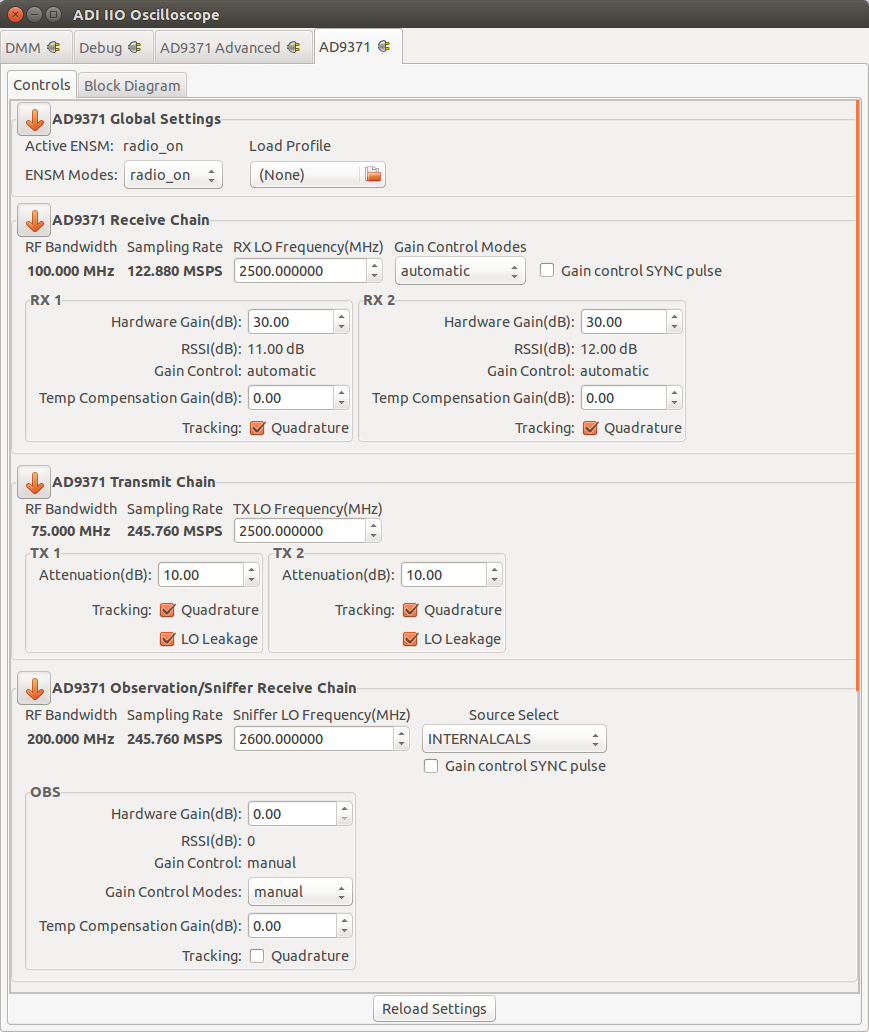
Device Global Settings
Active ENSM: Displays the active mode of the Enable State Machine.
ENSM Modes: Selects one of the available modes.
Profile configuration: Allows a Profile configuration to be loaded from a file.
Receive Chain
RF Bandwidth(MHz): Displays the Primary Signal Bandwidth of the current Profile.
Sampling Rate(MSPS): Displays the RX Sample Rate of the current Profile.
RX LO Frequency(MHz): Selects the RX local oscillator frequency. Range 300MHz to 6GHz with low tuning granularity.
RX
Hardware Gain(dB): Controls the RX gain only in Manual Gain Control Mode (MGC).
RSSI(dB): Displays the received strength signal level.
Gain Control: Displays the active gain mode.
Gain Control Modes: Selects one of the available modes: manual, hybrid and automatic.
Tracking
Quadrature
Transmit Chain
RF Bandwidth(MHz): Displays the Primary Signal Bandwidth of the current Profile.
Sampling Rate(MSPS): Displays the RX Sample Rate of the current Profile.
TX LO Frequency(MHz): Selects the TX local oscillator frequency. Range 300MHz to 6GHz with low tuning granularity.
TX
Attenuation(dB): The TX attenuation/gain can be individually controlled for TX1 and TX2. The range is from 0 to -41.95 dB in programmable steps sizes.
Tracking
Quadrature
LO Leakage
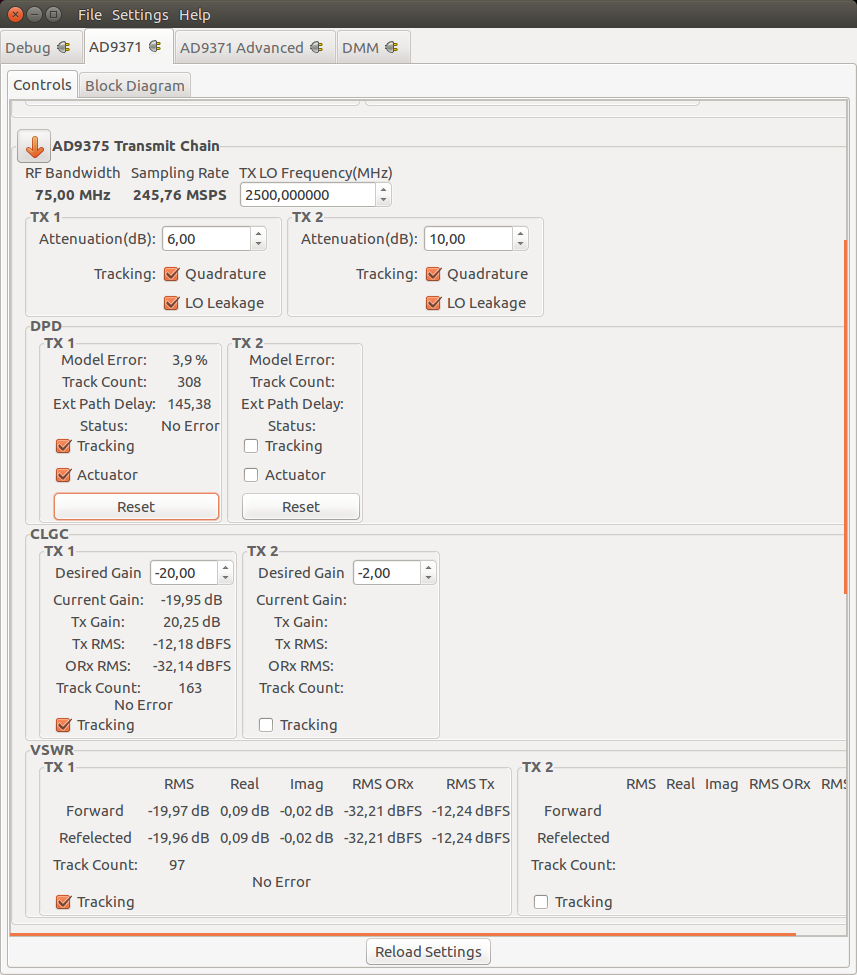
DPD Digital Predistortion Control (AD9375 only)
CLGC Closed-Loop Gain Control (AD9375 only)
VSWR Voltage Standing Wave Ratio Measurement (AD9375 only)
Observation Chain
RF Bandwidth(MHz): Displays the Primary Signal Bandwidth of the current Profile.
Sampling Rate(MSPS): Displays the RX Sample Rate of the current Profile.
SN LO Frequency(MHz): Selects the SNIFFER local oscillator frequency. Range 300MHz to 6GHz with low tuning granularity.
RX
Hardware Gain(dB): Controls the RX gain only in Manual Gain Control Mode (MGC).
RSSI(dB): Displays the received strength signal level.
Gain Control: Displays the active gain mode.
Gain Control Modes: Selects one of the available modes: manual, hybrid and automatic.
Tracking
Quadrature
FPGA Settings
Transmit/DDS
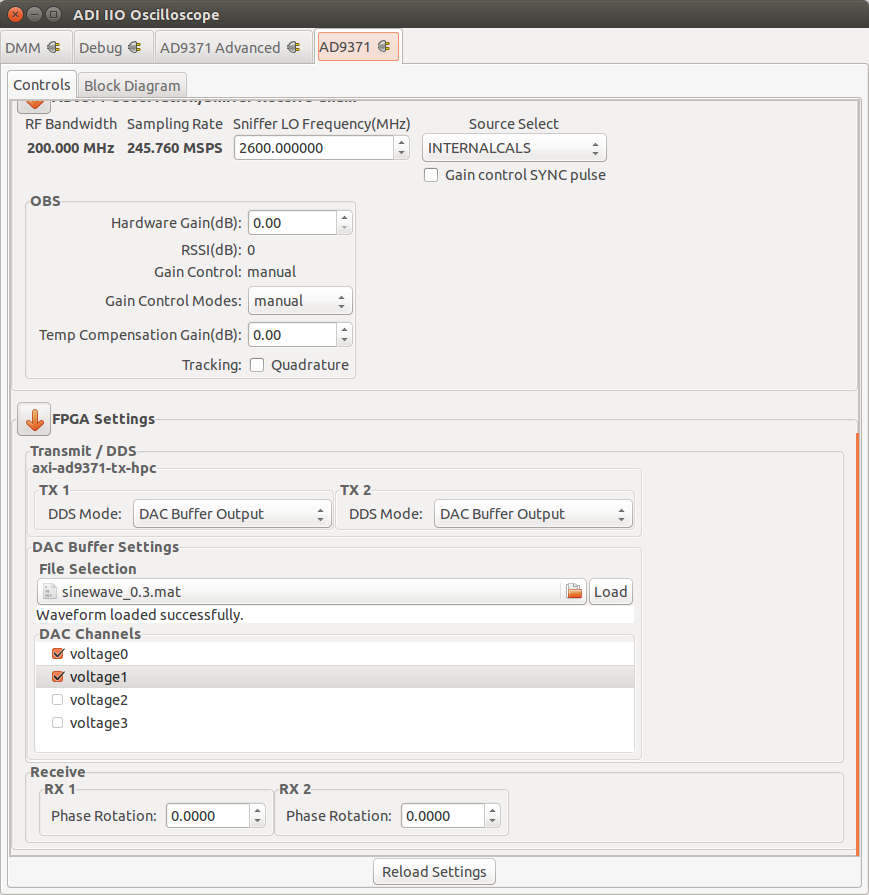
The plugin provides several options on how the transmitted data is generated. It is possible to either use the built-in two tone Direct Digital Synthesizer (DDS) to transmit a bi-tonal signal on channels I and Q of the DAC. Or it is possible to use the Direct Memory Access (DMA) facility to transmit custom data that you have stored in a file.
This can be achieved by selecting one of the following options listed by the DDS Mode:
One CW Tone
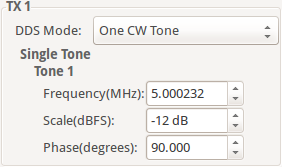
In One CW Tone mode one continuous wave (CW) tone will be outputted. The plugin displays the controls to set the Frequency, Amplitude and Phase for just one tone and makes sure that the amplitude of the other tone is set to 0. The resulting signal will be outputted on the Channel I of the DAC and the exact same signal but with a difference in phase of 90 degrees will be outputted on the Channel Q of the DAC.
Two CW Tone
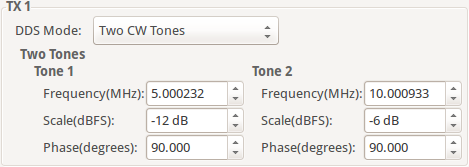
In Two CW Tone mode two continuous wave (CW) tones will be outputted. The plugin displays the controls to set the frequencies F1 and F2, amplitudes A1 and A2, phases P1 and P2 for the two tones. The resulting signal will be outputted on the Channel I of the DAC and the exact same signal but with a difference in phase of 90 degrees will be outputted on the Channel Q of the DAC.
Independent I/Q Control
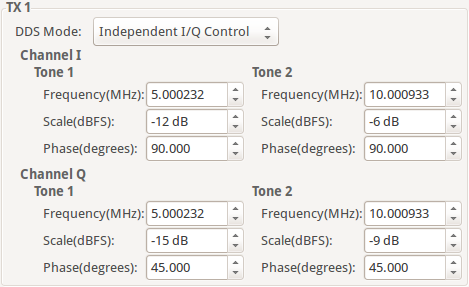
In Independent I/Q Control the plugin displays the controls to set the frequencies, amplitudes and phases for the two tones that will be outputted on channel I and additionally it allows for the two tones that will be outputted on channel Q of the DAC to be configured independently.
Note
The bi-tonal signal (T) is defined as the sum of two tones: T(t) = A1 * sin(2 * p * F1 * t + P1) + A2 * sin(2 * p * F2 * t + P2), where A-amplitude, F-frequency, P-phase of a tone.
DAC Buffer Output
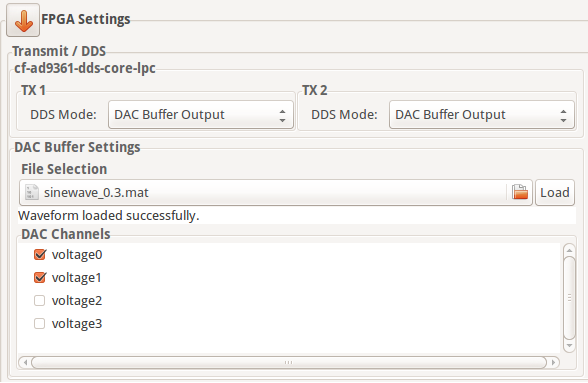
The file selector under the File Selection section is used to locate and choose the desired data file. Under the DAC Channels section the enabled channels will be used to transmit the data stored in the file. To finalize the process, a click on the Load button is required.
Restrictions:
There are two types of files that can be loaded: .txt or .mat. The IIO-Oscilloscope comes with several data files that can be used. If you want to create your own data files please take a look at the AD9371 Basic IQ Datafiles documentation first.
Due to hardware limitation only specific combinations of enabled channels are possible. You can enable a total of 1, 2, 4, etc. channels. If 1 channel is enabled then it can be any of them. If two channels are enabled then channels 0, 1 or channels 2, 3 can be enabled and so on.
Disable
In this mode both DDS and DMA are disabled causing the DAC channels to stop transmitting any data.
Note
Upon pressing Reload Settings button the values will be reloaded with the corresponding driver values. Useful in scenarios where the driver values get changed outside this plugin (e.g. with the use of Debug plugin) and a refresh on plugin’s values is needed.
Hint
Some plugin values will be rounded to the nearest value supported by the hardware.