ZedBoard quick start
All the products described on this page include ESD (electrostatic discharge) sensitive devices. Electrostatic charges as high as 4000V readily accumulate on the human body or test equipment and can discharge without detection. Although the boards feature ESD protection circuitry, permanent damage may occur on devices subjected to high-energy electrostatic discharges. Therefore, proper ESD precautions are recommended to avoid performance degradation or loss of functionality. This includes removing static charge on external equipment, cables, or antennas before connecting to the device.
Required software
A UART terminal (PuTTY / Tera Term / Minicom) at 115200 baud, 8N1
libiio installed on the host PC
IIO Oscilloscope and/or Scopy installed on the host PC
Required hardware
ZedBoard Rev D or later
EVAL-AD3552RFMCxZ evaluation board
16 GB (or larger) Class 10 micro-SD card
12 V, 3 A power supply
Micro-USB cable (UART)
Ethernet cable
Setting up the SD card
Download and install the ADI Kuiper Linux image by following the Using Kuiper Images instructions.
Copy the boot files (
BOOT.BIN,uImage,devicetree.dtb) from the ADI Kuiper Linux image to the FAT boot partition of the SD card.To build the HDL bitstream and software from source, follow these steps.
HDL reference design
Clone the HDL repository and build the ZedBoard project:
~$
cd hdl/projects/ad3552r_fmcz/zed
~/hdl/projects/ad3552r_fmcz/zed$
make
The bitstream is written into
hdl/projects/ad3552r_fmcz/zed/ad3552r_fmcz_zed.sdk/.Kuiper Linux kernel and device tree
Refer to Using Kuiper Images for building
uImageanddevicetree.dtbfor Zynq with the AD3552R device tree overlay.
Setting up the hardware
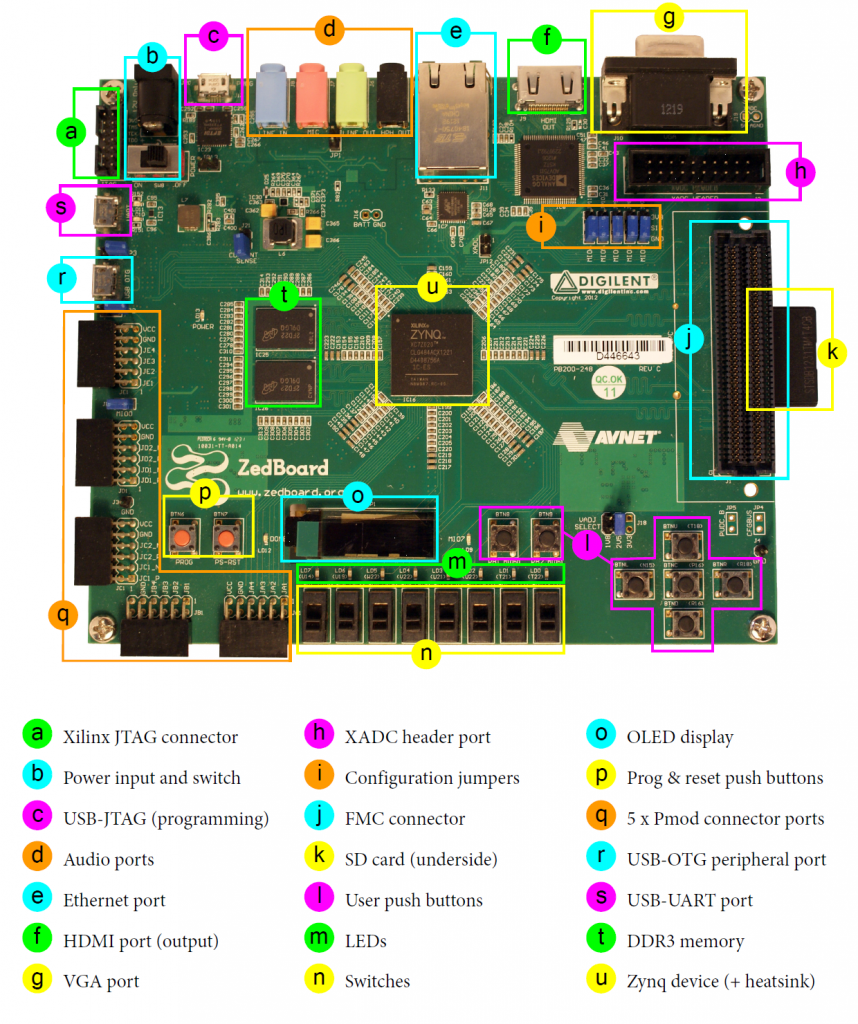
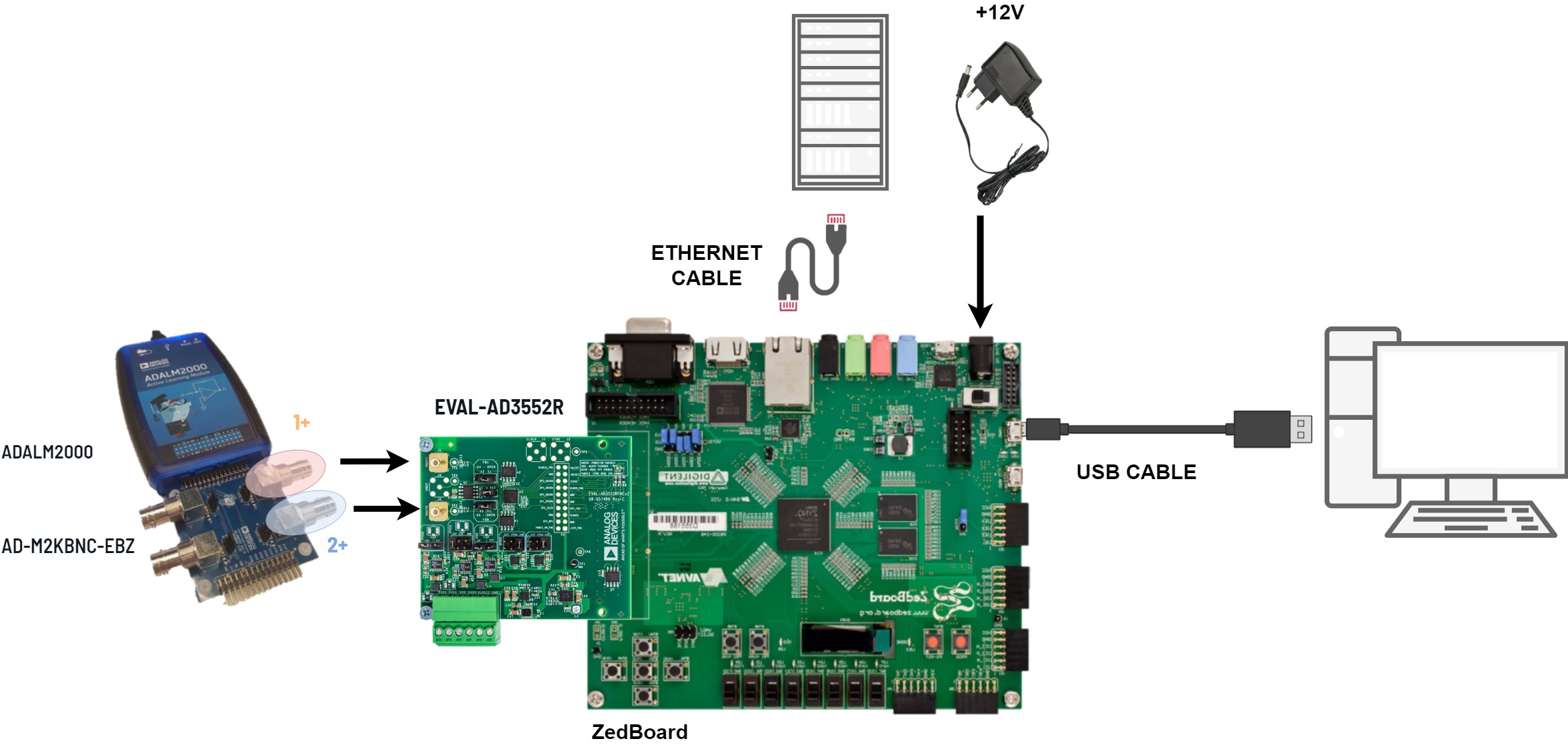
Insert the prepared micro-SD card into the SD card slot (J12) on the ZedBoard.
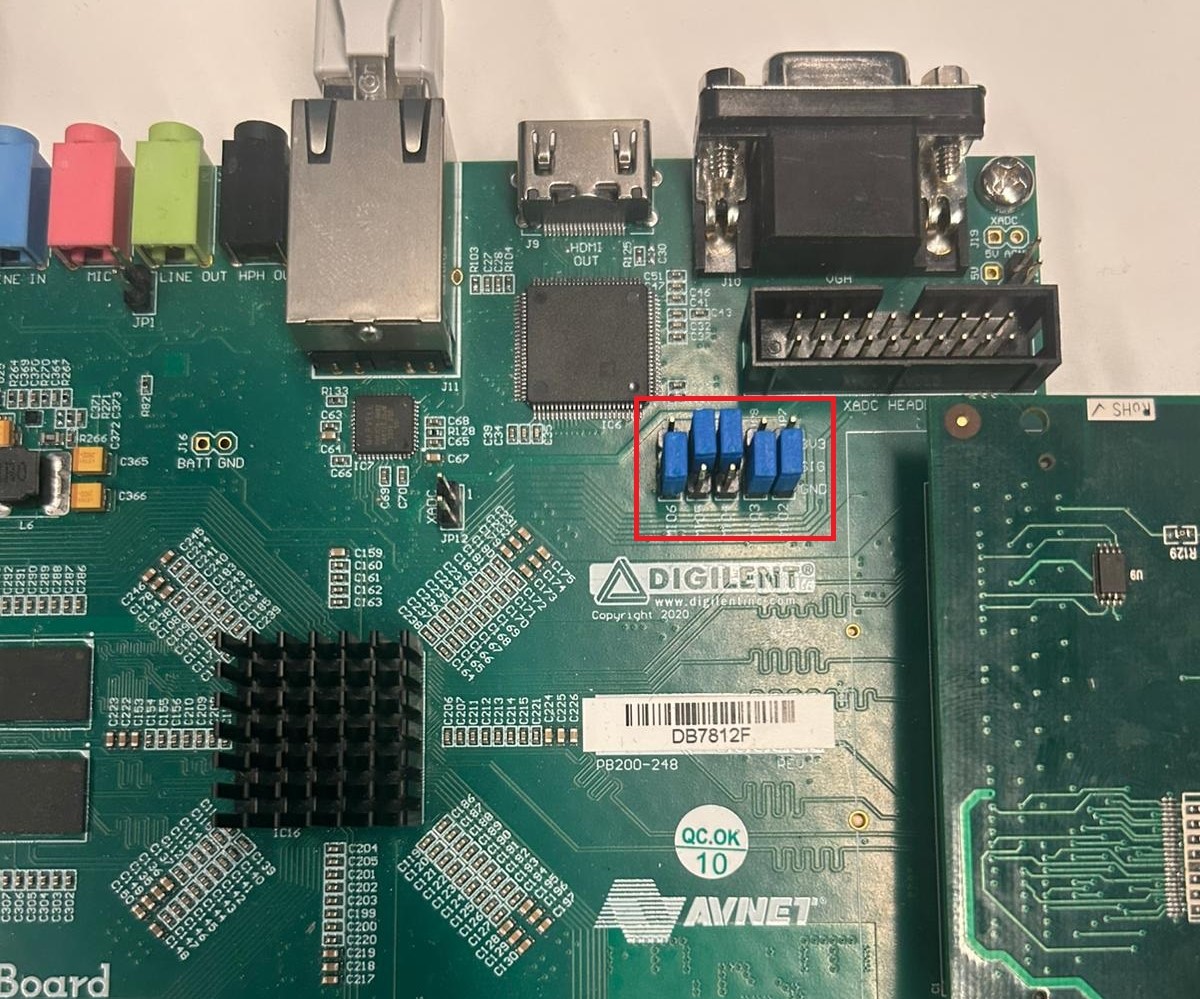
Configure the boot mode and VADJ voltage. The ZedBoard jumpers should be set for SD card boot and VADJ = 1.8 V.
Important
Set VADJ to 1.8 V before powering on. The AD3552R uses 1.8 V signaling on the FMC connector; a higher VADJ voltage can damage the evaluation board.
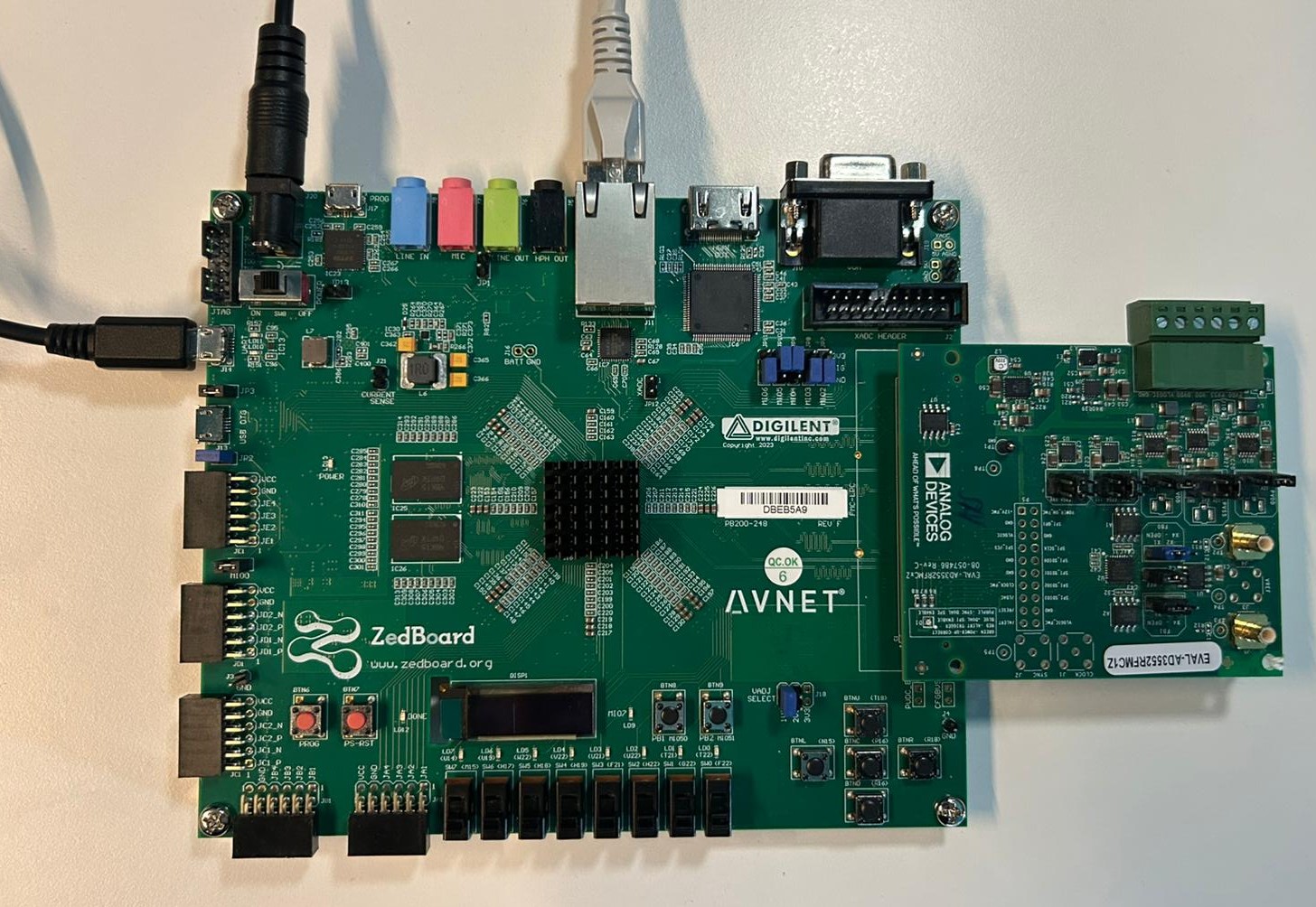
With the ZedBoard powered off, insert the EVAL-AD3552R evaluation board into the FMC LPC connector.
Connect the Micro-USB cable from J14 (USB UART) to your host PC.
Connect the Ethernet cable to J11 (RJ-45).
Connect SMB probes to J4 (CH0 output) and J5 (CH1 output) on the evaluation board to monitor the DAC outputs.
Connect the 12 V power supply to J20 and power on the ZedBoard.
Wait approximately 30 seconds for the DONE LED near DISP1 to turn blue, indicating the bitstream has been loaded.
Booting
Open the UART terminal (115200 baud, 8N1) on the host PC and observe the
boot log. The system auto-logs in as root.
U-Boot 2018.01-01677-geb93226123b (Mar 09 2026 - 12:15:19 +0200), Build: jenkins-development-build_uboot-69

Model: Zyn 0
Device: sdhci@e0100000
Manufacturer ID: 9f
OEM: 5449
Name: SD64G
Tran Speed: 50000000
Rd Block Len: 512
SD version 3.0
High Capacity: Yes
Capacity: 58 GiB
Bus Width: 4-bit
Erase Group Size: 512 Bytes
reading uEnv.txt
407 bytes read in 23 ms (16.6 KiB/s)
Loaded environment from uEnv.txt
Importing environment from SD ...
Running uenvcmd ...
Copying Linux from SD to RAM...
reading uImage
8897912 bytes read in 513 ms (16.5 MiB/s)
reading devicetree.dtb
18153 bytes read in 29 ms (610.4 KiB/s)
** Unable to read file uramdisk.image.gz **
## Booting kernel from Legacy Image at 03000000 ...
   Image Name:   Linux-6.12.0-27067-g126deeb87ea1
   Image Type:   ARM Linux Kernel Image (uncompressed)
   Data Size:    8897848 Bytes = 8.5 MiB
   Load Address: 00008000
   Entry Point:  00008000
   Verifying Checksum ... OK
## Flattened Device Tree blob at 02a00000
   Booting using the fdt blob at 0x2a00000
   Loading Kernel Image ... OK
   Loading Device Tree to 1eb12000, end 1eb196e8 ... OK

Starting kernel ...

Booting Linux on physical CPU 0x0
Linux version 6.12.0-27067-g126deeb87ea1-dirty (asarbu@HYB-9PqoEXICMOW) (arm-linux-gnueabi-gcc (Linaro GCC 7.5-2019.12) 7.5.0, GNU ld (Linaro_Binutils-2019.12) 2.28.2.20170706) #6 SMP PREEMPT Tue Feb 24 11:50:36 EET 2026
CPU: ARMv7 Processor [413fc090] revision 0 (ARMv7), cr=18c5387d
CPU: PIPT / VIPT nonaliasing data cache, VIPT aliasing instruction cache
OF: fdt: Machine model: Xilinx Zynq ZED
OF: fdt: earlycon: stdout-path /amba@0/uart@E0001000 not found
Memory policy: Data cache writealloc
cma: Reserved 128 MiB at 0x16800000 on node -1
Zone ranges:
Normal   [mem 0x0000000000000000-0x000000001fffffff]
HighMem  empty
Movable zone start for each node
Early memory node ranges
node   0: [mem 0x0000000000000000-0x000000001fffffff]
Initmem setup node 0 [mem 0x0000000000000000-0x000000001fffffff]
percpu: Embedded 12 pages/cpu s17356 r8192 d23604 u49152
Kernel command line: console=ttyPS0,115200 root=/dev/mmcblk0p2 rw earlycon rootfstype=ext4 rootwait clk_ignore_unused cpuidle.off=1
Dentry cache hash table entries: 65536 (order: 6, 262144 bytes, linear)
Inode-cache hash table entries: 32768 (order: 5, 131072 bytes, linear)
Built 1 zonelists, mobility grouping on.  Total pages: 131072
mem auto-init: stack:off, heap alloc:off, heap free:off
SLUB: HWalign=64, Order=0-3, MinObjects=0, CPUs=2, Nodes=1
rcu: Preemptible hierarchical RCU implementation.
rcu:    RCU restricting CPUs from NR_CPUS=4 to nr_cpu_ids=2.
rcu: RCU calculated value of scheduler-enlistment delay is 10 jiffies.
rcu: Adjusting geometry for rcu_fanout_leaf=16, nr_cpu_ids=2
NR_IRQS: 16, nr_irqs: 16, preallocated irqs: 16
efuse mapped to (ptrval)
slcr mapped to (ptrval)
L2C: platform modifies aux control register: 0x72360000 -> 0x72760000
L2C: DT/platform modifies aux control register: 0x72360000 -> 0x72760000
L2C-310 erratum 769419 enabled
L2C-310 enabling early BRESP for Cortex-A9
L2C-310 full line of zeros enabled for Cortex-A9
L2C-310 ID prefetch enabled, offset 1 lines
L2C-310 dynamic clock gating enabled, standby mode enabled
L2C-310 cache controller enabled, 8 ways, 512 kB
L2C-310: CACHE_ID 0x410000c8, AUX_CTRL 0x76760001
rcu: srcu_init: Setting srcu_struct sizes based on contention.
zynq_clock_init: clkc starts at (ptrval)
Zynq clock init
sched_clock: 64 bits at 167MHz, resolution 6ns, wraps every 4398046511103ns
clocksource: arm_global_timer: mask: 0xffffffffffffffff max_cycles: 0x26703d7dd8, max_idle_ns: 440795208065 ns
Switching to timer-based delay loop, resolution 6ns
Console: colour dummy device 80x30
Calibrating delay loop (skipped), value calculated using timer frequency.. 333.33 BogoMIPS (lpj=1666666)
CPU: Testing write buffer coherency: ok
CPU0: Spectre v2: using BPIALL workaround
pid_max: default: 32768 minimum: 301
Mount-cache hash table entries: 1024 (order: 0, 4096 bytes, linear)
Mountpoint-cache hash table entries: 1024 (order: 0, 4096 bytes, linear)
CPU0: thread -1, cpu 0, socket 0, mpidr 80000000
Setting up static identity map for 0x100000 - 0x100060
rcu: Hierarchical SRCU implementation.
rcu:    Max phase no-delay instances is 1000.
smp: Bringing up secondary CPUs ...
CPU1: thread -1, cpu 1, socket 0, mpidr 80000001
CPU1: Spectre v2: using BPIALL workaround
smp: Brought up 1 node, 2 CPUs
SMP: Total of 2 processors activated (666.66 BogoMIPS).
CPU: All CPU(s) started in SVC mode.
Memory: 359484K/524288K available (12288K kernel code, 906K rwdata, 10972K rodata, 1024K init, 500K bss, 32468K reserved, 131072K cma-reserved, 0K highmem)
devtmpfs: initialized
VFP support v0.3: implementor 41 architecture 3 part 30 variant 9 rev 4
clocksource: jiffies: mask: 0xffffffff max_cycles: 0xffffffff, max_idle_ns: 19112604462750000 ns
futex hash table entries: 512 (order: 3, 32768 bytes, linear)
pinctrl core: initialized pinctrl subsystem
NET: Registered PF_NETLINK/PF_ROUTE protocol family
DMA: preallocated 256 KiB pool for atomic coherent allocations
thermal_sys: Registered thermal governor 'step_wise'
platform axi: Fixed dependency cycle(s) with /axi/interrupt-controller@f8f01000
platform replicator: Fixed dependency cycle(s) with /axi/etb@f8801000
amba f8801000.etb: Fixed dependency cycle(s) with /replicator
platform replicator: Fixed dependency cycle(s) with /axi/tpiu@f8803000
amba f8803000.tpiu: Fixed dependency cycle(s) with /replicator
platform replicator: Fixed dependency cycle(s) with /axi/funnel@f8804000
amba f8804000.funnel: Fixed dependency cycle(s) with /axi/ptm@f889d000
amba f8804000.funnel: Fixed dependency cycle(s) with /axi/ptm@f889c000
amba f8804000.funnel: Fixed dependency cycle(s) with /replicator
amba f8804000.funnel: Fixed dependency cycle(s) with /axi/ptm@f889c000
amba f889c000.ptm: Fixed dependency cycle(s) with /axi/funnel@f8804000
amba f8804000.funnel: Fixed dependency cycle(s) with /axi/ptm@f889d000
amba f889d000.ptm: Fixed dependency cycle(s) with /axi/funnel@f8804000
platform 70e00000.lcd-controller: Fixed dependency cycle(s) with /fpga-axi@0/i2c@41600000/hdmi@39
hw-breakpoint: found 5 (+1 reserved) breakpoint and 1 watchpoint registers.
hw-breakpoint: maximum watchpoint size is 4 bytes.
e0001000.serial: ttyPS0 at MMIO 0xe0001000 (irq = 26, base_baud = 3125000) is a xuartps
printk: legacy console [ttyPS0] enabled
SCSI subsystem initialized
debugfs: Directory 'fixed-supply' with parent 'regulator' already present!
usbcore: registered new interface driver usbfs
debugfs: Directory 'fixed-supply' with parent 'regulator' already present!
usbcore: registered new interface driver hub
usbcore: registered new device driver usb
mc: Linux media interface: v0.10
videodev: Linux video capture interface: v2.00
pps_core: LinuxPPS API ver. 1 registered
pps_core: Software ver. 5.3.6 - Copyright 2005-2007 Rodolfo Giometti <giometti@linux.it>
PTP clock support registered
jesd204: found 0 devices and 0 topologies
FPGA manager framework
Advanced Linux Sound Architecture Driver Initialized.
clocksource: Switched to clocksource arm_global_timer
NET: Registered PF_INET protocol family
IP idents hash table entries: 8192 (order: 4, 65536 bytes, linear)
tcp_listen_portaddr_hash hash table entries: 512 (order: 0, 4096 bytes, linear)
Table-perturb hash table entries: 65536 (order: 6, 262144 bytes, linear)
TCP established hash table entries: 4096 (order: 2, 16384 bytes, linear)
TCP bind hash table entries: 4096 (order: 4, 65536 bytes, linear)
TCP: Hash tables configured (established 4096 bind 4096)
UDP hash table entries: 256 (order: 1, 8192 bytes, linear)
UDP-Lite hash table entries: 256 (order: 1, 8192 bytes, linear)
NET: Registered PF_UNIX/PF_LOCAL protocol family
RPC: Registered named UNIX socket transport module.
RPC: Registered udp transport module.
RPC: Registered tcp transport module.
RPC: Registered tcp-with-tls transport module.
RPC: Registered tcp NFSv4.1 backchannel transport module.
workingset: timestamp_bits=30 max_order=17 bucket_order=0
NFS: Registering the id_resolver key type
Key type id_resolver registered
Key type id_legacy registered
nfs4filelayout_init: NFSv4 File Layout Driver Registering...
nfs4flexfilelayout_init: NFSv4 Flexfile Layout Driver Registering...
fuse: init (API version 7.41)
io scheduler mq-deadline registered
io scheduler kyber registered
io scheduler bfq registered
zynq-pinctrl 700.pinctrl: zynq pinctrl initialized
ledtrig-cpu: registered to indicate activity on CPUs
dma-pl330 f8003000.dma-controller: Loaded driver for PL330 DMAC-241330
dma-pl330 f8003000.dma-controller:      DBUFF-128x8bytes Num_Chans-8 Num_Peri-4 Num_Events-16
brd: module loaded
loop: module loaded
Registered mathworks_ip class
spi-nor spi0.0: found s25fl256s1, expected n25q128a11
5 fixed-partitions partitions found on MTD device spi0.0
Creating 5 MTD partitions on "spi0.0":
0x000000000000-0x000000500000 : "boot"
0x000000500000-0x000000520000 : "bootenv"
0x000000520000-0x000000540000 : "config"
0x000000540000-0x000000fc0000 : "image"
0x000000fc0000-0x000002000000 : "spare"
MACsec IEEE 802.1AE
tun: Universal TUN/TAP device driver, 1.6
hwmon hwmon0: temp1_input not attached to any thermal zone
macb e000b000.ethernet eth0: Cadence GEM rev 0x00020118 at 0xe000b000 irq 40 (00:e0:22:02:be:d7)
usbcore: registered new interface driver asix
usbcore: registered new interface driver ax88179_178a
usbcore: registered new interface driver cdc_ether
usbcore: registered new interface driver net1080
usbcore: registered new interface driver cdc_subset
usbcore: registered new interface driver zaurus
usbcore: registered new interface driver cdc_ncm
usbcore: registered new interface driver r8153_ecm
usbcore: registered new interface driver uas
usbcore: registered new interface driver usb-storage
usbcore: registered new interface driver usbserial_generic
usbserial: USB Serial support registered for generic
usbcore: registered new interface driver ftdi_sio
usbserial: USB Serial support registered for FTDI USB Serial Device
usbcore: registered new interface driver upd78f0730
usbserial: USB Serial support registered for upd78f0730
ULPI transceiver vendor/product ID 0x0451/0x1507
Found TI TUSB1210 ULPI transceiver.
ULPI integrity check: passed.
ci_hdrc ci_hdrc.0: EHCI Host Controller
ci_hdrc ci_hdrc.0: new USB bus registered, assigned bus number 1
ci_hdrc ci_hdrc.0: USB 2.0 started, EHCI 1.00
usb usb1: New USB device found, idVendor=1d6b, idProduct=0002, bcdDevice= 6.12
usb usb1: New USB device strings: Mfr=3, Product=2, SerialNumber=1
usb usb1: Product: EHCI Host Controller
usb usb1: Manufacturer: Linux 6.12.0-27067-g126deeb87ea1-dirty ehci_hcd
usb usb1: SerialNumber: ci_hdrc.0
hub 1-0:1.0: USB hub found
hub 1-0:1.0: 1 port detected
i2c_dev: i2c /dev entries driver
platform 70e00000.lcd-controller: Fixed dependency cycle(s) with /fpga-axi@0/i2c@41600000/hdmi@39
i2c 0-0039: Fixed dependency cycle(s) with /fpga-axi@0/lcd-controller@70e00000
adv7511 0-0039: supply avdd not found, using dummy regulator
adv7511 0-0039: supply dvdd not found, using dummy regulator
adv7511 0-0039: supply pvdd not found, using dummy regulator
adv7511 0-0039: supply bgvdd not found, using dummy regulator
adv7511 0-0039: supply dvdd-3v not found, using dummy regulator
at24 1-0050: supply vcc not found, using dummy regulator
at24 1-0050: 256 byte 24c02 EEPROM, writable, 1 bytes/write
gspca_main: v2.14.0 registered
usbcore: registered new interface driver uvcvideo
cdns-wdt f8005000.watchdog: Xilinx Watchdog Timer with timeout 10s
Xilinx Zynq CpuIdle Driver started
failed to register cpuidle driver
sdhci: Secure Digital Host Controller Interface driver
sdhci: Copyright(c) Pierre Ossman
sdhci-pltfm: SDHCI platform and OF driver helper
clocksource: ttc_clocksource: mask: 0xffff max_cycles: 0xffff, max_idle_ns: 537538477 ns
timer #0 at (ptrval), irq=46
hid: raw HID events driver (C) Jiri Kosina
usbcore: registered new interface driver usbhid
usbhid: USB HID core driver
SPI driver fb_seps525 has no spi_device_id for syncoam,seps525
adi-axi-dac 44a70000.spi: AXI DAC IP core (9.02.b) probed
mmc0: SDHCI controller on e0100000.mmc [e0100000.mmc] using ADMA
armv7-pmu f8891000.pmu: hw perfevents: no interrupt-affinity property, guessing.
hw perfevents: enabled with armv7_cortex_a9 PMU driver, 7 (8000003f) counters available
axi_sysid 45000000.sysid: AXI System ID core version (1.01.a) found
axi_sysid 45000000.sysid: [ad35xxr_evb] on [zed] git branch <main> git <194cb2059da9757f3de014a479446705ec88be08> clean [2026-04-06 07:05:12] UTC
mmc0: new high speed SDXC card at address 5048
fpga_manager fpga0: Xilinx Zynq FPGA Manager registered
usbcore: registered new interface driver snd-usb-audio
mmcblk0: mmc0:5048 SD64G 58.0 GiB
axi-i2s 77600000.i2s: probed, capture enabled, playback enabled
mmcblk0: p1 p2 p3
NET: Registered PF_INET6 protocol family
Segment Routing with IPv6
In-situ OAM (IOAM) with IPv6
sit: IPv6, IPv4 and MPLS over IPv4 tunneling driver
NET: Registered PF_PACKET protocol family
NET: Registered PF_IEEE802154 protocol family
Key type dns_resolver registered
Registering SWP/SWPB emulation handler
of-fpga-region fpga-region: FPGA Region probed
[drm] Initialized axi_hdmi_drm 1.0.0 for 70e00000.lcd-controller on minor 0
axi-hdmi 70e00000.lcd-controller: [drm] Cannot find any crtc or sizes
axi-hdmi 70e00000.lcd-controller: [drm] Cannot find any crtc or sizes
ad3552r-hs dac@0.1.auto: Target SPI mode: 2 !
debugfs: File 'Capture' in directory 'dapm' already present!
input: gpio-keys as /devices/soc0/gpio-keys/input/input0
of_cfs_init
of_cfs_init: OK
clk: Not disabling unused clocks
ALSA device list:
#0: HDMI monitor
#1: ZED ADAU1761
EXT4-fs (mmcblk0p2): recovery complete
EXT4-fs (mmcblk0p2): mounted filesystem 61c00ade-b582-4574-a434-d56f9cb59143 r/w with ordered data mode. Quota mode: disabled.
VFS: Mounted root (ext4 filesystem) on device 179:2.
devtmpfs: mounted
Freeing unused kernel image (initmem) memory: 1024K
Run /sbin/init as init process
systemd[1]: System time before build time, advancing clock.
systemd[1]: Failed to look up module alias 'autofs4': Function not implemented
systemd[1]: systemd 247.3-7+rpi1+deb11u6 running in system mode. (+PAM +AUDIT +SELINUX +IMA +APPARMOR +SMACK +SYSVINIT +UTMP +LIBCRYPTSETUP +GCRYPT +GNUTLS +ACL +XZ +LZ4 +ZSTD +SECCOMP +BLKID +ELFUTILS +KMOD +IDN2 -IDN +PCRE2 default-hierarchy=unified)
systemd[1]: Detected architecture arm.

Welcome to Kuiper GNU/Linux 11.2 (bullseye)!

systemd[1]: Set hostname to <analog>.
systemd[1]: /lib/systemd/system/plymouth-start.service:16: Unit configured to use KillMode=none. This is unsafe, as it disables systemd's process lifecycle management for the service. Please update your service to use a safer KillMode=, such as 'mixed' or 'control-group'. Support for KillMode=none is deprecated and will eventually be removed.
systemd[1]: /lib/systemd/system/iiod.service:14: Invalid environment assignment, ignoring: $IIOD_EXTRA_OPTS=
systemd[1]: Queued start job for default target Graphical Interface.
random: crng init done
systemd[1]: system-getty.slice: unit configures an IP firewall, but the local system does not support BPF/cgroup firewalling.
systemd[1]: (This warning is only shown for the first unit using IP firewalling.)
systemd[1]: Created slice system-getty.slice.
[  OK  ] Created slice system-getty.slice.
systemd[1]: Created slice system-modprobe.slice.
[  OK  ] Created slice system-modprobe.slice.
systemd[1]: Created slice system-serial\x2dgetty.slice.
[  OK  ] Created slice system-serial\x2dgetty.slice.
systemd[1]: Created slice system-systemd\x2dfsck.slice.
[  OK  ] Created slice system-systemd\x2dfsck.slice.
systemd[1]: Created slice User and Session Slice.
[  OK  ] Created slice User and Session Slice.
systemd[1]: Started Forward Password Requests to Wall Directory Watch.
[  OK  ] Started Forward Password R…uests to Wall Directory Watch.
systemd[1]: Condition check resulted in Arbitrary Executable File Formats File System Automount Point being skipped.
systemd[1]: Reached target Slices.
[  OK  ] Reached target Slices.
systemd[1]: Reached target Swap.
[  OK  ] Reached target Swap.
systemd[1]: Listening on Syslog Socket.
[  OK  ] Listening on Syslog Socket.
systemd[1]: Listening on fsck to fsckd communication Socket.
[  OK  ] Listening on fsck to fsckd communication Socket.
systemd[1]: Listening on initctl Compatibility Named Pipe.
[  OK  ] Listening on initctl Compatibility Named Pipe.
systemd[1]: Condition check resulted in Journal Audit Socket being skipped.
systemd[1]: Listening on Journal Socket (/dev/log).
[  OK  ] Listening on Journal Socket (/dev/log).
systemd[1]: Listening on Journal Socket.
[  OK  ] Listening on Journal Socket.
systemd[1]: Listening on udev Control Socket.
[  OK  ] Listening on udev Control Socket.
systemd[1]: Listening on udev Kernel Socket.
[  OK  ] Listening on udev Kernel Socket.
systemd[1]: Condition check resulted in Huge Pages File System being skipped.
systemd[1]: Condition check resulted in POSIX Message Queue File System being skipped.
systemd[1]: Mounting RPC Pipe File System...
         Mounting RPC Pipe File System...
systemd[1]: Mounting Kernel Debug File System...
         Mounting Kernel Debug File System...
systemd[1]: Condition check resulted in Kernel Trace File System being skipped.
systemd[1]: Condition check resulted in Kernel Module supporting RPCSEC_GSS being skipped.
systemd[1]: Starting Restore / save the current clock...
         Starting Restore / save the current clock...
systemd[1]: Starting Set the console keyboard layout...
         Starting Set the console keyboard layout...
systemd[1]: Condition check resulted in Create list of static device nodes for the current kernel being skipped.
systemd[1]: Starting Load Kernel Module configfs...
         Starting Load Kernel Module configfs...
systemd[1]: Starting Load Kernel Module drm...
         Starting Load Kernel Module drm...
systemd[1]: Starting Load Kernel Module fuse...
         Starting Load Kernel Module fuse...
systemd[1]: Condition check resulted in Set Up Additional Binary Formats being skipped.
systemd[1]: Condition check resulted in File System Check on Root Device being skipped.
systemd[1]: Starting Journal Service...
         Starting Journal Service...
systemd[1]: Starting Load Kernel Modules...
         Starting Load Kernel Modules...
systemd[1]: Starting Remount Root and Kernel File Systems...
         Starting Remount Root and Kernel File Systems...
systemd[1]: Starting Coldplug All udev Devices...
         Starting Coldplug All udev Devices...
systemd[1]: Mounted RPC Pipe File System.
[  OK  ] Mounted RPC Pipe File System.
systemd[1]: Mounted Kernel Debug File System.
[  OK  ] Mounted Kernel Debug File System.
systemd[1]: Started Journal Service.
[  OK  ] Started Journal Service.
[  OK  ] Finished Restore / save the current clock.
[  OK  ] Finished Load Kernel Module configfs.
[  OK  ] Finished Load Kernel Module drm.
[  OK  ] Finished Load Kernel Module fuse.
[FAILED] Failed to start Load Kernel Modules.
See 'systemctl status systemd-modules-load.service' for details.
[  OK  ] Finished Set the console keyboard layout.
         Mounting FUSE Control File System...
         Mounting Kernel Configuration File System...
         Starting Apply Kernel Variables...
[  OK  ] Mounted FUSE Control File System.
[  OK  ] Mounted Kernel Configuration File System.
[  OK  ] Finished Apply Kernel Variables.
[  OK  ] Finished Coldplug All udev Devices.
[  OK  ] Finished Remount Root and Kernel File Systems.
         Starting Helper to synchronize boot up for ifupdown...
         Starting Flush Journal to Persistent Storage...
         Starting Load/Save Random Seed...
         Starting Create System Users...
         Starting Wait for udev To …plete Device Initialization...
[  OK  ] Finished Helper to synchronize boot up for ifupdown.
[  OK  ] Finished Create System Users.
[  OK  ] Finished Load/Save Random Seed.
         Starting Create Static Device Nodes in /dev...
[  OK  ] Finished Flush Journal to Persistent Storage.
[  OK  ] Finished Create Static Device Nodes in /dev.
[  OK  ] Reached target Local File Systems (Pre).
         Starting Rule-based Manage…for Device Events and Files...
[  OK  ] Started Rule-based Manager for Device Events and Files.
         Starting Show Plymouth Boot Screen...
[  OK  ] Started Show Plymouth Boot Screen.
[  OK  ] Started Forward Password R…s to Plymouth Directory Watch.
[  OK  ] Reached target Local Encrypted Volumes.
[  OK  ] Found device /dev/ttyPS0.
[  OK  ] Found device /dev/disk/by-partuuid/5c29002e-01.
[  OK  ] Finished Wait for udev To Complete Device Initialization.
         Starting File System Check…isk/by-partuuid/5c29002e-01...
         Starting Load Kernel Modules...
[  OK  ] Started File System Check Daemon to report status.
[FAILED] Failed to start Load Kernel Modules.
See 'systemctl status systemd-modules-load.service' for details.
[  OK  ] Finished File System Check…/disk/by-partuuid/5c29002e-01.
         Mounting /boot...
[  OK  ] Mounted /boot.
[  OK  ] Reached target Local File Systems.
         Starting Set console font and keymap...
         Starting Raise network interfaces...
         Starting Preprocess NFS configuration...
         Starting Tell Plymouth To Write Out Runtime Data...
         Starting Create Volatile Files and Directories...
[  OK  ] Finished Set console font and keymap.
[  OK  ] Finished Tell Plymouth To Write Out Runtime Data.
[  OK  ] Finished Preprocess NFS configuration.
[  OK  ] Reached target NFS client services.
[  OK  ] Reached target Remote File Systems (Pre).
[  OK  ] Reached target Remote File Systems.
[  OK  ] Finished Create Volatile Files and Directories.
         Starting Network Time Synchronization...
         Starting Update UTMP about System Boot/Shutdown...
[  OK  ] Finished Update UTMP about System Boot/Shutdown.
         Starting Load Kernel Modules...
[  OK  ] Started Network Time Synchronization.
[  OK  ] Finished Raise network interfaces.
[  OK  ] Reached target System Time Set.
[  OK  ] Reached target System Time Synchronized.
[FAILED] Failed to start Load Kernel Modules.
See 'systemctl status systemd-modules-load.service' for details.
[  OK  ] Reached target System Initialization.
[  OK  ] Started CUPS Scheduler.
[  OK  ] Started Daily apt download activities.
[  OK  ] Started Daily apt upgrade and clean activities.
[  OK  ] Started Periodic ext4 Onli…ata Check for All Filesystems.
[  OK  ] Started Discard unused blocks once a week.
[  OK  ] Started Daily rotation of log files.
[  OK  ] Started Daily man-db regeneration.
[  OK  ] Started Daily Cleanup of Temporary Directories.
[  OK  ] Reached target Paths.
[  OK  ] Reached target Timers.
[  OK  ] Listening on Avahi mDNS/DNS-SD Stack Activation Socket.
[  OK  ] Listening on CUPS Scheduler.
[  OK  ] Listening on D-Bus System Message Bus Socket.
[  OK  ] Listening on Erlang Port Mapper Daemon Activation Socket.
[  OK  ] Listening on GPS (Global P…ioning System) Daemon Sockets.
[  OK  ] Listening on triggerhappy.socket.
[  OK  ] Reached target Sockets.
[  OK  ] Reached target Basic System.
         Starting Analog Devices power up/down sequence...
         Starting Save/Restore Sound Card State...
         Starting Avahi mDNS/DNS-SD Stack...
[  OK  ] Started Regular background program processing daemon.
[  OK  ] Started D-Bus System Message Bus.
         Starting dphys-swapfile - …unt, and delete a swap file...
         Starting Remove Stale Onli…t4 Metadata Check Snapshots...
[  OK  ] Started fan-control.
         Starting Fix DP audio and X11 for Jupiter...
         Starting Creating IIOD Context Attributes......
         Starting Authorization Manager...
         Starting DHCP Client Daemon...
         Starting LSB: Switch to on…nless shift key is pressed)...
         Starting LSB: rng-tools (Debian variant)...
         Starting System Logging Service...
         Starting User Login Management...
         Starting triggerhappy global hotkey daemon...
         Starting Disk Manager...
         Starting WPA supplicant...
[  OK  ] Finished Save/Restore Sound Card State.
[  OK  ] Finished Fix DP audio and X11 for Jupiter.
[  OK  ] Reached target Sound Card.
[  OK  ] Started triggerhappy global hotkey daemon.
[  OK  ] Started System Logging Service.
[  OK  ] Started DHCP Client Daemon.
[  OK  ] Started LSB: rng-tools (Debian variant).
[  OK  ] Finished dphys-swapfile - …mount, and delete a swap file.
[  OK  ] Started User Login Management.
[  OK  ] Started WPA supplicant.
[  OK  ] Started Avahi mDNS/DNS-SD Stack.
[  OK  ] Reached target Network.
[  OK  ] Reached target Network is Online.
         Starting CUPS Scheduler...
[  OK  ] Started Erlang Port Mapper Daemon.
         Starting HTTP based time synchronization tool...
         Starting Internet superserver...
         Starting /etc/rc.local Compatibility...
         Starting OpenBSD Secure Shell server...
         Starting Permit User Sessions...
[  OK  ] Started Unattended Upgrades Shutdown.
[  OK  ] Started Internet superserver.
[  OK  ] Finished Remove Stale Onli…ext4 Metadata Check Snapshots.
[  OK  ] Started HTTP based time synchronization tool.
[  OK  ] Started /etc/rc.local Compatibility.
[  OK  ] Finished Permit User Sessions.
[  OK  ] Started Authorization Manager.
         Starting Modem Manager...
         Starting Light Display Manager...
         Starting Hold until boot process finishes up...
[  OK  ] Started LSB: Switch to ond…(unless shift key is pressed).
[FAILED] Failed to start VNC Server for X11.

Raspbian GNU/Linux 11 analog ttyPS0

analog login: root (automatic login)

Linux analog 6.12.0-27067-g126deeb87ea1-dirty #6 SMP PREEMPT Tue Feb 24 11:50:36 EET 2026 armv7l

The programs included with the Debian GNU/Linux system are free software;
the exact distribution terms for each program are described in the
individual files in /usr/share/doc/*/copyright.

Debian GNU/Linux comes with ABSOLUTELY NO WARRANTY, to the extent
permitted by applicable law.
Last login: Fri Nov  8 15:17:16 GMT 2024 on ttyPS0
root@analog:~#
Useful commands
Check network address:
~$
ifconfig eth0
List IIO devices:
~$
iio_info | grep iio:device
Power down the board safely:
~$
poweroff
Using IIO Oscilloscope
Install the latest IIO Oscilloscope on the host PC.
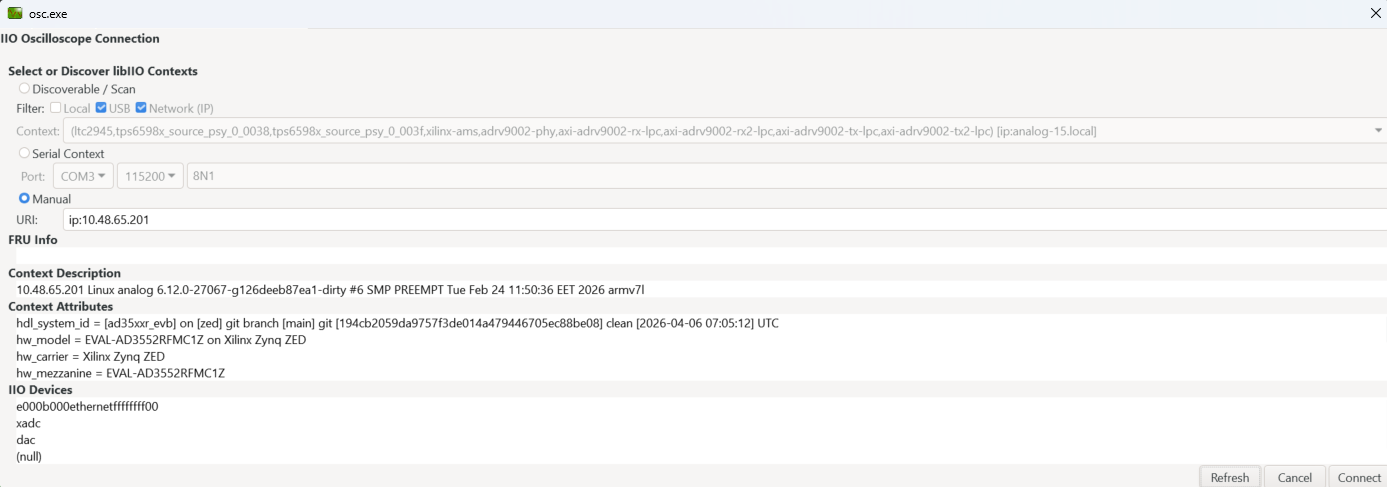
Open IIO Oscilloscope. In the connection dialog, enter the URI of the ZedBoard:
ip:<ip-address-of-zedboard>
For local access directly on the ZedBoard, use:
ip:localhost
Note
The host PC and ZedBoard must be on the same network for IP-based access. You can verify connectivity with
iio_info -u ip:<ip-address-of-zedboard>from the host PC.Click Refresh to populate the device list, then click Connect.
In the DAC plugin, select the
axi-ad3552rdevice. You can set raw output codes for each channel or configure DDS tone generation.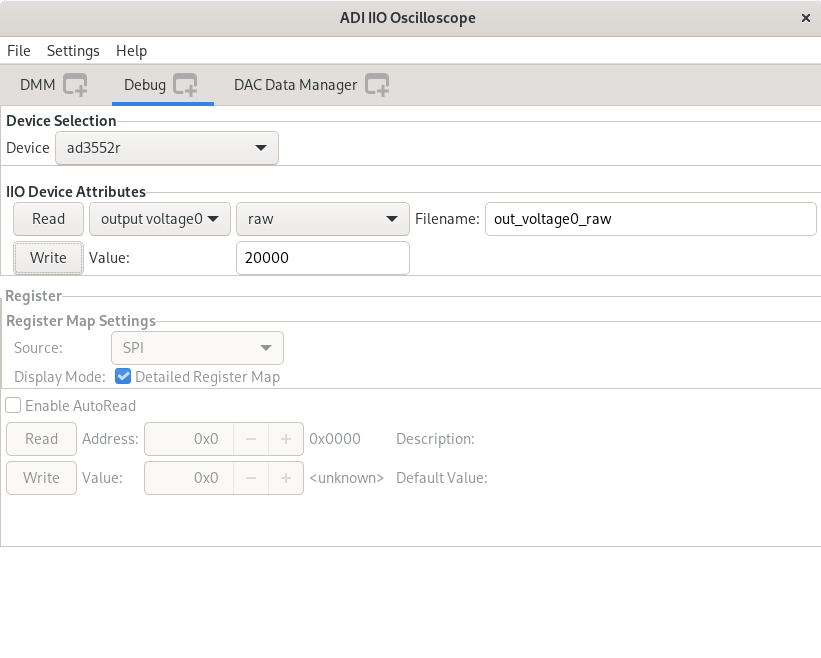
Use the Debug tab to access individual IIO attributes directly, such as
output_range,sampling_frequency, andout_voltage0_raw.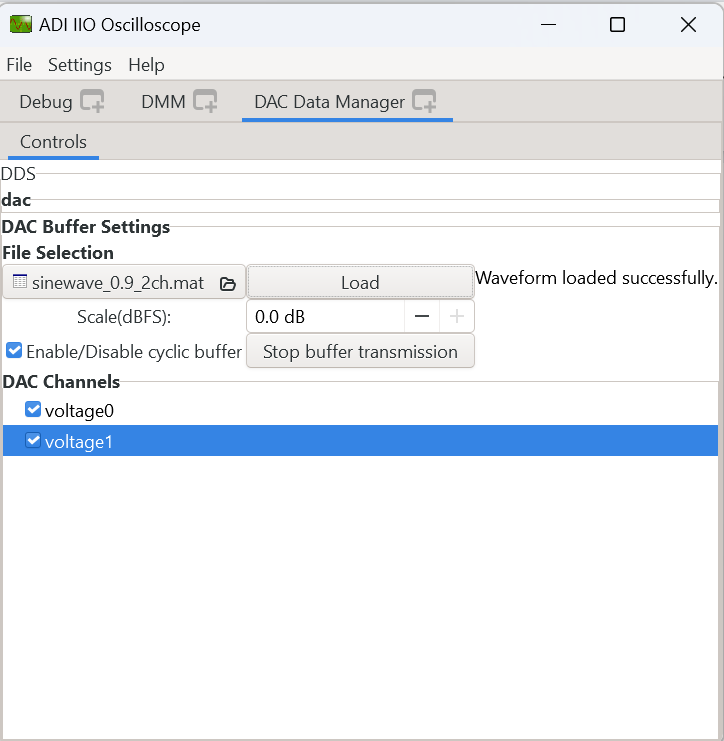
Note
If the sine wave on the oscilloscope looks split, this is a data format mismatch. The AXI IP core defaults to offset binary, but if your software sends two’s complement samples (or vice versa), the output wraps around like this.
To fix it, run on the ZedBoard:
busybox devmem 0x44A70048 32 0x4030
This sets the DATA_FORMAT bit in the DAC interface control
register to offset binary (1). Set it to 0 for two’s
complement.
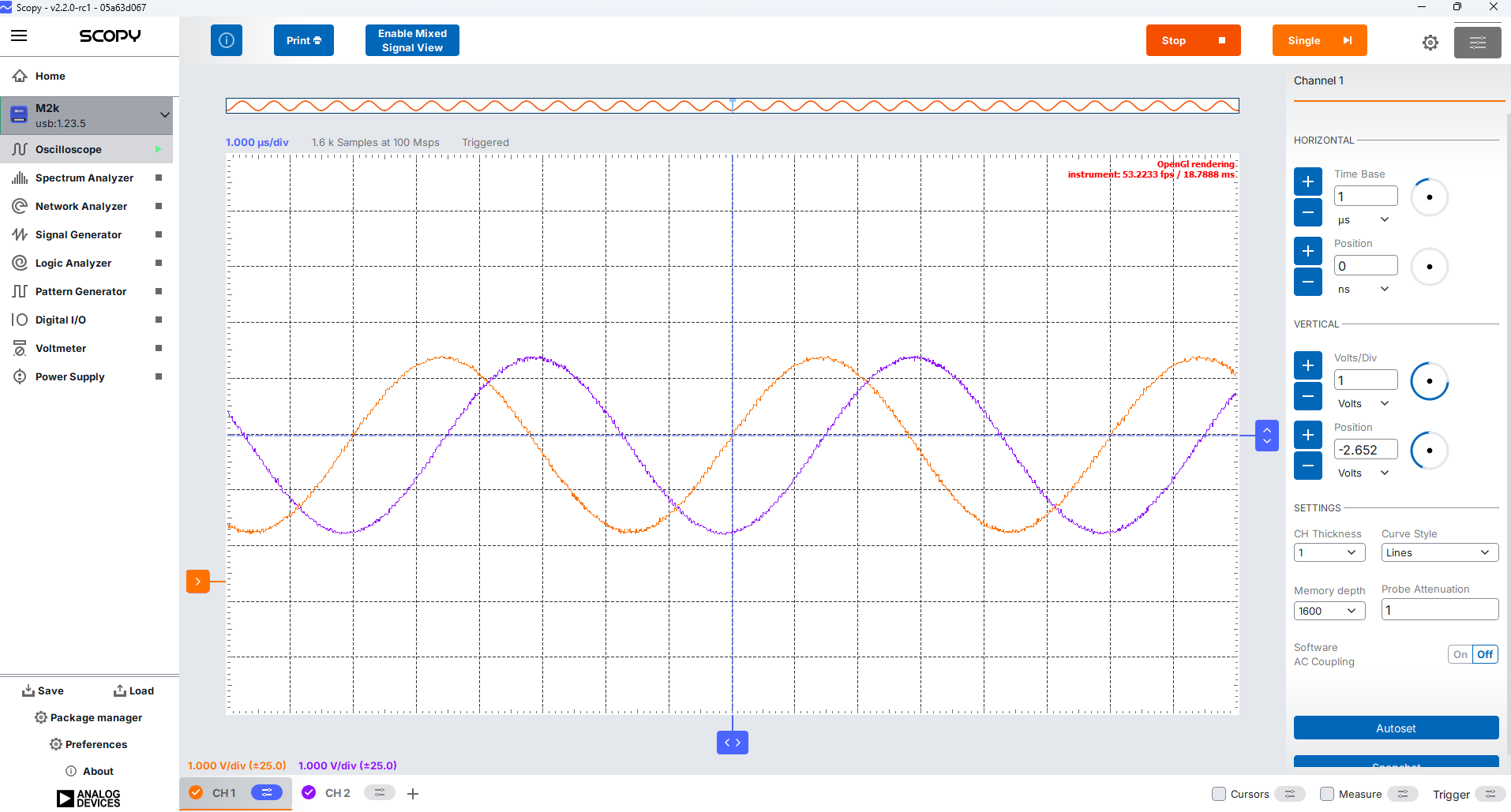
Using Scopy
Install Scopy on the host PC.
Connect to the ZedBoard using the network URI
ip:<ip-address-of-zedboard>.Open the IIO plugin in Scopy to read and write IIO device attributes, or use the Signal Generator plugin to stream samples to the DAC.
Using PyADI-IIO
Install PyADI-IIO on the host PC, then run the example script:
export PYTHONPATH=/path/to/pyadi-iio/
python examples/ad3552r_hs_example.py ip:<ip-address-of-zedboard>
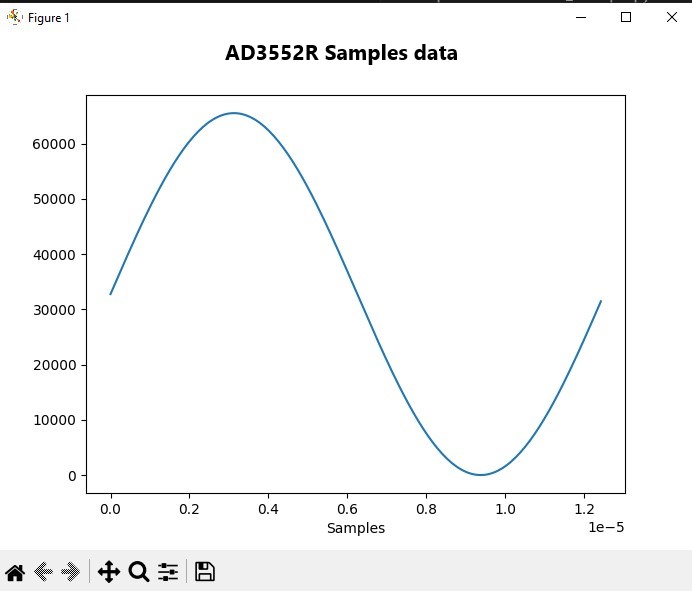
The script generates an 80 kHz sine wave in offset-binary uint16 format and streams it to both DAC channels in cyclic mode. Expected output:
uri: ip:<ip-address-of-zedboard>
sample rate: 33333333
Sample data min: 1
Sample data max: 65534
A matplotlib window will appear showing the generated waveform. The DAC outputs on J4 and J5 should show a clean 80 kHz sine wave.
Using No-OS
The No-OS ad3552r_fmcz project runs on the Zynq PS ARM core and
exposes an IIOD server over UART. To use it:
The hardware setup is the same as for the Linux instructions above. You need an extra micro USB cable to connect the ZedBoard’s JTAG port to the host PC in order to flash the No-OS firmware.
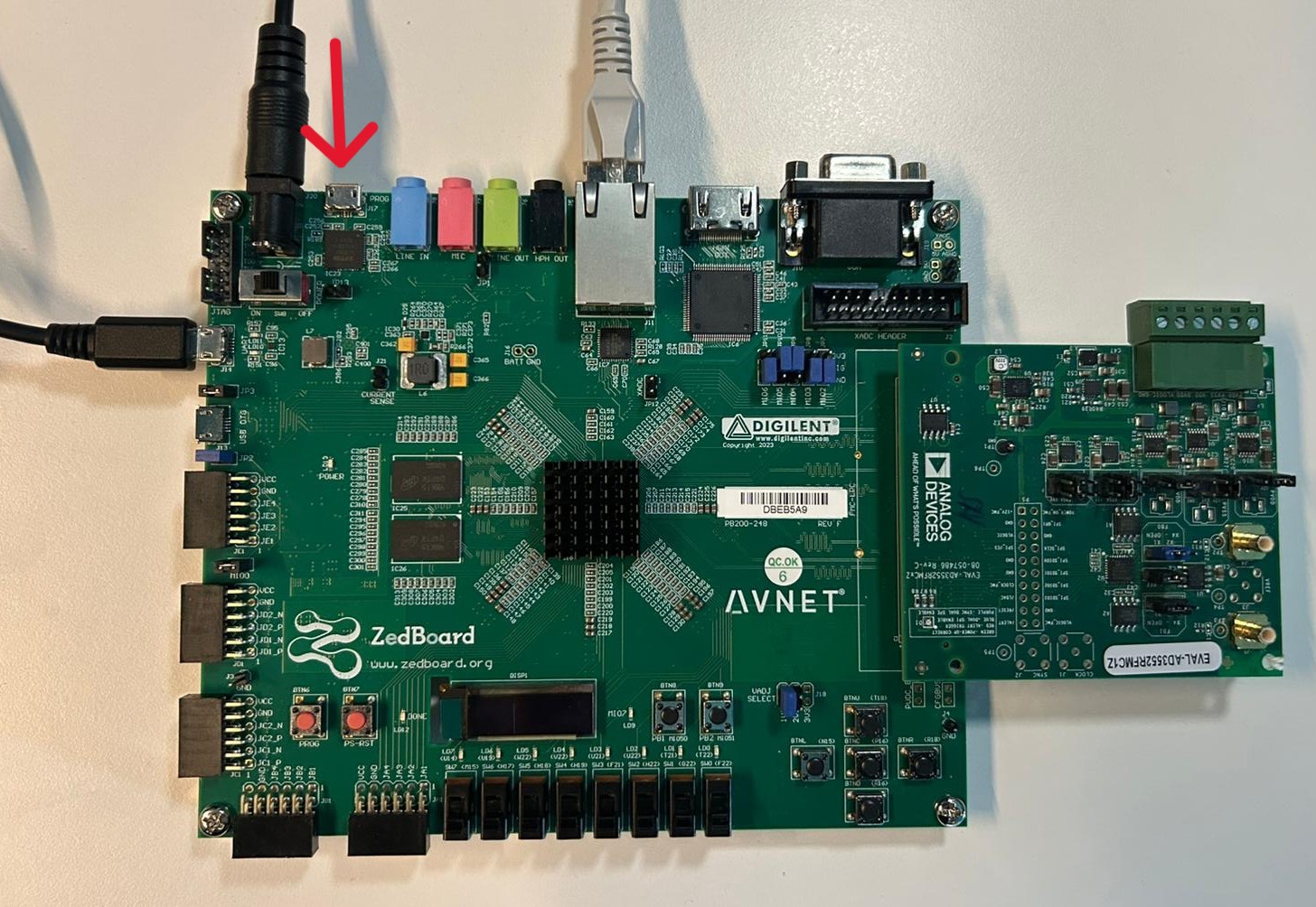
Program the ZedBoard with the No-OS firmware (built from projects/ad3552r_fmcz).
Observe the boot output on the UART terminal:
Hey, welcome to ad3552r_fmcz AXI example
tx_clkgen: MMCM-PLL locked (133000000 Hz)
ad3552r_core: Successfully initialized (133332824 Hz)
Running IIOD server...
If successful, you may connect an IIO client application by:
  1. Disconnecting the serial terminal you use to view this message.
  2. Connecting the IIO client application using the serial backend:
       Baudrate: 115200
       Data size: 8 bits
       Parity: none
       Stop bits: 1
       Flow control: none
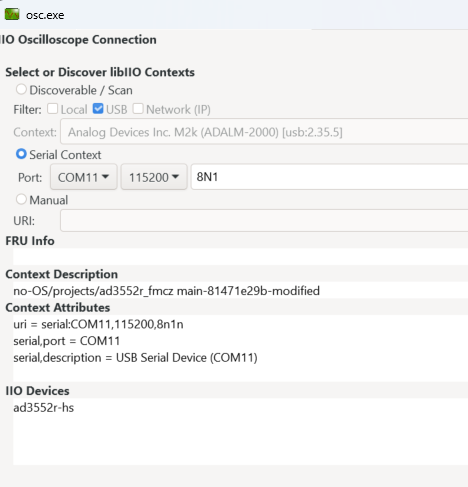
Close the serial terminal, then connect IIO Oscilloscope using the serial backend.