Prerequisites
What you need, depends on what you are trying to do. As a minimum, you need to start out with:
Hardware prerequisites
The ADAQ7980 evaluation board: EVAL-ADAQ7980-SDZ
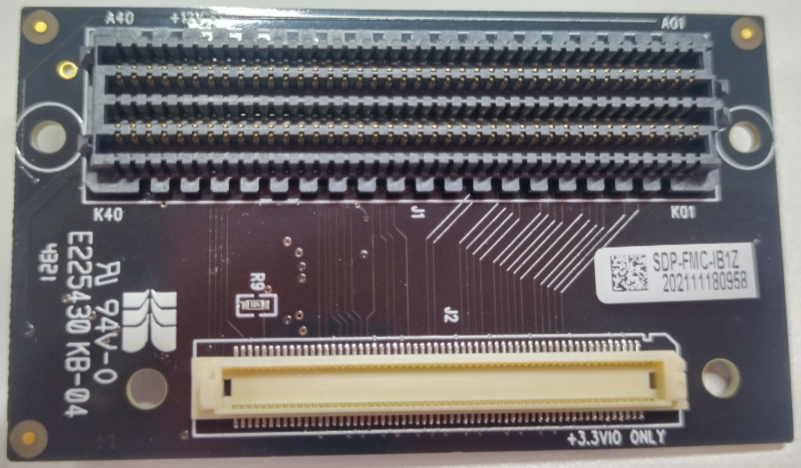
FMC Interposer Board: EVAL-SDP-CK1Z (FMC-I-SDP)
Required to connect the SDP-format EVAL-ADAQ7980-SDZ to the Zedboard’s FMC connector
An FPGA carrier platform. Our recommended platform can be found here.
The Zedboard is the officially supported platform for this evaluation board.
The evaluation board connects via the FMC connector using the FMC-I-SDP interposer.
Some way to interact with the FPGA platform:
For the Zedboard (ARM/FPGA SoC platform), this normally includes:
USB cable for UART communication (required)
JTAG connection via USB (required for programming)
Signal source for analog input:
Function generator or signal source with SMA output
SMA cable for connecting signal source to evaluation board
Alternatively, test signal can be generated from precision voltage source
Internet connection to download HDL and no-OS source code and build tools (firewalls are OK, proxies may require additional configuration).
Software prerequisites
For basic functionality and data visualization, you will need:
HDL Build Tools
To build the HDL reference design, you need:
AMD Xilinx Vivado Design Suite (version specified in the HDL Release Notes)
Make (GNU Make for building the HDL project)
Git (for cloning the HDL repository)
See the HDL User Guide for detailed tool installation and build instructions.
No-OS Build Tools
To build the no-OS software, you need:
ARM cross-compiler toolchain (e.g., arm-none-eabi-gcc)
Make (GNU Make for building the no-OS project)
Git (for cloning the no-OS repository)
See No-OS Build Guide for detailed setup instructions.
Optional Software
For enhanced evaluation and data analysis:
Serial terminal application (e.g., PuTTY, Tera Term, minicom) for UART communication - required for viewing console output and ADC data
Note
Analog Devices does not offer FPGA carrier platforms for sale or loan; obtaining one yourself is the normal part of development or evaluation.
Recommended Reading
Before starting, it’s recommended to review:
ADAQ7980 Datasheet - for device specifications and features
EVAL-ADAQ7980 User Guide - for evaluation board details
ADI Reference Designs HDL User Guide - for understanding the HDL framework
no-OS documentation - for no-OS driver and project structure
Getting Started Checklist
Before proceeding to the quickstart guide, ensure you have:
[ ] EVAL-ADAQ7980-SDZ evaluation board
[ ] Zedboard FPGA development board
[ ] USB cable for UART and JTAG connection
[ ] FMC-I-SDP interposer board
[ ] Signal source with SMA cable
[ ] AMD Xilinx Vivado installed (for HDL builds and FPGA programming)
[ ] ARM cross-compiler installed (for no-OS builds)
[ ] Git installed for cloning repositories
[ ] Internet connection for downloading source code
[ ] Serial terminal software (PuTTY, Tera Term, etc.)
Next Steps
Once you have all the prerequisites ready, proceed to:
Quickstart - for step-by-step setup instructions