Quickstart
The Quick Start Guide provides a simple step by step instruction on how to do an initial system setup for the EVAL-ADAQ7980-SDZ board on the ZedBoard FPGA development board. It will discuss how to program the bitstream and run a no-OS program.
Supported carriers
The carrier we support is:
ZedBoard on FMC connector
Supported Environments
The supported environments are:
Board |
HDL |
Linux Software |
No-OS Software |
|---|---|---|---|
Yes |
No |
Yes |
Hardware Setup
The EVAL-ADAQ7980-SDZ board connects to the ZedBoard FMC connector. The carrier setup requires power, UART (115200 baud), and JTAG connections for no-OS development.
A typical setup is shown below.
ZedBoard + EVAL-ADAQ7980-SDZ
The EVAL-ADAQ7980-SDZ connects to the ZedBoard via the FMC LPC (Low Pin Count) connector using an FMC-I-SDP interposer board. The interposer provides the physical and electrical connection between the SDP-format ADAQ7980 board and the ZedBoard’s FMC connector.
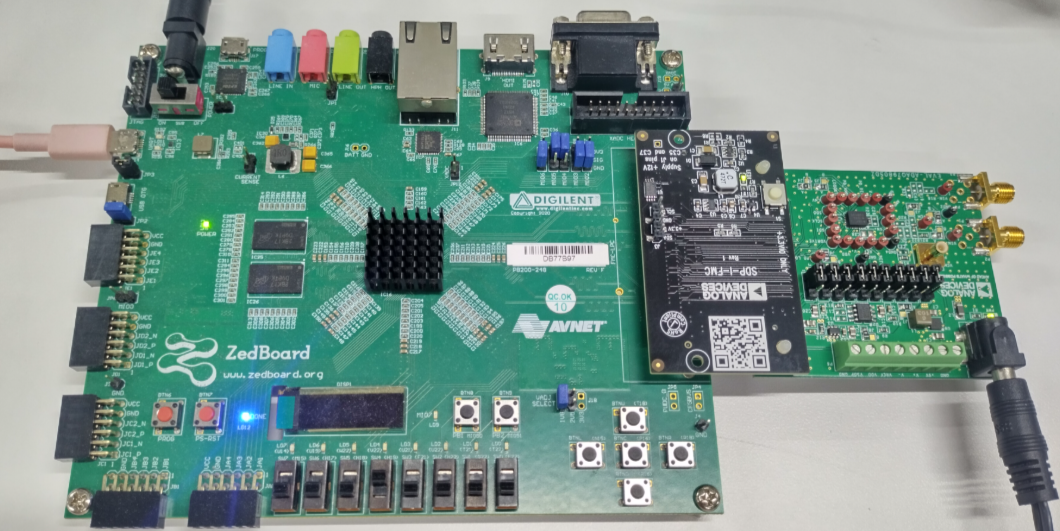
Connection Steps:
Power off the ZedBoard
Connect the FMC-I-SDP interposer to the ZedBoard’s FMC LPC connector
Connect the EVAL-ADAQ7980-SDZ to the FMC-I-SDP interposer
Ensure all connections are fully seated and properly aligned
Secure with standoffs if provided
Connect USB cable from ZedBoard to host PC (for UART and JTAG)
Connect signal source to the SMA input on EVAL-ADAQ7980-SDZ
Power on the ZedBoard
Required Connections:
FMC connector: Between ZedBoard and EVAL-ADAQ7980-SDZ
USB UART: ZedBoard to host PC (115200 baud, 8N1)
USB JTAG: ZedBoard to host PC (for programming)
Power: 12V DC power supply to ZedBoard
Signal: SMA cable from signal source to EVAL-ADAQ7980-SDZ input
Jumper Settings:
Ensure ZedBoard boot mode jumpers are set for JTAG boot (for no-OS)
All EVAL-ADAQ7980-SDZ jumpers should be in default positions
Next Steps
Proceed to the ZedBoard quickstart guide for detailed build and programming instructions.