ZED Quickstart
This guide provides quick instructions on how to setup the AD-FMCOMMS2-EBZ or AD-FMCOMMS3-EBZ or AD-FMCOMMS4-EBZ on:
ZedBoard FMC LPC
Using Linux as software
Necessary files
Note
The SD card includes several folders in the root directory of the BOOT partition. In order to configure the SD card to work with a specific FPGA board and ADI hardware, several files must be copied onto the root directory. Using the host PC, drag and drop the required files onto the BOOT partition, and use the EJECT function when removing the SD card from the reader.
The following files are needed for the system to boot:
HDL boot image:
BOOT.BINLinux Kernel image:
uImageLinux device tree:
devicetree.dtb
They can either be taken from the SD card – already generated by us, or you can build them manually:
Instructions on how to choose the boot files from the SD card can be found in the Platform-Specific Manual Steps section from here: Hardware Configuration.
Instructions on how to manually build the boot files from source can be found here:
Build Zynq Linux kernel and devicetree (the only difference compared to the ZynqMP is that instead of running
make adi_zynqmp_defconfig, you must runmake zynq_xcomm_adv7511_defconfig)FMCOMMS2/3/4 HDL Project build documentation. More HDL build details at Build an HDL project.
Important
Some projects provide multiple devicetree files in the SD card’s boot folders. Make sure you select the devicetree that matches your specific use case.
Required Software
SD Card 16GB imaged with Kuiper (check out that guide on how to do it, then come back to this section)
A UART terminal (Putty/Tera Term/Minicom, etc.) with baud rate 115200 (8N1)
Required Hardware
AMD Xilinx ZedBoard FPGA board and its power supply (12V)
AD-FMCOMMS2-EBZ / AD-FMCOMMS3-EBZ / AD-FMCOMMS4-EBZ FMC evaluation board
2x SMA cable orAntenna
Micro-USB cable (UART)
LAN cable (Ethernet)
(Optional) USB keyboard & mouse and a HDMI compatible monitor (Full HD only)
More details as to why you need these can be found at Prerequisites for AD9361/AD9364 based boards.
Testing
Creating the setup
AD-FMCOMMS2-EBZ/ZED
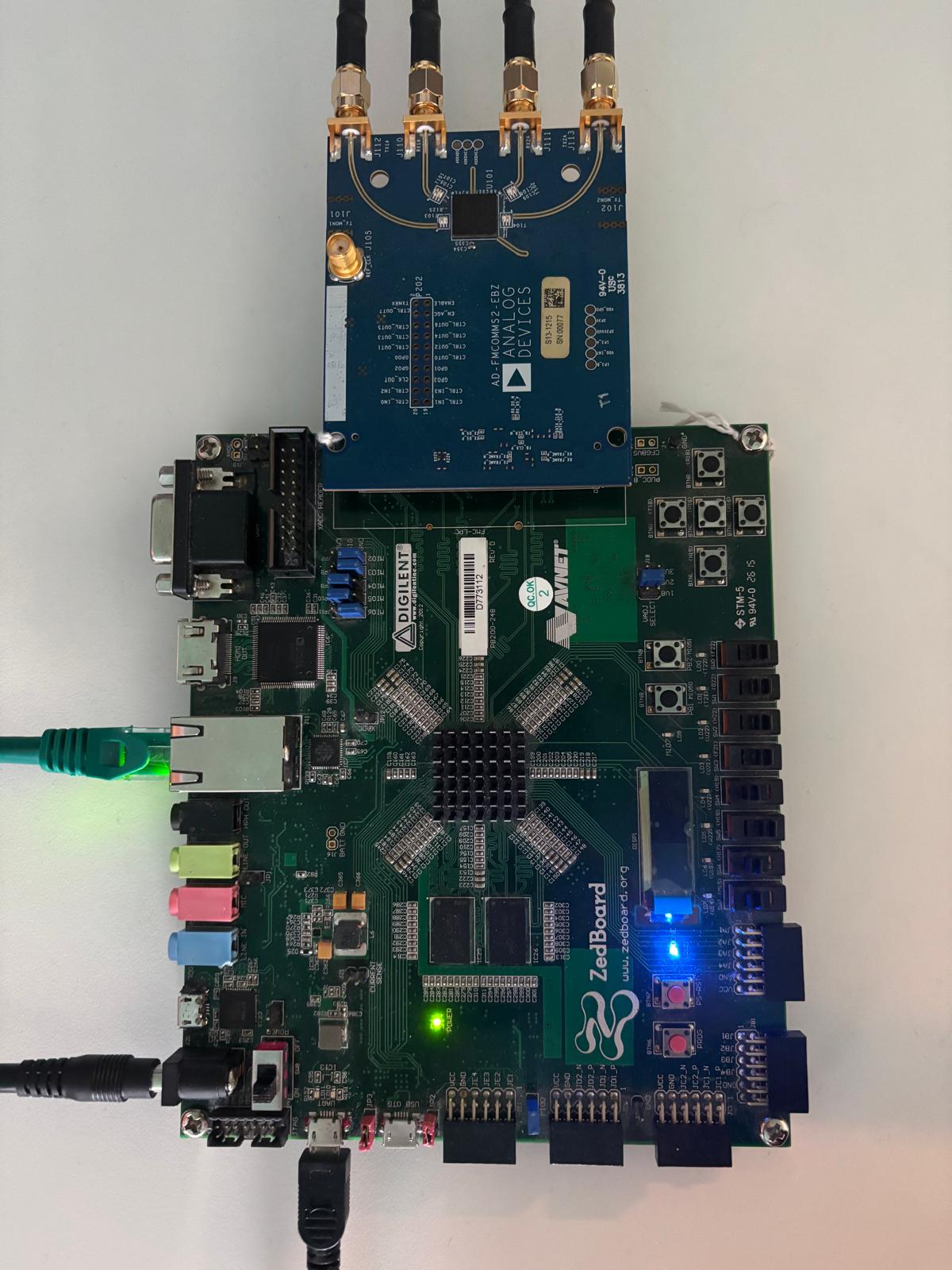
In the following example, we will make a physical loopback between the ADC and the DAC channels on the evaluation board, using SMA cables.
Follow the steps in this order, to avoid damaging the components:
Get the ZedBoard
Configure ZedBoard for SD BOOT:

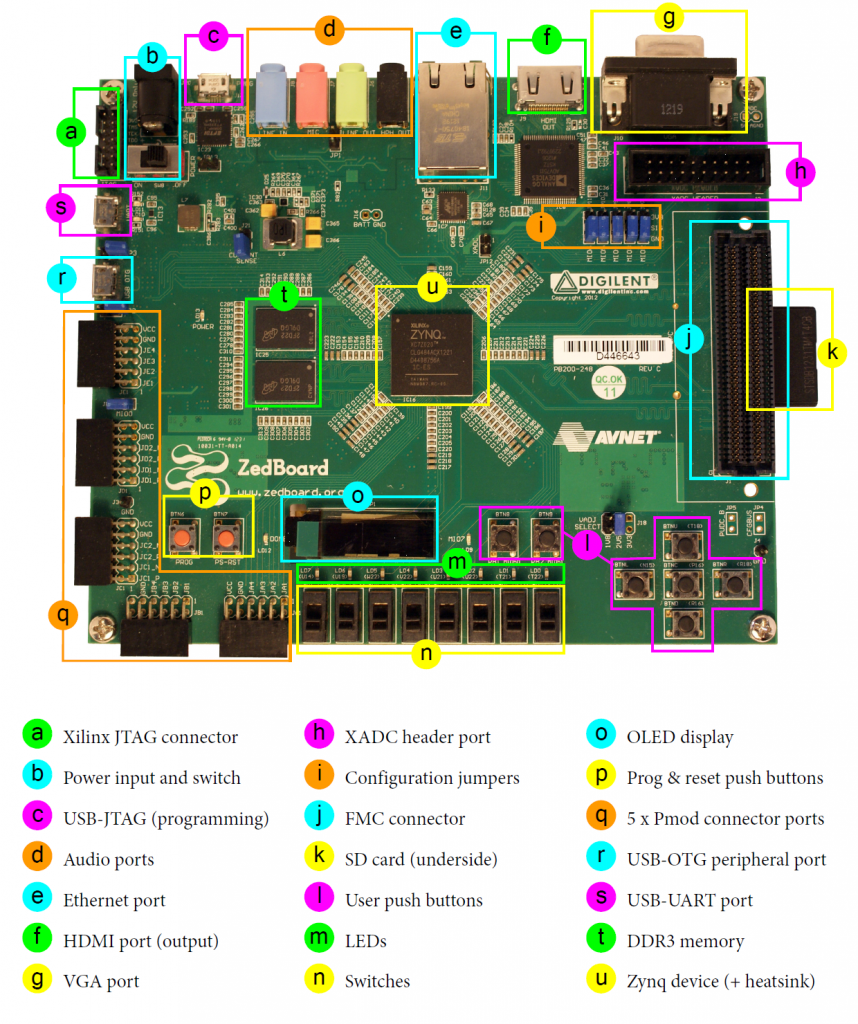
The BOOT switches (JP7-JP11) and the MIO0 jumper (JP6) must be set for SD-card boot mode. VADJ must be set to 2.5V, as specified in the HDL project’s README at FMCOMMS2/3/4 HDL Project. Optionally, to use USB peripheral devices with the ZedBoard, install jumpers JP2 and JP3.
Insert the SD card into the SD Card Interface Connector (J12)
Connect your signal generator to the analog inputs of the evaluation board using the appropriate jumper wires or SMB connectors.
Plug the AD-FMCOMMS2-EBZ into the FMC LPC Connector (J1)
Plug the Power Supply into 12V Power input connector (J20) (DO NOT turn the device on).
Plug-in an Ethernet cable from your router/switch to the Ethernet port on the FPGA board
Connect the UART port of ZedBoard (J14) to a PC via MicroUSB
Turn on the power switch on the FPGA board
Observe Kernel and serial console output messages on your terminal
You can also connect a monitor, keyboard and mouse directly to the board for a local connection. The UART connection is still recommended for debugging purposes. For the local connection, follow these additional steps:
Plug your HDMI display device into the HDMI Video Connector (J9).
Plug your USB mouse/keyboard into the USB OTG Micro-B Connector (J13). You will have to use a USB hub to connect both mouse and keyboard. Some keyboards have a mouse or touch pad sharing the same USB connection or wireless dongle. This can be used to eliminate the use of a USB hub.
Wait another ~30 seconds for the HDMI display device to start showing signs of life.
Note
The USB OTG circuit requires specific jumper settings for Host mode. Ensure the following jumper settings on the ZedBoard (these are the defaults; verify them if USB is not working):
JP2 → Short (enables 5V output to USB OTG connector)
JP3 → Short (Host mode)
Boot messages
The following is what is printed in the serial console, after you have connected to the proper ttyUSB or COM port:
U-Boot 2018.01-21442-gf06dec3cab (Oct 17 2024 - 08:59:33 +0300), Build: jenkins-development-build_uboot-35

Model: Zynq Zerandom: crng init done
systemd[1]: Initializing machine ID from random generator.
systemd[1]: /lib/systemd/system/plymouth-start.service:16: Unit configured to use KillMode=none. This is unsafe, as it disables systemd's process lifecycle management for the service. Please update your service to use a safer KillMode=, such as 'mixed' or 'control-group'. Support for KillMode=none is deprecated and will eventually be removed.
systemd[1]: Queued start job for default target Graphical Interface.
systemd[1]: system-getty.slice: unit configures an IP firewall, but the local system does not support BPF/cgroup firewalling.
systemd[1]: (This warning is only shown for the first unit using IP firewalling.)
systemd[1]: Created slice system-getty.slice.
[  OK  ] Created slice system-getty.slice.
systemd[1]: Created slice system-modprobe.slice.
[  OK  ] Created slice system-modprobe.slice.
systemd[1]: Created slice system-serial\x2dgetty.slice.
[  OK  ] Created slice system-serial\x2dgetty.slice.
systemd[1]: Created slice system-systemd\x2dfsck.slice.
[  OK  ] Created slice system-systemd\x2dfsck.slice.
systemd[1]: Created slice User and Session Slice.
[  OK  ] Created slice User and Session Slice.
systemd[1]: Started Forward Password Requests to Wall Directory Watch.
[  OK  ] Started Forward Password R…uests to Wall Directory Watch.
systemd[1]: Condition check resulted in Arbitrary Executable File Formats File System Automount Point being skipped.
systemd[1]: Reached target Slices.
[  OK  ] Reached target Slices.
systemd[1]: Reached target Swap.
[  OK  ] Reached target Swap.
systemd[1]: Listening on Syslog Socket.
[  OK  ] Listening on Syslog Socket.
systemd[1]: Listening on fsck to fsckd communication Socket.
[  OK  ] Listening on fsck to fsckd communication Socket.
systemd[1]: Listening on initctl Compatibility Named Pipe.
[  OK  ] Listening on initctl Compatibility Named Pipe.
systemd[1]: Condition check resulted in Journal Audit Socket being skipped.
systemd[1]: Listening on Journal Socket (/dev/log).
[  OK  ] Listening on Journal Socket (/dev/log).
systemd[1]: Listening on Journal Socket.
[  OK  ] Listening on Journal Socket.
systemd[1]: Listening on udev Control Socket.
[  OK  ] Listening on udev Control Socket.
systemd[1]: Listening on udev Kernel Socket.
[  OK  ] Listening on udev Kernel Socket.
systemd[1]: Condition check resulted in Huge Pages File System being skipped.
systemd[1]: Condition check resulted in POSIX Message Queue File System being skipped.
systemd[1]: Mounting RPC Pipe File System...
         Mounting RPC Pipe File System...
systemd[1]: Mounting Kernel Debug File System...
         Mounting Kernel Debug File System...
systemd[1]: Condition check resulted in Kernel Trace File System being skipped.
systemd[1]: Condition check resulted in Kernel Module supporting RPCSEC_GSS being skipped.
systemd[1]: Starting Restore / save the current clock...
         Starting Restore / save the current clock...
systemd[1]: Starting Set the console keyboard layout...
         Starting Set the console keyboard layout...
systemd[1]: Condition check resulted in Create list of static device nodes for the current kernel being skipped.
systemd[1]: Starting Load Kernel Module configfs...
         Starting Load Kernel Module configfs...
systemd[1]: Starting Load Kernel Module drm...
         Starting Load Kernel Module drm...
systemd[1]: Starting Load Kernel Module fuse...
         Starting Load Kernel Module fuse...
systemd[1]: Condition check resulted in Set Up Additional Binary Formats being skipped.
systemd[1]: Condition check resulted in File System Check on Root Device being skipped.
systemd[1]: Starting Journal Service...
         Starting Journal Service...
systemd[1]: Starting Load Kernel Modules...
         Starting Load Kernel Modules...
systemd[1]: Starting Remount Root and Kernel File Systems...
         Starting Remount Root and Kernel File Systems...
systemd[1]: Starting Coldplug All udev Devices...
         Starting Coldplug All udev Devices...
systemd[1]: Mounted RPC Pipe File System.
[  OK  ] Mounted RPC Pipe File System.
systemd[1]: Mounted Kernel Debug File System.
[  OK  ] Mounted Kernel Debug File System.
systemd[1]: Finished Restore / save the current clock.
[  OK  ] Finished Restore / save the current clock.
systemd[1]: modprobe@configfs.service: Succeeded.
systemd[1]: Finished Load Kernel Module configfs.
[  OK  ] Finished Load Kernel Module configfs.
systemd[1]: modprobe@drm.service: Succeeded.
systemd[1]: Finished Load Kernel Module drm.
[  OK  ] Finished Load Kernel Module drm.
systemd[1]: modprobe@fuse.service: Succeeded.
systemd[1]: Finished Load Kernel Module fuse.
[  OK  ] Finished Load Kernel Module fuse.
systemd[1]: systemd-modules-load.service: Main process exited, code=exited, status=1/FAILURE
systemd[1]: systemd-modules-load.service: Failed with result 'exit-code'.
systemd[1]: Failed to start Load Kernel Modules.
[FAILED] Failed to start Load Kernel Modules.
See 'systemctl status systemd-modules-load.service' for details.
systemd[1]: Finished Set the console keyboard layout.
[  OK  ] Finished Set the console keyboard layout.
systemd[1]: Started Journal Service.
[  OK  ] Started Journal Service.
         Mounting FUSE Control File System...
         Mounting Kernel Configuration File System...
         Starting Apply Kernel Variables...
[  OK  ] Mounted FUSE Control File System.
EXT4-fs (mmcblk0p2): re-mounted. Quota mode: disabled.
[  OK  ] Finished Remount Root and Kernel File Systems.
[  OK  ] Mounted Kernel Configuration File System.
[  OK  ] Finished Apply Kernel Variables.
         Starting Flush Journal to Persistent Storage...
         Starting Load/Save Random Seed...
         Starting Create System Users...
[  OK  ] Finished Coldplug All udev Devices.
[  OK  ] Finished Load/Save Random Seed.
         Starting Helper to synchronize boot up for ifupdown...
         Starting Wait for udev To …plete Device Initialization...
[  OK  ] Finished Flush Journal to Persistent Storage.
[  OK  ] Finished Helper to synchronize boot up for ifupdown.
[  OK  ] Finished Create System Users.
         Starting Create Static Device Nodes in /dev...
[  OK  ] Finished Create Static Device Nodes in /dev.
[  OK  ] Reached target Local File Systems (Pre).
         Starting Rule-based Manage…for Device Events and Files...
[  OK  ] Started Rule-based Manager for Device Events and Files.
         Starting Show Plymouth Boot Screen...
[  OK  ] Started Show Plymouth Boot Screen.
[  OK  ] Started Forward Password R…s to Plymouth Directory Watch.
[  OK  ] Reached target Local Encrypted Volumes.
[  OK  ] Found device /dev/ttyPS0.
[  OK  ] Found device /dev/disk/by-partuuid/a22286d2-01.
[  OK  ] Finished Wait for udev To Complete Device Initialization.
         Starting File System Check…isk/by-partuuid/a22286d2-01...
         Starting Load Kernel Modules...
[  OK  ] Started File System Check Daemon to report status.
[FAILED] Failed to start Load Kernel Modules.
See 'systemctl status systemd-modules-load.service' for details.
[  OK  ] Finished File System Check…/disk/by-partuuid/a22286d2-01.
         Mounting /boot...
[  OK  ] Mounted /boot.
[  OK  ] Reached target Local File Systems.
         Starting Set console font and keymap...
         Starting Raise network interfaces...
         Starting Preprocess NFS configuration...
         Starting Tell Plymouth To Write Out Runtime Data...
         Starting Create Volatile Files and Directories...
[  OK  ] Finished Set console font and keymap.
[  OK  ] Finished Tell Plymouth To Write Out Runtime Data.
[  OK  ] Finished Preprocess NFS configuration.
[  OK  ] Reached target NFS client services.
[  OK  ] Reached target Remote File Systems (Pre).
[  OK  ] Reached target Remote File Systems.
[  OK  ] Finished Create Volatile Files and Directories.
         Starting Network Time Synchronization...
         Starting Update UTMP about System Boot/Shutdown...
[  OK  ] Finished Update UTMP about System Boot/Shutdown.
         Starting Load Kernel Modules...
[  OK  ] Started Network Time Synchronization.
[  OK  ] Finished Raise network interfaces.
[  OK  ] Reached target System Time Set.
[  OK  ] Reached target System Time Synchronized.
[FAILED] Failed to start Load Kernel Modules.
See 'systemctl status systemd-modules-load.service' for details.
[  OK  ] Reached target System Initialization.
[  OK  ] Started CUPS Scheduler.
[  OK  ] Started Daily apt download activities.
[  OK  ] Started Daily apt upgrade and clean activities.
[  OK  ] Started Periodic ext4 Onli…ata Check for All Filesystems.
[  OK  ] Started Discard unused blocks once a week.
[  OK  ] Started Daily rotation of log files.
[  OK  ] Started Daily man-db regeneration.
[  OK  ] Started Daily Cleanup of Temporary Directories.
[  OK  ] Reached target Paths.
[  OK  ] Reached target Timers.
[  OK  ] Listening on Avahi mDNS/DNS-SD Stack Activation Socket.
[  OK  ] Listening on CUPS Scheduler.
[  OK  ] Listening on D-Bus System Message Bus Socket.
[  OK  ] Listening on Erlang Port Mapper Daemon Activation Socket.
[  OK  ] Listening on GPS (Global P…ioning System) Daemon Sockets.
[  OK  ] Listening on triggerhappy.socket.
[  OK  ] Reached target Sockets.
[  OK  ] Reached target Basic System.
         Starting Analog Devices power up/down sequence...
         Starting Save/Restore Sound Card State...
         Starting Avahi mDNS/DNS-SD Stack...
[  OK  ] Started Regular background program processing daemon.
[  OK  ] Started D-Bus System Message Bus.
         Starting dphys-swapfile - …unt, and delete a swap file...
         Starting Remove Stale Onli…t4 Metadata Check Snapshots...
         Starting LSB: Resize the r…ilesystem to fill partition...
[  OK  ] Started fan-control.
         Starting Fix DP audio and X11 for Jupiter...
         Starting Creating IIOD Context Attributes......
         Starting Authorization Manager...
         Starting DHCP Client Daemon...
         Starting LSB: Switch to on…nless shift key is pressed)...
         Starting Regenerate SSH host keys...
         Starting LSB: rng-tools (Debian variant)...
         Starting System Logging Service...
         Starting User Login Management...
         Starting triggerhappy global hotkey daemon...
         Starting Disk Manager...
         Starting WPA supplicant...
[  OK  ] Started System Logging Service.
[  OK  ] Started triggerhappy global hotkey daemon.
[  OK  ] Finished Save/Restore Sound Card State.
[  OK  ] Reached target Sound Card.
[  OK  ] Finished Fix DP audio and X11 for Jupiter.
[  OK  ] Started DHCP Client Daemon.
[  OK  ] Started User Login Management.
[  OK  ] Started Avahi mDNS/DNS-SD Stack.
[  OK  ] Started LSB: Switch to ond…(unless shift key is pressed).
[  OK  ] Started LSB: rng-tools (Debian variant).
[  OK  ] Started Authorization Manager.
         Starting Modem Manager...
[  OK  ] Started WPA supplicant.
[  OK  ] Reached target Network.
[  OK  ] Reached target Network is Online.
         Starting CUPS Scheduler...
[  OK  ] Started Erlang Port Mapper Daemon.
         Starting HTTP based time synchronization tool...
         Starting Internet superserver...
         Starting /etc/rc.local Compatibility...
         Starting Permit User Sessions...
[  OK  ] Started Unattended Upgrades Shutdown.
[  OK  ] Started Internet superserver.
[  OK  ] Finished dphys-swapfile - …mount, and delete a swap file.
[  OK  ] Finished Permit User Sessions.
         Starting Light Display Manager...
[  OK  ] Started /etc/rc.local Compatibility.
[  OK  ] Started HTTP based time synchronization tool.
         Starting Hold until boot process finishes up...
[  OK  ] Finished Creating IIOD Context Attributes....
[  OK  ] Started IIO Daemon.
[  OK  ] Started CUPS Scheduler.
[  OK  ] Started Make remote CUPS printers available locally.
[  OK  ] Finished Analog Devices power up/down sequence.
[FAILED] Failed to start VNC Server for X11.

Raspbian GNU/Linux 11 analog ttyPS0

analog login: root (automatic login)

Linux analog 6.1.70-284114-g2e8908932dfd #1060 SMP PREEMPT Tue Mar 18 16:11:24 EET 2025 armv7l

The programs included with the Debian GNU/Linux system are free software;
the exact distribution terms for each program are described in the
individual files in /usr/share/doc/*/copyright.

Debian GNU/Linux comes with ABSOLUTELY NO WARRANTY, to the extent
permitted by applicable law.
root@analog:~#
Useful commands for the serial terminal
The below commands are to be run in the serial terminal connected to the FPGA.
Login Information
user: analog password: analog
To find out the IP of the FPGA board, run the following command and take the IP specified at “eth0 inet”:
~$
ifconfig
To see the IIO devices detected, run:
~$
iio_info | grep iio:device
iio:device0: ad7291
iio:device1: ad9361-phy
iio:device2: xadc
iio:device3: cf-ad9361-dds-core-lpc (buffer capable)
iio:device4: cf-ad9361-lpc (buffer capable
To power off the system, run the following command, and wait for the final message to be printed, then power off the FPGA board from the switch as well.
~$
poweroff
To reboot the system, run:
~$
reboot
Important
Even though this is Linux, this is a persistent file system. Care should
be taken not to corrupt the file system – please shut down things, don’t
just turn off the power switch. Depending on your monitor, the standard
power off could be hiding. You can do this from the terminal as well with
sudo shutdown -h now or the above-mentioned command for powering
off.