KCU105 Quickstart
This guide provides some quick instructions on how to setup the AD-FMCDAQ3-EBZ on:
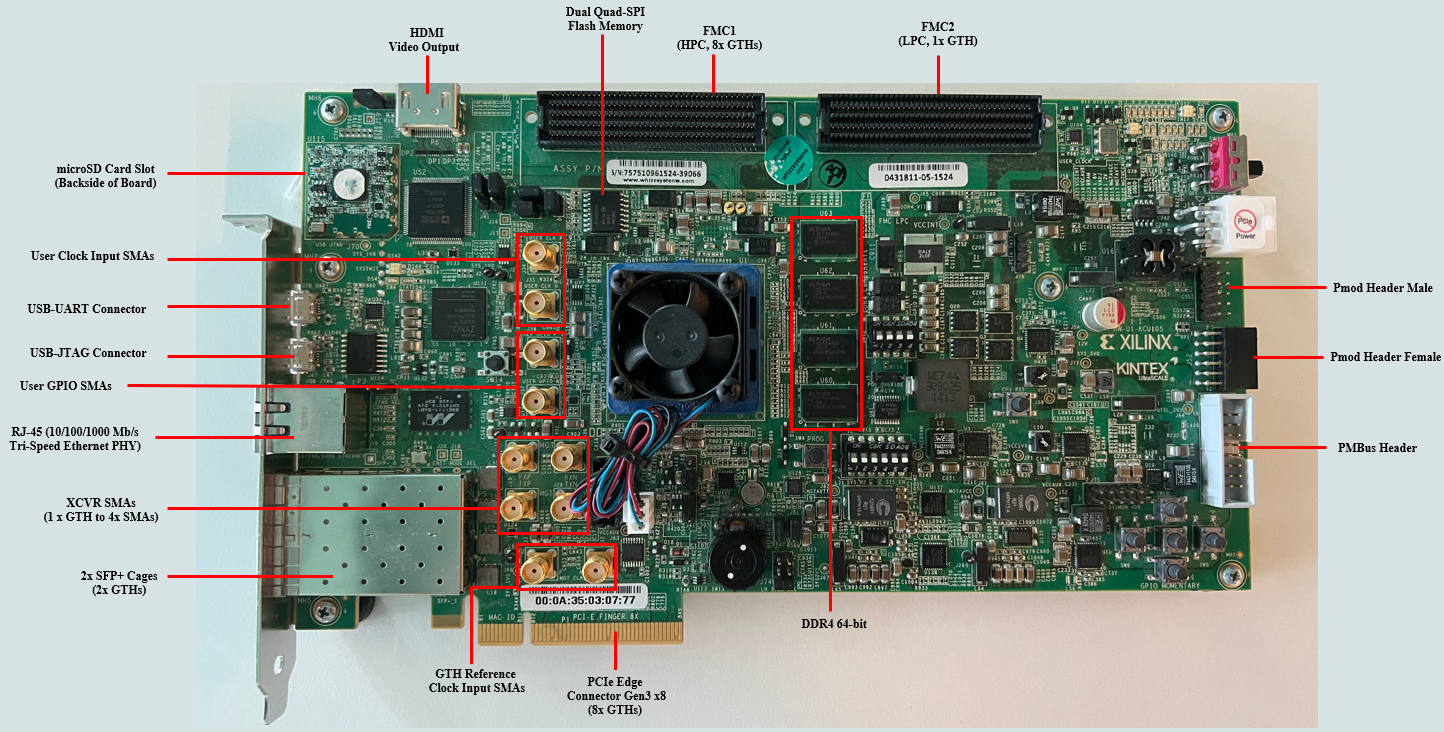
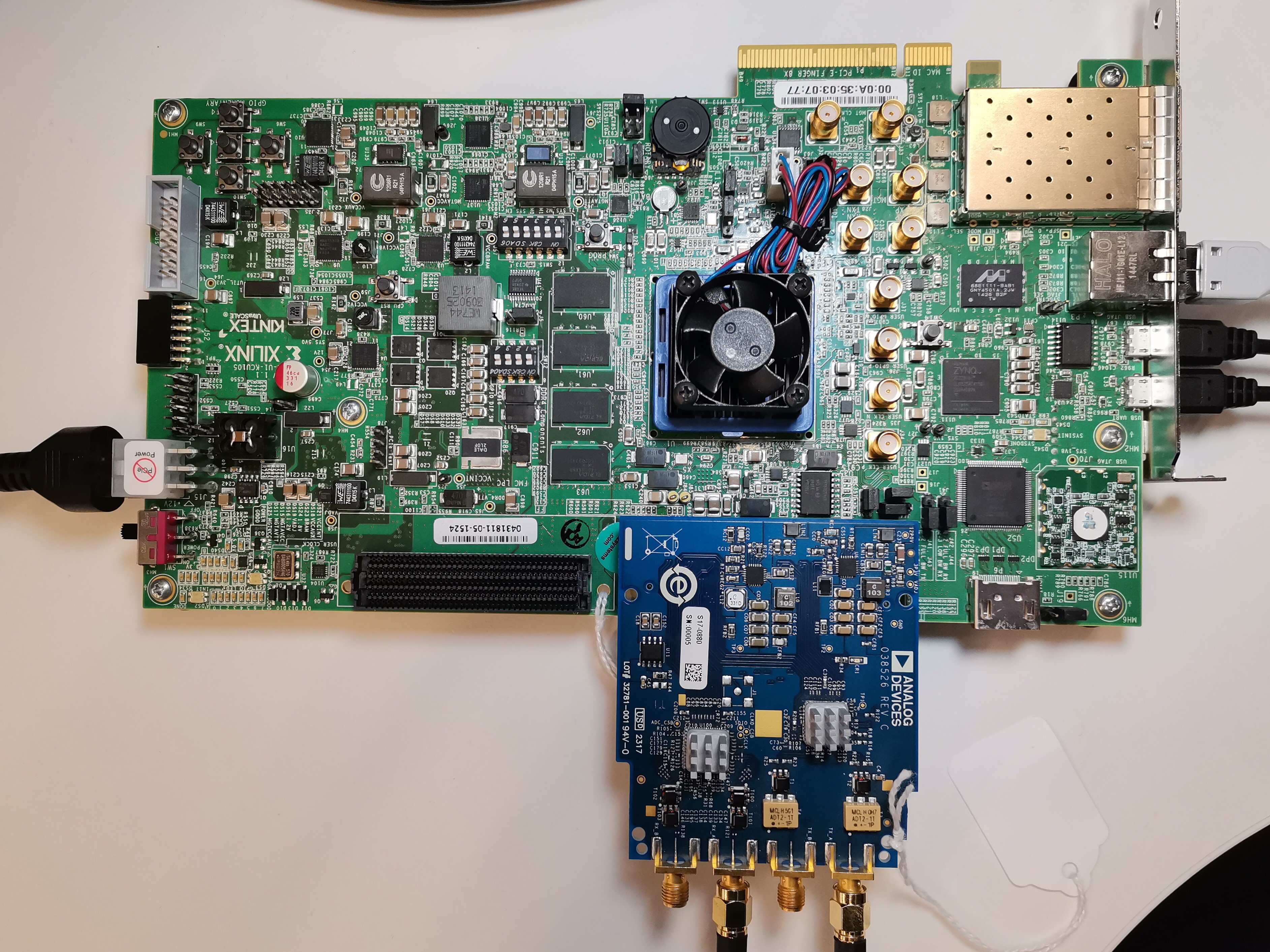
KCU105 on FMC HPC (J22) port
All the products described on this page include ESD (electrostatic discharge) sensitive devices. Electrostatic charges as high as 4000V readily accumulate on the human body or test equipment and can discharge without detection. Although the boards feature ESD protection circuitry, permanent damage may occur on devices subjected to high-energy electrostatic discharges. Therefore, proper ESD precautions are recommended to avoid performance degradation or loss of functionality. This includes removing static charge on external equipment, cables, or antennas before connecting to the device.
Using Linux as software
Necessary files
The following files are needed for the system to boot:
HDL boot image:
system_top.bitLinux simple image:
simpleImage.kcu105_fmcdaq3Programming script:
run.tclInstructions on how to choose the boot files from the SD card can be found in the Platform-Specific Manual Steps section from here: Hardware Configuration.
Instructions on how to manually build the boot files from source can be found here:
DAQ3 HDL Project build documentation. More HDL build details at Build an HDL project.
Required software
AMD Xilinx Vivado and Vitis (downloading Vitis from here will include Vivado as well) - AMD Xilinx Software Command-Line Tool (XSCT)
A UART terminal (Putty/Tera Term/Minicom, etc.) with baud rate 115200 (8N1)
Required hardware
AMD Xilinx KCU105 Rev 1.0 FPGA board or later and its power supply
AD-FMCDAQ3-EBZ FMC evaluation board
Micro-USB cable (UART)
LAN cable (Ethernet)
(Optional) 2x SMA cable for analog signal loopback
Note
- Pre-built images and loading instructions can be found at
Testing
Creating the setup
Caution
This project was tested with VADJ = 1.8 V
In the following example, we will make a physical loopback between the ADC and the DAC channels on the evaluation board, using SMA cables.
Follow the steps in this order, to avoid damaging the components:
Get the - KCU105 board
Connect the AD-FMCDAQ3-EBZ FMC board to the FPGA carrier, on the FMC1 HPC socket (J22)
Connect USB UART J4 (Micro USB) to your host PC
Connect USB JTAG J87 (Micro USB) to your host PC
Configure the KCU105 for JTAG boot: set pin 6 of SW15 to 0 and pin 5 to 0 (refer to the UG917 - KCU105 Board User Guide, FPGA Configuration section)
Plug the Power Supply into the 12V Power input connector (J15)
Turn on the power switch on the FPGA board
All the products described on this page include ESD (electrostatic discharge) sensitive devices. Electrostatic charges as high as 4000V readily accumulate on the human body or test equipment and can discharge without detection. Although the boards feature ESD protection circuitry, permanent damage may occur on devices subjected to high-energy electrostatic discharges. Therefore, proper ESD precautions are recommended to avoid performance degradation or loss of functionality. This includes removing static charge on external equipment, cables, or antennas before connecting to the device.
Programming the FPGA
There are two ways of loading the design. One is using the XCST command line, and the second method is to run the tcl script which takes care of loading the bit file and the Linux image.
If no target is shown, then check the following:
Check if your cable is connected to JTAG and is a data cable and not just a power-giving cable
Cable drivers are installed. On Windows, run
C:\Xilinx\Vivado\<version>\data\xicom\cable_drivers\nt64\install_drivers.cmdas Administrator
1. Loading the design using XSCT command line
In Windows, run the XSCT terminal as Administrator from start menu → AMD Xilinx Design Tools → AMD Xilinx Software Command Line Tool → Run as Administrator.
Boot messages
xsct% cd /to/path/where/you/have/the/files

xsct% connect
tcfchan#0
xsct% fpga -f system_top.bit
100%   10MB   1.7MB/s  00:06

xsct% targets
  1  xcku040
     2  MicroBlaze Debug Module at USER2
        3  MicroBlaze #0 (Running)
     4  Legacy Debug Hub
xsct% target 3
xsct% targets
  1  xcku040
     2  MicroBlaze Debug Module at USER2
        3* MicroBlaze #0 (Running)
     4  Legacy Debug Hub

xsct% dow simpleImage.kcu105_fmcdaq3.strip
Downloading Program -- /media/data/bcapota/workspace/working_dir/simpleImage.kcu105_fmcdaq3.strip
  section, .text: 0x80000000 - 0x80837907
  section, __fdt_blob: 0x80837908 - 0x80847907
  section, .rodata: 0x80848000 - 0x80ed2ef7
  section, .pci_fixup: 0x80ed2ef8 - 0x80ed5477
  section, .builtin_fw: 0x80ed5478 - 0x80ed551f
  section, __ksymtab: 0x80ed5520 - 0x80ee1603
  section, __ksymtab_gpl: 0x80ee1604 - 0x80eed183
  section, __ksymtab_strings: 0x80eed184 - 0x80f12848
  section, __param: 0x80f1284c - 0x80f131e7
  section, __modver: 0x80f131e8 - 0x80f13277
  section, __ex_table: 0x80f13280 - 0x80f1479f
  section, .notes: 0x80f147a0 - 0x80f147f3
  section, .sdata2: 0x80f15000 - 0x80f14fff
  section, .data: 0x80f15000 - 0x80fc36df
  section, .data..percpu: 0x80fc4000 - 0x80fc3fff
  section, .init.text: 0x80fc4000 - 0x80ff437b
  section, .init.data: 0x80ff437c - 0x80ff763f
  section, .init.ivt: 0x80ff7640 - 0x80ff7667
  section, .init.setup: 0x80ff7668 - 0x80ff7bd7
  section, .initcall.init: 0x80ff7bd8 - 0x80ff81ff
  section, .con_initcall.init: 0x80ff8200 - 0x80ff8207
  section, .bss: 0x80ff9000 - 0x810296e7
  section, .init.ramfs: 0x8112a000 - 0x8160c30b
100%   20MB   0.2MB/s  01:38
Setting PC to Program Start Address 0x80000000
Successfully downloaded /media/data/bcapota/workspace/working_dir/simpleImage.kcu105_fmcdaq3.strip
xsct% Info: MicroBlaze #0 (target 3) Stopped at 0x0 (Stop)

xsct% con
Info: MicroBlaze #0 (target 3) Running

xsct% disconnect
xsct% Info: tcfchan#0 closed
2. Loading the design using tcl script
Run Vivado TCL Shell from Windows start menu → AMD Xilinx Design Suite → Vivado → Vivado TCL Shell. (In Linux, source the settings.sh file first)
Boot messages
****** Vivado v2023.2 (64-bit)
**** SW Build 4029153 on Fri Oct 13 20:13:54 MDT 2023
**** IP Build 4028589 on Sat Oct 14 00:45:43 MDT 2023
**** SharedData Build 4025554 on Tue Oct 10 17:18:54 MDT 2023
  ** Copyright 1986-2022 Xilinx, Inc. All Rights Reserved.
  ** Copyright 2022-2023 Advanced Micro Devices, Inc. All Rights Reserved.

Vivado% cd /to/path/where/you/have/the/file
Vivado% xsct run.tcl

****** Xilinx hw_server v2023.2
**** Build date : Sep 25 2023 at 02:23:13
** Copyright 1986-2022 Xilinx, Inc. All Rights Reserved.
** Copyright 2022-2023 Advanced Micro Devices, Inc. All Rights Reserved.
INFO: hw_server application started
INFO: Use Ctrl-C to exit hw_server application
INFO: To connect to this hw_server instance use url: TCP:127.0.0.1:3121
Vivado%
Note
In case of using older releases of VIVADO xsct run.tcl command is replaced by xmd -tcl run.tcl
Remote IIO Oscilloscope
Plug your ethernet cable into the RJ45 ethernet connector(J21)
Observe kernel and serial console messages on your UART terminal. You will see two COM ports in application. Choose the COM port that says Welcome to Buildroot and asks for a buildroot login (user) and then a password user:root password:analog
Ramdisk addr 0x00000000,
Compiled-in FDT at 0x80837908
earlycon: uartlite_a0 at MMIO 0x40600000 (options '115200n8')
printk: legacy bootconsole [uartlite_a0] enabled
cma: Reserved 512 MiB at 0x8fc00000 on node -1
Linux version 6.12.0-g864af9db11c1 (vsts@pkrvm6wozh0us80) (microblazeel-xilinx-elf-gcc (crosstool-NG 1.26.0) 13.2.0, GNU ld (crosstool-NG 1.26.0) 2.40) #12 Thu Aug 28 10:13:03 UTC 2025
setup_memory: max_mapnr: 0x7ffff
setup_memory: min_low_pfn: 0x80000
setup_memory: max_low_pfn: 0xb0000
setup_memory: max_pfn: 0xfffff
Zone ranges:
  DMA      [mem 0x0000000080000000-0x00000000afffffff]
  Normal   empty
  HighMem  [mem 0x00000000b0000000-0x00000000ffffefff]
Movable zone start for each node
Early memory node ranges
  node   0: [mem 0x0000000080000000-0x00000000ffffefff]
Initmem setup node 0 [mem 0x0000000080000000-0x00000000ffffefff]
setup_cpuinfo: initialising
setup_cpuinfo: Using full CPU PVR support
wt_msr_noirq
pcpu-alloc: s0 r0 d32768 u32768 alloc=1*32768
pcpu-alloc: [0] 0
Kernel command line: earlycon
Dentry cache hash table entries: 32768 (order: 5, 131072 bytes, linear)
Inode-cache hash table entries: 16384 (order: 4, 65536 bytes, linear)
Built 1 zonelists, mobility grouping on.  Total pages: 524287
mem auto-init: stack:all(zero), heap alloc:off, heap free:off
SLUB: HWalign=32, Order=0-3, MinObjects=0, CPUs=1, Nodes=1
NR_IRQS: 64, nr_irqs: 64, preallocated irqs: 0
irq-xilinx: mismatch in kind-of-intr param
irq-xilinx: /amba_pl/interrupt-controller@41200000: num_irq=16, edge=0xffff05f0
/amba_pl/timer@41c00000: irq=1
clocksource: xilinx_clocksource: mask: 0xffffffff max_cycles: 0xffffffff, max_idle_ns: 19112604467 ns
xilinx_timer_shutdown
xilinx_timer_set_periodic
sched_clock: 32 bits at 100MHz, resolution 10ns, wraps every 21474836475ns
Console: colour dummy device 80x25
printk: legacy console [tty0] enabled
printk: legacy bootconsole [uartlite_a0] disabled
Ramdisk addr 0x00000000,
Compiled-in FDT at 0x80837908
earlycon: uartlite_a0 at MMIO 0x40600000 (options '115200n8')
printk: legacy bootconsole [uartlite_a0] enabled
cma: Reserved 512 MiB at 0x8fc00000 on node -1
Linux version 6.12.0-g864af9db11c1 (vsts@pkrvm6wozh0us80) (microblazeel-xilinx-elf-gcc (crosstool-NG 1.26.0) 13.2.0, GNU ld (crosstool-NG 1.26.0) 2.40) #12 Thu Aug 28 10:13:03 UTC 2025
setup_memory: max_mapnr: 0x7ffff
setup_memory: min_low_pfn: 0x80000
setup_memory: max_low_pfn: 0xb0000
setup_memory: max_pfn: 0xfffff
Zone ranges:
  DMA      [mem 0x0000000080000000-0x00000000afffffff]
  Normal   empty
  HighMem  [mem 0x00000000b0000000-0x00000000ffffefff]
Movable zone start for each node
Early memory node ranges
  node   0: [mem 0x0000000080000000-0x00000000ffffefff]
Initmem setup node 0 [mem 0x0000000080000000-0x00000000ffffefff]
setup_cpuinfo: initialising
setup_cpuinfo: Using full CPU PVR support
wt_msr_noirq
pcpu-alloc: s0 r0 d32768 u32768 alloc=1*32768
pcpu-alloc: [0] 0
Kernel command line: earlycon
Dentry cache hash table entries: 32768 (order: 5, 131072 bytes, linear)
Inode-cache hash table entries: 16384 (order: 4, 65536 bytes, linear)
Built 1 zonelists, mobility grouping on.  Total pages: 524287
mem auto-init: stack:all(zero), heap alloc:off, heap free:off
SLUB: HWalign=32, Order=0-3, MinObjects=0, CPUs=1, Nodes=1
NR_IRQS: 64, nr_irqs: 64, preallocated irqs: 0
irq-xilinx: mismatch in kind-of-intr param
irq-xilinx: /amba_pl/interrupt-controller@41200000: num_irq=16, edge=0xffff05f0
/amba_pl/timer@41c00000: irq=1
clocksource: xilinx_clocksource: mask: 0xffffffff max_cycles: 0xffffffff, max_idle_ns: 19112604467 ns
xilinx_timer_shutdown
xilinx_timer_set_periodic
sched_clock: 32 bits at 100MHz, resolution 10ns, wraps every 21474836475ns
Console: colour dummy device 80x25
printk: legacy console [tty0] enabled
printk: legacy bootconsole [uartlite_a0] disabled
Calibrating delay loop... 49.35 BogoMIPS (lpj=246784)
pid_max: default: 32768 minimum: 301
Mount-cache hash table entries: 1024 (order: 0, 4096 bytes, linear)
Mountpoint-cache hash table entries: 1024 (order: 0, 4096 bytes, linear)
Memory: 1533396K/2097148K available (8414K kernel code, 697K rwdata, 6964K rodata, 208K init, 193K bss, 38988K reserved, 524288K cma-reserved, 1310716K highmem)
devtmpfs: initialized
clocksource: jiffies: mask: 0xffffffff max_cycles: 0xffffffff, max_idle_ns: 19112604462750000 ns
futex hash table entries: 256 (order: -1, 3072 bytes, linear)
NET: Registered PF_NETLINK/PF_ROUTE protocol family
DMA: preallocated 256 KiB GFP_KERNEL pool for atomic allocations
DMA: preallocated 256 KiB GFP_KERNEL|GFP_DMA pool for atomic allocations
pps_core: LinuxPPS API ver. 1 registered
pps_core: Software ver. 5.3.6 - Copyright 2005-2007 Rodolfo Giometti <giometti@linux.it>
PTP clock support registered
jesd204: created con: id=0, topo=1, link=0, /amba_pl/spi@44a70000/ad9528@0 <-> /amba_pl/axi-ad9152-adxcvr@44a60000
jesd204: created con: id=1, topo=1, link=0, /amba_pl/axi-ad9152-adxcvr@44a60000 <-> /amba_pl/axi-jesd204-tx@44a90000
jesd204: created con: id=2, topo=0, link=0, /amba_pl/axi-ad9680-adxcvr@44a50000 <-> /amba_pl/axi-jesd204-rx@44aa0000
jesd204: created con: id=3, topo=1, link=0, /amba_pl/axi-jesd204-tx@44a90000 <-> /amba_pl/axi-ad9152-hpc@44a04000
jesd204: created con: id=4, topo=0, link=0, /amba_pl/axi-jesd204-rx@44aa0000 <-> /amba_pl/axi-ad9680-hpc@44a10000
jesd204: created con: id=5, topo=0, link=0, /amba_pl/axi-ad9680-hpc@44a10000 <-> /amba_pl/spi@44a70000/ad9680@2
jesd204: created con: id=6, topo=1, link=0, /amba_pl/axi-ad9152-hpc@44a04000 <-> /amba_pl/spi@44a70000/ad9152@1
jesd204: /amba_pl/spi@44a70000/ad9680@2: JESD204[0:0] transition uninitialized -> initialized
jesd204: /amba_pl/spi@44a70000/ad9152@1: JESD204[1:0] transition uninitialized -> initialized
jesd204: found 9 devices and 2 topologies
vgaarb: loaded
clocksource: Switched to clocksource xilinx_clocksource
NET: Registered PF_INET protocol family
IP idents hash table entries: 4096 (order: 3, 32768 bytes, linear)
tcp_listen_portaddr_hash hash table entries: 1024 (order: 0, 4096 bytes, linear)
Table-perturb hash table entries: 65536 (order: 6, 262144 bytes, linear)
TCP established hash table entries: 2048 (order: 1, 8192 bytes, linear)
TCP bind hash table entries: 2048 (order: 2, 16384 bytes, linear)
TCP: Hash tables configured (established 2048 bind 2048)
UDP hash table entries: 256 (order: 0, 4096 bytes, linear)
UDP-Lite hash table entries: 256 (order: 0, 4096 bytes, linear)
NET: Registered PF_UNIX/PF_LOCAL protocol family
RPC: Registered named UNIX socket transport module.
RPC: Registered udp transport module.
RPC: Registered tcp transport module.
RPC: Registered tcp-with-tls transport module.
RPC: Registered tcp NFSv4.1 backchannel transport module.
PCI: CLS 0 bytes, default 32
workingset: timestamp_bits=30 max_order=19 bucket_order=0
Key type cifs.idmap registered
jffs2: version 2.2. (NAND) (SUMMARY)  © 2001-2006 Red Hat, Inc.
romfs: ROMFS MTD (C) 2007 Red Hat, Inc.
bounce: pool size: 64 pages
io scheduler mq-deadline registered
io scheduler kyber registered
Serial: 8250/16550 driver, 4 ports, IRQ sharing disabled
40600000.serial: ttyUL0 at MMIO 0x40600000 (irq = 4, base_baud = 0) is a uartlite
printk: legacy console [ttyUL0] enabled
uartlite 41400000.serial: error -EINVAL: could not read current-speed
uartlite 41400000.serial: probe with driver uartlite failed with error -22
brd: module loaded
xilinx_axienet 40e00000.ethernet: missing/invalid xlnx,addrwidth property, using default
i2c_dev: i2c /dev entries driver
pca954x 0-0075: supply vdd not found, using dummy regulator
i2c i2c-0: Added multiplexed i2c bus 1
at24 2-0050: supply vcc not found, using dummy regulator
at24 2-0050: 256 byte 24c02 EEPROM, writable, 1 bytes/write
i2c i2c-0: Added multiplexed i2c bus 2
i2c i2c-0: Added multiplexed i2c bus 3
i2c i2c-0: Added multiplexed i2c bus 4
pca954x 0-0075: registered 4 multiplexed busses for I2C mux pca9544
ad9528 spi0.0: supply vcc not found, using dummy regulator
jesd204: /amba_pl/spi@44a70000/ad9528@0,jesd204:0,parent=spi0.0: Using as SYSREF provider
axi_adxcvr_drv 44a50000.axi-ad9680-adxcvr: AXI-ADXCVR-RX (17.05.a) using CPLL on GTH3. Number of lanes: 4.
axi_adxcvr_drv 44a60000.axi-ad9152-adxcvr: AXI-ADXCVR-TX (17.05.a) using QPLL on GTH3. Number of lanes: 4.
axi-jesd204-rx 44aa0000.axi-jesd204-rx: AXI-JESD204-RX (1.07.a). Encoder 8b10b, width 4/4, lanes 4, jesd204-fsm.
axi-jesd204-tx 44a90000.axi-jesd204-tx: AXI-JESD204-TX (1.06.a). Encoder 8b10b, width 4/4, lanes 4, jesd204-fsm.
axi_sysid 45000000.axi-sysid-0: AXI System ID core version (1.01.a) found
axi_sysid 45000000.axi-sysid-0: [daq3] [RX:M=2 L=4 S=1 TX:M=2 L=4 S=1 ADC_OFFLOAD:TYPE=0 SIZE=524288 DAC_OFFLOAD:TYPE=0 SIZE=524288] on [kcu105] git branch <main> git <442ab0b2108743693b106422149d5c4988de2f4f> clean [2026-03-04 13:02:39] UTC
Initializing XFRM netlink socket
NET: Registered PF_INET6 protocol family
Segment Routing with IPv6
In-situ OAM (IOAM) with IPv6
sit: IPv6, IPv4 and MPLS over IPv4 tunneling driver
NET: Registered PF_PACKET protocol family
NET: Registered PF_KEY protocol family
Key type dns_resolver registered
Key type encrypted registered
ad9208 spi0.2: ad9680 PLL LOCKED
ad9208 spi0.2: ad9680 Rev. 4 Grade 12 (API 1.0.1) probed
jesd204: /amba_pl/spi@44a70000/ad9152@1,jesd204:1,parent=spi0.1: JESD204[1:0] transition initialized -> probed
jesd204: /amba_pl/spi@44a70000/ad9152@1,jesd204:1,parent=spi0.1: JESD204[1:0] transition probed -> initialized
jesd204: /amba_pl/spi@44a70000/ad9152@1,jesd204:1,parent=spi0.1: JESD204[1:0] transition initialized -> probed
jesd204: /amba_pl/spi@44a70000/ad9152@1,jesd204:1,parent=spi0.1: JESD204[1:0] transition probed -> idle
jesd204: /amba_pl/spi@44a70000/ad9152@1,jesd204:1,parent=spi0.1: JESD204[1:0] transition idle -> device_init
jesd204: /amba_pl/spi@44a70000/ad9152@1,jesd204:1,parent=spi0.1: JESD204[1:0] transition device_init -> link_init
jesd204: /amba_pl/spi@44a70000/ad9152@1,jesd204:1,parent=spi0.1: JESD204[1:0] transition link_init -> link_supported
jesd204: /amba_pl/spi@44a70000/ad9152@1,jesd204:1,parent=spi0.1: JESD204[1:0] transition link_supported -> link_pre_setup
jesd204: /amba_pl/spi@44a70000/ad9152@1,jesd204:1,parent=spi0.1: JESD204[1:0] transition link_pre_setup -> clk_sync_stage1
jesd204: /amba_pl/spi@44a70000/ad9152@1,jesd204:1,parent=spi0.1: JESD204[1:0] transition clk_sync_stage1 -> clk_sync_stage2
jesd204: /amba_pl/spi@44a70000/ad9152@1,jesd204:1,parent=spi0.1: JESD204[1:0] transition clk_sync_stage2 -> clk_sync_stage3
jesd204: /amba_pl/spi@44a70000/ad9152@1,jesd204:1,parent=spi0.1: JESD204[1:0] transition clk_sync_stage3 -> link_setup
jesd204: /amba_pl/spi@44a70000/ad9152@1,jesd204:1,parent=spi0.1: JESD204[1:0] transition link_setup -> opt_setup_stage1
jesd204: /amba_pl/spi@44a70000/ad9152@1,jesd204:1,parent=spi0.1: JESD204[1:0] transition opt_setup_stage1 -> opt_setup_stage2
jesd204: /amba_pl/spi@44a70000/ad9152@1,jesd204:1,parent=spi0.1: JESD204[1:0] transition opt_setup_stage2 -> opt_setup_stage3
jesd204: /amba_pl/spi@44a70000/ad9152@1,jesd204:1,parent=spi0.1: JESD204[1:0] transition opt_setup_stage3 -> opt_setup_stage4
jesd204: /amba_pl/spi@44a70000/ad9152@1,jesd204:1,parent=spi0.1: JESD204[1:0] transition opt_setup_stage4 -> opt_setup_stage5
jesd204: /amba_pl/spi@44a70000/ad9152@1,jesd204:1,parent=spi0.1: JESD204[1:0] transition opt_setup_stage5 -> clocks_enable
jesd204: /amba_pl/spi@44a70000/ad9152@1,jesd204:1,parent=spi0.1: JESD204[1:0] transition clocks_enable -> link_enable
ad9144 spi0.1: Link0 code grp sync: f
ad9144 spi0.1: Link0 frame sync stat: f
ad9144 spi0.1: Link0 good checksum stat: f
ad9144 spi0.1: Link0 init lane_sync stat: f
ad9144 spi0.1: Link0 4 lanes @ 12333333 kBps
jesd204: /amba_pl/spi@44a70000/ad9152@1,jesd204:1,parent=spi0.1: JESD204[1:0] transition link_enable -> link_running
jesd204: /amba_pl/spi@44a70000/ad9152@1,jesd204:1,parent=spi0.1: JESD204[1:0] transition link_running -> opt_post_running_stage
cf_axi_dds 44a04000.axi-ad9152-hpc: Analog Devices CF_AXI_DDS_DDS MASTER (9.02.b) at 0x44A04000 mapped to 0x(ptrval), probed DDS (null)
jesd204: /amba_pl/spi@44a70000/ad9680@2,jesd204:2,parent=spi0.2: JESD204[0:0] transition initialized -> probed
jesd204: /amba_pl/spi@44a70000/ad9680@2,jesd204:2,parent=spi0.2: JESD204[0:0] transition probed -> initialized
jesd204: /amba_pl/spi@44a70000/ad9680@2,jesd204:2,parent=spi0.2: JESD204[0:0] transition initialized -> probed
jesd204: /amba_pl/spi@44a70000/ad9680@2,jesd204:2,parent=spi0.2: JESD204[0:0] transition probed -> idle
jesd204: /amba_pl/spi@44a70000/ad9680@2,jesd204:2,parent=spi0.2: JESD204[0:0] transition idle -> device_init
jesd204: /amba_pl/spi@44a70000/ad9680@2,jesd204:2,parent=spi0.2: JESD204[0:0] transition device_init -> link_init
jesd204: /amba_pl/spi@44a70000/ad9680@2,jesd204:2,parent=spi0.2: JESD204[0:0] transition link_init -> link_supported
jesd204: /amba_pl/spi@44a70000/ad9680@2,jesd204:2,parent=spi0.2: JESD204[0:0] transition link_supported -> link_pre_setup
jesd204: /amba_pl/spi@44a70000/ad9680@2,jesd204:2,parent=spi0.2: JESD204[0:0] transition link_pre_setup -> clk_sync_stage1
jesd204: /amba_pl/spi@44a70000/ad9680@2,jesd204:2,parent=spi0.2: JESD204[0:0] transition clk_sync_stage1 -> clk_sync_stage2
jesd204: /amba_pl/spi@44a70000/ad9680@2,jesd204:2,parent=spi0.2: JESD204[0:0] transition clk_sync_stage2 -> clk_sync_stage3
jesd204: /amba_pl/spi@44a70000/ad9680@2,jesd204:2,parent=spi0.2: JESD204[0:0] transition clk_sync_stage3 -> link_setup
jesd204: /amba_pl/spi@44a70000/ad9680@2,jesd204:2,parent=spi0.2: JESD204[0:0] transition link_setup -> opt_setup_stage1
jesd204: /amba_pl/spi@44a70000/ad9680@2,jesd204:2,parent=spi0.2: JESD204[0:0] transition opt_setup_stage1 -> opt_setup_stage2
jesd204: /amba_pl/spi@44a70000/ad9680@2,jesd204:2,parent=spi0.2: JESD204[0:0] transition opt_setup_stage2 -> opt_setup_stage3
jesd204: /amba_pl/spi@44a70000/ad9680@2,jesd204:2,parent=spi0.2: JESD204[0:0] transition opt_setup_stage3 -> opt_setup_stage4
jesd204: /amba_pl/spi@44a70000/ad9680@2,jesd204:2,parent=spi0.2: JESD204[0:0] transition opt_setup_stage4 -> opt_setup_stage5
jesd204: /amba_pl/spi@44a70000/ad9680@2,jesd204:2,parent=spi0.2: JESD204[0:0] transition opt_setup_stage5 -> clocks_enable
jesd204: /amba_pl/spi@44a70000/ad9680@2,jesd204:2,parent=spi0.2: JESD204[0:0] transition clocks_enable -> link_enable
jesd204: /amba_pl/spi@44a70000/ad9680@2,jesd204:2,parent=spi0.2: JESD204[0:0] transition link_enable -> link_running
jesd204: /amba_pl/spi@44a70000/ad9680@2,jesd204:2,parent=spi0.2: JESD204[0:0] transition link_running -> opt_post_running_stage
cf_axi_adc 44a10000.axi-ad9680-hpc: ADI AIM (10.03.) probed ADC AD9680 as MASTER
clk: Disabling unused clocks
Freeing unused kernel image (initmem) memory: 208K
This architecture does not have kernel memory protection.
Run /init as init process
  with arguments:
    /init
  with environment:
    HOME=/
    TERM=linux
Starting syslogd: OK
Starting klogd: OK
Running sysctl: OK
Saving 256 bits of non-creditable seed for next boot
Starting network: udhcpc: started, v1.36.1
xilinx_axienet 40e00000.ethernet eth0: PHY [axienet-40e00000:07] driver [Marvell 88E1111] (irq=POLL)
xilinx_axienet 40e00000.ethernet eth0: configuring for phy/sgmii link mode
random: crng init done
udhcpc: broadcasting discover
xilinx_axienet 40e00000.ethernet eth0: Link is Up - 1Gbps/Full - flow control off
udhcpc: broadcasting discover
udhcpc: broadcasting discover
udhcpc: broadcasting select for 10.48.65.219, server 10.48.65.20
udhcpc: lease of 10.48.65.219 obtained from 10.48.65.20, lease time 21600
deleting routers
adding dns 10.32.51.110
adding dns 10.64.53.110
Starting dropbear sshd: OK
Starting IIO Server Daemon

Welcome to Buildroot
buildroot login: root
Password:
#
Run the ifconfig command on your UART terminal and get your board IP
# ifconfig
eth0 Link encap:Ethernet HWaddr 00:0A:35:00:00:01
     inet addr:your_board_ip  Bcast:   Mask:255.255.255.0
     inet6 addr: fe80::20a:35ff:fe00:1/64 Scope:Link
     UP BROADCAST RUNNING MULTICAST  MTU:1500  Metric:1
     RX packets:126 errors:0 dropped:12 overruns:0 frame:0
     TX packets:11 errors:0 dropped:1 overruns:0 carrier:0
     collisions:0 txqueuelen:1000
     RX bytes:14741 (14.3 KiB)  TX bytes:1682 (1.6 KiB)
Check the available IIO devices (the following should be present):
# iio_info | grep iio:device
iio:device0: ad7291
iio:device1: ad9528
iio:device2: axi-ad9152-hpc (buffer capable)
iio:device3: axi-ad9680-hpc (buffer capable)
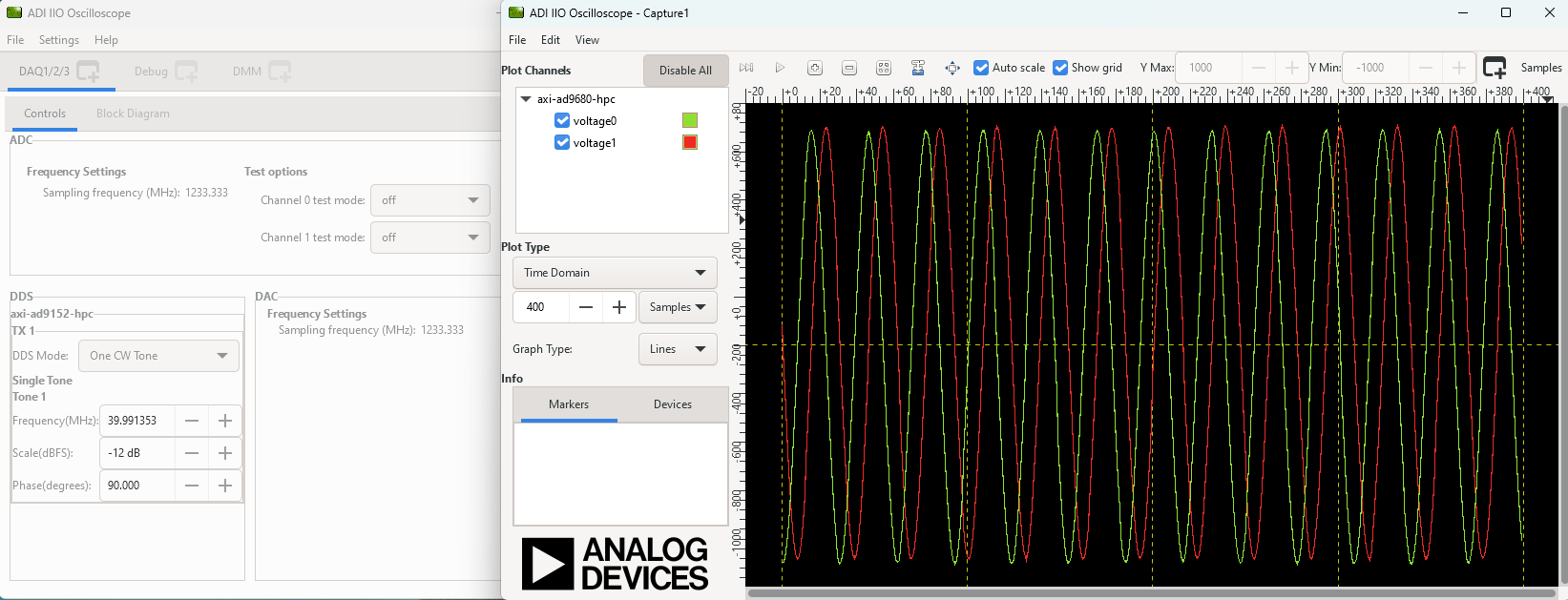
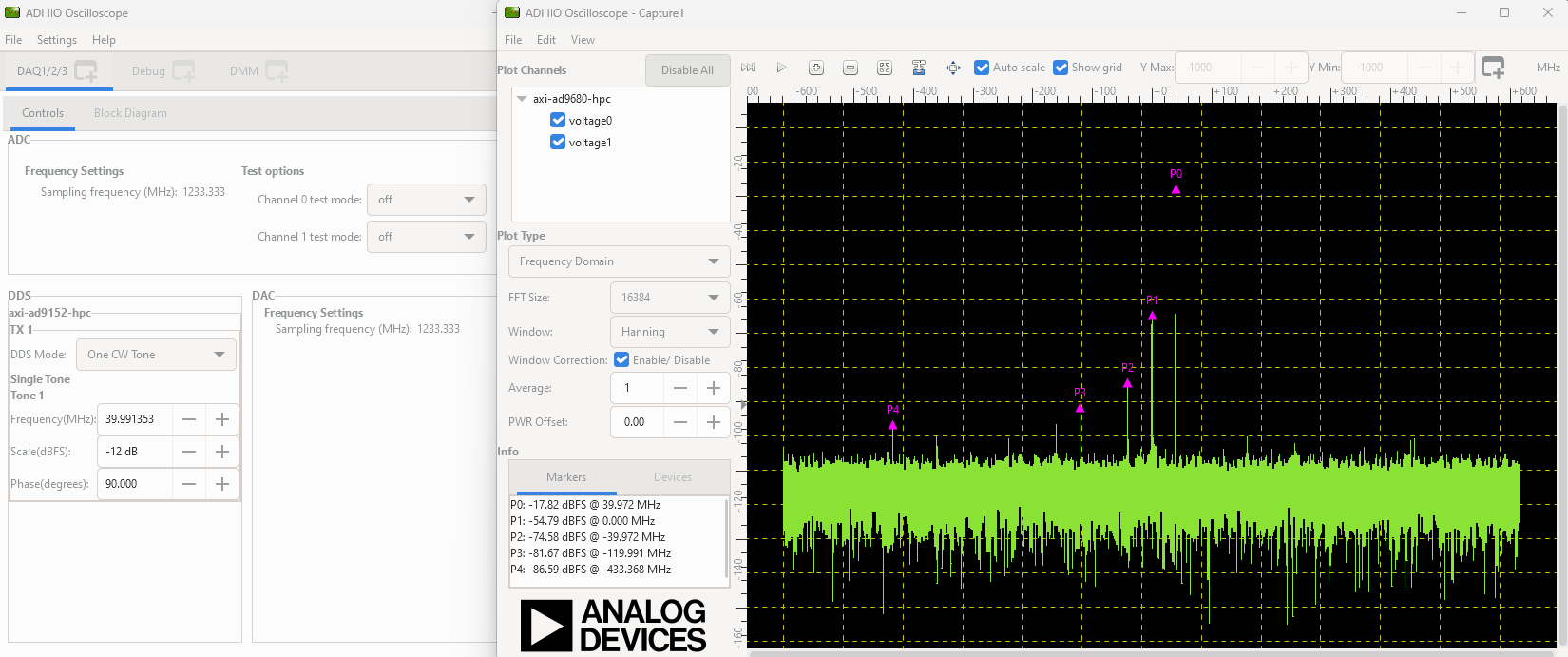
Open IIO Scope application and type ip:board_ip in the URI tab
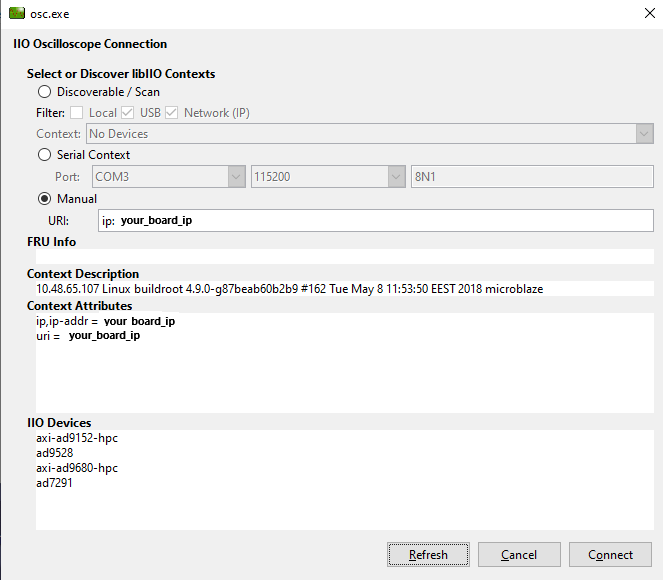
You should see two screens: