ZedBoard Quick Start
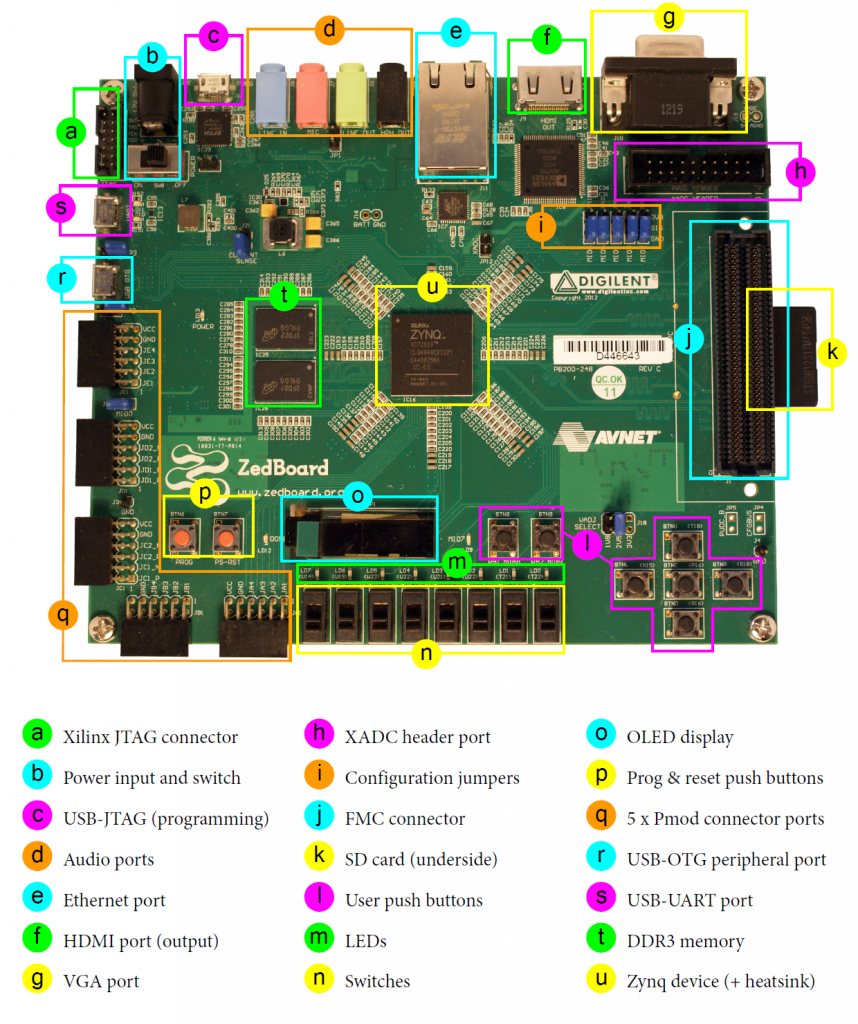
All the products described on this page include ESD (electrostatic discharge) sensitive devices. Electrostatic charges as high as 4000V readily accumulate on the human body or test equipment and can discharge without detection. Although the boards feature ESD protection circuitry, permanent damage may occur on devices subjected to high-energy electrostatic discharges. Therefore, proper ESD precautions are recommended to avoid performance degradation or loss of functionality. This includes removing static charge on external equipment, cables, or antennas before connecting to the device.
This guide provides step-by-step instructions for setting up the LTC2378-20 evaluation board on the ZedBoard using Kuiper Linux.
Important
Although this guide only focuses on LTC2378-20 with the ZedBoard, the setup applies to all other supported devices as they share the same FMC connector and pin-compatible interface.
Using Linux as software
Necessary files
The ZedBoard boots Kuiper Linux from a microSD card. The SD card must contain a boot partition with the following files:
BOOT.BIN- combines the FSBL, U-Boot, and FPGA bitstream built from projects/ltc2378_fmc/zeduImage- Linux kernel imagedevicetree.dtb- device tree for ZedBoard + LTC2378 FMC
Note
Pre-built Kuiper Linux SD card images with the LTC2378 FMC support are available from the Kuiper page. If you want to build the files yourself, refer to the Build an HDL project guide.
Required software
On the host PC:
A UART terminal (e.g. PuTTY, Tera Term, or Minicom) at 115200 baud (8N1)
IIO Oscilloscope for data capture and visualization
Required hardware
ZedBoard and its 12V power supply
LTC2378-20 FMC evaluation board
microSD card
Micro-USB cable for UART
Ethernet cable connected to your local network
Signal source for the analog input
More details on hardware requirements are at Prerequisites.
Testing
Creating the setup
Follow the steps below in order to avoid damaging the components:
Write the Kuiper Linux image to the microSD card on the host PC
Insert the microSD card into the ZedBoard SD card slot
Insert the LTC2378-20 FMC evaluation board into the FMC slot on the ZedBoard
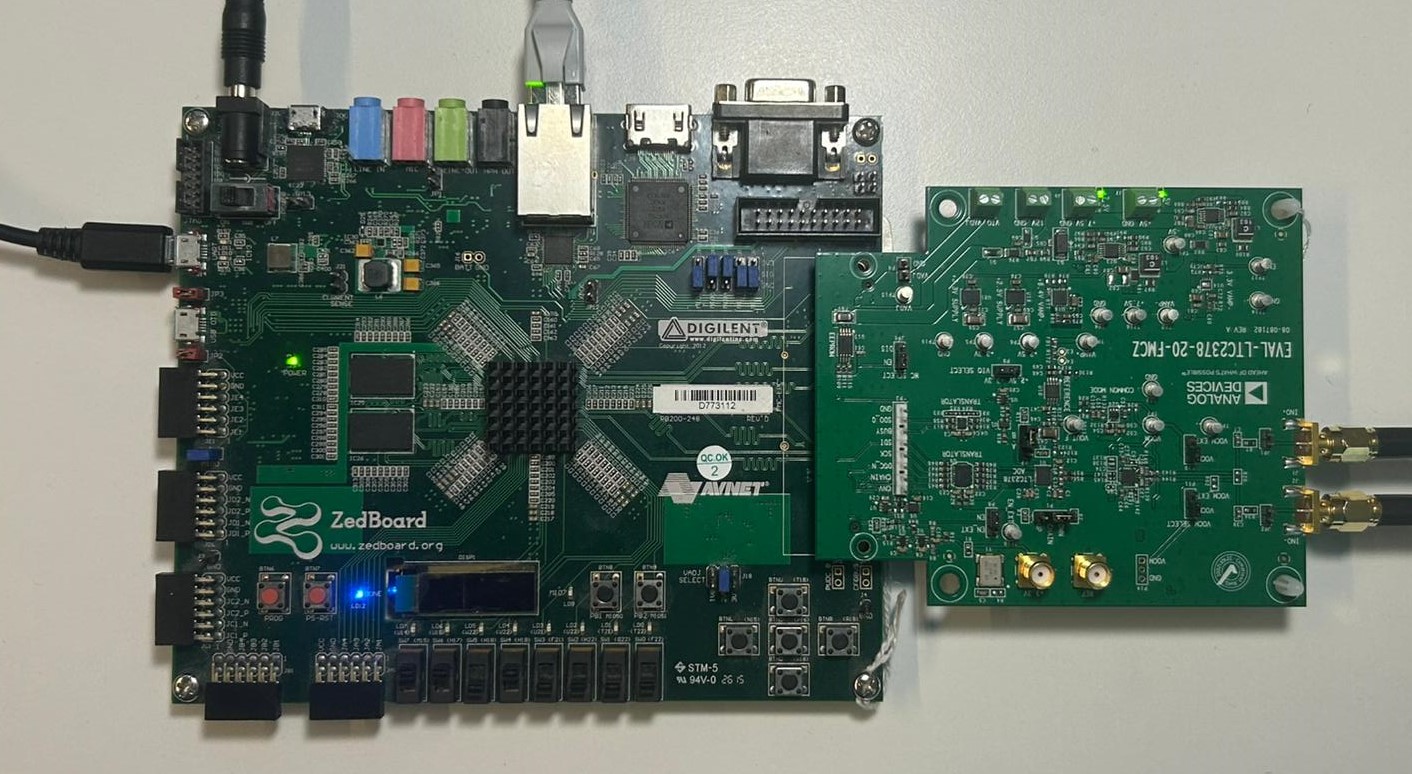
Set the ZedBoard boot mode jumpers for SD card boot and VADJ to 2.5V:
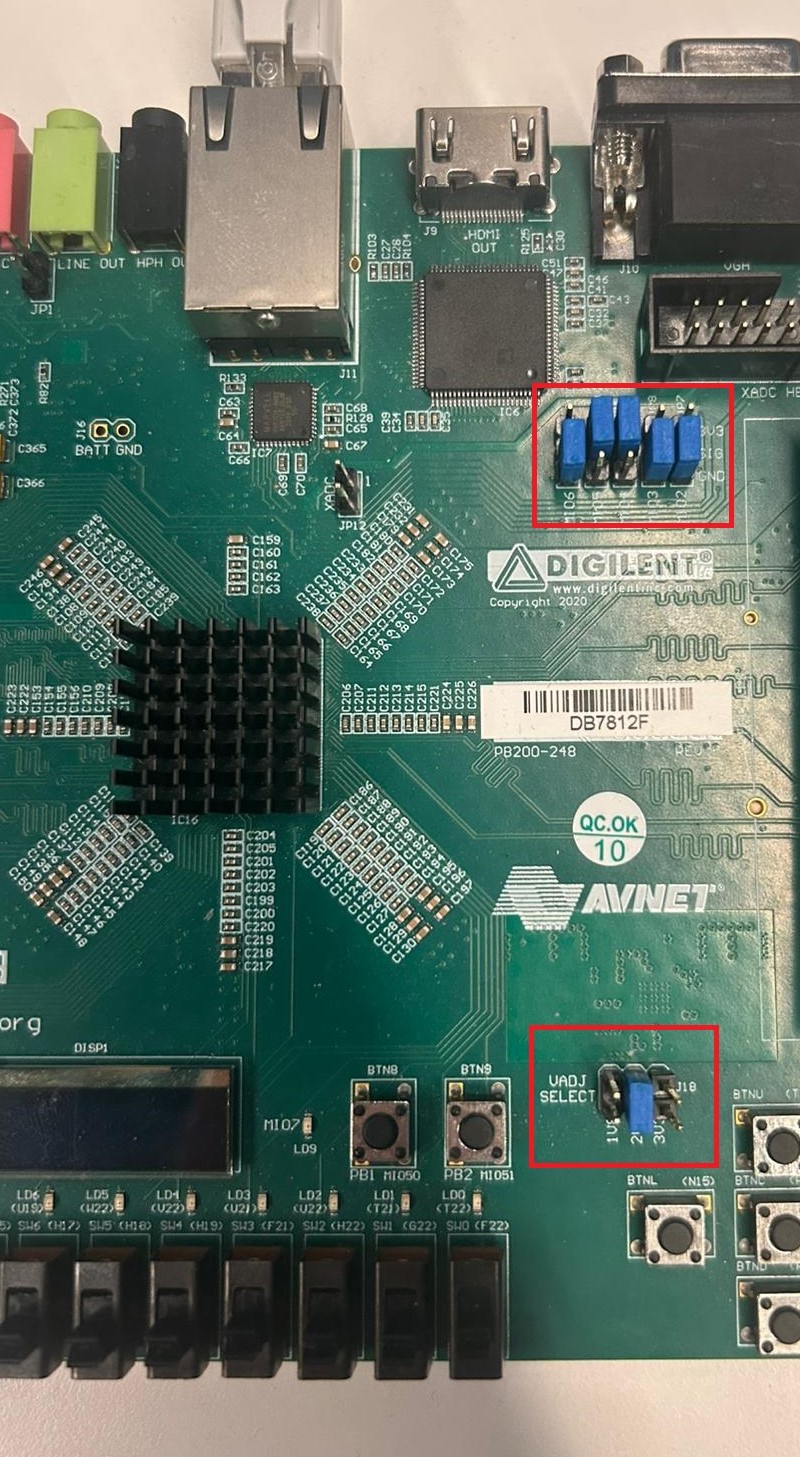
Connect the Micro-USB cable to the UART port (J14) on the ZedBoard
Connect the Ethernet cable to the ZedBoard RJ45 port
Power on the ZedBoard using the power switch
Boot messages
Connect your UART terminal at 115200 baud, 8N1 before powering on the ZedBoard to observe the full boot log. Once the system has finished booting, a login prompt appears:
U-Boot 2018.01-21442-gf06dec3cab (Feb 13 2025 - 17:07:11 +0200), Build: jenkins-development-build_uboot-57

Model: Zynq Zesystemd[1]: System time before build time, advancing clock.
systemd[1]: Failed to look up module alias 'autofs4': Function not implemented
systemd[1]: systemd 247.3-7+rpi1+deb11u6 running in system mode. (+PAM +AUDIT +SELINUX +IMA +APPARMOR +SMACK +SYSVINIT +UTMP +LIBCRYPTSETUP +GCRYPT +GNUTLS +ACL +XZ +LZ4 +ZSTD +SECCOMP +BLKID +ELFUTILS +KMOD +IDN2 -IDN +PCRE2 default-hierarchy=unified)
systemd[1]: Detected architecture arm.

Welcome to Kuiper GNU/Linux 11.2 (bullseye)!

systemd[1]: Set hostname to <analog>.
systemd[1]: /lib/systemd/system/plymouth-start.service:16: Unit configured to use KillMode=none. This is unsafe, as it disables systemd's process lifecycle management for the service. Please update your service to use a safer KillMode=, such as 'mixed' or 'control-group'. Support for KillMode=none is deprecated and will eventually be removed.
systemd[1]: /lib/systemd/system/iiod.service:14: Invalid environment assignment, ignoring: $IIOD_EXTRA_OPTS=
systemd[1]: Queued start job for default target Graphical Interface.
random: crng init done
systemd[1]: system-getty.slice: unit configures an IP firewall, but the local system does not support BPF/cgroup firewalling.
systemd[1]: (This warning is only shown for the first unit using IP firewalling.)
systemd[1]: Created slice system-getty.slice.
[  OK  ] Created slice system-getty.slice.
systemd[1]: Created slice system-modprobe.slice.
[  OK  ] Created slice system-modprobe.slice.
systemd[1]: Created slice system-serial\x2dgetty.slice.
[  OK  ] Created slice system-serial\x2dgetty.slice.
systemd[1]: Created slice system-systemd\x2dfsck.slice.
[  OK  ] Created slice system-systemd\x2dfsck.slice.
systemd[1]: Created slice User and Session Slice.
[  OK  ] Created slice User and Session Slice.
systemd[1]: Started Forward Password Requests to Wall Directory Watch.
[  OK  ] Started Forward Password R…uests to Wall Directory Watch.
systemd[1]: Condition check resulted in Arbitrary Executable File Formats File System Automount Point being skipped.
systemd[1]: Reached target Slices.
[  OK  ] Reached target Slices.
systemd[1]: Reached target Swap.
[  OK  ] Reached target Swap.
systemd[1]: Listening on Syslog Socket.
[  OK  ] Listening on Syslog Socket.
systemd[1]: Listening on fsck to fsckd communication Socket.
[  OK  ] Listening on fsck to fsckd communication Socket.
systemd[1]: Listening on initctl Compatibility Named Pipe.
[  OK  ] Listening on initctl Compatibility Named Pipe.
systemd[1]: Condition check resulted in Journal Audit Socket being skipped.
systemd[1]: Listening on Journal Socket (/dev/log).
[  OK  ] Listening on Journal Socket (/dev/log).
systemd[1]: Listening on Journal Socket.
[  OK  ] Listening on Journal Socket.
systemd[1]: Listening on udev Control Socket.
[  OK  ] Listening on udev Control Socket.
systemd[1]: Listening on udev Kernel Socket.
[  OK  ] Listening on udev Kernel Socket.
systemd[1]: Condition check resulted in Huge Pages File System being skipped.
systemd[1]: Condition check resulted in POSIX Message Queue File System being skipped.
systemd[1]: Mounting RPC Pipe File System...
         Mounting RPC Pipe File System...
systemd[1]: Mounting Kernel Debug File System...
         Mounting Kernel Debug File System...
systemd[1]: Condition check resulted in Kernel Trace File System being skipped.
systemd[1]: Condition check resulted in Kernel Module supporting RPCSEC_GSS being skipped.
systemd[1]: Starting Restore / save the current clock...
         Starting Restore / save the current clock...
systemd[1]: Starting Set the console keyboard layout...
         Starting Set the console keyboard layout...
systemd[1]: Condition check resulted in Create list of static device nodes for the current kernel being skipped.
systemd[1]: Starting Load Kernel Module configfs...
         Starting Load Kernel Module configfs...
systemd[1]: Starting Load Kernel Module drm...
         Starting Load Kernel Module drm...
systemd[1]: Starting Load Kernel Module fuse...
         Starting Load Kernel Module fuse...
systemd[1]: Condition check resulted in Set Up Additional Binary Formats being skipped.
systemd[1]: Condition check resulted in File System Check on Root Device being skipped.
systemd[1]: Starting Journal Service...
         Starting Journal Service...
systemd[1]: Starting Load Kernel Modules...
         Starting Load Kernel Modules...
systemd[1]: Starting Remount Root and Kernel File Systems...
         Starting Remount Root and Kernel File Systems...
systemd[1]: Starting Coldplug All udev Devices...
         Starting Coldplug All udev Devices...
systemd[1]: Mounted RPC Pipe File System.
[  OK  ] Mounted RPC Pipe File System.
systemd[1]: Mounted Kernel Debug File System.
[  OK  ] Mounted Kernel Debug File System.
systemd[1]: Finished Restore / save the current clock.
[  OK  ] Finished Restore / save the current clock.
systemd[1]: modprobe@configfs.service: Succeeded.
systemd[1]: Finished Load Kernel Module configfs.
[  OK  ] Finished Load Kernel Module configfs.
systemd[1]: modprobe@drm.service: Succeeded.
systemd[1]: Finished Load Kernel Module drm.
[  OK  ] Finished Load Kernel Module drm.
systemd[1]: modprobe@fuse.service: Succeeded.
systemd[1]: Finished Load Kernel Module fuse.
[  OK  ] Finished Load Kernel Module fuse.
systemd[1]: systemd-modules-load.service: Main process exited, code=exited, status=1/FAILURE
systemd[1]: systemd-modules-load.service: Failed with result 'exit-code'.
systemd[1]: Failed to start Load Kernel Modules.
[FAILED] Failed to start Load Kernel Modules.
See 'systemctl status systemd-modules-load.service' for details.
systemd[1]: Started Journal Service.
[  OK  ] Started Journal Service.
         Mounting FUSE Control File System...
         Mounting Kernel Configuration File System...
         Starting Apply Kernel Variables...
[  OK  ] Finished Set the console keyboard layout.
[  OK  ] Mounted FUSE Control File System.
[  OK  ] Mounted Kernel Configuration File System.
[  OK  ] Finished Apply Kernel Variables.
[  OK  ] Finished Remount Root and Kernel File Systems.
         Starting Flush Journal to Persistent Storage...
         Starting Load/Save Random Seed...
         Starting Create System Users...
[  OK  ] Finished Coldplug All udev Devices.
         Starting Helper to synchronize boot up for ifupdown...
         Starting Wait for udev To …plete Device Initialization...
[  OK  ] Finished Load/Save Random Seed.
[  OK  ] Finished Create System Users.
[  OK  ] Finished Helper to synchronize boot up for ifupdown.
         Starting Create Static Device Nodes in /dev...
[  OK  ] Finished Create Static Device Nodes in /dev.
[  OK  ] Reached target Local File Systems (Pre).
         Starting Rule-based Manage…for Device Events and Files...
[  OK  ] Finished Flush Journal to Persistent Storage.
[  OK  ] Started Rule-based Manager for Device Events and Files.
         Starting Show Plymouth Boot Screen...
[  OK  ] Started Show Plymouth Boot Screen.
[  OK  ] Started Forward Password R…s to Plymouth Directory Watch.
[  OK  ] Reached target Local Encrypted Volumes.
[  OK  ] Found device /dev/ttyPS0.
[  OK  ] Found device /dev/disk/by-partuuid/5c29002e-01.
         Starting File System Check…isk/by-partuuid/5c29002e-01...
         Starting Load Kernel Modules...
[  OK  ] Finished Wait for udev To Complete Device Initialization.
[FAILED] Failed to start Load Kernel Modules.
See 'systemctl status systemd-modules-load.service' for details.
[  OK  ] Started File System Check Daemon to report status.
[  OK  ] Finished File System Check…/disk/by-partuuid/5c29002e-01.
         Mounting /boot...
[  OK  ] Mounted /boot.
[  OK  ] Reached target Local File Systems.
         Starting Set console font and keymap...
         Starting Raise network interfaces...
         Starting Preprocess NFS configuration...
         Starting Tell Plymouth To Write Out Runtime Data...
         Starting Create Volatile Files and Directories...
[  OK  ] Finished Set console font and keymap.
[  OK  ] Finished Preprocess NFS configuration.
[  OK  ] Finished Tell Plymouth To Write Out Runtime Data.
[  OK  ] Reached target NFS client services.
[  OK  ] Reached target Remote File Systems (Pre).
[  OK  ] Reached target Remote File Systems.
[  OK  ] Finished Create Volatile Files and Directories.
         Starting Network Time Synchronization...
         Starting Update UTMP about System Boot/Shutdown...
[  OK  ] Finished Update UTMP about System Boot/Shutdown.
         Starting Load Kernel Modules...
[  OK  ] Started Network Time Synchronization.
[  OK  ] Reached target System Time Set.
[  OK  ] Reached target System Time Synchronized.
[FAILED] Failed to start Load Kernel Modules.
See 'systemctl status systemd-modules-load.service' for details.
[  OK  ] Reached target System Initialization.
[  OK  ] Started CUPS Scheduler.
[  OK  ] Started Daily apt download activities.
[  OK  ] Started Daily apt upgrade and clean activities.
[  OK  ] Started Periodic ext4 Onli…ata Check for All Filesystems.
[  OK  ] Started Discard unused blocks once a week.
[  OK  ] Started Daily rotation of log files.
[  OK  ] Started Daily man-db regeneration.
[  OK  ] Started Daily Cleanup of Temporary Directories.
[  OK  ] Reached target Paths.
[  OK  ] Reached target Timers.
[  OK  ] Listening on Avahi mDNS/DNS-SD Stack Activation Socket.
[  OK  ] Listening on CUPS Scheduler.
[  OK  ] Listening on D-Bus System Message Bus Socket.
[  OK  ] Listening on Erlang Port Mapper Daemon Activation Socket.
[  OK  ] Listening on GPS (Global P…ioning System) Daemon Sockets.
[  OK  ] Listening on triggerhappy.socket.
[  OK  ] Reached target Sockets.
[  OK  ] Reached target Basic System.
         Starting Analog Devices power up/down sequence...
         Starting Save/Restore Sound Card State...
         Starting Avahi mDNS/DNS-SD Stack...
[  OK  ] Started Regular background program processing daemon.
[  OK  ] Started D-Bus System Message Bus.
         Starting dphys-swapfile - …unt, and delete a swap file...
         Starting Remove Stale Onli…t4 Metadata Check Snapshots...
[  OK  ] Started fan-control.
         Starting Fix DP audio and X11 for Jupiter...
         Starting Creating IIOD Context Attributes......
         Starting Authorization Manager...
         Starting DHCP Client Daemon...
         Starting LSB: Switch to on…nless shift key is pressed)...
         Starting LSB: rng-tools (Debian variant)...
         Starting System Logging Service...
         Starting User Login Management...
         Starting triggerhappy global hotkey daemon...
         Starting Disk Manager...
         Starting WPA supplicant...
[  OK  ] Finished Raise network interfaces.
[  OK  ] Finished Save/Restore Sound Card State.
[  OK  ] Reached target Sound Card.
[  OK  ] Started triggerhappy global hotkey daemon.
[  OK  ] Finished Fix DP audio and X11 for Jupiter.
[  OK  ] Started System Logging Service.
[  OK  ] Started DHCP Client Daemon.
[  OK  ] Started LSB: rng-tools (Debian variant).
[  OK  ] Finished dphys-swapfile - …mount, and delete a swap file.
[  OK  ] Started User Login Management.
[  OK  ] Started Avahi mDNS/DNS-SD Stack.
[  OK  ] Started WPA supplicant.
[  OK  ] Reached target Network.
[  OK  ] Reached target Network is Online.
         Starting CUPS Scheduler...
[  OK  ] Started Erlang Port Mapper Daemon.
         Starting HTTP based time synchronization tool...
         Starting Internet superserver...
         Starting /etc/rc.local Compatibility...
         Starting OpenBSD Secure Shell server...
         Starting Permit User Sessions...
[  OK  ] Started Unattended Upgrades Shutdown.
[  OK  ] Started Internet superserver.
[  OK  ] Finished Remove Stale Onli…ext4 Metadata Check Snapshots.
[  OK  ] Started /etc/rc.local Compatibility.
[  OK  ] Started HTTP based time synchronization tool.
[  OK  ] Finished Permit User Sessions.
[  OK  ] Started Authorization Manager.
         Starting Modem Manager...
         Starting Light Display Manager...
         Starting Hold until boot process finishes up...
[  OK  ] Started LSB: Switch to ond…(unless shift key is pressed).
[  OK  ] Finished Creating IIOD Context Attributes....
[  OK  ] Started IIO Daemon.
[  OK  ] Finished Analog Devices power up/down sequence.
[FAILED] Failed to start VNC Server for X11.

Raspbian GNU/Linux 11 analog ttyPS0

analog login: root (automatic login)

Linux analog 6.12.0-26878-g8bd12ffb8f43 #276 SMP PREEMPT Wed Nov 19 13:46:04 EET 2025 armv7l

The programs included with the Debian GNU/Linux system are free software;
the exact distribution terms for each program are described in the
individual files in /usr/share/doc/*/copyright.

Debian GNU/Linux comes with ABSOLUTELY NO WARRANTY, to the extent
permitted by applicable law.
Last login: Fri Nov  8 17:17:16 GMT 2024 on ttyPS0
root@analog:~#
Useful commands
The following commands are to be run in the serial terminal connected to the ZedBoard.
To find the IP address assigned to the board, run:
~$
ifconfig eth0
To list the IIO devices detected:
~$
iio_info | grep iio:device
To shut down the system cleanly:
~$
poweroff
Important
Wait for the system to complete the shutdown sequence before removing power or the SD card. Removing power abruptly may corrupt the filesystem on the SD card.
IIO Oscilloscope
IIO Oscilloscope is a cross-platform GUI application that can connect to the ZedBoard remotely over the network and capture data from the LTC23xx IIO device.
To connect, open IIO Oscilloscope on the host PC, go to Settings,
Connect, check the Manual option, and enter the URI using the board IP
address obtained from ifconfig:
ip:<board-ip>
Press Refresh to list the available IIO devices, then press Connect.
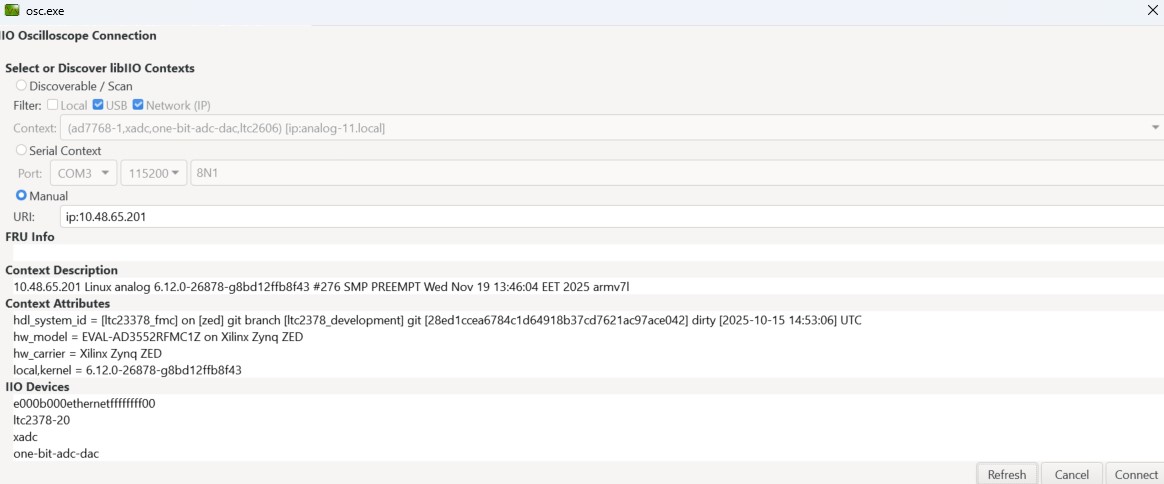
Once connected, select the LTC2378-20 device and use the Capture window to acquire and display ADC samples.
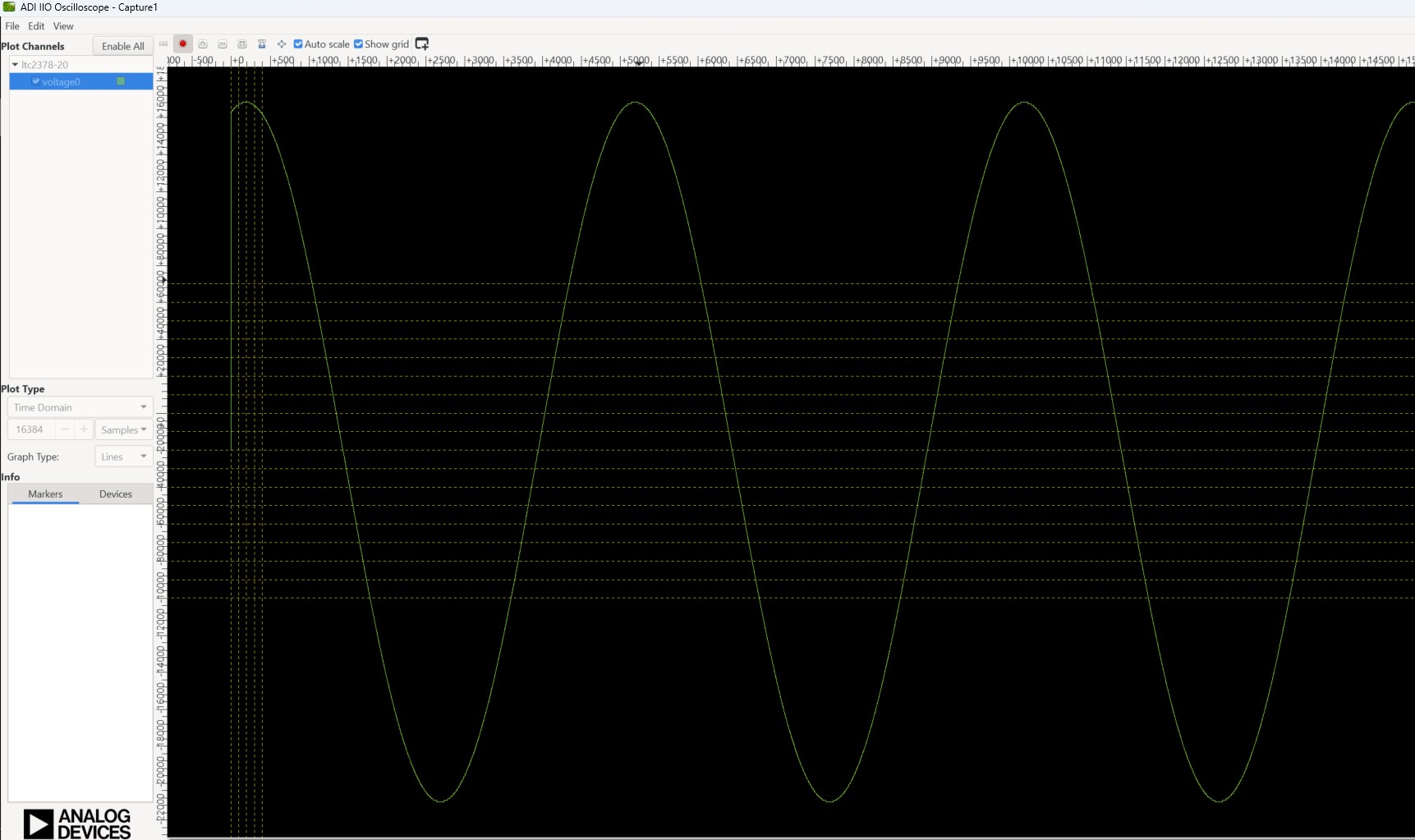
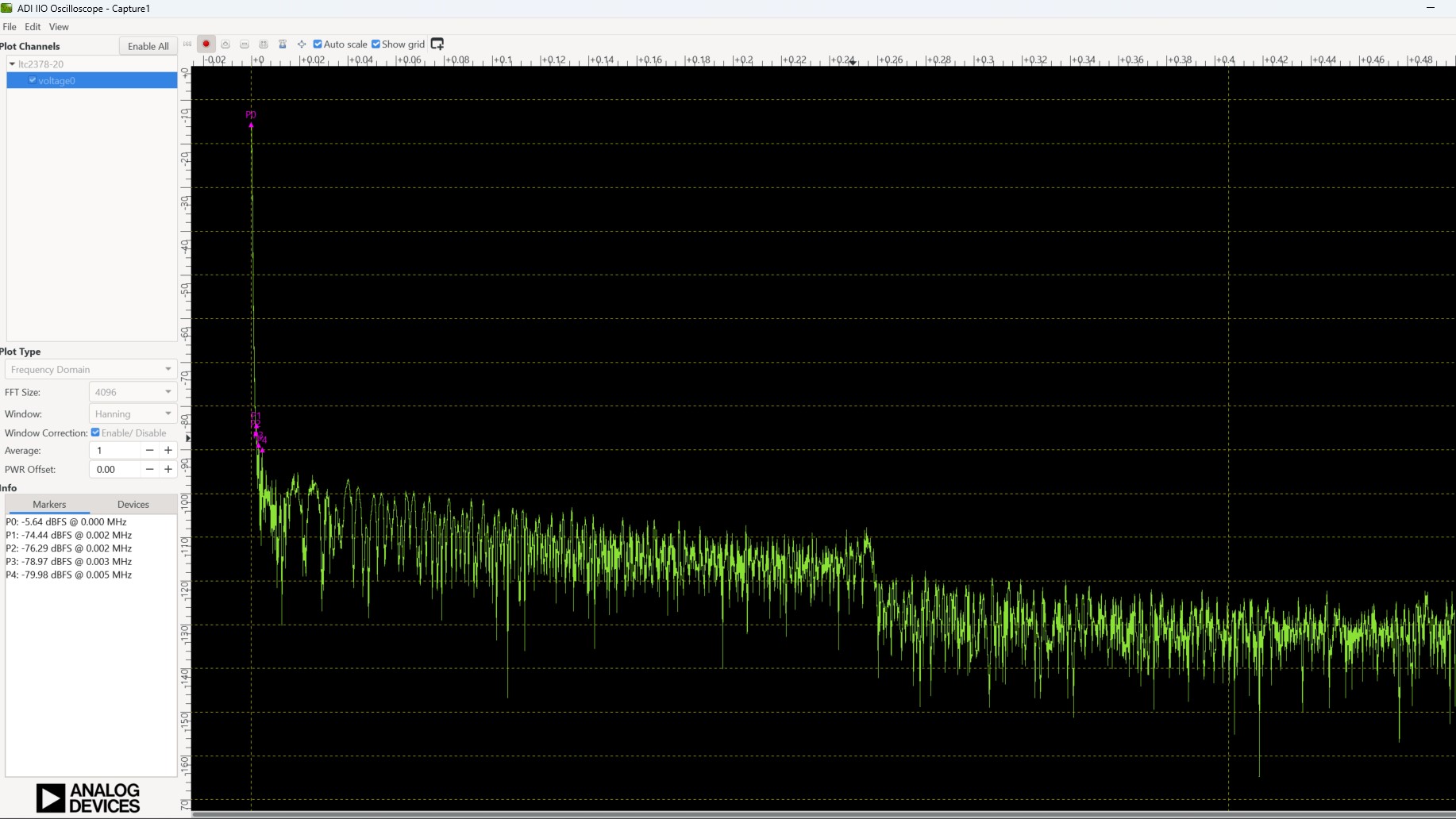
Figure 6 LTC2378-20 frequency domain capture in IIO Oscilloscope