Synchronizing Radar Chirps
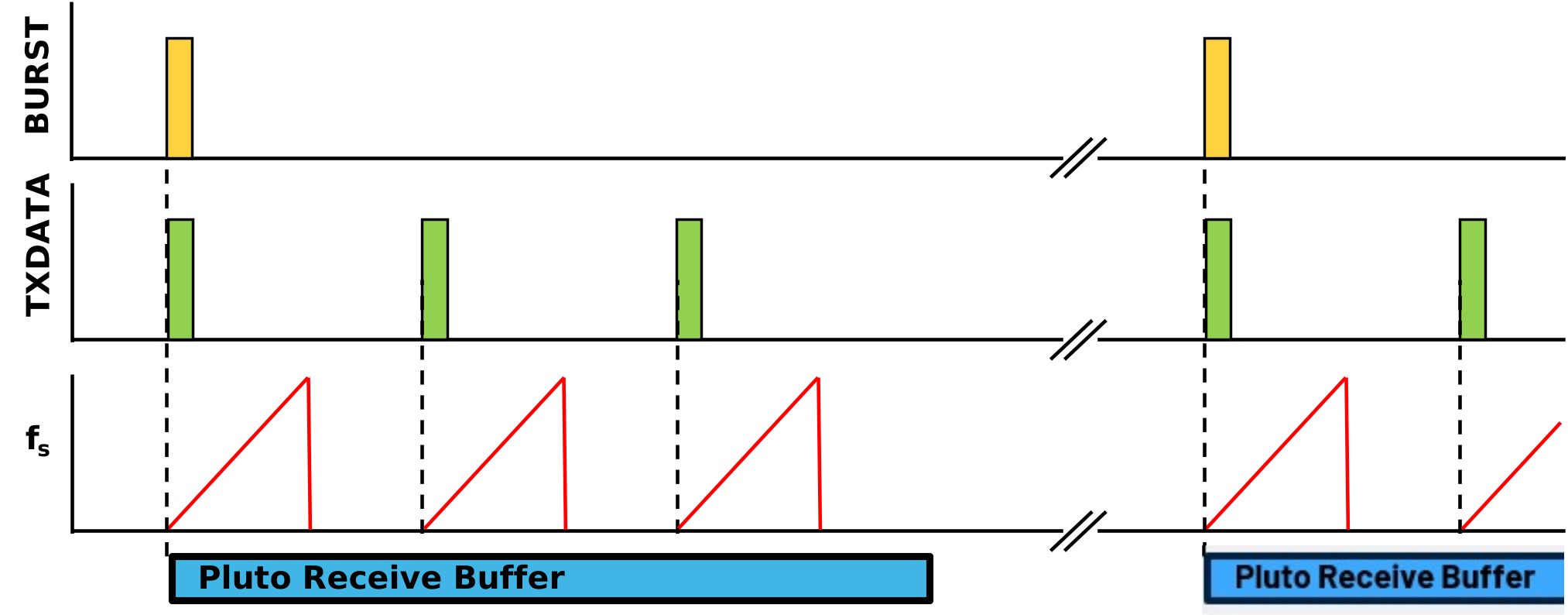
When we ask the Pluto to output receive data, it simply captures a buffer containing the number of data points requested. As a result, there is no alignment between the start of the buffer and the start of any chirp.
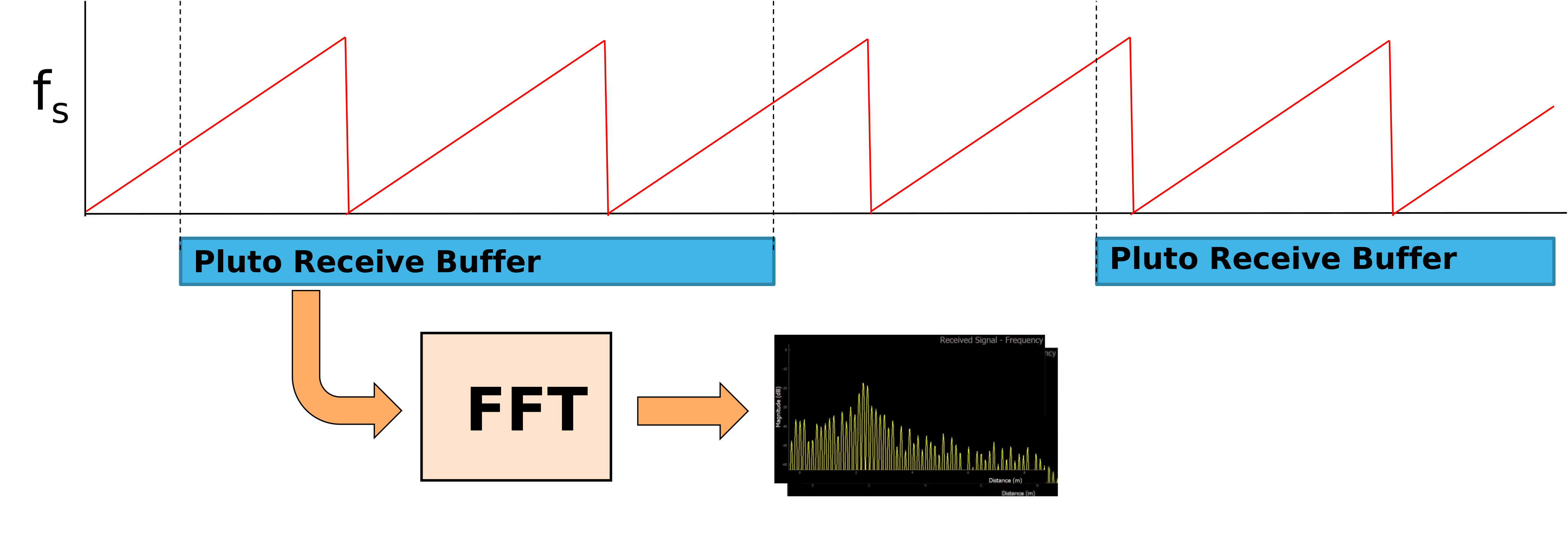
However, for a lot of radar processing (like range doppler and MTI) we’ll want to record the beat frequency for each chirp. And then organize those beat frequencies into a sequence. This means that we need some way to align Pluto’s receive buffer with one (or more) chirps.
On Phaser, this is implemented using
The TX_DATA pin of the ADF4159 and
The TDD engine of Pluto
The ADF4159 TX_DATA Pin
The ADF4159 has a special pin called “TX_DATA.” And when you toggle this pin, the ADF4159 will do one preprogrammed sequence. For our uses, we want that one sequence to do a complete frequency chirp.
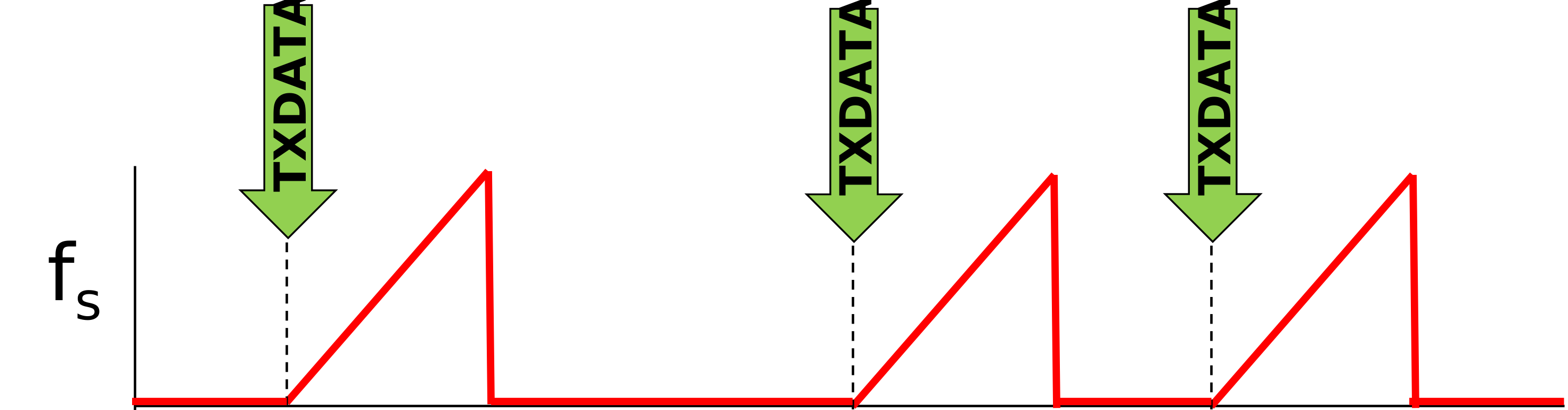
This is easily programmed in Phaser by setting the ADF4159’s ramp mode and then enabling this trigger:
> my_phaser.ramp_mode = "single_sawtooth_burst"
> my_phaser.tx_trig_en = 1 # start a ramp with the TXdata input
Now, each time that the ADF4159 receives a pulse on the TX_DATA pin, it will output whatever frequency ramp was programmed into it. This works well, and we could simply use a GPIO from the Raspberry Pi to send these pulses to TX_DATA. However, the Raspberry Pi is not great and controlling the timing between pulses. And for a lot of radar processing, we’ll want to know how much time has passed between chirps. To solve this, we’ll use a feature of Pluto called the “TDD Engine.”
Pluto’s TDD Engine
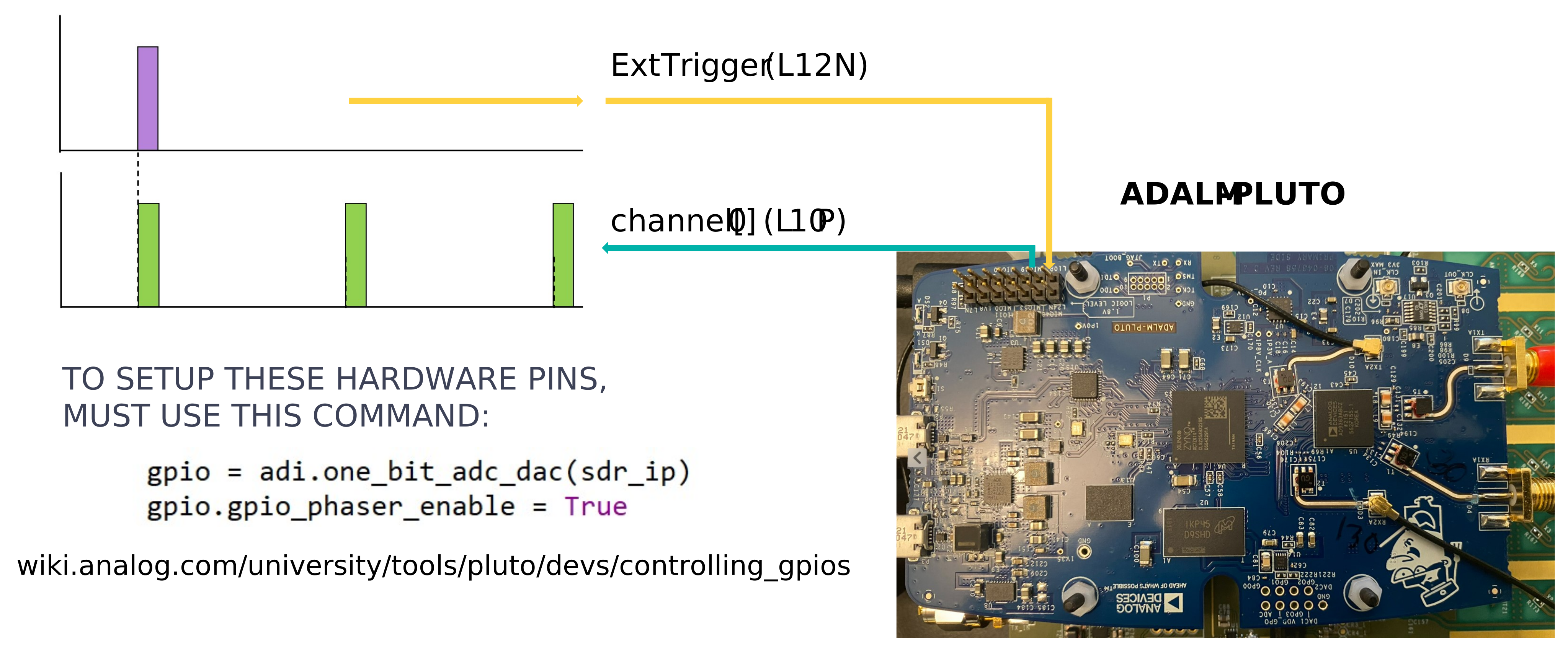
Pluto’s TDD Engine offers a method to produce a series of carefully timed pulses. These pulses are produced with respect to the start of the receive buffer. The whole process is initiated via either a software command (sync_soft) or a voltage pulse onto one of Pluto’s pins (L12N).
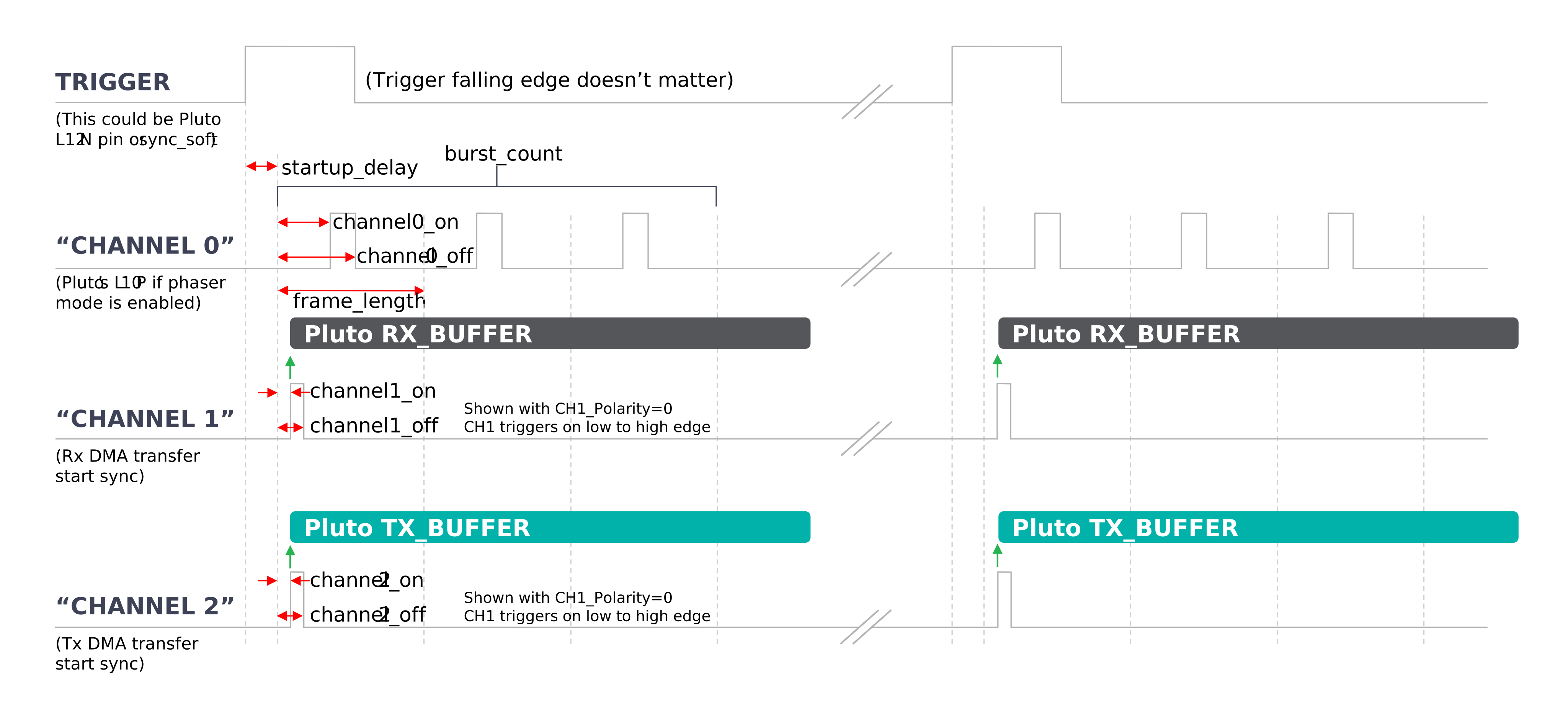
This is what Pluto’s TDD attributes and corresponding sequence look like. The top graph is the trigger signal and then there’s three channels below that. The trigger signal is going to tell us when to begin our timing, and it is initiated with either a sync_soft software command or by pulsing the L12N pin on Pluto’s 14 pin header.
The three channels are simply called channel[0], channel[1], and channel[2]:
channel[0] is a physical output pin, it’s L10P on Pluto’s 14 pin header. We’ll input a pulse from the Raspberry Pi here when we want to start a sequence of chirps.
channel[1] is the timing for the receive buffer
channel[2] is the timing for the transmit buffer.
For each of these buffers we’re going to program a software pulse that is going to have a brief on duration. And we may want that to repeat those pulses at certain intervals. Those intervals are called the frame length. And of course all of these timings and delays and the number of pulses that we want–all of this is configurable in Python or MATLAB. Here’s an example of how to program them in Python:
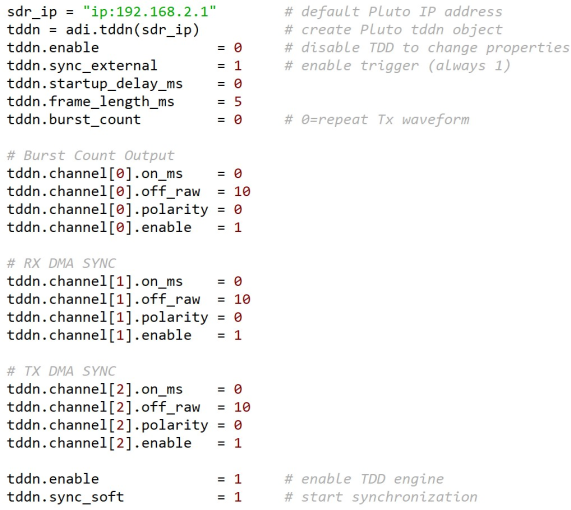
Note
sdr.tx_cyclic_buffer must be true
The object context is just the same as Pluto’s
tddn.enable must be 0 (False) to change the tddn attributes. Set tdd.enable=1 when finished making changes
sync_external should always be 1 (True)
burst_count controls how many pulses to output to channel[0]. This will be the number of chirps that we want in one buffer of receive data from Pluto
After programming the tddn, trigger it with a sync_soft command or an external signal to L12N
Phaser Implementation
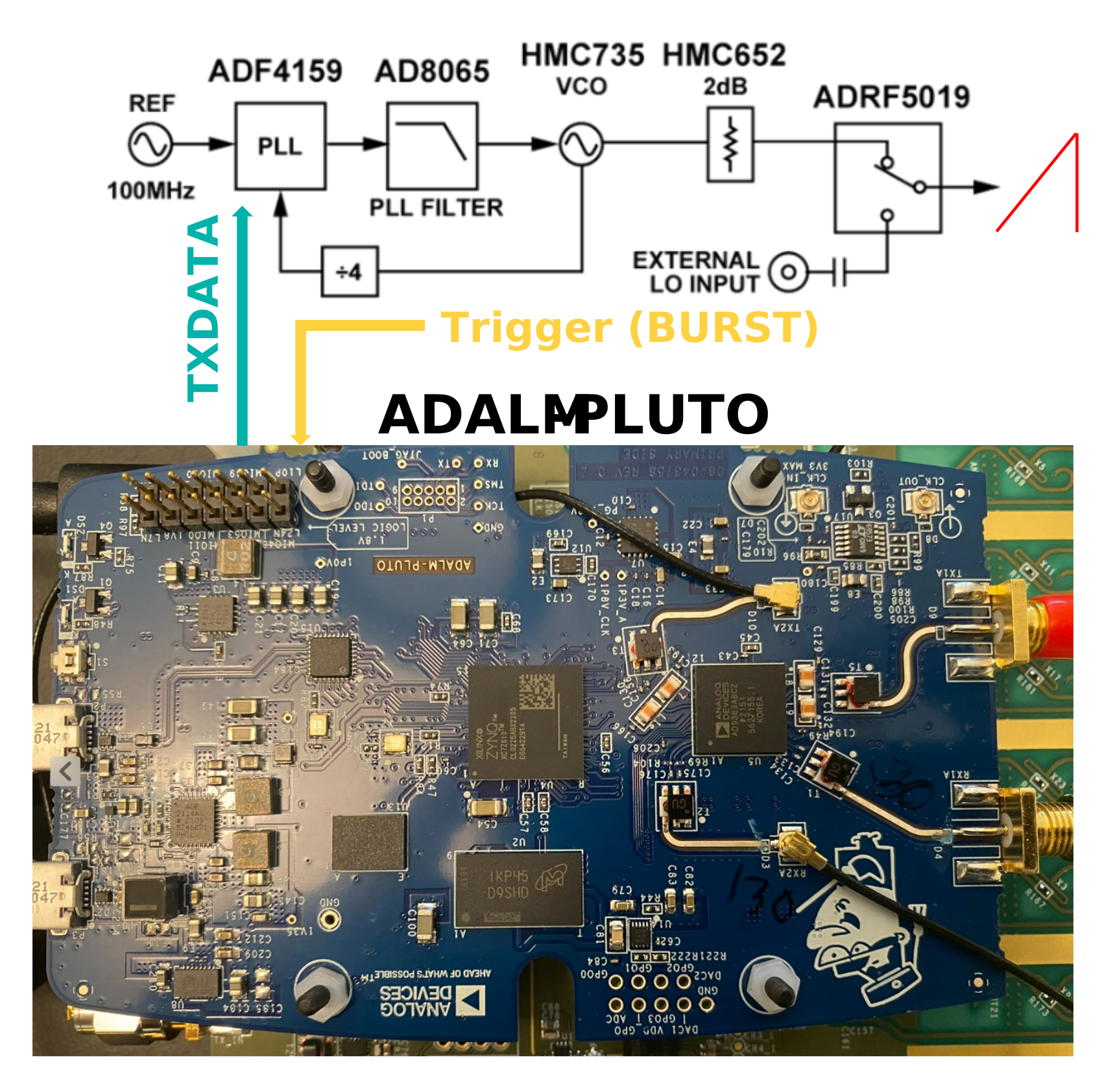
So when we want a new buffer of data from Pluto, just send a gpio pulse to L12N. Pluto will then output a series of pulses to L10P. These pulses are routed to the TX_DATA input of the ADF4159. And each time the ADF415 receives a pulse, it will execute one complete frequency ramp. All of this timing is synchronized in relation to the start of a Pluto receive buffer.
You can find a video walkthrough of this material here:
Note
For questions or help with the Phaser, please visit: EngineerZone