Implementing Beamforming on PlutoSDR
In the previous sections we learnt the basics of beamforming theory and setup Pluto for 2 channel operation. In this section we will show how to implement a simple two-channel digital beamformer using the PlutoSDR.
Software
The script for this Pilot is available to download here:
The software is written in Python and uses the PyADI-IIO library to interface with PlutoSDR.
Code Walkthrough
The code is structured as follows:
The first bit of code just sets up our key variables.
The sample rate is set to 2MHz, but this could be anything between 600kHz and 30.72 MHz.
NumSamples is how many IQ samples we want, per channel, in each receive buffer.
“fc” is some baseband sine wave. The exact frequency of this tone doesn’t matter–we just want it to be a little bit away from 0 Hz, and about 1/10th (or less) of the sample rate. The receive LO, which is the same as the transmit LO, is what carrier frequency that tone will be at.
Leave “phase_cal” at zero for now. Once we run a scan, we’ll observe the offset and then come back and enter in a correction here.
'''Setup'''
samp_rate = 2e6    # must be <=30.72 MHz if both channels are enabled
NumSamples = 2**12
rx_lo = 2.3e9
rx_mode = "manual"  # can be "manual" or "slow_attack"
rx_gain0 = 40
rx_gain1 = 40
tx_lo = rx_lo
tx_gain = -3
fc0 = int(200e3)
phase_cal = 0
num_scans = 5
Plot_Compass = False

''' Set distance between Rx antennas '''
d_wavelength = 0.5                  # distance between elements as a fraction of wavelength.  This is normally 0.5
wavelength = 3E8/rx_lo              # wavelength of the RF carrier
d = d_wavelength*wavelength         # distance between elements in meters
print("Set distance between Rx Antennas to ", int(d*1000), "mm")
The next bit of the code, is pretty standard for any PyADI-IIO Pluto Python script. Of course we have to import the PyADI library (import adi). Then we create our Pluto radio object (“sdr”). Then we assign rx and tx attributes to that object. Finally, we’ll program the transmit buffer of Pluto to create a complex sine wave.
Some interesting notes on this section:
We send IQ samples to both transmit channels, even though we are only using transmit channel 0. This is due to an oddity in the dual channel programming of Pluto. When set to dual Tx mode, Pluto expects some signal on both Tx0 and Tx1. Not to worry though! Because we’ve set the transmit chan1 gain to -88, which effectively turns it off.
“set_kernel_buffers_count(1)”: This is the number of receive buffers that Pluto keeps in its circular buffer. By default, this is 4. So normally, Pluto records 4 buffers of data, then stops recording. Sometime later, when you request a buffer of data, it gives you the first of those 4 buffers and then records a new buffer, which is now in 4th place (FIFO). In normal systems, this will greatly speed up streaming data (because you are not waiting to record new data–its already happening in the background). But for this setup, where we change a parameter and then want to record a buffer of data that reflects that change, we don’t want “stale” data. Therefore, we set buffers_count to 1. It takes a little longer to stream the data, but we can be confident that any data we get fully reflects whatever change we’ve made to Pluto.
import adi
import matplotlib.pyplot as plt
import numpy as np

'''Create Radio'''
sdr = adi.ad9361(uri='ip:192.168.2.1')

'''Configure properties for the Radio'''
sdr.rx_enabled_channels = [0, 1]
sdr.sample_rate = int(samp_rate)
sdr.rx_rf_bandwidth = int(fc0*3)
sdr.rx_lo = int(rx_lo)
sdr.gain_control_mode = rx_mode
sdr.rx_hardwaregain_chan0 = int(rx_gain0)
sdr.rx_hardwaregain_chan1 = int(rx_gain1)
sdr.rx_buffer_size = int(NumSamples)
sdr._rxadc.set_kernel_buffers_count(1)   # set buffers to 1 (instead of the default 4) to avoid stale data on Pluto
sdr.tx_rf_bandwidth = int(fc0*3)
sdr.tx_lo = int(tx_lo)
sdr.tx_cyclic_buffer = True
sdr.tx_hardwaregain_chan0 = int(tx_gain)
sdr.tx_hardwaregain_chan1 = int(-88)
sdr.tx_buffer_size = int(2**18)

'''Program Tx and Send Data'''
fs = int(sdr.sample_rate)
N = 2**16
ts = 1 / float(fs)
t = np.arange(0, N * ts, ts)
i0 = np.cos(2 * np.pi * t * fc0) * 2 ** 14
q0 = np.sin(2 * np.pi * t * fc0) * 2 ** 14
iq0 = i0 + 1j * q0
sdr.tx([iq0,iq0])  # Send Tx data.
Now we’ll create a function to convert the phase shift of each channel into the steering angle (where the beam is pointing). Remember that math we did in this section? We’re putting into action here!
def calcTheta(phase):
    arcsin_arg = np.deg2rad(phase)*3E8/(2*np.pi*rx_lo*d)
    arcsin_arg = max(min(1, arcsin_arg), -1)     # arcsin argument must be between 1 and -1, or numpy will throw a warning
    calc_theta = np.rad2deg(np.arcsin(arcsin_arg))
    return calc_theta
This next function, “dbfs”, converts the IQ samples from Pluto’s receive buffer into “decibels full scale”. What does that mean? Decibels are always relative to something. And since we don’t have an absolute power measurement, we make these decibels relative to the only consistent thing that we do know: the full scale range of the receiver’s ADC. So this is decibels relative to the full scale value of the ADC. That full scale value is always 0dB (or 0dBFS). So our Pluto conversions will always be a negative number (unless we start combining multiple channels, and then that sum could get higher than the full scale range of any one individual receiver ADC). There’s an excellent explanation of “dbfs” here.
def dbfs(raw_data):
    NumSamples = len(raw_data)
    win = np.hamming(NumSamples)
    y = raw_data * win
    s_fft = np.fft.fft(y) / np.sum(win)
    s_shift = np.fft.fftshift(s_fft)
    s_dbfs = 20*np.log10(np.abs(s_shift)/(2**11))     # Pluto is a signed 12 bit ADC, so use 2^11 to convert to dBFS
    return s_dbfs
Finally, we put all of this into a loop and plot out the peak response for every steering angle:
'''Collect Data'''
for i in range(num_scans):
    data = sdr.rx()
    Rx_0=data[0]
    Rx_1=data[1]
    peak_sum = []
    delay_phases = np.arange(-180, 180, 2)    # phase delay in degrees
    for phase_delay in delay_phases:
        delayed_Rx_1 = Rx_1 * np.exp(1j*np.deg2rad(phase_delay+phase_cal))
        delayed_sum = dbfs(Rx_0 + delayed_Rx_1)
        peak_sum.append(np.max(delayed_sum[signal_start:signal_end]))
    peak_dbfs = np.max(peak_sum)
    peak_delay_index = np.where(peak_sum==peak_dbfs)
    peak_delay = delay_phases[peak_delay_index[0][0]]
    steer_angle = int(calcTheta(peak_delay))
    if Plot_Compass==False:
        plt.plot(delay_phases, peak_sum)
        plt.axvline(x=peak_delay, color='r', linestyle=':')
        plt.text(-180, -26, "Peak signal occurs with phase shift = {} deg".format(round(peak_delay,1)))
        plt.text(-180, -28, "If d={}mm, then steering angle = {} deg".format(int(d*1000), steer_angle))
        plt.ylim(top=0, bottom=-30)
        plt.xlabel("phase shift [deg]")
        plt.ylabel("Rx0 + Rx1 [dBfs]")
        plt.draw()
        plt.show()
    else:
        fig = plt.figure(figsize=(3,3))
        ax = plt.subplot(111,polar=True)
        ax.set_theta_zero_location('N')
        ax.set_theta_direction(-1)
        ax.set_thetamin(-90)
        ax.set_thetamax(90)
        ax.set_rlim(bottom=-20, top=0)
        ax.set_yticklabels([])
        ax.vlines(np.deg2rad(steer_angle),0,-20)
        ax.text(-2, -14, "{} deg".format(steer_angle))
        plt.draw()
        plt.show()
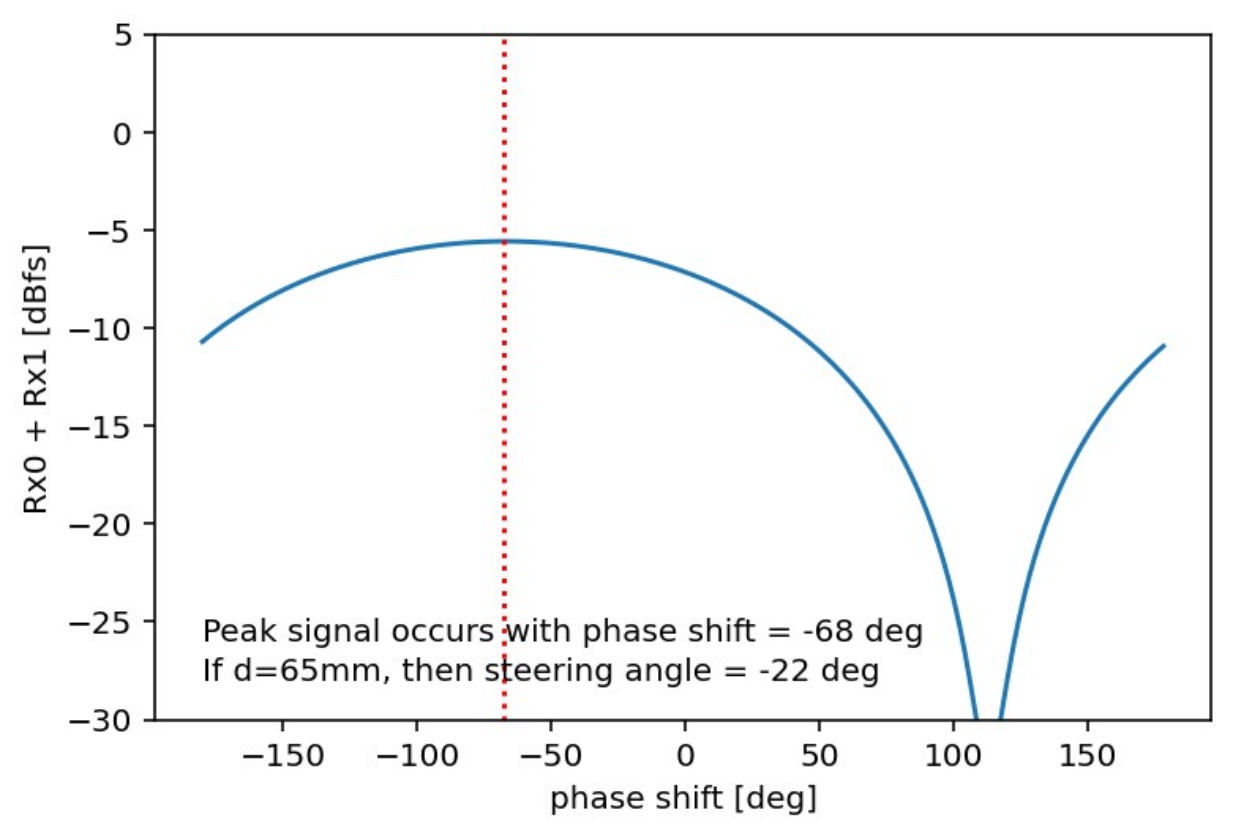
The end result will look something like the plot below. So this is the power received by the two element array for every angle from horizon to horizon.
Now let’s revisit that “phase_cal” variable from the top of this page. Rerun this python example, but first make sure to place the transmitter directly in front of the receive array – this is called the “mechanical boresight.” With the signal source (transmitter) at mechanical boresight, the plot should be centered at a steering angle of 0 deg. But you’re plot probably won’t be. So view the plot, and note the phase shift that is reported. Enter this number as the “phase_cal” and then rerun the script. Is that new plot now centered? If so, you’ve just calibrated your 2 element digital beamformer! Now when you move the transmitter around, the peak should accurately follow the direction of arrival (DOA) of that transmit wavefront. Try it out!
A video walkthrough of this system example, including detailed code descriptions, is here:
Note
For questions or help with the Pluto SDR, please visit: EngineerZone