Phaser Assembly
The Phaser RF board, Raspberry Pi, and Pluto will come pre-assembled. Only a few steps are needed to fully setup the system:
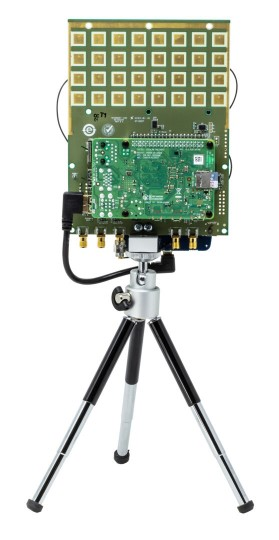
Carefully thread the tripod into the tripod mount. Please minimize stress on the tripod mount while plugging in cables and other operations, as it is screwed directly to the PC board. It is important to do this step before connecting Pluto’s micro USB cable.
Connect Pluto’s center micro-USB port to the Raspberry Pi USB port via the included micro-USB cable.
Refer to the “Common Configurations” page and determine if you will you use the Standard Configuration or the VNC Configuration
For Standard Config: Connect an HDMI display, USB keyboard, and USB mouse to the Raspberry pi or
For VNC Config: connect the Raspberry Pi’s Ethernet jack to your wired network, or directly to a host computer’s Ethernet jack
Verify that the SD card is properly inserted into the slot on the Raspberry Pi.
Power up the setup through the type-C port on the RF Board. Do NOT connect a supply to the Raspberry Pi.
Wait for Raspberry Pi to boot. The first time booting may take a minute or two, as the filesystem is expanded on first boot.
When finished using the Phaser, it is important to shut down the system properly!
Do not disconnect power while the Raspberry Pi is running! Doing so may corrupt the SD card.
Instead, shut down the Raspberry Pi by using its Power Off menu or
Press the small white button on the back of the Phaser (just above the OUT1 SMA connector). This will execute a script to safely shutdown the Raspberry Pi.
Note
For questions or help with the Phaser, please visit: EngineerZone