VC707 Quick start
Warning
The VC707 carrier is last supported in the hdl_2017_r1 release.
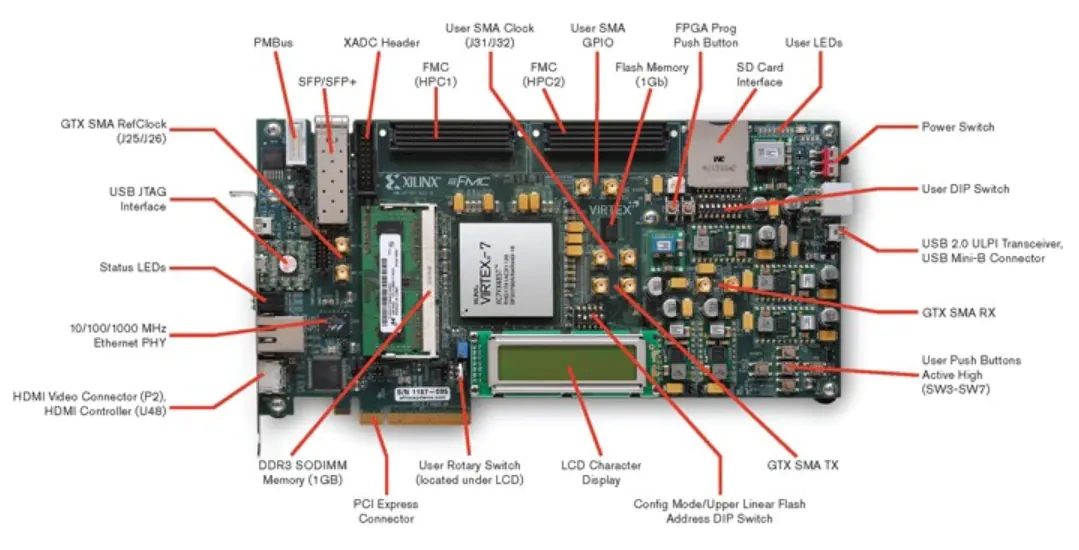
This guide provides quick instructions on how to setup the ADV7511 HDMI transmitter on:
VC707 (Virtex-7 FPGA)
All the products described on this page include ESD (electrostatic discharge) sensitive devices. Electrostatic charges as high as 4000V readily accumulate on the human body or test equipment and can discharge without detection. Although the boards feature ESD protection circuitry, permanent damage may occur on devices subjected to high-energy electrostatic discharges. Therefore, proper ESD precautions are recommended to avoid performance degradation or loss of functionality. This includes removing static charge on external equipment, cables, or antennas before connecting to the device.
Note
The VC707 platform uses a 36-bit RGB 444 interface for the ADV7511, unlike other platforms that use a 16-bit YCbCr 422 interface.
Using no-OS as software
Necessary files
The following files are needed for the system to work:
HDL project files: projects/adv7511/vc707
no-OS project: projects/adv7511
ADV7511 Transmitter Library: ADV7511 HDMI Transmitter Library
Instructions on how to build the files from source can be found here:
More HDL build details at Build an HDL project
no-OS build guide: No-OS Build Guide
Required Software
AMD Xilinx Vivado (the supported version can be found in the HDL repository)
UART terminal (Putty/Tera Term/Minicom, etc.) with baud rate 115200 (8N1)
ADV7511 Transmitter Library (requires Wine on Linux)
Required Hardware
AMD Xilinx VC707 FPGA board and its power supply
HDMI Monitor
HDMI cable
Mini-USB cable (UART)
JTAG cable (for programming)
More details as to why you need these, can be found at Prerequisites.
Testing
Creating the setup
Follow the steps in this order, to avoid damaging the components:
Connect an HDMI cable between the VC707 HDMI output port and the HDMI monitor
Connect the Mini-USB cable to the UART port on the VC707
Connect the JTAG cable to the JTAG port on the VC707
Connect the power supply to the VC707
Turn on the HDMI monitor
Turn on the power switch on the VC707 board
Building and Running the Software
Follow these steps to build and run the ADV7511 demo:
Download and install the ADV7511 HDMI Transmitter Library
On Linux: Use Wine to install the library
Extract the TX folder from the installation directory to the no-OS project:
From:
<installation folder>/Src/TX/To:
<no-OS repo>/projects/adv7511/TX/
Build the HDL project for VC707:
Follow the instructions at Build an HDL project
Generate the .xsa file
Copy the .xsa file to the no-OS project directory:
<no-OS repo>/projects/adv7511/
In the no-OS project, edit
src/app_config.h:Uncomment
#define PLATFORM_VC707
Build the no-OS project following the No-OS Build Guide
Program the FPGA and run the application through your IDE (Vitis)
Open your UART terminal and connect to the VC707 serial port (115200 baud)
Console output
If programming was successful, you should see messages appear on the terminal similar to this:
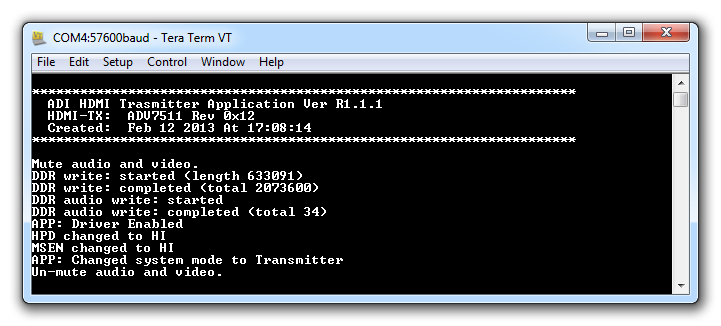
The reference design demonstrates:
Initializing the ADV7511 HDMI transmitter
Checking the current AVR operating mode
Setting the AV mute state
Displaying a test image on the HDMI monitor
Playing audio (if configured)
Changing Video Resolution
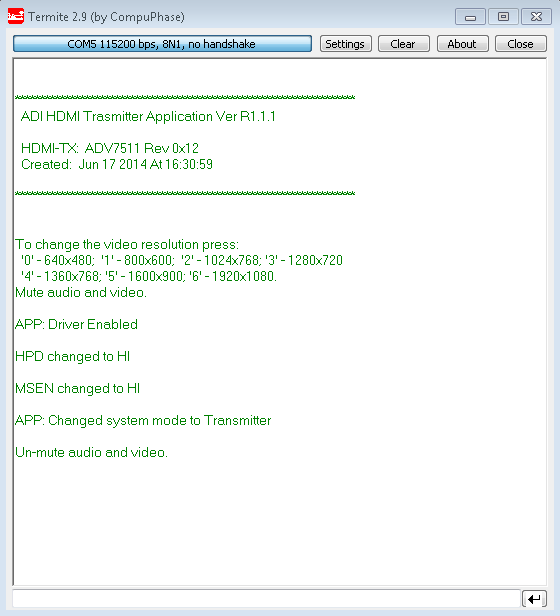
You can change the video resolution by typing a number from 0 to 6 in the terminal:
0: 640x480 @ 60Hz
1: 800x600 @ 60Hz
2: 1024x768 @ 60Hz
3: 1280x720 @ 60Hz
4: 1360x768 @ 60Hz
5: 1600x900 @ 60Hz
6: 1920x1080 @ 60Hz
Support
For additional support, please visit: