Quick Start Guide
Warning
The AD-FMCADC2-EBZ is a legacy product and is no longer actively supported. This documentation is provided for reference only.
Linux Quick Start (VC707)
This guide provides instructions on how to set up the AD-FMCADC2-EBZ on:
Required Software
Bitfile and Linux ELF image.
Xilinx ISE Microprocessor Debugger (XMD) is sufficient for the demo.
A UART terminal (Tera Term/Hyperterminal), Baud rate 115200 (8N1).
Required Hardware
Xilinx VC707 / ZC706 FPGA carrier board.
AD-FMCADC2-EBZ FMC Board.
Micro / Mini-USB Cable
Testing
Connect the AD-FMCADC2-EBZ FMC board to the FPGA carrier, on the VC707: FMC1 HPC connector.
Connect USB JTAG (Micro USB) to your host PC.
Turn on the power switch on the FPGA board.
Open XMD console to configure the FPGA and download the elf image.
Loading
Download the pre-build image for your device in question: Master Microblaze images
There are two ways of loading the design. One is using the XMD command line. Open an XMD command window/shell and enter the commands manually.
Below is just an example and the file-names may vary.
Dave@HAL9000:~$ xmd

* Xilinx Microprocessor Debugger (XMD) Engine
* XMD v2014.2 (64-bit)
  *** SW Build 932637 on Wed Jun 11 13:12:06 MDT 2014
    ** Copyright 1986-2014 Xilinx, Inc. All Rights Reserved.

XMD% fpga -f download.bit
Configuring Device 1 (xcku040) with Bitstream -- download.bit
....10....20....30....40....50....60.....70....80....90....Done
Successfully downloaded bit file.

JTAG chain configuration
Device   ID Code        IR Length    Part Name
 1       03822093           6        xcku040

0
XMD% connect mb mdm

JTAG chain configuration
Device   ID Code        IR Length    Part Name
 1       03822093           6        xcku040

MicroBlaze Processor Configuration :
Version............................9.3
Optimization.......................Performance
Interconnect.......................AXI-LE
MMU Type...........................Full_MMU
No of PC Breakpoints...............1
No of Read Addr/Data Watchpoints...0
No of Write Addr/Data Watchpoints..0
Instruction Cache Support..........on
Instruction Cache Base Address.....0x80000000
Instruction Cache High Address.....0xbfffffff
Data Cache Support.................on
Data Cache Base Address............0x80000000
Data Cache High Address............0xbfffffff
Exceptions  Support................on
FPU  Support.......................off
Hard Divider Support...............on
Hard Multiplier Support............on - (Mul64)
Barrel Shifter Support.............on
MSR clr/set Instruction Support....on
Compare Instruction Support........on
PVR Supported......................on
PVR Configuration Type.............Full
Data Cache Write-back Support......off
Fault Tolerance Support............off
Stack Protection Support...........off

Connected to "mb" target. id = 0
Starting GDB server for "mb" target (id = 0) at TCP port no 1234

XMD% dow /home/dace/linux/arch/microblaze/boot/simpleImage.kcu105_ad_fmcdaq2_ebz
System Reset .... DONE
Downloading Program -- /home/michael/linux/arch/microblaze/boot/simpleImage.kcu105_ad_fmcdaq2_ebz
    section, .text: 0x80000000-0x8031cda7
    section, .init.text: 0x803fc000-0x804185eb
    section, .init.ivt: 0x8041afac-0x8041afd3
    section, __fdt_blob: 0x8031cda8-0x80324da7
    section, .rodata: 0x80325000-0x803b950f
    section, __ksymtab: 0x803b9510-0x803be90f
    section, __ksymtab_gpl: 0x803be910-0x803c1e27
    section, __ksymtab_strings: 0x803c1e28-0x803d4dd7
    section, __param: 0x803d4dd8-0x803d5147
    section, __modver: 0x803d5148-0x803d5fff
    section, __ex_table: 0x803d6000-0x803d75df
    section, .notes: 0x803d75e0-0x803d7603
    section, .sdata2: 0x803d7604-0x803d7fff
    section, .data: 0x803d8000-0x803fbc5f
    section, .init.data: 0x804185ec-0x8041afab
    section, .init.setup: 0x8041afd4-0x8041b327
    section, .initcall.init: 0x8041b328-0x8041b683
    section, .con_initcall.init: 0x8041b684-0x8041b68b
    section, .init.ramfs: 0x8041b68c-0x806f97b3
    section, .bss: 0x806fa000-0x8070f8db
Download Progress........10.......20.......30.......40.......50........60.......70.......80.......90........Done
Setting PC with Program Start Address 0x80000000
XMD% con
Processor started. Type "stop" to stop processor

RUNNING> XMD%
XMD has been replaced with XSCT/XSDB in newer releases of Vivado. In Windows, run the XSCT terminal from Start menu -> Xilinx Design Tools -> Xilinx Software Command Line Tool. In Linux, source the settings.sh file first.
* Xilinx System Debugger (XSDB) v2021.1
  *** Build date : Jun 10 2021-20:11:58
    ** Copyright 1986-2020 Xilinx, Inc. All Rights Reserved.

xsdb% connect
attempting to launch hw_server

* Xilinx hw_server v2021.1
  *** Build date : Jun 10 2021 at 20:11:57
    ** Copyright 1986-2021 Xilinx, Inc. All Rights Reserved.

INFO: hw_server application started
INFO: Use Ctrl-C to exit hw_server application

INFO: To connect to this hw_server instance use url: TCP:127.0.0.1:3121

tcfchan#0
xsdb% fpga -f system_top.bit
100%    4MB   1.7MB/s  00:02
xsdb% targets
  1  xc7k325t
     2  MicroBlaze Debug Module at USER2
        3  MicroBlaze #0 (Running)
xsdb% target 3
xsdb% dow simpleImage.kc705_fmcomms2-3.strip
Downloading Program -- /home/liacob/microblaze/simpleImage.kc705_fmcomms2-3/simpleImage.kc705_fmcomms2-3.strip
        section, .text: 0x80000000 - 0x804763ab
        section, __fdt_blob: 0x804763ac - 0x804863ab
        section, .rodata: 0x80487000 - 0x808b110f
        section, .builtin_fw: 0x808b1110 - 0x808b1133
        section, __ksymtab: 0x808b1134 - 0x808b746b
        section, __ksymtab_gpl: 0x808b746c - 0x808bc483
        section, __ksymtab_strings: 0x808bc484 - 0x808d6973
        section, __param: 0x808d6974 - 0x808d6e5f
        section, __modver: 0x808d6e60 - 0x808d6fff
        section, __ex_table: 0x808d7000 - 0x808d844f
        section, .notes: 0x808d8450 - 0x808d848b
        section, .sdata2: 0x808d848c - 0x808d8fff
        section, .data: 0x808d9000 - 0x8095893f
        section, .init.text: 0x80959000 - 0x8097a75b
        section, .init.data: 0x8097a75c - 0x8097c053
        section, .init.ivt: 0x8097c054 - 0x8097c07b
        section, .init.setup: 0x8097c07c - 0x8097c3f3
        section, .initcall.init: 0x8097c3f4 - 0x8097c80f
        section, .con_initcall.init: 0x8097c810 - 0x8097c813
        section, .init.ramfs: 0x8097c814 - 0x80c2a9fb
        section, .bss: 0x80c2b000 - 0x80c4225b
100%   12MB   0.2MB/s  00:56
Setting PC to Program Start Address 0x80000000
Successfully downloaded /home/liacob/microblaze/simpleImage.kc705_fmcomms2-3/simpleImage.kc705_fmcomms2-3.strip
xsdb% Info: MicroBlaze #0 (target 3) Stopped at 0x0 (Stop)
xsdb% con
Info: MicroBlaze #0 (target 3) Running
xsdb%
The second method is to run the TCL script which handles loading the bit file and the Linux image. Run Vivado TCL Shell from Windows Start menu -> Xilinx Design Suite -> Vivado -> Vivado TCL Shell. In Linux, source the settings.sh file first.
Then run the TCL script:
* Xilinx System Debugger (XSDB) v2021.1
  *** Build date : Jun 10 2021-20:11:58
    ** Copyright 1986-2020 Xilinx, Inc. All Rights Reserved.

xsdb% source run.tcl
attempting to launch hw_server

* Xilinx hw_server v2021.1
  *** Build date : Jun 10 2021 at 20:11:57
    ** Copyright 1986-2021 Xilinx, Inc. All Rights Reserved.

INFO: hw_server application started
INFO: Use Ctrl-C to exit hw_server application

INFO: To connect to this hw_server instance use url: TCP:127.0.0.1:3121

100%    4MB   1.7MB/s  00:02
Downloading Program -- /home/liacob/microblaze/simpleImage.kc705_fmcomms2-3/simpleImage.kc705_fmcomms2-3.strip
        section, .text: 0x80000000 - 0x804763ab
        section, __fdt_blob: 0x804763ac - 0x804863ab
        section, .rodata: 0x80487000 - 0x808b110f
        section, .builtin_fw: 0x808b1110 - 0x808b1133
        section, __ksymtab: 0x808b1134 - 0x808b746b
        section, __ksymtab_gpl: 0x808b746c - 0x808bc483
        section, __ksymtab_strings: 0x808bc484 - 0x808d6973
        section, __param: 0x808d6974 - 0x808d6e5f
        section, __modver: 0x808d6e60 - 0x808d6fff
        section, __ex_table: 0x808d7000 - 0x808d844f
        section, .notes: 0x808d8450 - 0x808d848b
        section, .sdata2: 0x808d848c - 0x808d8fff
        section, .data: 0x808d9000 - 0x8095893f
        section, .init.text: 0x80959000 - 0x8097a75b
        section, .init.data: 0x8097a75c - 0x8097c053
        section, .init.ivt: 0x8097c054 - 0x8097c07b
        section, .init.setup: 0x8097c07c - 0x8097c3f3
        section, .initcall.init: 0x8097c3f4 - 0x8097c80f
        section, .con_initcall.init: 0x8097c810 - 0x8097c813
        section, .init.ramfs: 0x8097c814 - 0x80c2a9fb
        section, .bss: 0x80c2b000 - 0x80c4225b
100%   12MB   0.2MB/s  00:56
Setting PC to Program Start Address 0x80000000
Successfully downloaded /home/liacob/microblaze/simpleImage.kc705_fmcomms2-3/simpleImage.kc705_fmcomms2-3.strip
Info: MicroBlaze #0 (target 3) Running
xsdb% Info: tcfchan#0 closed
xsdb%
Messages
Connect a USB cable to the USB UART port (115200, 8N1) to access the Linux console.
There are two users:
user |
password |
|---|---|
root |
analog |
analog |
analog |
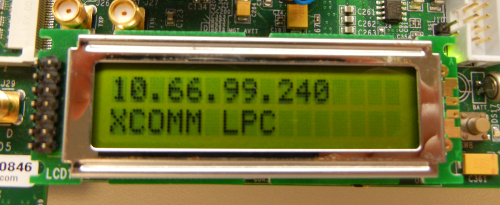
If the FPGA carrier board features an LCD display and the board is connected to a DHCP-enabled network, the IP address will be printed on the display, allowing remote access via SSH or libiio.
If the IP address shown is 192.168.2.2, DHCP failed and the board is using its default address. This address may not be within your subnet, so remote access may not work.
The kernel start-up messages should appear as follows:
Early console on uartlite at 0x40600000
bootconsole [earlyser0] enabled
Ramdisk addr 0x00000000,
Compiled-in FDT at 80323fe8
Linux version 3.17.0-126736-gdf1ca8f-dirty (michael@mhenneri-D04) (gcc version 4.8.3 20140131 (prerelease) (crosstool-NG 1.18.0) ) #1947 Wed Dec 17 11:04:20 CET 2014
setup_cpuinfo: initialising
setup_cpuinfo: Using full CPU PVR support
wt_msr_noirq
setup_memory: max_mapnr: 0x30000
setup_memory: min_low_pfn: 0x80000
setup_memory: max_low_pfn: 0xb0000
setup_memory: max_pfn: 0xb0000
Zone ranges:
  DMA      [mem 0x80000000-0xafffffff]
  Normal   empty
Movable zone start for each node
Early memory node ranges
  node   0: [mem 0x80000000-0xbfffffff]
On node 0 totalpages: 196608
free_area_init_node: node 0, pgdat 8040751c, node_mem_map 81000000
  DMA zone: 1536 pages used for memmap
  DMA zone: 0 pages reserved
  DMA zone: 196608 pages, LIFO batch:31
early_printk_console remapping from 0x40600000 to 0xffffd000
pcpu-alloc: s0 r0 d32768 u32768 alloc=1*32768
pcpu-alloc: [0] 0
Built 1 zonelists in Zone order, mobility grouping on.  Total pages: 195072
Kernel command line: console=ttyUL0,115200
PID hash table entries: 4096 (order: 2, 16384 bytes)
Dentry cache hash table entries: 131072 (order: 7, 524288 bytes)
Inode-cache hash table entries: 65536 (order: 6, 262144 bytes)
Memory: 768436K/786432K available (3215K kernel code, 148K rwdata, 724K rodata, 5988K init, 86K bss, 17996K reserved)
Kernel virtual memory layout:
  * 0xffffe000..0xfffff000  : fixmap
  * 0xffffd000..0xffffe000  : early ioremap
  * 0xb0000000..0xffffd000  : vmalloc & ioremap
NR_IRQS:128
/axi@0/axi-intc@41200000: num_irq=15, edge=0x3810
/axi@0/axi-timer@41c00000: irq=1
xilinx_timer_set_mode: shutdown
xilinx_timer_set_mode: periodic
sched_clock: 32 bits at 100MHz, resolution 10ns, wraps every 42949672950ns
Calibrating delay loop... 49.35 BogoMIPS (lpj=246784)
pid_max: default: 32768 minimum: 301
Mount-cache hash table entries: 2048 (order: 1, 8192 bytes)
Mountpoint-cache hash table entries: 2048 (order: 1, 8192 bytes)
devtmpfs: initialized
regulator-dummy: no parameters
NET: Registered protocol family 16
Switched to clocksource xilinx_clocksource
xilinx_timer_set_mode: oneshot
NET: Registered protocol family 2
TCP established hash table entries: 8192 (order: 3, 32768 bytes)
TCP bind hash table entries: 8192 (order: 3, 32768 bytes)
TCP: Hash tables configured (established 8192 bind 8192)
TCP: reno registered
UDP hash table entries: 512 (order: 1, 8192 bytes)
UDP-Lite hash table entries: 512 (order: 1, 8192 bytes)
NET: Registered protocol family 1
RPC: Registered named UNIX socket transport module.
RPC: Registered udp transport module.
RPC: Registered tcp transport module.
RPC: Registered tcp NFSv4.1 backchannel transport module.
XGpio: /axi@0/gpio@40030000: registered, base is 254
XGpio: /axi@0/gpio@40020000: registered, base is 241
XGpio: /axi@0/gpio@40020000: dual channel registered, base is 233
Skipping unavailable RESET gpio -2 (reset)
futex hash table entries: 256 (order: -1, 3072 bytes)
jffs2: version 2.2. (NAND) (SUMMARY)  © 2001-2006 Red Hat, Inc.
msgmni has been set to 1500
Block layer SCSI generic (bsg) driver version 0.4 loaded (major 253)
io scheduler noop registered
io scheduler deadline registered
io scheduler cfq registered (default)
Serial: 8250/16550 driver, 4 ports, IRQ sharing disabled
40600000.serial: ttyUL0 at MMIO 0x40600000 (irq = 36, base_baud = 0) is a uartlite
console [ttyUL0] enabled
console [ttyUL0] enabled
bootconsole [earlyser0] disabled
bootconsole [earlyser0] disabled
of_serial 41400000.serial: Unknown serial port found, ignored
brd: module loaded
Xilinx SystemACE device driver, major=254
xilinx_lcd 40010000.gpio_lcd: Device Tree Probing 'gpio_lcd'
xilinx_lcd 40010000.gpio_lcd: LCD 0x40010000 mapped to 0xb0160000
60000000.axi-emc: Found 1 x16 devices at 0x0 in 16-bit bank. Manufacturer ID 0x000089 Chip ID 0x0088b0
NOR chip too large to fit in mapping. Attempting to cope...
Intel/Sharp Extended Query Table at 0x010A
Intel/Sharp Extended Query Table at 0x010A
Intel/Sharp Extended Query Table at 0x010A
Intel/Sharp Extended Query Table at 0x010A
Intel/Sharp Extended Query Table at 0x010A
Using buffer write method
Using auto-unlock on power-up/resume
cfi_cmdset_0001: Erase suspend on write enabled
erase region 0: offset=0x0,size=0x40000,blocks=512
60000000.axi-emc: program region size/ctrl_valid/ctrl_inval = 1024/16/16
60000000.axi-emc: 1 set(s) of 1 interleaved chips --> 8 partitions of 16384 KiB
Reducing visibility of 131072KiB chip to 32768KiB
4 ofpart partitions found on MTD device 60000000.axi-emc
Creating 4 MTD partitions on "60000000.axi-emc":
0x000000000000-0x000001380000 : "fpga"
0x000001380000-0x000001400000 : "boot"
0x000001400000-0x000001440000 : "bootenv"
0x000001440000-0x000002000000 : "image"
xilinx_spi 44a70000.axi-quad-spi: at 0x44A70000 mapped to 0xb21a0000, irq=13
libphy: Fixed MDIO Bus: probed
xilinx_axienet 40e00000.network: TX_CSUM 2
xilinx_axienet 40e00000.network: RX_CSUM 2
libphy: Xilinx Axi Ethernet MDIO: probed
i2c /dev entries driver
i2c i2c-0: Added multiplexed i2c bus 1
at24 2-0050: 256 byte 24c02 EEPROM, writable, 1 bytes/write
at24 2-0054: 256 byte 24c02 EEPROM, writable, 1 bytes/write
i2c i2c-0: Added multiplexed i2c bus 2
i2c i2c-0: Added multiplexed i2c bus 3
i2c i2c-0: Added multiplexed i2c bus 4
i2c i2c-0: Added multiplexed i2c bus 5
i2c i2c-0: Added multiplexed i2c bus 6
i2c i2c-0: Added multiplexed i2c bus 7
i2c i2c-0: Added multiplexed i2c bus 8
pca954x 0-0074: registered 8 multiplexed busses for I2C switch pca9548
platform 44a10000.axi-ad9625: Driver cf_axi_adc requests probe deferral
spi spi32766.0: Driver ad9467 requests probe deferral
platform 44a91000.axi-jesd204b-rx: Driver cf_axi_jesd204b_v51 requests probe deferral
cf_axi_jesd204b_gt 44a60000.axi-jesd-gt-rx: AXI-JESD204B (6.00.b) at 0x44A60000 mapped to 0xb2260000,
TCP: cubic registered
NET: Registered protocol family 17
platform 44a10000.axi-ad9625: Driver cf_axi_adc requests probe deferral
spi spi32766.0: Driver ad9467 requests probe deferral
cf_axi_jesd204b_v51 44a91000.axi-jesd204b-rx: AXI-JESD204B 5.2 Rev 1, at 0x44A91000 mapped to 0xb0032000,
platform 44a10000.axi-ad9625: Driver cf_axi_adc requests probe deferral
ad9467 spi32766.0: AD9625 PLL LOCKED
cf_axi_adc 44a10000.axi-ad9625: ADI AIM (8.00.b) at 0x44A10000 mapped to 0xb22a0000, probed ADC AD9625 as MASTER
Freeing unused kernel memory: 5988K (80409000 - 809e2000)
Starting logging: OK
Starting network...
Starting network...
udhcpc (v1.22.1) started
net eth0: Promiscuous mode disabled.
net eth0: Promiscuous mode disabled.
Sending discover...
xilinx_axienet 40e00000.network eth0: Link is Down
xilinx_axienet 40e00000.network eth0: Link is Up - 100Mbps/Full - flow control off
Sending discover...
Sending select for 10.44.2.131...
Lease of 10.44.2.131 obtained, lease time 86400
deleting routers
adding dns 10.32.51.110
adding dns 10.64.53.110
random: ssh-keygen urandom read with 45 bits of entropy available
Starting sshd: OK
Starting IIO Server Daemon: OK

Welcome to Buildroot
buildroot login: root
Password:
~ #
IIO Oscilloscope Remote
The IIO Oscilloscope application can be used to connect to another platform that has a connected device in order to configure the device and read data from it. See IIO Oscilloscope for more information.
Build and start the oscilloscope on a network-enabled Linux host. Once the application is launched, go to Settings -> Connect and enter the IP address of the target in the popup window.
No-OS Quick Start (ZC706 / VC707)
This guide provides instructions on how to set up the AD-FMCADC2-EBZ on:
Downloads
Download
AD-FMCADC2-EBZ no-OS - fmcadc2 project
Required Software
The Xilinx tools version supported on each release can be found in the HDL repository.
A UART terminal (Tera Term/Hyperterminal), baud rate 115200.
Software Setup
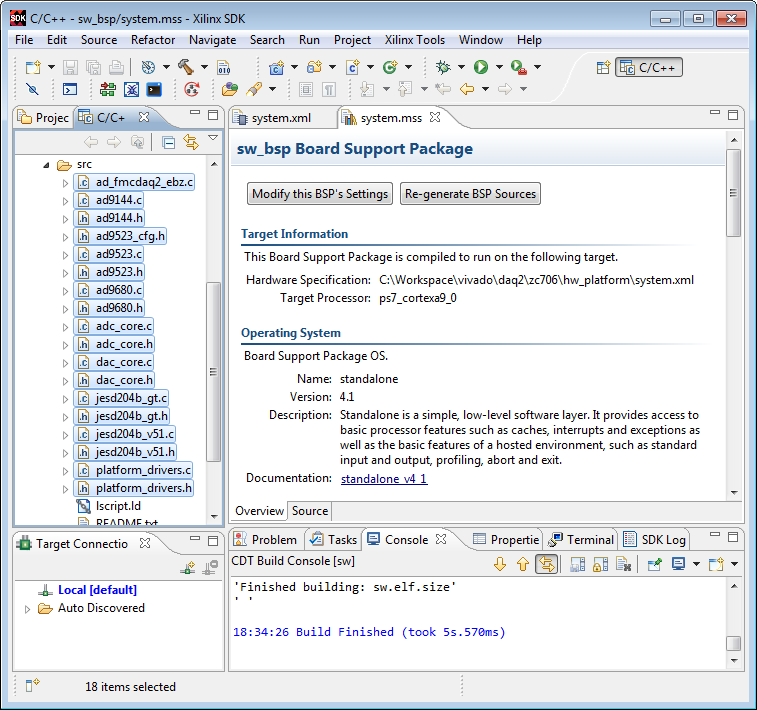
After Build an HDL project, open the Xilinx SDK.
When the SDK starts it asks to provide a folder where to store the workspace. Any folder can be provided.
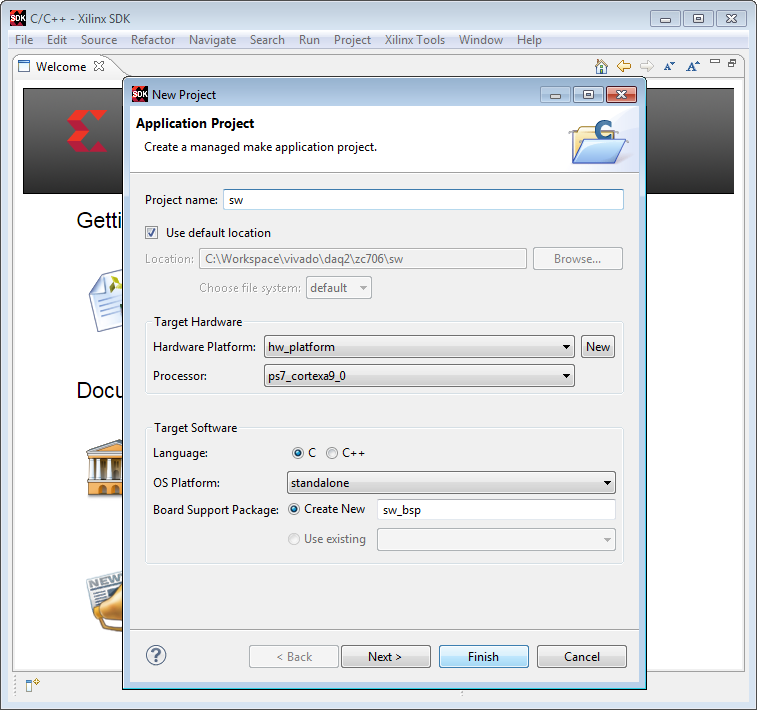
Type a project name and click Next.
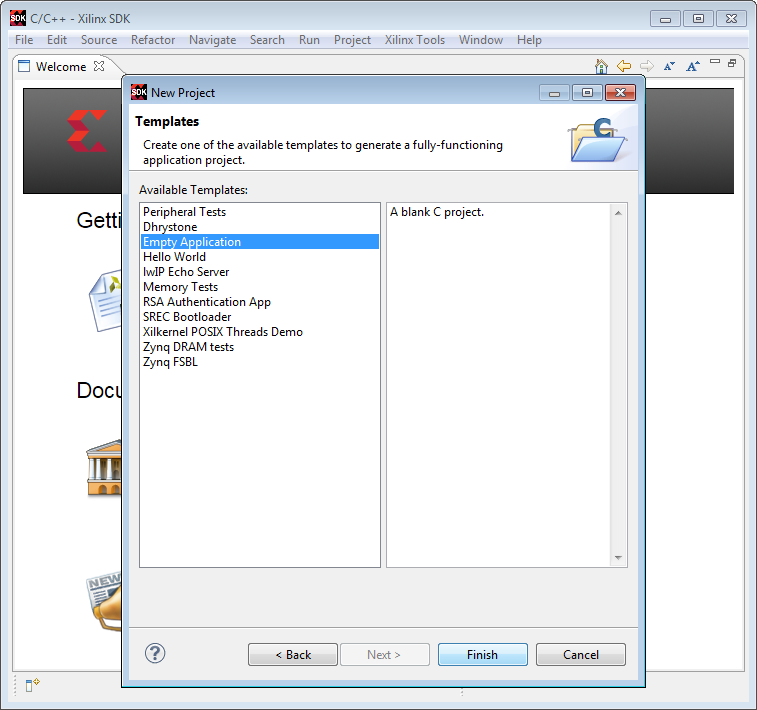
Select the Empty Application template and click Finish.
Download the required source files from the Downloads section above.
Copy the downloaded source files into the src folder of the just created empty application.
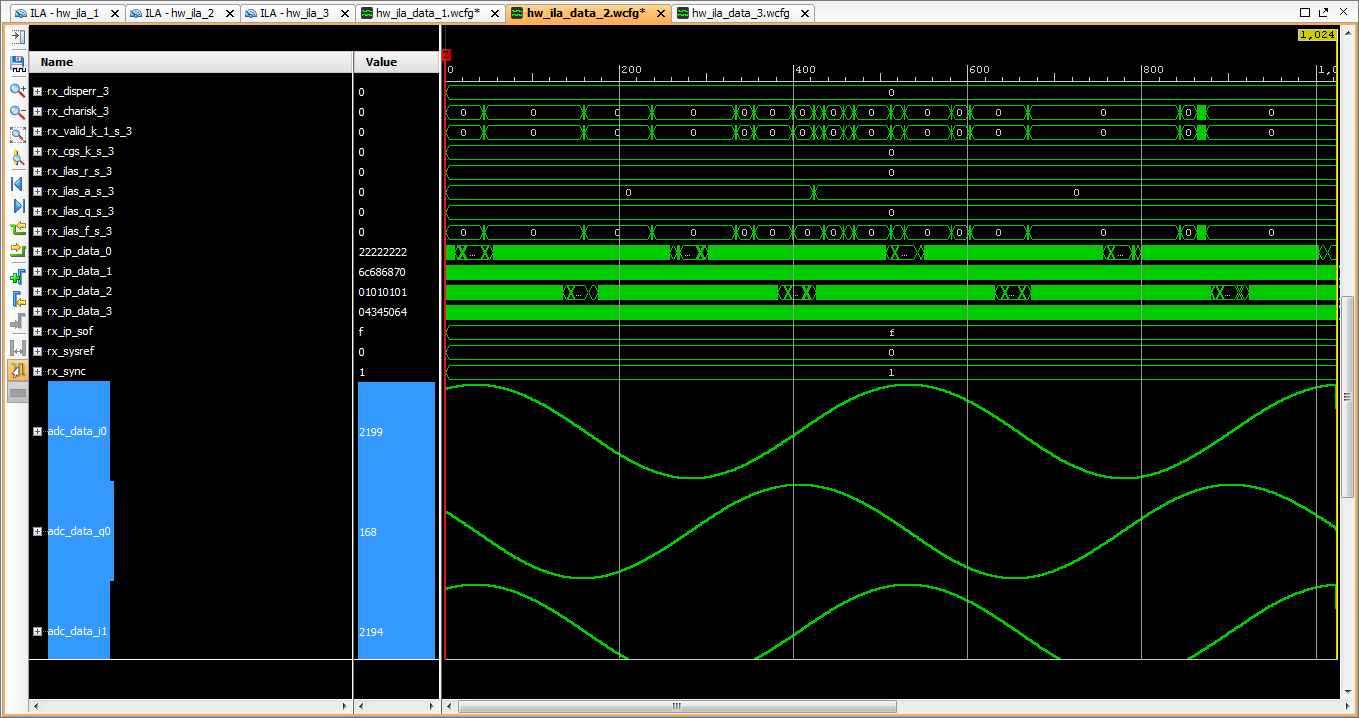
The project can be easily debugged using the Vivado Hardware Manager and the integrated logic analyzer (ILA) debug cores.