ADRV9364-Z7020 System on Module (SOM) SDR
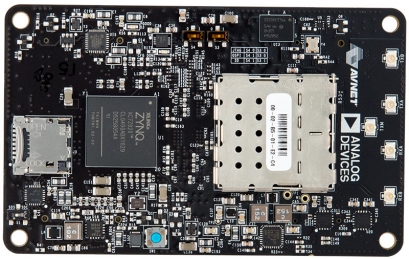
https://media.githubusercontent.com/media/analogdevicesinc/documentation/main/docs/solutions/reference-designs/adrv9364z7020/images/adrv9364z7020.jpg

The ADRV9364-Z7020 is built on a portfolio of highly integrated System-On-Module (SOMs) based on the Xilinx Zynq®-7000 All Programmable (AP)SoC. Built on the AD9364, it is schematically & HDL similar to the AD-FMCOMMS4-EBZ.

The purpose of the SDR is to provide an RF platform to software developers, system architects, product developers, etc, who want a single platform which operates over a wide tuning range (70 MHz – 6 GHz) that is capable of being used for prototyping, evaluation, and as a reference design to help with production volume.

Table of Contents

People who follow the flow that is outlined, have a much better experience with things. However, like many things, documentation is never as complete as it should be. If you have any questions, feel free to ask.

  1. Purchase

  2. Introduction to boards based on the AD9361

  3. RF SOM Hardware

  4. Tuning the system

  5. Use the RF SOM Hardware to better understand the AD9364

    1. What you need to get started

    2. Quick Start Guides

      1. Linux on RF SOM

      2. Configure an SD Card with Kuiper

    3. Linux Applications

      1. IIO Oscilloscope

      2. AD9361 Control IIO Scope Plugin

      3. AD9361 Advanced Control IIO Scope Plugin

      4. Command Line/Shell scripts

    4. Push custom data into/out of the RF SOM SDR

      1. Basic Data files and formats

      2. Create and analyze data files in MATLAB

      3. Stream data into/out of MATLAB

      4. AD9361 libiio streaming example

      5. Python Support with AD9364 Interface Class

  6. Design with the AD9364

    1. Understanding the AD9364

      1. AD9364 Product page

      2. Full Datasheet and chip design package

      3. MATLAB Filter Design Wizard for AD9361

    2. Simulation

      1. MathWorks SimRF Models of the AD9361

    3. Hardware in the Loop / How to design your own custom BaseBand

      1. MATLAB/Simulink Examples

        1. Stream data into/out of MATLAB

        2. Beacon Frame Receiver Example

        3. QPSK Transmit and Receive Example

        4. LTE Transmit and Receive Example

        5. ADS-B Airplane Tracking Example

      2. GNU Radio

      3. FM Radio/Tuner (listen to FM signals on the HDMI monitor)

      4. C example

    4. Targeting

      1. Analog Devices BSP for MathWorks HDL Workflow Advisor

    5. Complete Workflow

      1. ADS-B Airplane Tracking Tutorial

    6. Design a custom AD9364-based platform

      1. Linux software

        1. Linux Device Driver

        2. Build the demo on ZC702, ZC706, or ZED from source

        3. Build the demo on KC705 or VC707 for Microblaze from source

        4. Build the 2014_R2 Release Linux kernel from source

        5. Customizing the devicetree on the target

      2. No-OS AD9361 project

      3. HDL Reference Design which you must use in your FPGA.

        1. Digital Interface Timing Validation

  7. Additional Documentation about SDR Signal Chains

    1. The math behind the RF

  8. Help and Support

ADI Articles

Four Quick Steps to Production: Using Model-Based Design for Software-Defined Radio

  1. Part 1 - The Analog Devices/Xilinx SDR Rapid Prototyping Platform: Its Capabilities, Benefits, and Tools

  2. Part 2 - Mode S Detection and Decoding Using MATLAB and Simulink

  3. Part 3 - Mode S Signals Decoding Algorithm Validation Using Hardware in the Loop

  4. Part 4 - Rapid Prototyping Using the Zynq SDR Kit and Simulink Code Generation Workflow

Warning

All the products described on this page include ESD (electrostatic discharge) sensitive devices. Electrostatic charges as high as 4000V readily accumulate on the human body or test equipment and can discharge without detection. Although the boards feature ESD protection circuitry, permanent damage may occur on devices subjected to high-energy electrostatic discharges. Therefore, proper ESD precautions are recommended to avoid performance degradation or loss of functionality. This includes removing static charge on external equipment, cables, or antennas before connecting to the device.