Synchrona Overview
The AD-SYNCHRONA14-EBZ (Synchrona) is a highly accurate frequency and phase controlled source clock. Synchrona is based on the AD9545, which is a quad input synchronizer and jitter cleaner, and the HMC7044, a 3.2 GHz, 14 output high performance jitter attenuator.
In order to change the channel configuration of Synchrona, follow this guide here that shows how to use RaspAP with Synchrona. RaspAP is an open-source software suite that transforms a Raspberry Pi into a functional, web-managed wireless access point.
Synchrona plays a vital part in the Jupiter MCS pilot, accurately syncing two Jupiters and allowing for both wired and over-the-air propagation. In the MCS demo, Synchrona takes in a raw signal from each Jupiter, aligns their phase and frequency, and transmits them to either a splitter or an antenna.
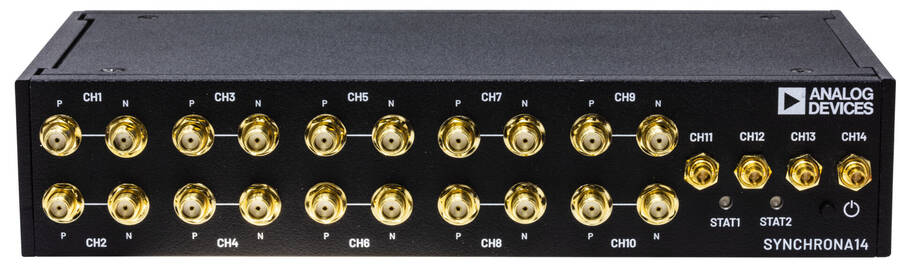
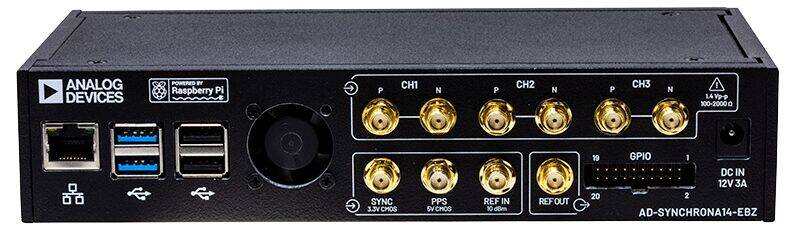
Synchrona Block Diagram
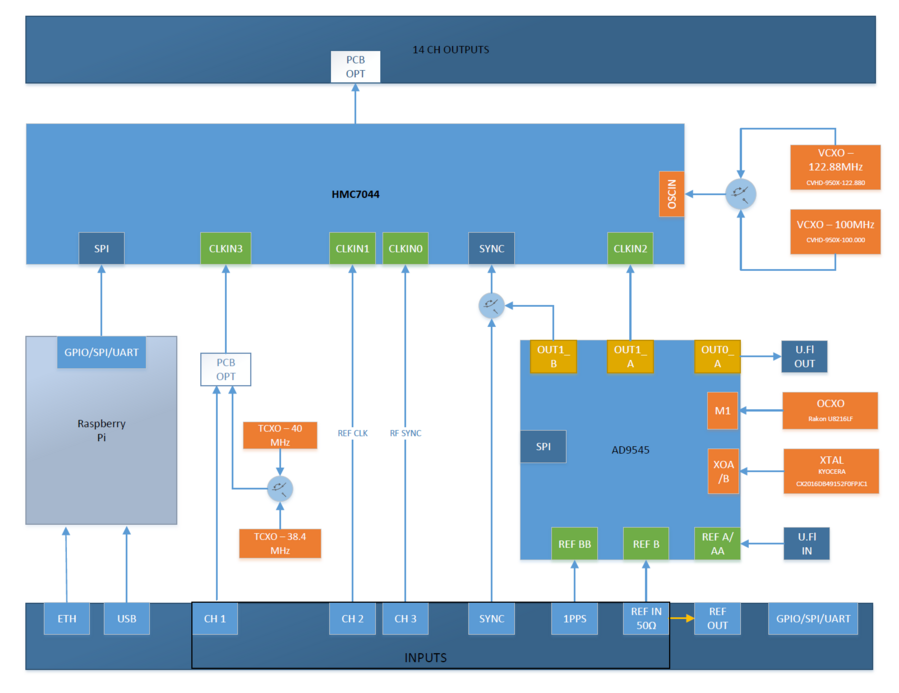
HMC7044 Clock Generator / Jitter Cleaner - Central clock‑distribution IC that produces up to 14 synchronized low‑jitter clock outputs from multiple reference inputs.
AD9545 Precision Clock Synchronizer - Conditions incoming references, performs jitter cleaning, and generates stable clock outputs for the HMC7044 and system timing.
Reference Oscillators (VCXO / OCXO / XO / TCXO) - Multiple high‑stability oscillators provide selectable reference frequency sources for disciplined clocking.
Flexible Clock Input Paths - Inputs such as CH1–CH3, SYNC, 1PPS, and REF IN feed external references, GPS timing, or system synchronization signals.
Multiplexers & Routing Logic - Switching blocks route and select between reference sources, enabling redundancy, failover, and flexible clock generation paths.
Raspberry Pi System Controller - Provides SPI/GPIO/UART configuration and control, manages clock settings, and interfaces to the board via USB/Ethernet.
14‑Channel Clock Output Bank - The final clock fan‑out section delivering synchronized timing signals to downstream hardware (e.g., converters, transceivers, or FPGA systems).
ADD-ON Voltage Translation Board
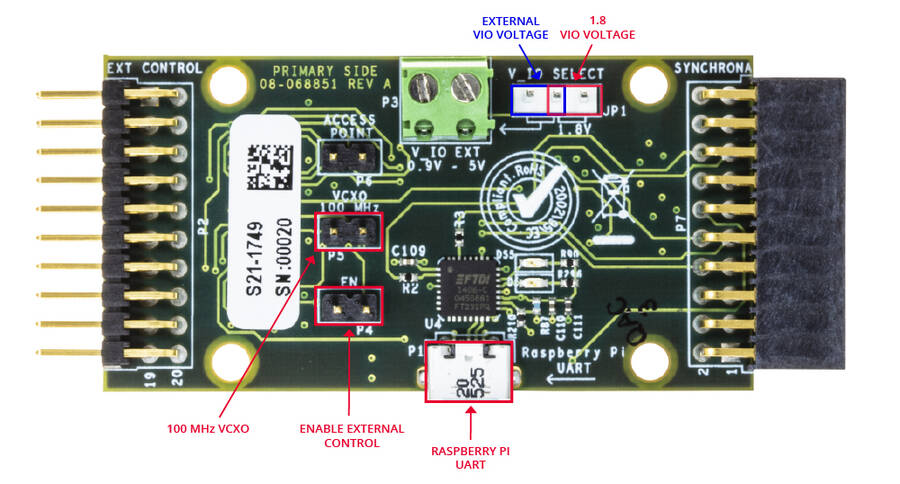
Inside the AD-SYNCHRONA14-EBZ package, you can find an ADD-ON board that allows you to connect via SPI with an external CPU or FPGA. It has voltage translators able to function from 0.9 V to 5 V. It also gives access to the Raspberry Pi UART via USB. When the EN jumper (enable) is placed, the SPI interface is disconnected from the Raspberry Pi inside, allowing external SPI control. The VIO_SELECT allows the user to select V_IO voltage of 1.8 V (on-board) or the external V_IO voltage connected on P3. The VCXO 100 MHz jumper forces the use of the 100 MHz VCXO inside AD-SYNCHRONA14-EBZ.
In the Jupiter Pilot this add-on board allows for connection to a terminal emulator. Alternatively, a connection can be made without this board using an ethernet cable and connecting via the IP address.
RaspAP Web Interface
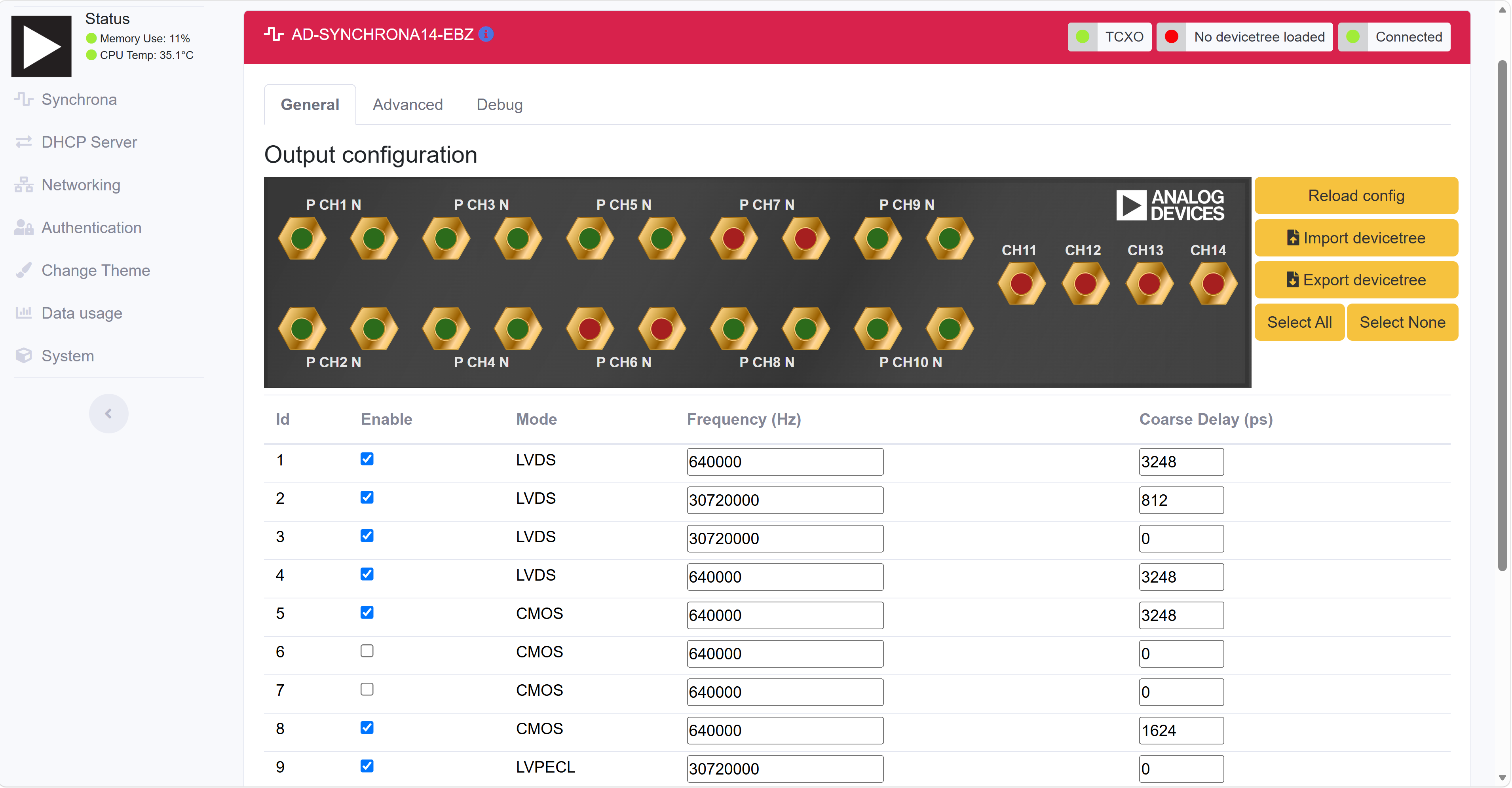
Synchrona runs a web-based configuration GUI called RaspAP (https://raspap.com/) on the onboard Raspberry Pi. This allows you to view and modify the clock configuration directly from a browser without needing a serial connection or the ADD-ON board.
Accessing the GUI
Connect the Synchrona’s Raspberry Pi to your network using an Ethernet cable.
Find the IP address of the Raspberry Pi (check your router’s DHCP table, or use a tool like
arp -aon your host machine).Open a web browser and navigate to
http://<synchrona-ip-address>.Log in with the default credentials:
Username:
adminPassword:
analog
What You Can Do
From the RaspAP interface you can:
View the current clock channel configuration (AD9545 and HMC7044 settings)
Change output channel mappings and frequencies
Monitor lock status and reference input selection
Adjust jitter cleaner parameters
Notes
The Raspberry Pi must be powered and booted before the GUI becomes available. Give it about 30 seconds after power-on.
If you cannot reach the IP address, verify that the Ethernet link is active (check for a link LED on the RJ45 jack).
Changes made through the GUI take effect immediately on the hardware.
More information about the GUI and its pages can be found here.