ADRV9029 DPD model
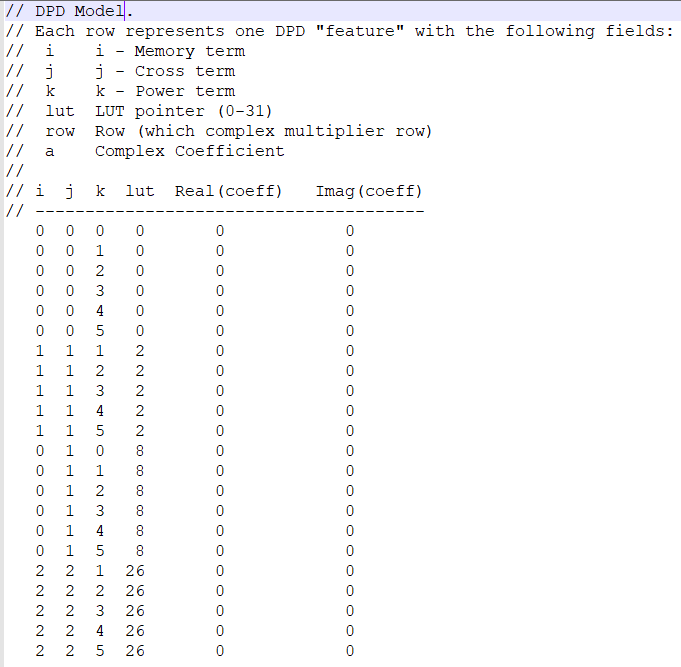
The DPD model is a fundamental building block of ADRV9029 DPD that defines the GMP polynomial (memory terms and polynomial degree) for modeling a power amplifier in the baseband. Good modeling of the PA is critical for achieving good DPD performance. An example DPD model descriptor is shown below.
DPD model generation
ADI provides a library of 140 pre-defined DPD models that are optimized for good performance on the ADRV9029 with various types of power amplifiers that can be downloaded at this link. For 190 coefficient model files, download from here.
In order to identify a DPD model that is optimum for a power amplifier, the following procedure is recommended:
Set up the ADRV9029 Transceiver Evaluation platform as shown in the prerequisites page.
Ensure that you are able to bring up DPD on the ADRV9029 evaluation platform by following the instructions on the ADRV9029 DPD evaluation through TES GUI page.
After verifying that DPD bring up is successful on the ADRV9029 platform, browse to the following location on your PC and ensure that the DPD model library is available:
C:\Program Files\Analog Devices\ADRV902x Transceiver Evaluation Software_x64_FULL\Resources\DpdModels
In case the DPD model library is not installed in the above mentioned location, the user can download the DPD model library at this link and manually install the DPD library at the same location on your PC.
At this stage the user can download the DPD model sweep script provided by ADI at this link. The model sweep script automates the process of picking the most suitable model for the PA by iterating through the DPD model library and picking the DPD model that produces the least amount of error between pre-DPD actuator Tx and post PA observed ORx data.
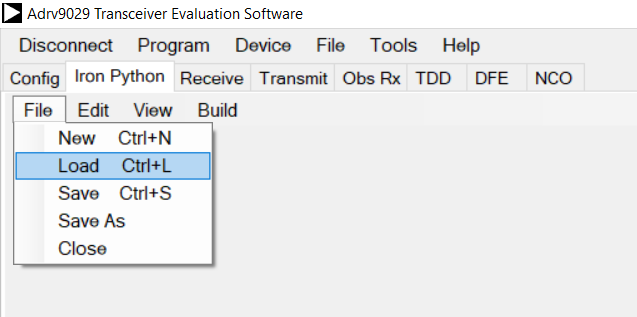
Load the script downloaded in the previous step into the Iron Python tab of the ADRV9029 TES GUI by clicking on File -> Load in the Iron Python tab of the ADRV9029 GUI as shown in the figure below and browsing to the location where you have stored the script on your PC.
After loading the script, execute the script by clicking Build -> Run in the Iron Python tab of the ADRV9029 TES GUI.
At the end of execution of this script, the DPD model producing the least amount of error will be logged as:
C:\Program Files\Analog Devices\ADRV9025 Transceiver Evaluation Software_x64_FULL\Resources\DpdModels\DpdModelOptimized.txt
Note
The DPD model sweep script is configured to run on transmitter Tx1 by default. Please ensure that the PA gain line up is connected to Tx1 in the ADRV9029 evaluation system.
Once the DpdModelOptimized.txt is obtained from the script, the user can
continue DPD evaluation by loading this DPD model as described in
Evaluating ADRV9029 DPD through TES GUI.