ZC706 Quickstart
This guide provides quick instructions on how to set up the EVAL-AD9265 on:
ZC706 (rev 1.1 or higher) FMC LPC
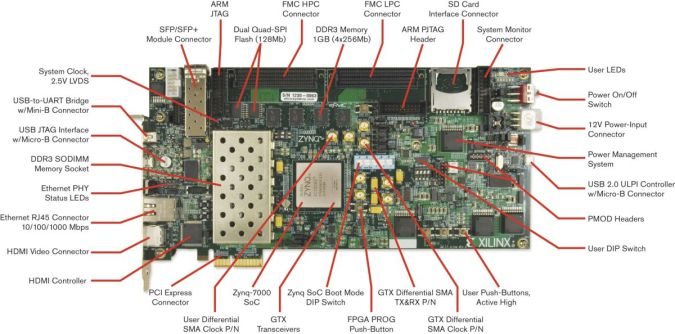
All the products described on this page include ESD (electrostatic discharge) sensitive devices. Electrostatic charges as high as 4000V readily accumulate on the human body or test equipment and can discharge without detection. Although the boards feature ESD protection circuitry, permanent damage may occur on devices subjected to high-energy electrostatic discharges. Therefore, proper ESD precautions are recommended to avoid performance degradation or loss of functionality. This includes removing static charge on external equipment, cables, or antennas before connecting to the device.
Using Linux as software
Necessary files
Note
The SD card includes several folders in the root directory of the BOOT partition. In order to configure the SD card to work with a specific FPGA board and ADI hardware, several files must be copied onto the root directory. Using the host PC, drag and drop the required files onto the BOOT partition, and use the EJECT function when removing the SD card from the reader.
The following files are needed for the system to boot:
HDL boot image:
BOOT.BINLinux Kernel image:
uImageLinux device tree:
devicetree.dtb
They can either be taken from the SD card - already generated by us, or you can build them manually:
Instructions on how to choose the boot files from the SD card can be found in the Platform-Specific Manual Steps section from here: Hardware Configuration.
Instructions on how to manually build the boot files from source can be found here:
AD9265-FMC HDL project build documentation. More HDL build details at Build an HDL project.
Important
Some projects provide multiple devicetree files in the SD card’s boot folders. Make sure you select the devicetree that matches your specific use case.
Required software
SD card (16 GB minimum) imaged with Kuiper (see that guide for instructions, then return here)
A UART terminal (PuTTY/Tera Term/Minicom, etc.), baud rate 115200 (8N1)
Required hardware
AMD Xilinx ZC706 Rev 1.1 or higher FPGA board and its 12 V power supply
EVAL-AD9265 FMC evaluation board (AD9265-FMC-125EBZ)
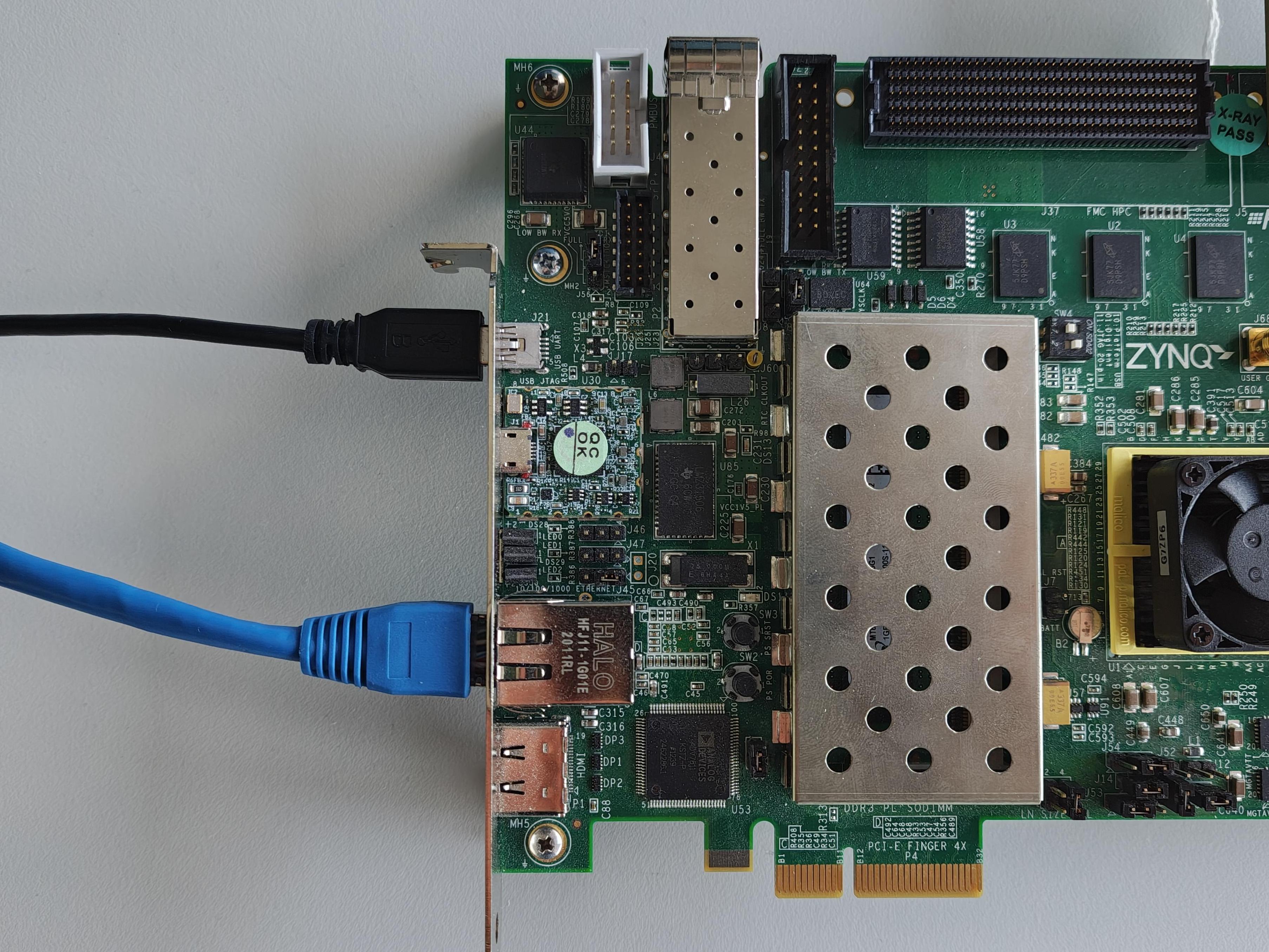
Mini-USB cable (UART, connects to J21)
LAN cable (Ethernet, connects to J45)
Signal generator (low-jitter, low-phase-noise recommended)
SMA cables for analog input connection to J100
More details can be found at Prerequisites.
Testing
Creating the setup
Caution
This project was tested with VADJ = 2.5 V
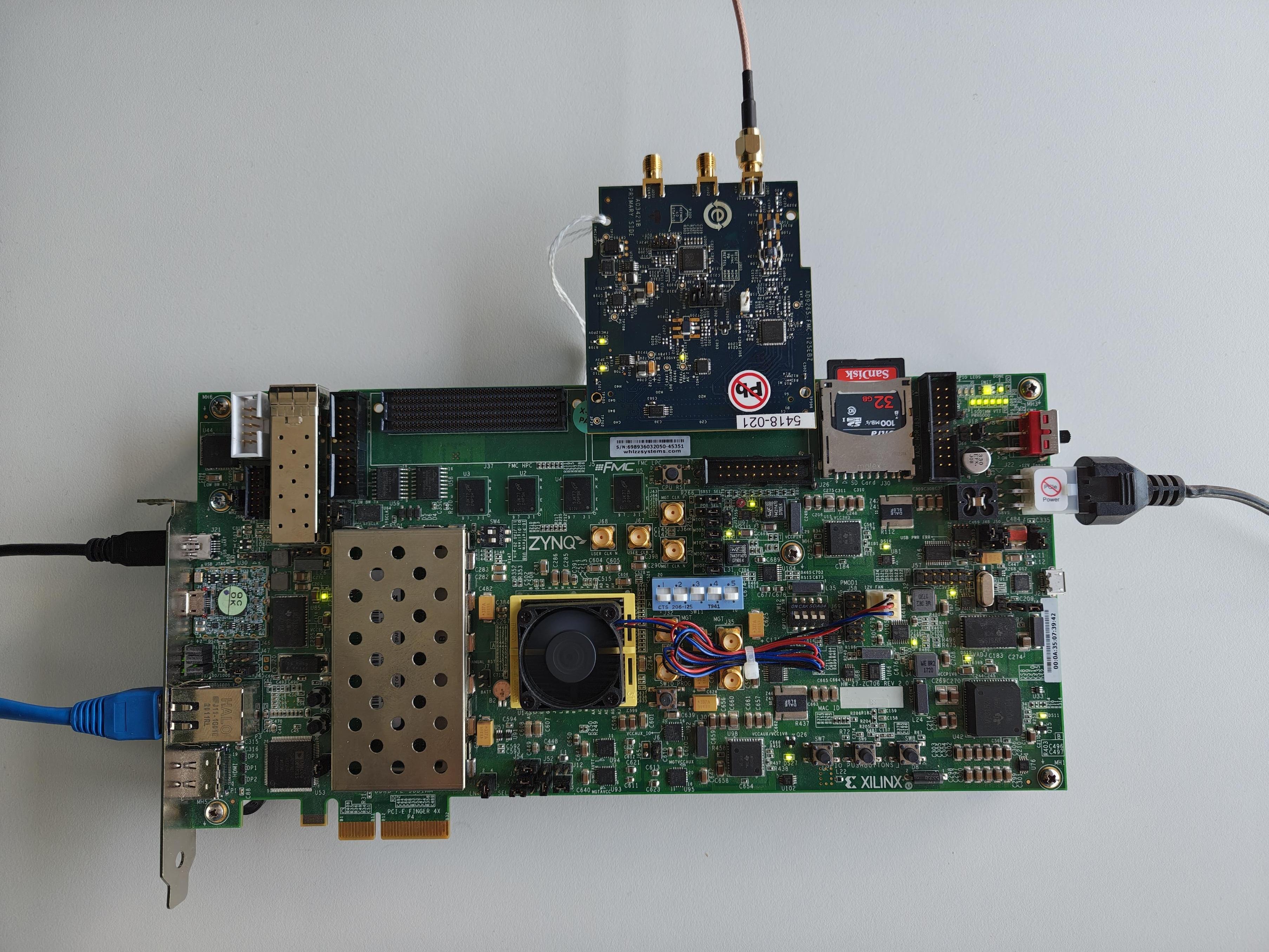
Follow the steps in this order, to avoid damaging the components:
Get the ZC706
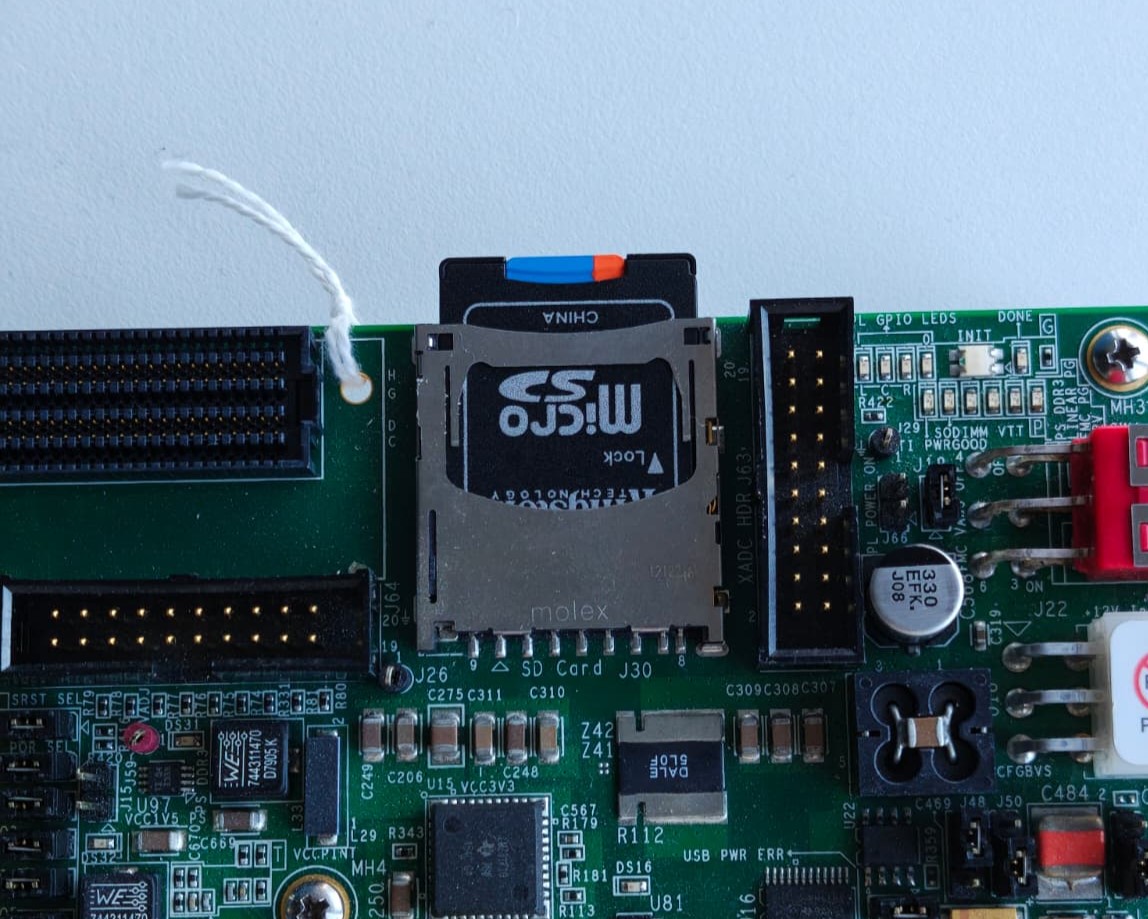
Insert the SD card into the SD Card Interface Connector (J30)
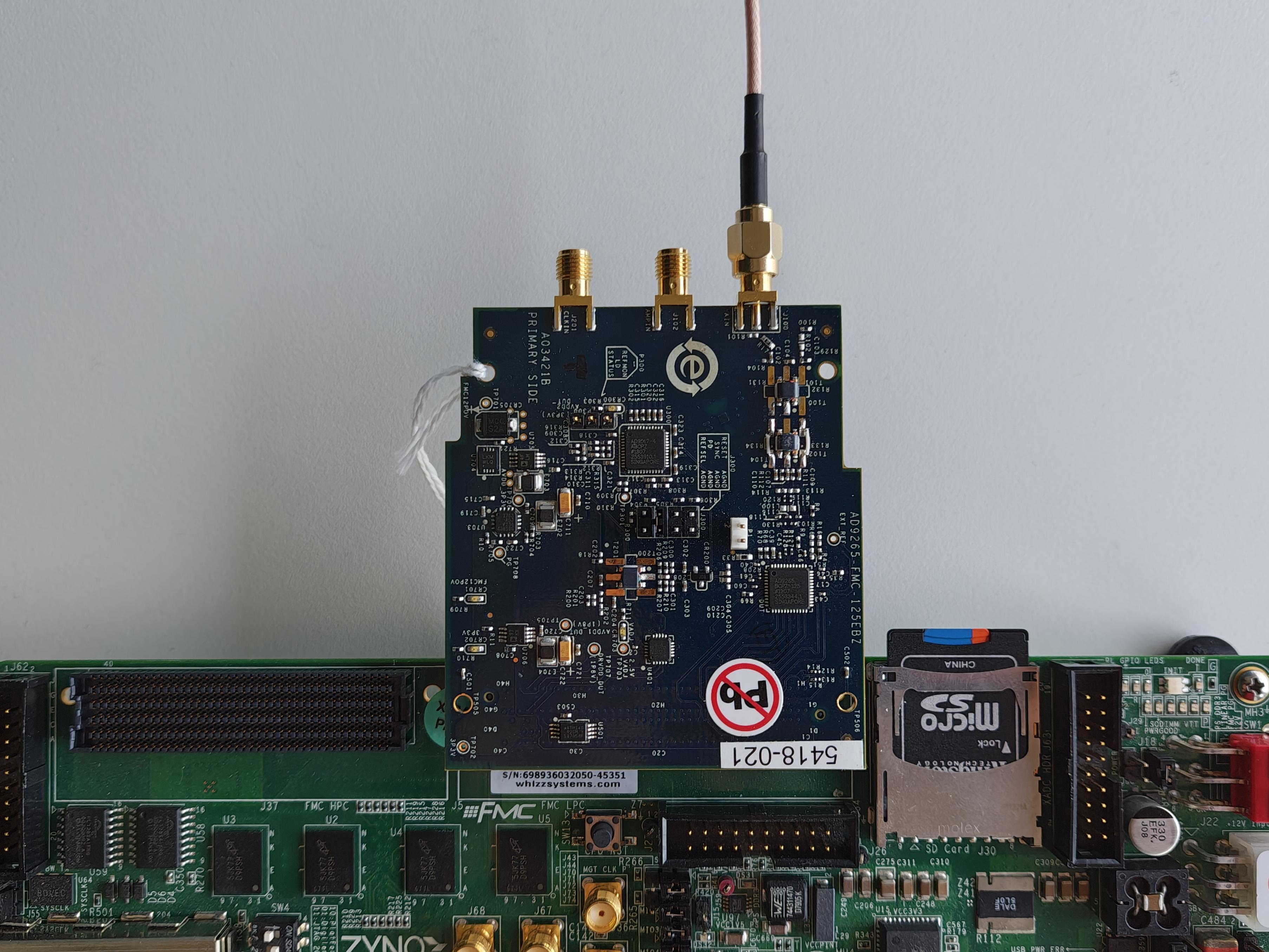
Plug the EVAL-AD9265 into the FMC LPC Connector (J5)
Connect your signal generator to the analog input of the evaluation board using a SMA cable connected to the J100 pin.
Plug the Mini-USB cable into the UART connector (J21) and connect it to your host PC.
Plug the Ethernet cable into the Ethernet connector (J45) and connect it to your host PC.
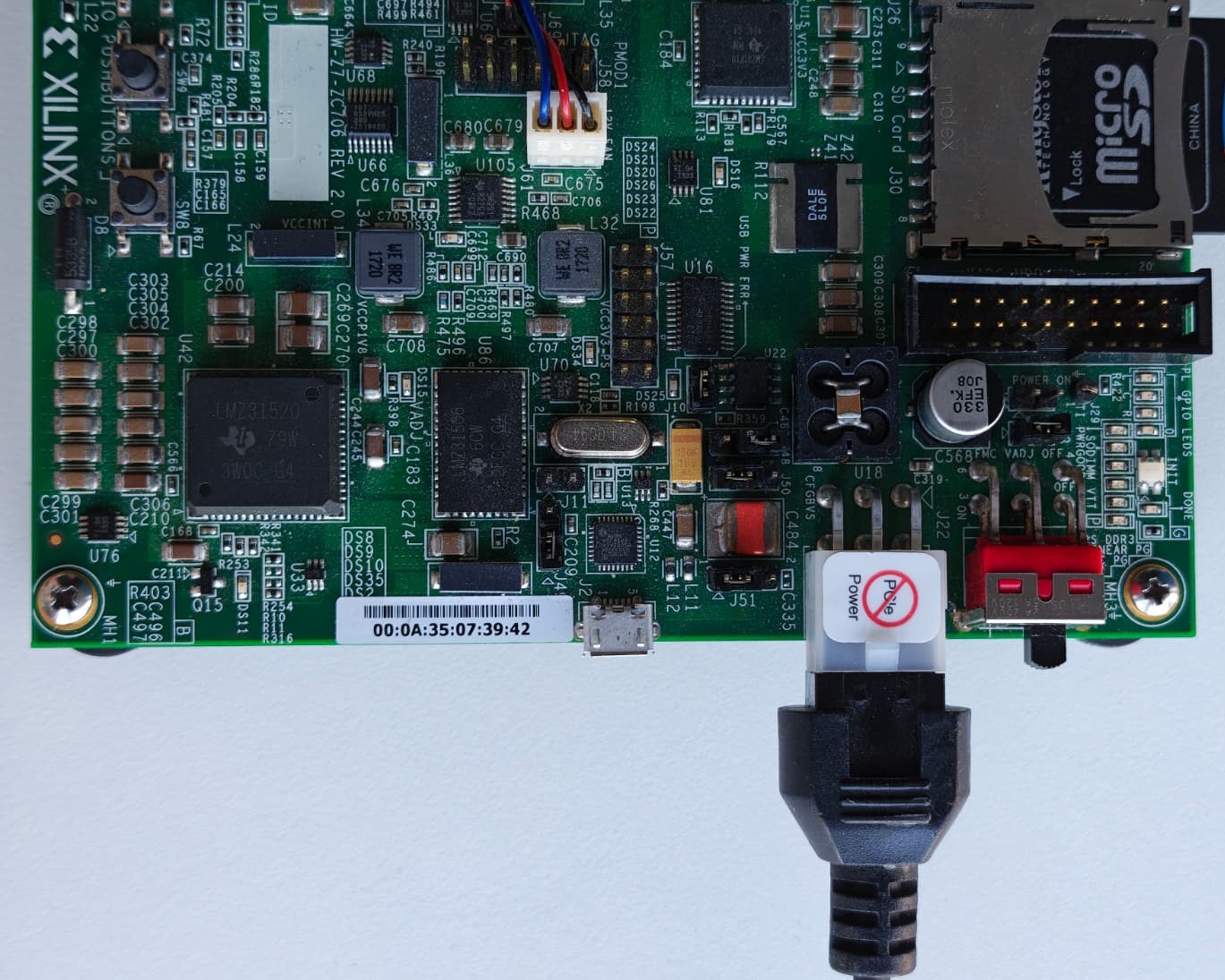
Plug the Power Supply into 12V Power input connector (J22) (DO NOT turn the device on).
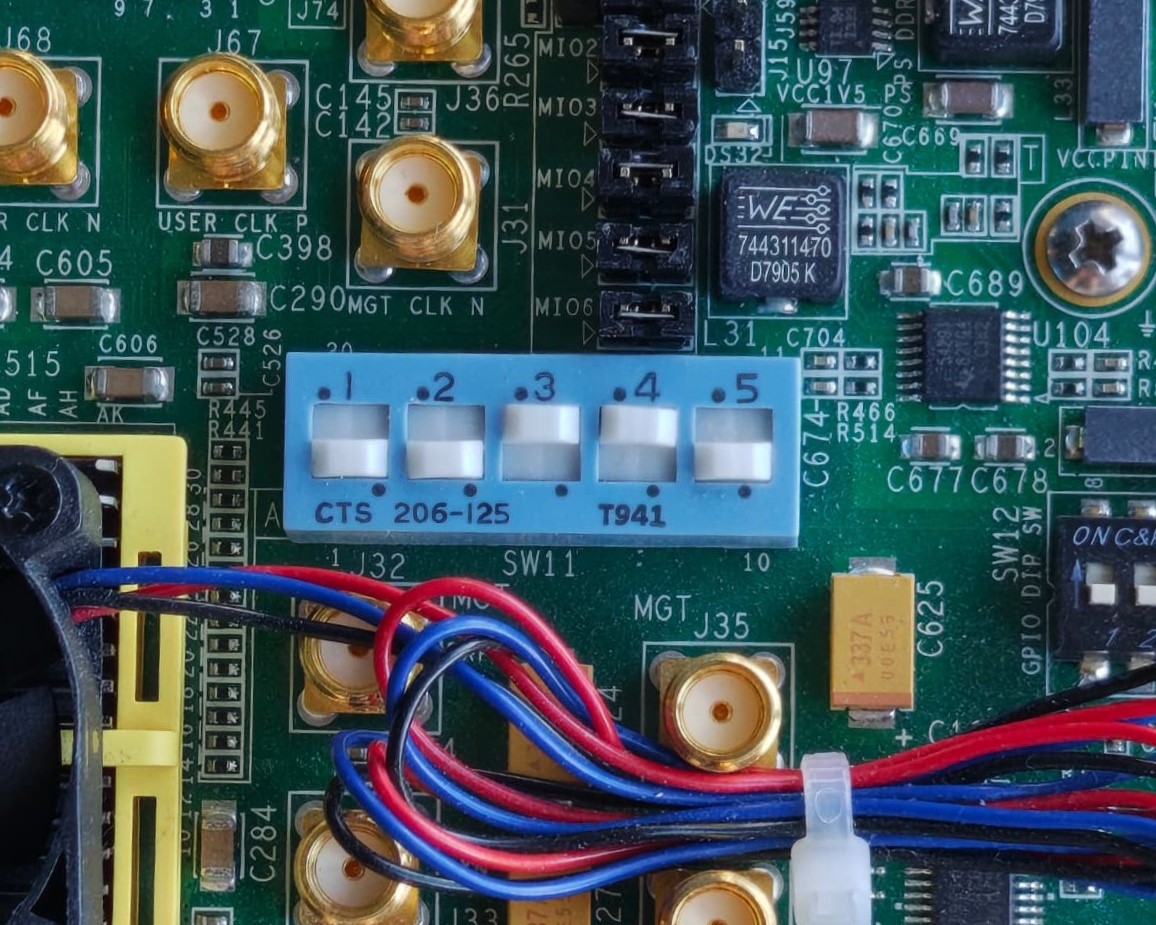
Set the boot mode switch (SW11). For SD card boot, set it to: 1: Down, 2: Down, 3: Up, 4: Up, 5: Down.
Turn on the power switch on the FPGA board
Connect to the serial console to observe the boot messages
Boot messages
The following is what is printed in the serial console, after you have connected to the proper ttyUSB or COM port:
U-Boot 2018.01-21441-ga6ab387 (Aug 31 2022 - 11:41:38 +0100) Xilinx Zynq ZC706, Build: jenkins-development-build_uboot-2

Model: Zynq ZC706 Development Board
Board: Xilinx Zynq
Silicon: v3.1
I2C:   ready
DRAM:  ECC disabled 1 GiB
MMC:   sdhci@e0100000: 0 (SD)
SF: Detected s25fl128s_64k with page size 512 Bytes, erase size 128 KiB, total 32 MiB
*** Warning - bad CRC, using default environment

In:    serial@e0001000
Out:   serial@e0001000
Err:   serial@e0001000
Net:   ZYNQ GEM: e000b000, phyaddr 7, interface rgmii-id
eth0: ethernet@e000b000
reading uEnv.txt
407 bytes read in 18 ms (21.5 KiB/s)
Importing environment from SD ...
Hit any key to stop autoboot:  0
Device: sdhci@e0100000
Manufacturer ID: 1d
OEM: 4144
Name: USDTran Speed: 50000000
Rd Block Len: 512
SD version 3.0
High Capacity: Yes
Capacity: 29.1 GiB
Bus Width: 4-bit
Erase Group Size: 512 Bytes
reading uEnv.txt
407 bytes read in 19 ms (20.5 KiB/s)
Loaded environment from uEnv.txt
Importing environment from SD ...
Running uenvcmd ...
Copying Linux from SD to RAM...
reading uImage
7538368 bytes read in 432 ms (16.6 MiB/s)
reading devicetree.dtb
20579 bytes read in 25 ms (803.7 KiB/s)
** Unable to read file uramdisk.image.gz **
## Booting kernel from Legacy Image at 03000000 ...
   Image Name:   Linux-5.10.0-98744-g64e7a607b659
   Image Type:   ARM Linux Kernel Image (uncompressed)
   Data Size:    7538304 Bytes = 7.2 MiB
   Load Address: 00008000
   Entry Point:  00008000
   Verifying Checksum ... OK
## Flattened Device Tree blob at 02a00000
   Booting using the fdt blob at 0x2a00000
   Loading Kernel Image ... OK
   Loading Device Tree to 1fff7000, end 1ffff062 ... OK

Starting kernel ...

Booting Linux on physical CPU 0x0
Linux version 5.10.0-98744-g64e7a607b659 (jenkins@romlxbuild1) (arm-xilinx-linux-gnueabi-gcc.real (GCC) 10.2.0, GNU ld (GNU Binutils) 2.35.0.20200730) #1788 SMP PREEMPT Fri Mar 31 16:51:05 EEST 2023
CPU: ARMv7 Processor [413fc090] revision 0 (ARMv7), cr=18c5387d
CPU: PIPT / VIPT nonaliasing data cache, VIPT aliasing instruction cache
OF: fdt: Machine model: Xilinx Zynq ZC706
OF: fdt: earlycon: stdout-path /amba@0/uart@E0001000 not found
Memory policy: Data cache writealloc
cma: Reserved 128 MiB at 0x38000000
Zone ranges:
Normal   [mem 0x0000000000000000-0x000000002fffffff]
HighMem  [mem 0x0000000030000000-0x000000003fffffff]
Movable zone start for each node
Early memory node ranges
node   0: [mem 0x0000000000000000-0x000000003fffffff]
Initmem setup node 0 [mem 0x0000000000000000-0x000000003fffffff]
percpu: Embedded 15 pages/cpu s29900 r8192 d23348 u61440
Built 1 zonelists, mobility grouping on.  Total pages: 260608
Kernel command line: console=ttyPS0,115200 root=/dev/mmcblk0p2 rw earlycon rootfstype=ext4 rootwait clk_ignore_unused cpuidle.off=1
Dentry cache hash table entries: 131072 (order: 7, 524288 bytes, linear)
Inode-cache hash table entries: 65536 (order: 6, 262144 bytes, linear)
mem auto-init: stack:off, heap alloc:off, heap free:off
Memory: 886020K/1048576K available (11264K kernel code, 804K rwdata, 7628K rodata, 1024K init, 492K bss, 31484K reserved, 131072K cma-reserved, 131072K highmem)
rcu: Preemptible hierarchical RCU implementation.
rcu:    RCU event tracing is enabled.
rcu:    RCU restricting CPUs from NR_CPUS=4 to nr_cpu_ids=2.
      Trampoline variant of Tasks RCU enabled.
rcu: RCU calculated value of scheduler-enlistment delay is 10 jiffies.
rcu: Adjusting geometry for rcu_fanout_leaf=16, nr_cpu_ids=2
NR_IRQS: 16, nr_irqs: 16, preallocated irqs: 16
efuse mapped to (ptrval)
slcr mapped to (ptrval)
L2C: platform modifies aux control register: 0x72360000 -> 0x72760000
L2C: DT/platform modifies aux control register: 0x72360000 -> 0x72760000
L2C-310 erratum 769419 enabled
L2C-310 enabling early BRESP for Cortex-A9
L2C-310 full line of zeros enabled for Cortex-A9
L2C-310 ID prefetch enabled, offset 1 lines
L2C-310 dynamic clock gating enabled, standby mode enabled
L2C-310 cache controller enabled, 8 ways, 512 kB
L2C-310: CACHE_ID 0x410000c8, AUX_CTRL 0x76760001
random: get_random_bytes called from start_kernel+0x33c/0x4e0 with crng_init=0
zynq_clock_init: clkc starts at (ptrval)
Zynq clock init
sched_clock: 64 bits at 333MHz, resolution 3ns, wraps every 4398046511103ns
clocksource: arm_global_timer: mask: 0xffffffffffffffff max_cycles: 0x4ce07af025, max_idle_ns: 440795209040 ns
Switching to timer-based delay loop, resolution 3ns
clocksource: ttc_clocksource: mask: 0xffff max_cycles: 0xffff, max_idle_ns: 537538477 ns
timer #0 at (ptrval), irq=25
Console: colour dummy device 80x30
Calibrating delay loop (skipped), value calculated using timer frequency.. 666.66 BogoMIPS (lpj=3333333)
pid_max: default: 32768 minimum: 301
Mount-cache hash table entries: 2048 (order: 1, 8192 bytes, linear)
Mountpoint-cache hash table entries: 2048 (order: 1, 8192 bytes, linear)
CPU: Testing write buffer coherency: ok
CPU0: Spectre v2: using BPIALL workaround
CPU0: thread -1, cpu 0, socket 0, mpidr 80000000
Setting up static identity map for 0x100000 - 0x100060
rcu: Hierarchical SRCU implementation.
smp: Bringing up secondary CPUs ...
CPU1: thread -1, cpu 1, socket 0, mpidr 80000001
CPU1: Spectre v2: using BPIALL workaround
smp: Brought up 1 node, 2 CPUs
SMP: Total of 2 processors activated (1333.33 BogoMIPS).
CPU: All CPU(s) started in SVC mode.
devtmpfs: initialized
VFP support v0.3: implementor 41 architecture 3 part 30 variant 9 rev 4
clocksource: jiffies: mask: 0xffffffff max_cycles: 0xffffffff, max_idle_ns: 19112604462750000 ns
futex hash table entries: 512 (order: 3, 32768 bytes, linear)
pinctrl core: initialized pinctrl subsystem
NET: Registered protocol family 16
DMA: preallocated 256 KiB pool for atomic coherent allocations
thermal_sys: Registered thermal governor 'step_wise'
hw-breakpoint: found 5 (+1 reserved) breakpoint and 1 watchpoint registers.
hw-breakpoint: maximum watchpoint size is 4 bytes.
zynq-ocm f800c000.ocmc: ZYNQ OCM pool: 256 KiB @ 0x(ptrval)
e0001000.serial: ttyPS0 at MMIO 0xe0001000 (irq = 33, base_baud = 3125000) is a xuartps
printk: console [ttyPS0] enabled
SCSI subsystem initialized
usbcore: registered new interface driver usbfs
usbcore: registered new interface driver hub
usbcore: registered new device driver usb
mc: Linux media interface: v0.10
videodev: Linux video capture interface: v2.00
jesd204: found 0 devices and 0 topologies
FPGA manager framework
Advanced Linux Sound Architecture Driver Initialized.
clocksource: Switched to clocksource arm_global_timer
NET: Registered protocol family 2
tcp_listen_portaddr_hash hash table entries: 512 (order: 0, 6144 bytes, linear)
TCP established hash table entries: 8192 (order: 3, 32768 bytes, linear)
TCP bind hash table entries: 8192 (order: 4, 65536 bytes, linear)
TCP: Hash tables configured (established 8192 bind 8192)
UDP hash table entries: 512 (order: 2, 16384 bytes, linear)
UDP-Lite hash table entries: 512 (order: 2, 16384 bytes, linear)
NET: Registered protocol family 1
RPC: Registered named UNIX socket transport module.
RPC: Registered udp transport module.
RPC: Registered tcp transport module.
RPC: Registered tcp NFSv4.1 backchannel transport module.
hw perfevents: no interrupt-affinity property for /pmu@f8891000, guessing.
hw perfevents: enabled with armv7_cortex_a9 PMU driver, 7 counters available
workingset: timestamp_bits=30 max_order=18 bucket_order=0
NFS: Registering the id_resolver key type
Key type id_resolver registered
Key type id_legacy registered
nfs4filelayout_init: NFSv4 File Layout Driver Registering...
fuse: init (API version 7.32)
bounce: pool size: 64 pages
io scheduler mq-deadline registered
io scheduler kyber registered
zynq-pinctrl 700.pinctrl: zynq pinctrl initialized
dma-pl330 f8003000.dmac: Loaded driver for PL330 DMAC-241330
dma-pl330 f8003000.dmac:        DBUFF-128x8bytes Num_Chans-8 Num_Peri-4 Num_Events-16
brd: module loaded
loop: module loaded
Registered mathworks_ip class
spi-nor spi1.0: found s25fl128s1, expected n25q128a11
random: fast init done
random: crng init done
spi-nor spi1.0: trying to lock already unlocked area
spi-nor spi1.0: s25fl128s1 (32768 Kbytes)
5 fixed-partitions partitions found on MTD device spi1.0
Creating 5 MTD partitions on "spi1.0":
0x000000000000-0x000000500000 : "boot"
0x000000500000-0x000000520000 : "bootenv"
0x000000520000-0x000000540000 : "config"
0x000000540000-0x000000fc0000 : "image"
0x000000fc0000-0x000002000000 : "spare"
MACsec IEEE 802.1AE
libphy: Fixed MDIO Bus: probed
tun: Universal TUN/TAP device driver, 1.6
libphy: MACB_mii_bus: probed
macb e000b000.ethernet eth0: Cadence GEM rev 0x00020118 at 0xe000b000 irq 36 (00:0a:35:00:01:22)
usbcore: registered new interface driver asix
usbcore: registered new interface driver ax88179_178a
usbcore: registered new interface driver cdc_ether
usbcore: registered new interface driver net1080
usbcore: registered new interface driver cdc_subset
usbcore: registered new interface driver zaurus
usbcore: registered new interface driver cdc_ncm
ehci_hcd: USB 2.0 'Enhanced' Host Controller (EHCI) Driver
usbcore: registered new interface driver uas
usbcore: registered new interface driver usb-storage
usbcore: registered new interface driver usbserial_generic
usbserial: USB Serial support registered for generic
usbcore: registered new interface driver ftdi_sio
usbserial: USB Serial support registered for FTDI USB Serial Device
usbcore: registered new interface driver upd78f0730
usbserial: USB Serial support registered for upd78f0730
ULPI transceiver vendor/product ID 0x0424/0x0007
Found SMSC USB3320 ULPI transceiver.
ULPI integrity check: passed.
ci_hdrc ci_hdrc.0: EHCI Host Controller
ci_hdrc ci_hdrc.0: new USB bus registered, assigned bus number 1
ci_hdrc ci_hdrc.0: USB 2.0 started, EHCI 1.00
usb usb1: New USB device found, idVendor=1d6b, idProduct=0002, bcdDevice= 5.10
usb usb1: New USB device strings: Mfr=3, Product=2, SerialNumber=1
usb usb1: Product: EHCI Host Controller
usb usb1: Manufacturer: Linux 5.10.0-98744-g64e7a607b659 ehci_hcd
usb usb1: SerialNumber: ci_hdrc.0
hub 1-0:1.0: USB hub found
hub 1-0:1.0: 1 port detected
i2c /dev entries driver
si570 1-005d: registered, current frequency 156250000 Hz
i2c i2c-0: Added multiplexed i2c bus 1
adv7511 2-0039: supply avdd not found, using dummy regulator
adv7511 2-0039: supply dvdd not found, using dummy regulator
adv7511 2-0039: supply pvdd not found, using dummy regulator
adv7511 2-0039: supply bgvdd not found, using dummy regulator
adv7511 2-0039: supply dvdd-3v not found, using dummy regulator
i2c i2c-0: Added multiplexed i2c bus 2
at24 3-0054: supply vcc not found, using dummy regulator
at24 3-0054: 1024 byte 24c08 EEPROM, writable, 1 bytes/write
i2c i2c-0: Added multiplexed i2c bus 3
pca953x 4-0021: supply vcc not found, using dummy regulator
pca953x 4-0021: using no AI
i2c i2c-0: Added multiplexed i2c bus 4
rtc-pcf8563 5-0051: low voltage detected, date/time is not reliable.
rtc-pcf8563 5-0051: registered as rtc0
rtc-pcf8563 5-0051: low voltage detected, date/time is not reliable.
rtc-pcf8563 5-0051: hctosys: unable to read the hardware clock
i2c i2c-0: Added multiplexed i2c bus 5
i2c i2c-0: Added multiplexed i2c bus 6
i2c i2c-0: Added multiplexed i2c bus 7
i2c i2c-0: Added multiplexed i2c bus 8
pca954x 0-0074: registered 8 multiplexed busses for I2C switch pca9548
usbcore: registered new interface driver uvcvideo
USB Video Class driver (1.1.1)
gspca_main: v2.14.0 registered
cdns-wdt f8005000.watchdog: Xilinx Watchdog Timer with timeout 10s
Xilinx Zynq CpuIdle Driver started
failed to register cpuidle driver
sdhci: Secure Digital Host Controller Interface driver
sdhci: Copyright(c) Pierre Ossman
sdhci-pltfm: SDHCI platform and OF driver helper
ledtrig-cpu: registered to indicate activity on CPUs
hid: raw HID events driver (C) Jiri Kosina
usbcore: registered new interface driver usbhid
usbhid: USB HID core driver
mmc0: SDHCI controller on e0100000.mmc [e0100000.mmc] using ADMA
ad9517 spi0.1: AD9517 successfully initialized
axi_sysid 45000000.axi-sysid-0: AXI System ID core version (1.01.a) found
axi_sysid 45000000.axi-sysid-0: [ad9265_fmc] on [zc706] git branch <hdl_2021_r2> git <a83056b11d6b092d342b72c68ef713b362b10521> clean [2023-03-31 20:31:44] UTC
fpga_manager fpga0: Xilinx Zynq FPGA Manager registered
mmc0: new high speed SDHC card at address 0001
usbcore: registered new interface driver snd-usb-audio
mmcblk0: mmc0:0001 USD 29.1 GiB
NET: Registered protocol family 10
mmcblk0: p1 p2 p3
Segment Routing with IPv6
sit: IPv6, IPv4 and MPLS over IPv4 tunneling driver
NET: Registered protocol family 17
NET: Registered protocol family 36
Key type dns_resolver registered
Registering SWP/SWPB emulation handler
of-fpga-region fpga-full: FPGA Region probed
[drm] Initialized axi_hdmi_drm 1.0.0 20120930 for 70e00000.axi_hdmi on minor 0
axi-hdmi 70e00000.axi_hdmi: [drm] Cannot find any crtc or sizes
o
o
o
o
o
o
o
o
o
o
o
o
o
o
o
o
o
o
o
o
o
o
o
o
o
o
o
o
o
o
o
o
o

|
o
o
o
o
o
o
o
o
o
o
o
o
o
o
o
o
o
o
o
o
o
o
o
o
o
o
o
o
o
o
o
o
INVERT DCO 0x0 CLK 0 Hz
cf_axi_adc 44a00000.axi-ad9265-core-lpc: ADI AIM (10.02.b) at 0x44A00000 mapped to 0x2108dc5a probed ADC AD9265 as MASTER
input: gpio_keys as /devices/soc0/gpio_keys/input/input0
of_cfs_init
of_cfs_init: OK
clk: Not disabling unused clocks
ALSA device list:
#0: HDMI monitor
EXT4-fs (mmcblk0p2): recovery complete
EXT4-fs (mmcblk0p2): mounted filesystem with ordered data mode. Opts: (null)
VFS: Mounted root (ext4 filesystem) on device 179:2.
devtmpfs: mounted
Freeing unused kernel memory: 1024K
Run /sbin/init as init process
systemd[1]: System time before build time, advancing clock.
systemd[1]: systemd 247.3-7+rpi1+deb11u1 running in system mode. (+PAM +AUDIT +SELINUX +IMA +APPARMOR +SMACK +SYSVINIT +UTMP +LIBCRYPTSETUP +GCRYPT +GNUTLS +ACL +XZ +LZ4 +ZSTD +SECCOMP +BLKID +ELFUTILS +KMOD +IDN2 -IDN +PCRE2 default-hierarchy=unified)
systemd[1]: Detected architecture arm.

Welcome to Kuiper GNU/Linux 11.2 (bullseye)!

systemd[1]: Set hostname to <analog>.
systemd[1]: /lib/systemd/system/plymouth-start.service:16: Unit configured to use KillMode=none. This is unsafe, as it disables systemd's process lifecycle management for the service. Please update your service to use a safer KillMode=, such as 'mixed' or 'control-group'. Support for KillMode=none is deprecated and will eventually be removed.
systemd[1]: Queued start job for default target Graphical Interface.
systemd[1]: system-getty.slice: unit configures an IP firewall, but the local system does not support BPF/cgroup firewalling.
systemd[1]: (This warning is only shown for the first unit using IP firewalling.)
systemd[1]: Created slice system-getty.slice.
[  OK  ] Created slice system-getty.slice.
systemd[1]: Created slice system-modprobe.slice.
[  OK  ] Created slice system-modprobe.slice.
systemd[1]: Created slice system-serial\x2dgetty.slice.
[  OK  ] Created slice system-serial\x2dgetty.slice.
systemd[1]: Created slice system-systemd\x2dfsck.slice.
[  OK  ] Created slice system-systemd\x2dfsck.slice.
systemd[1]: Created slice User and Session Slice.
[  OK  ] Created slice User and Session Slice.
systemd[1]: Started Forward Password Requests to Wall Directory Watch.
[  OK  ] Started Forward Password R…uests to Wall Directory Watch.
systemd[1]: Condition check resulted in Arbitrary Executable File Formats File System Automount Point being skipped.
systemd[1]: Reached target Slices.
[  OK  ] Reached target Slices.
systemd[1]: Reached target Swap.
[  OK  ] Reached target Swap.
systemd[1]: Listening on Syslog Socket.
[  OK  ] Listening on Syslog Socket.
systemd[1]: Listening on fsck to fsckd communication Socket.
[  OK  ] Listening on fsck to fsckd communication Socket.
systemd[1]: Listening on initctl Compatibility Named Pipe.
[  OK  ] Listening on initctl Compatibility Named Pipe.
systemd[1]: Condition check resulted in Journal Audit Socket being skipped.
systemd[1]: Listening on Journal Socket (/dev/log).
[  OK  ] Listening on Journal Socket (/dev/log).
systemd[1]: Listening on Journal Socket.
[  OK  ] Listening on Journal Socket.
systemd[1]: Listening on udev Control Socket.
[  OK  ] Listening on udev Control Socket.
systemd[1]: Listening on udev Kernel Socket.
[  OK  ] Listening on udev Kernel Socket.
systemd[1]: Condition check resulted in Huge Pages File System being skipped.
systemd[1]: Condition check resulted in POSIX Message Queue File System being skipped.
systemd[1]: Mounting RPC Pipe File System...
         Mounting RPC Pipe File System...
systemd[1]: Mounting Kernel Debug File System...
         Mounting Kernel Debug File System...
systemd[1]: Condition check resulted in Kernel Trace File System being skipped.
systemd[1]: Condition check resulted in Kernel Module supporting RPCSEC_GSS being skipped.
systemd[1]: Starting Restore / save the current clock...
         Starting Restore / save the current clock...
systemd[1]: Starting Set the console keyboard layout...
         Starting Set the console keyboard layout...
systemd[1]: Condition check resulted in Create list of static device nodes for the current kernel being skipped.
systemd[1]: Starting Load Kernel Module configfs...
         Starting Load Kernel Module configfs...
systemd[1]: Starting Load Kernel Module drm...
         Starting Load Kernel Module drm...
systemd[1]: Starting Load Kernel Module fuse...
         Starting Load Kernel Module fuse...
systemd[1]: Condition check resulted in Set Up Additional Binary Formats being skipped.
systemd[1]: Condition check resulted in File System Check on Root Device being skipped.
systemd[1]: Starting Journal Service...
         Starting Journal Service...
systemd[1]: Starting Load Kernel Modules...
         Starting Load Kernel Modules...
systemd[1]: Starting Remount Root and Kernel File Systems...
         Starting Remount Root and Kernel File Systems...
systemd[1]: Starting Coldplug All udev Devices...
         Starting Coldplug All udev Devices...
systemd[1]: Mounted RPC Pipe File System.
[  OK  ] Mounted RPC Pipe File System.
systemd[1]: Mounted Kernel Debug File System.
[  OK  ] Mounted Kernel Debug File System.
systemd[1]: Finished Restore / save the current clock.
[  OK  ] Finished Restore / save the current clock.
systemd[1]: modprobe@configfs.service: Succeeded.
systemd[1]: Finished Load Kernel Module configfs.
[  OK  ] Finished Load Kernel Module configfs.
systemd[1]: modprobe@drm.service: Succeeded.
systemd[1]: Finished Load Kernel Module drm.
[  OK  ] Finished Load Kernel Module drm.
systemd[1]: modprobe@fuse.service: Succeeded.
systemd[1]: Finished Load Kernel Module fuse.
[  OK  ] Finished Load Kernel Module fuse.
systemd[1]: systemd-modules-load.service: Main process exited, code=exited, status=1/FAILURE
systemd[1]: systemd-modules-load.service: Failed with result 'exit-code'.
EXT4-fs (mmcblk0p2): re-mounted. Opts: (null)
systemd[1]: Failed to start Load Kernel Modules.
[FAILED] Failed to start Load Kernel Modules.
See 'systemctl status systemd-modules-load.service' for details.
systemd[1]: Started Journal Service.
[  OK  ] Started Journal Service.
[  OK  ] Finished Set the console keyboard layout.
[  OK  ] Finished Remount Root and Kernel File Systems.
         Mounting FUSE Control File System...
         Mounting Kernel Configuration File System...
         Starting Flush Journal to Persistent Storage...
         Starting Load/Save Random Seed...
systemd-journald[96]: Received client request to flush runtime journal.
         Starting Apply Kernel Variables...
         Starting Create System Users...
systemd-journald[96]: File /var/log/journal/d63f539d2eec4e4da82accda789ef6cd/system.journal corrupted or uncleanly shut down, renaming and replacing.
[  OK  ] Mounted FUSE Control File System.
[  OK  ] Mounted Kernel Configuration File System.
[  OK  ] Finished Load/Save Random Seed.
[  OK  ] Finished Apply Kernel Variables.
[  OK  ] Finished Create System Users.
[  OK  ] Finished Coldplug All udev Devices.
         Starting Helper to synchronize boot up for ifupdown...
         Starting Create Static Device Nodes in /dev...
         Starting Wait for udev To …plete Device Initialization...
[  OK  ] Finished Flush Journal to Persistent Storage.
[  OK  ] Finished Helper to synchronize boot up for ifupdown.
[  OK  ] Finished Create Static Device Nodes in /dev.
[  OK  ] Reached target Local File Systems (Pre).
         Starting Rule-based Manage…for Device Events and Files...
[  OK  ] Started Rule-based Manager for Device Events and Files.
         Starting Show Plymouth Boot Screen...
[  OK  ] Started Show Plymouth Boot Screen.
[  OK  ] Started Forward Password R…s to Plymouth Directory Watch.
[  OK  ] Reached target Local Encrypted Volumes.
[  OK  ] Found device /dev/ttyPS0.
[  OK  ] Found device /dev/disk/by-partuuid/9785213e-01.
[  OK  ] Finished Wait for udev To Complete Device Initialization.
         Starting File System Check…isk/by-partuuid/9785213e-01...
         Starting Load Kernel Modules...
[  OK  ] Started File System Check Daemon to report status.
[FAILED] Failed to start Load Kernel Modules.
See 'systemctl status systemd-modules-load.service' for details.
[  OK  ] Finished File System Check…/disk/by-partuuid/9785213e-01.
         Mounting /boot...
[  OK  ] Mounted /boot.
[  OK  ] Reached target Local File Systems.
         Starting Set console font and keymap...
         Starting Raise network interfaces...
         Starting Preprocess NFS configuration...
         Starting Tell Plymouth To Write Out Runtime Data...
         Starting Create Volatile Files and Directories...
[  OK  ] Finished Set console font and keymap.
[  OK  ] Finished Preprocess NFS configuration.
[  OK  ] Finished Tell Plymouth To Write Out Runtime Data.
[  OK  ] Reached target NFS client services.
[  OK  ] Reached target Remote File Systems (Pre).
[  OK  ] Reached target Remote File Systems.
[  OK  ] Finished Create Volatile Files and Directories.
         Starting Update UTMP about System Boot/Shutdown...
[  OK  ] Finished Update UTMP about System Boot/Shutdown.
[  OK  ] Reached target System Initialization.
[  OK  ] Started CUPS Scheduler.
[  OK  ] Started Daily apt download activities.
[  OK  ] Started Daily apt upgrade and clean activities.
[  OK  ] Started Periodic ext4 Onli…ata Check for All Filesystems.
[  OK  ] Started Discard unused blocks once a week.
[  OK  ] Started Daily rotation of log files.
[  OK  ] Started Daily man-db regeneration.
[  OK  ] Started Daily Cleanup of Temporary Directories.
[  OK  ] Reached target Paths.
[  OK  ] Reached target Timers.
[  OK  ] Listening on Avahi mDNS/DNS-SD Stack Activation Socket.
[  OK  ] Listening on CUPS Scheduler.
[  OK  ] Listening on D-Bus System Message Bus Socket.
[  OK  ] Listening on Erlang Port Mapper Daemon Activation Socket.
[  OK  ] Listening on GPS (Global P…ioning System) Daemon Sockets.
[  OK  ] Listening on triggerhappy.socket.
[  OK  ] Reached target Sockets.
[  OK  ] Reached target Basic System.
         Starting Analog Devices power up/down sequence...
         Starting Save/Restore Sound Card State...
         Starting Avahi mDNS/DNS-SD Stack...
[  OK  ] Started Regular background program processing daemon.
[  OK  ] Started D-Bus System Message Bus.
         Starting dphys-swapfile - …unt, and delete a swap file...
         Starting Remove Stale Onli…t4 Metadata Check Snapshots...
         Starting Creating IIOD Context Attributes......
         Starting Authorization Manager...
         Starting DHCP Client Daemon...
         Starting LSB: Switch to on…nless shift key is pressed)...
         Starting LSB: rng-tools (Debian variant)...
         Starting System Logging Service...
         Starting User Login Management...
         Starting triggerhappy global hotkey daemon...
         Starting Disk Manager...
         Starting WPA supplicant...
[  OK  ] Finished Save/Restore Sound Card State.
[  OK  ] Started triggerhappy global hotkey daemon.
[  OK  ] Started System Logging Service.
[  OK  ] Finished Remove Stale Onli…ext4 Metadata Check Snapshots.
[  OK  ] Started DHCP Client Daemon.
[  OK  ] Finished Raise network interfaces.
[  OK  ] Finished dphys-swapfile - …mount, and delete a swap file.
[  OK  ] Started LSB: rng-tools (Debian variant).
[  OK  ] Started Authorization Manager.
[  OK  ] Started Avahi mDNS/DNS-SD Stack.
[  OK  ] Started WPA supplicant.
[  OK  ] Reached target Sound Card.
         Starting Modem Manager...
[  OK  ] Reached target Network.
[  OK  ] Reached target Network is Online.
         Starting CUPS Scheduler...
[  OK  ] Started Erlang Port Mapper Daemon.
         Starting HTTP based time synchronization tool...
         Starting Internet superserver...
         Starting /etc/rc.local Compatibility...
         Starting OpenBSD Secure Shell server...
         Starting Permit User Sessions...
[  OK  ] Started Internet superserver.
[  OK  ] Started User Login Management.
[  OK  ] Started Unattended Upgrades Shutdown.
[  OK  ] Finished Permit User Sessions.
         Starting Light Display Manager...
[  OK  ] Started HTTP based time synchronization tool.
[  OK  ] Started CUPS Scheduler.
[  OK  ] Started /etc/rc.local Compatibility.
[  OK  ] Started Make remote CUPS printers available locally.
         Starting Hold until boot process finishes up...
[  OK  ] Started LSB: Switch to ond…(unless shift key is pressed).
[FAILED] Failed to start VNC Server for X11.

Raspbian GNU/Linux 11 analog ttyPS0

analog login: root (automatic login)

Linux analog 5.10.0-98744-g64e7a607b659 #1788 SMP PREEMPT Fri Mar 31 16:51:05 EEST 2023 armv7l

The programs included with the Debian GNU/Linux system are free software;
the exact distribution terms for each program are described in the
individual files in /usr/share/doc/*/copyright.

Debian GNU/Linux comes with ABSOLUTELY NO WARRANTY, to the extent
permitted by applicable law.
Last login: Sun Apr  2 21:47:01 BST 2023 on ttyPS0
root@analog:~#
Useful commands for the serial terminal
The below commands are to be run in the serial terminal connected to the FPGA.
Login Information
user: analog password: analog
To find out the IP of the FPGA board, run the following command and take the IP specified at “eth0 inet”:
~$
ifconfig
To see the IIO devices detected, run:
~$
iio_info | grep iio:device
iio:device0: xadc
iio:device1: ad9517-4
iio:device2: axi-ad9265-core-lpc (buffer capable)
To power off the system, run the following command, and wait for the final message to be printed, then power off the FPGA board from the switch as well.
~$
poweroff
To reboot the system, run:
~$
reboot
Important
This is a persistent file system. Care should be taken not to corrupt the
file system - please shut down things, don’t just turn off the power switch.
Depending on your monitor, the standard power off could be hiding. You can
do this from the terminal as well with sudo shutdown -h now or the above-mentioned command for powering off.
IIO Oscilloscope
Important
Make sure to download/update to the latest version of IIO Oscilloscope.
Once the board has booted, open IIO Oscilloscope on your host PC. Supply the board’s IP address as the URI in the format
ip:<ip_address>. To find the IP address, runifconfigin the serial terminal and look for the address undereth0 inet.Press
Refreshto display available IIO devices and pressConnectafter your device has been detected.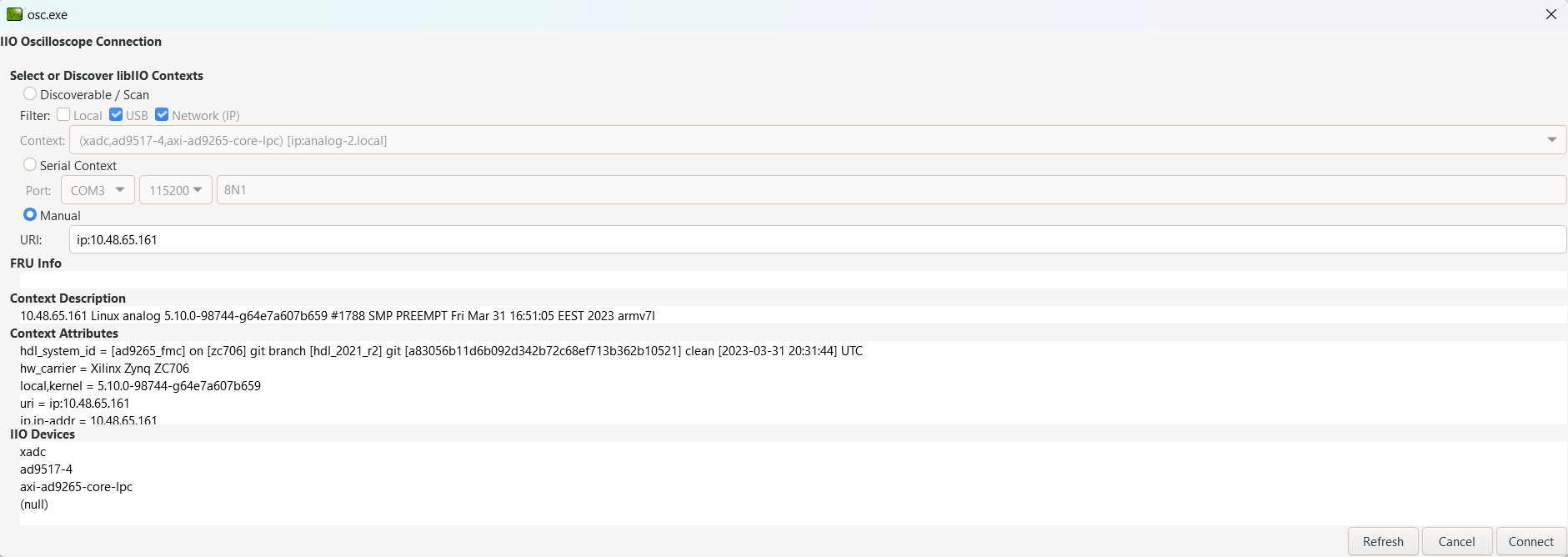
Select the
axi-ad9265-core-lpcdevice and enable thevoltage0channel. Press thePlaybutton to start sampling. The data capture window will show the digitized waveform from the ADC in both time and frequency domains.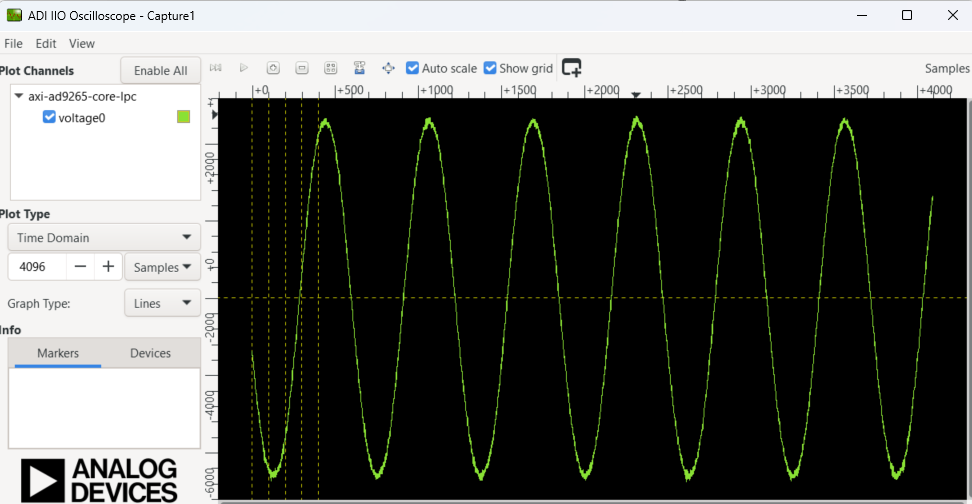
Using no-OS as software
Necessary files
The following files are needed to build and run the no-OS project:
HDL hardware description:
system_top.xsa— generated from the HDL projectno-OS project: projects/ad9265-fmc-125ebz
Instructions on how to build these from source can be found here:
AD9265-FMC-125EBZ no-OS Example Project. More no-OS build details at No-OS Build Guide.
AD9265-FMC HDL project. More HDL build details at Build an HDL project.
Required software
AMD Xilinx Vitis 2025.1 or later (includes Vivado; download from here)
Python 3, CMake, and Ninja (required by the
no_os_build.pybuild script)A UART terminal (PuTTY/Tera Term/Minicom, etc.), baud rate 115200 (8N1)
Required hardware
AMD Xilinx ZC706 Rev 1.1 or higher FPGA board and its 12 V power supply
EVAL-AD9265 FMC evaluation board (AD9265-FMC-125EBZ)
Mini-USB cable (UART, connects to J21)
Micro-USB cable (JTAG)
Signal generator (low-jitter, low-phase-noise recommended)
SMA cables for analog input connection to J100
More details can be found at Prerequisites.
Hardware setup
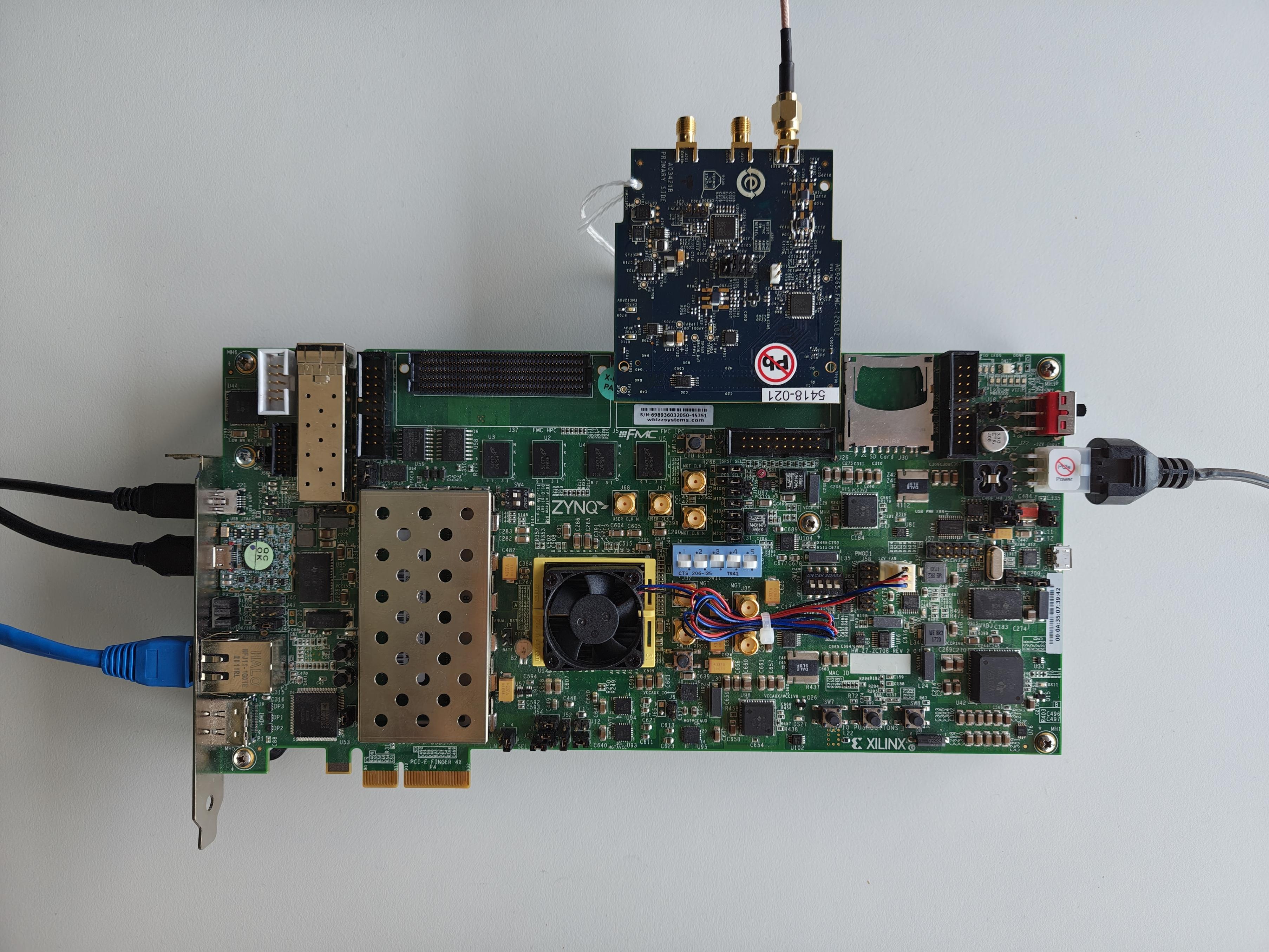
Caution
This project was tested with VADJ = 2.5 V
Follow the steps in this order, to avoid damaging the components:
Connect the EVAL-AD9265 FMC board to the ZC706 LPC FMC socket (J5)
Connect your signal generator to the analog input SMA connector (J100) on the evaluation board.
Configure the ZC706 for JTAG boot mode by setting SW11:
Switch
Position
SW11-1
DOWN
SW11-2
DOWN
SW11-3
DOWN
SW11-4
DOWN
SW11-5
DOWN
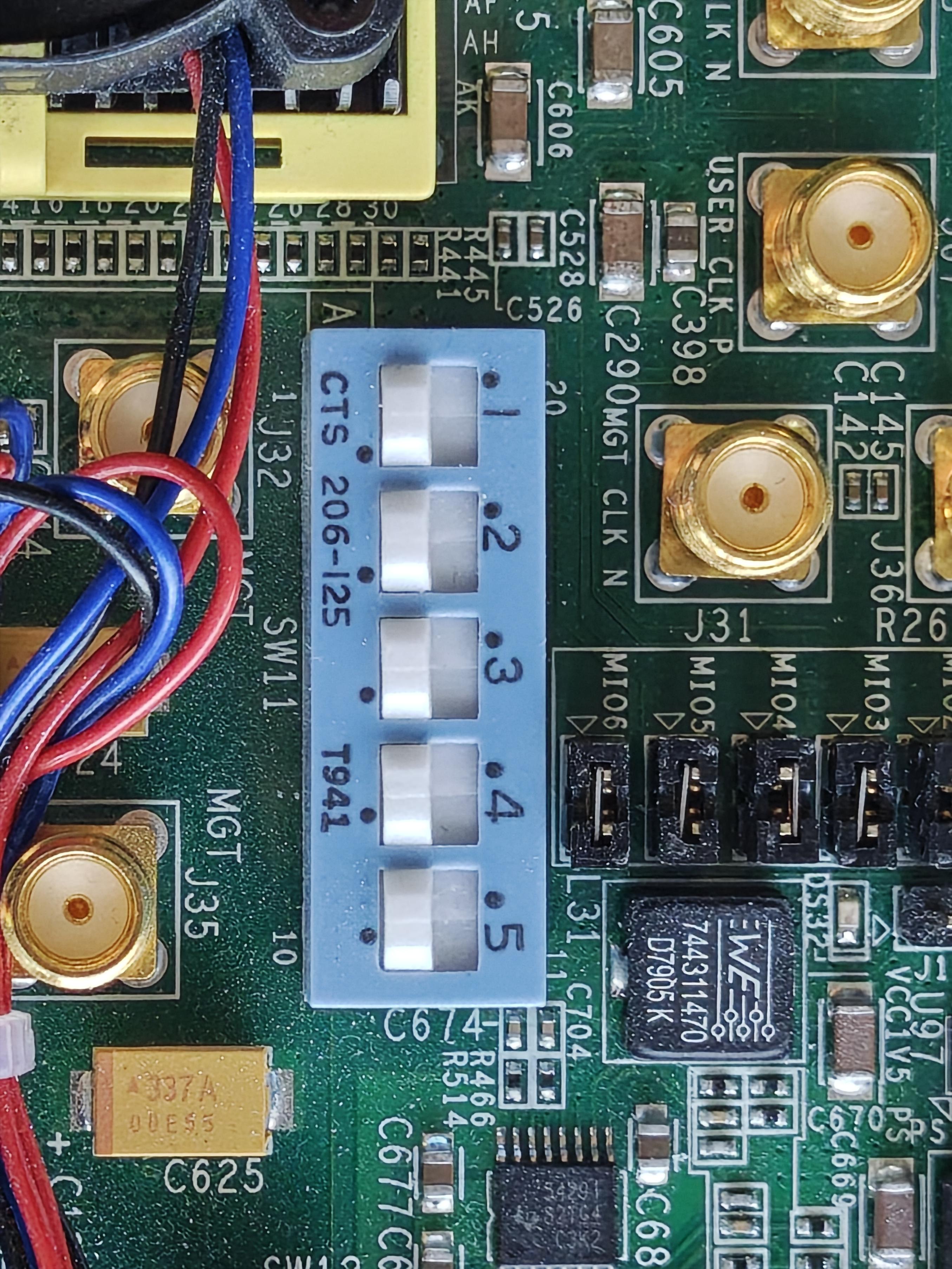
Connect the Mini-USB cable to the UART connector (J21) and to your host PC
Connect the Micro-USB cable to the JTAG connector and to your host PC
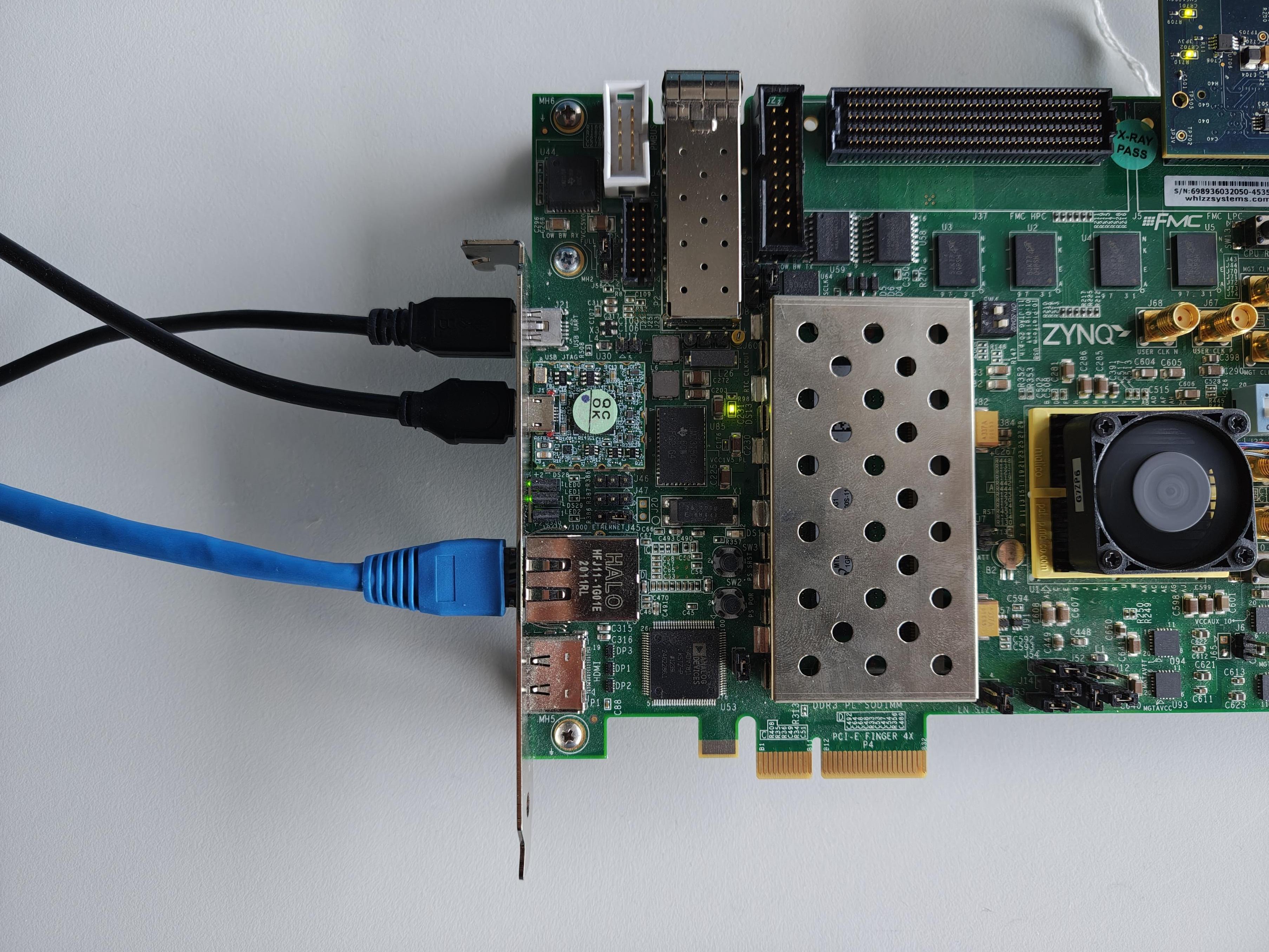
Connect the power supply to the 12 V Power Input Connector (J22)
Turn on the power switch (SW1) on the FPGA board — the green LED (DS22) will illuminate when power is on
Supported examples
Demo example
The demo example initializes the AD9265 ADC via the AXI ADC core and AXI DMAC, runs test pattern verification on the digital output lanes, and performs a DMA capture of ADC samples into DDR memory.
Build and flash
~$
source /opt/Xilinx/2025.1/Vitis/settings64.sh
~$
cd no-OS
~/no-OS$
python tools/scripts/no_os_build.py build \
  --project ad9265-fmc-125ebz --variant demo --board zc706 \
  --hardware /path/to/system_top.xsa \
  --probe openocd --flash
Boot messages
The following is what is printed in the serial console after the demo example boots:
ad9265_core: Successfully initialized (125001525 Hz)
ooooooo|ooooooo------------------
DCO 0x6
AD9265 successfully initialized.
Capture done.
Done
IIO example
The IIO example launches an IIOD server on the carrier board so that the user may connect to it via an IIO client. Using the IIO Oscilloscope application, users can configure the AD9265 ADC and visualize captured data from the 16-bit, 125 MSPS ADC.
Build and flash
~$
source /opt/Xilinx/2025.1/Vitis/settings64.sh
~$
cd no-OS
~/no-OS$
python tools/scripts/no_os_build.py build \
  --project ad9265-fmc-125ebz --variant iio --board zc706 \
  --hardware /path/to/system_top.xsa \
  --probe openocd --flash
Boot messages
The following is what is printed in the serial console after the IIO example boots:
ad9265_core: Successfully initialized (125001525 Hz)
ooooooo|ooooooo----------------Running IIOD server...
If successful, you may connect an IIO client application by:

1. Disconnecting the serial terminal you use to view this message.
2. Connecting the IIO client application using the serial backend
configured as shown:

Baudrate: 115200
Data bits: 8
Parity: none
Stop bits: 1
Flow control: none
IIO Oscilloscope
Important
Make sure to download/update to the latest version of IIO Oscilloscope.
Once the IIO example is running and the serial terminal is closed, open IIO Oscilloscope. Connect using the serial backend URI:
serial:COM10,115200
replacing
COM10with the appropriate port on your system (e.g./dev/ttyUSB0on Linux).Press
Refreshto display available IIO devices and pressConnectafter your device has been detected.Select the
axi-ad9265-core-lpcdevice and enable thevoltage0channel. Press thePlaybutton to start sampling. The data capture window will show the digitized waveform from the ADC in both time and frequency domains.